
Introduction
Thank you for choosing the Decofy LT-SC01 70-inch Tall Storage Cabinet. This manual provides essential information for the safe assembly, operation, and maintenance of your new storage unit. Please read all instructions carefully before beginning assembly and retain this manual for future reference.
Safety Warnings
- Do not exceed the weight limit of 30 pounds (13.6 kg) per shelf.
- Ensure proper mounting of the anti-tilt device to a wall stud to prevent tipping.
- Keep fingers clear of cabinet doors and drawers during opening and closing to avoid pinch injuries.
- Assemble the unit on a soft, clean surface to prevent scratches.
- Always use the correct tools as specified in the assembly instructions.
Included Components
Please verify that all parts listed below are present before beginning assembly. If any parts are missing or damaged, please contact customer support.
- Cabinet Panels (Top, Bottom, Sides, Back)
- Adjustable Shelves (6)
- Cabinet Doors (2)
- Drawer Components (Front, Sides, Back, Bottom)
- Hardware Kit (Screws, Dowels, Hinges, Handles, Drawer Slides, Anti-Tilt Device)
- User Manual
Assembly Instructions
Follow the steps below carefully. It is recommended to have two people for assembly.
Video: Detailed assembly guide for the Decofy Tall Storage Cabinet. This video demonstrates each step of the construction process, from attaching panels to installing doors and drawers, ensuring a smooth setup.
- Prepare the Base: Attach the bottom panel to the side panels using the provided cam locks and dowels. Ensure all connections are secure.
- Install Drawer Slides: Secure the drawer slides to the designated side panels of the cabinet using the appropriate screws.
- Assemble the Drawer: Construct the drawer by attaching the front, back, and side panels. Insert the drawer bottom and secure it. Attach the drawer knobs and the corresponding drawer slides.
- Attach Back Panels: Slide the back panels into the grooves on the cabinet frame and secure them with small nails or screws.
- Install Shelves: Insert the shelf pins into the desired holes for the adjustable shelves. Place the shelves onto the pins.
- Attach Door Hinges: Secure the cushioning hinges to the cabinet doors and then to the cabinet frame. Adjust the hinges as needed for proper door alignment.
- Install Door Handles: Attach the door handles to the cabinet doors.
- Mount Anti-Tilt Device: Secure the anti-tilt device to the top-rear of the cabinet and then to a wall stud using the provided hardware. This is a critical safety step.

Image: Detailed view of key hardware components, including drawer slides, adjustable shelf supports, anti-tilt mechanism, and soft-close hinges.
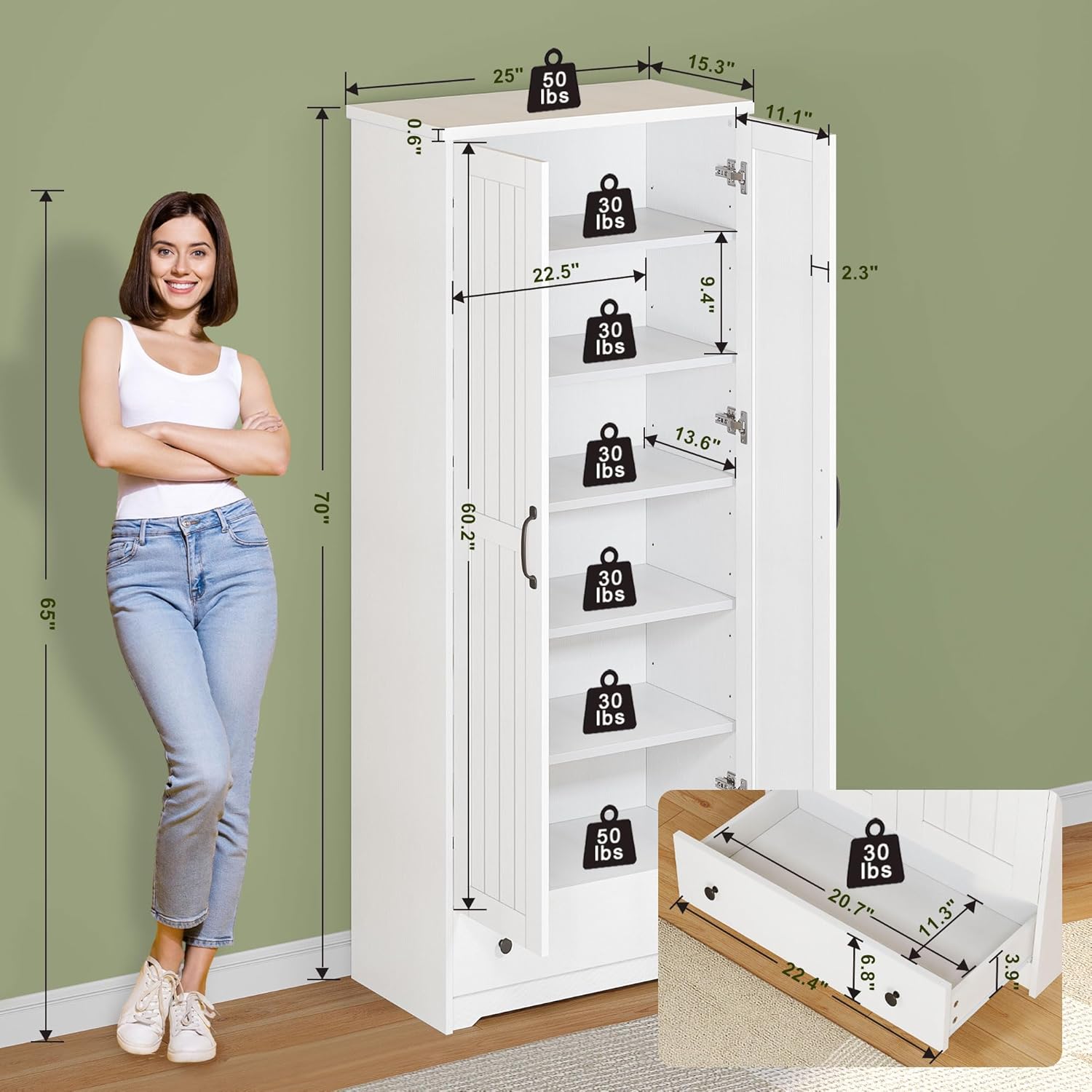
Image: Product dimensions and individual weight capacities for shelves and the top surface.
Operating Instructions
Adjustable Shelves
The cabinet features 6 adjustable and removable shelves. To adjust a shelf, carefully remove all items from the shelf. Remove the shelf pins from their current holes and reinsert them into the desired new height. Place the shelf back onto the pins, ensuring it is level and secure before placing items back on it.
Doors and Drawer
The two cabinet doors are equipped with cushioning hinges for smooth and quiet operation. The bottom drawer features bottom slides for easy opening and closing. Always use the handles to operate doors and drawers.

Image: Example of the cabinet's large capacity, storing various household items.
Maintenance
To maintain the appearance and longevity of your Decofy storage cabinet, follow these simple care instructions:
- Wipe surfaces with a soft, damp cloth. Avoid abrasive cleaners or harsh chemicals.
- Promptly clean up spills to prevent staining or damage to the finish.
- Periodically check all hardware connections and tighten if necessary to ensure stability.

Image: Demonstrating easy cleaning and highlighting key features like adjustable shelves, large capacity, and durability.
Troubleshooting
| Problem | Possible Cause | Solution |
|---|---|---|
| Cabinet is wobbly | Loose connections; uneven floor; anti-tilt device not installed. | Tighten all screws and cam locks. Ensure the cabinet is on a level surface. Install the anti-tilt device securely to a wall stud. |
| Doors do not align properly | Hinges need adjustment. | Adjust the screws on the hinges to align the doors horizontally and vertically. Refer to the assembly video for hinge adjustment details. |
| Drawer sticks or does not slide smoothly | Drawer slides are misaligned or damaged. | Check that the drawer slides are correctly installed and aligned. Ensure no obstructions are in the drawer tracks. |
Specifications
| Feature | Detail |
|---|---|
| Brand | Decofy |
| Model Number | LT-SC01 |
| Product Dimensions (D x W x H) | 15.35" x 25" x 70" (39 cm x 63.5 cm x 177.8 cm) |
| Material | High-density MDF/PB Composite Board, Engineered Wood |
| Color | White |
| Number of Shelves | 6 (Adjustable) |
| Number of Doors | 2 |
| Number of Drawers | 1 |
| Weight Capacity (Top) | 50 lbs (22.7 kg) |
| Weight Capacity (Each Shelf) | 30 lbs (13.6 kg) |
| Weight Capacity (Drawer) | 30 lbs (13.6 kg) |
| Assembly Required | Yes |
| Special Features | Adjustable Shelves, Removable Shelves, Cushioning Hinges, Bottom Slides, Anti-Tilt Device |
Warranty and Support
Decofy products are designed for quality and durability. For warranty information, replacement parts, or customer support, please refer to the contact information provided with your purchase or visit the official Decofy store online.
Online Store: Decofy Store on Amazon