
Introduction
Thank you for choosing the SKMEI Model 9333 Analog Quartz Watch. This manual provides detailed instructions for setting up, operating, and maintaining your watch to ensure optimal performance and longevity. Please read this manual carefully before using your watch.
Product Overview
The SKMEI Model 9333 features a robust design with multiple functions. Familiarize yourself with the main components of your watch:

Image: Overview of the SKMEI Model 9333 watch components, including the case, dial, band, mirror, clasp, and back cover.
- Watch Case: The main body of the watch, housing the movement and dial.
- Watch Dial: The face of the watch displaying time and other functions.
- Watch Band: The strap that secures the watch to your wrist.
- Watch Mirror (Crystal): The transparent cover protecting the dial.
- Watch Clasp: The mechanism used to secure the watch band.
- Back Cover: The rear part of the watch case, often containing model and water resistance information.
- Crown: Typically located on the right side, used for setting time and date.
- Pushers: Buttons used to operate functions like stopwatch or LED light.
Setup Instructions
Setting the Time
- Pull the crown out to the first click position.
- Rotate the crown to adjust the hour and minute hands to the desired time.
- Push the crown back into its normal position to start the watch.
Setting the Date and Day of the Week
- Pull the crown out to the second click position.
- Rotate the crown clockwise or counter-clockwise to set the correct date and day.
- Once set, push the crown back into its normal position.
- Note: Avoid setting the date between 9 PM and 3 AM, as this may interfere with the automatic date change mechanism.
Operating Instructions
Using the Stopwatch Function
The watch is equipped with a stopwatch for measuring elapsed time.
- Press the upper pusher to start the stopwatch.
- Press the upper pusher again to pause the stopwatch.
- Press the lower pusher to reset the stopwatch to zero.
Alarm Function
Refer to the specific instructions for setting the alarm, usually involving a dedicated pusher or crown position. (Note: Detailed alarm setting steps are not provided in the product description, general guidance is given.)
LED Light
To illuminate the dial in low-light conditions, press the designated light button (usually a pusher on the side of the case). The light will typically stay on for a few seconds.
12/24 Hour Format
The watch supports both 12-hour and 24-hour time display. The sub-dial for 24-hour format will indicate the current hour in a 24-hour cycle. This is typically synchronized with the main time setting.
Water Resistance Guidelines
Your SKMEI Model 9333 watch is rated for 30 meters (3 ATM/BAR) water resistance. This means it is suitable for daily use and can withstand splashes, rain, and brief immersion in water, such as hand washing.

Image: The SKMEI watch shown with water splashes, indicating its water-resistant capabilities for daily activities.
Important Precautions:
- Do NOT operate the crown or pushers when the watch is wet or submerged in water.
- Do NOT use the watch for swimming, diving, snorkeling, or any water sports.
- Avoid exposing the watch to hot water, steam, or extreme temperature changes, as this can compromise the water seals.
- If the watch is exposed to saltwater, rinse it gently with fresh water and dry it thoroughly.
Care and Maintenance
- Cleaning: Wipe the watch case and band regularly with a soft, dry cloth to remove dirt and moisture. For stainless steel bands, a slightly damp cloth can be used, followed by immediate drying.
- Avoid Chemicals: Do not expose the watch to solvents, detergents, perfumes, or cosmetics, as these can damage the case, band, or seals.
- Temperature: Avoid extreme temperatures, both hot and cold, as they can affect the watch's accuracy and battery life.
- Magnetic Fields: Keep the watch away from strong magnetic fields (e.g., speakers, refrigerators, mobile phones) to prevent interference with the quartz movement.
- Battery Replacement: When the watch stops or the LED light dims significantly, it's time to replace the battery. It is recommended to have this done by a qualified watch technician to ensure proper sealing and water resistance. The battery type is SR920SW.
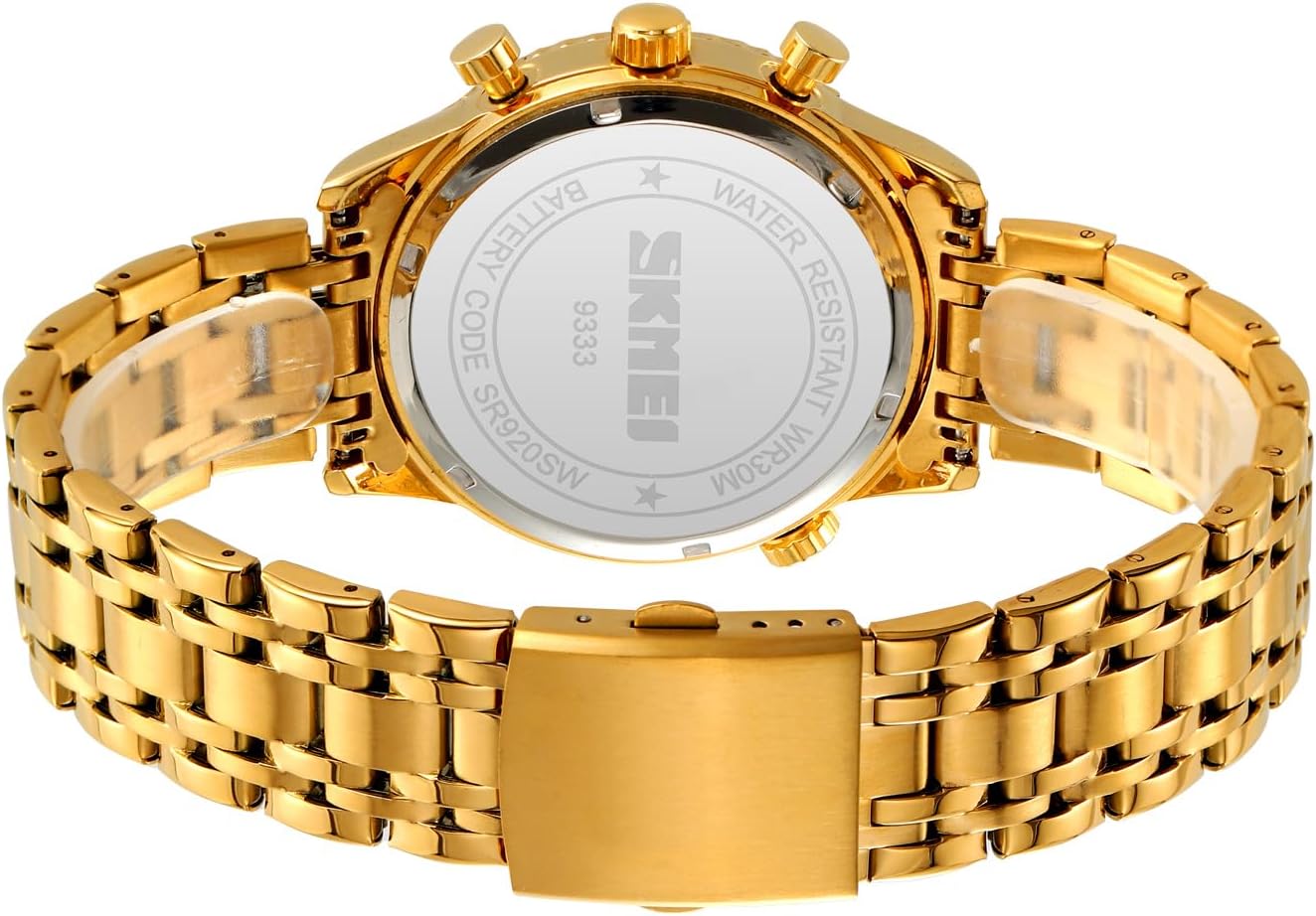
Image: The back cover of the SKMEI watch, displaying the model number (9333) and water resistance rating (WR30M), along with battery type (SR920SW).
Troubleshooting
| Problem | Possible Cause | Solution |
|---|---|---|
| Watch stops or runs inaccurately. | Low battery; exposure to strong magnetic fields; impact. | Replace battery; move away from magnetic sources; consult a technician if due to impact. |
| Date/Day does not change correctly. | Date set during prohibited hours (9 PM - 3 AM); incorrect initial setting. | Reset date outside of prohibited hours; ensure correct initial setting. |
| Condensation inside the watch. | Exposure to extreme temperature changes; compromised water seals. | Avoid extreme temperature changes. If condensation persists, seek professional service immediately to prevent damage. |
| Stopwatch not functioning. | Incorrect operation; low battery. | Review operating instructions; replace battery if needed. |
Specifications
| Brand | SKMEI |
| Model Number | 9333 |
| Movement | Analog Quartz |
| Case Material | Zinc Alloy |
| Band Material | Stainless Steel |
| Crystal Material | Mineral Glass |
| Water Resistance | 30 Meters (3 ATM/BAR) |
| Functions | Time Display, Date, Day of the Week, Stopwatch, Alarm, LED Light, 12/24 Hour Format |
| Case Width | 43.3 mm |
| Case Thickness | 13.5 mm |
| Band Length | 240 mm |
| Band Width | 20 mm |
| Weight | 119.3 g |
| Battery Type | SR920SW |
Warranty and Support
SKMEI watches are manufactured to high-quality standards. For specific warranty details, please refer to the warranty card included with your purchase or visit the official SKMEI website. If you encounter any issues or require technical assistance, please contact SKMEI customer support through their official channels or the retailer where the watch was purchased.
Online Support: Visit the SKMEI Store on Amazon


