
1. Introduction
This manual provides detailed instructions for the installation, setup, operation, and maintenance of the BAWAZINA HB-B3HL AC 220V Stepper Motor Driver. Please read this manual thoroughly before using the product to ensure correct operation and to prevent damage.
2. Product Overview
The BAWAZINA HB-B3HL is an AC 220V stepper motor driver designed for precise control of stepper motors in various industrial and automation applications. It is compatible with HB-B3C and HB-B3CE series stepper motors.
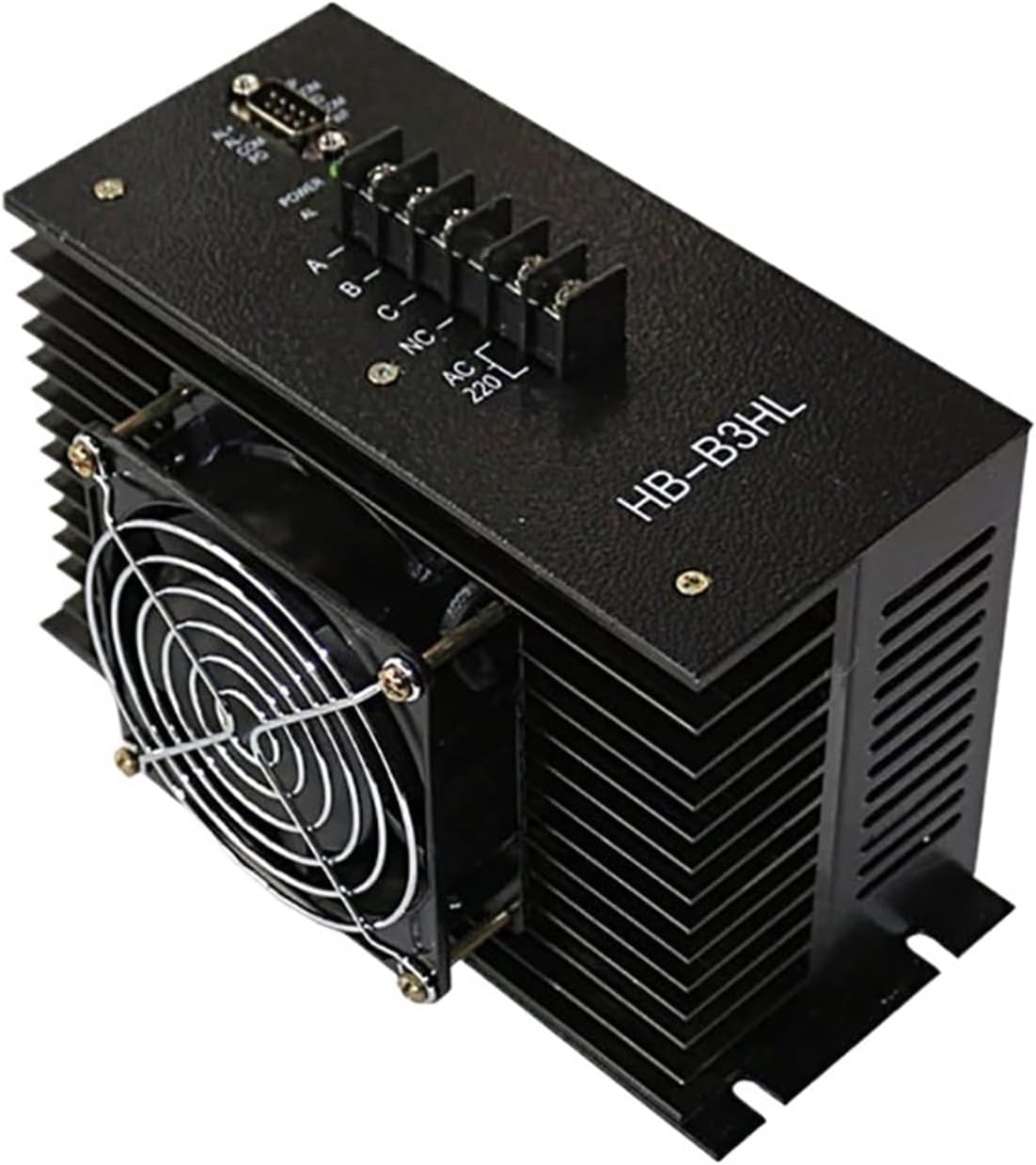
Figure 1: Front view of the BAWAZINA HB-B3HL AC 220V Stepper Motor Driver, showing the cooling fan, power input, and motor connection terminals.
3. Specifications
| Feature | Detail |
|---|---|
| Model Number | HB-B3HL |
| Input Voltage | AC 220V |
| Item Weight | 7.1 ounces |
| Package Dimensions | 0.39 x 0.39 x 0.39 inches |
| Assembly Required | No |
| Number of Pieces | 1 |
| Manufacturer | BAWAZINA |
4. Setup and Configuration
Proper configuration of the step angle and phase current is crucial for optimal motor performance. Refer to the following tables and diagrams for setting the driver's DIP switches.
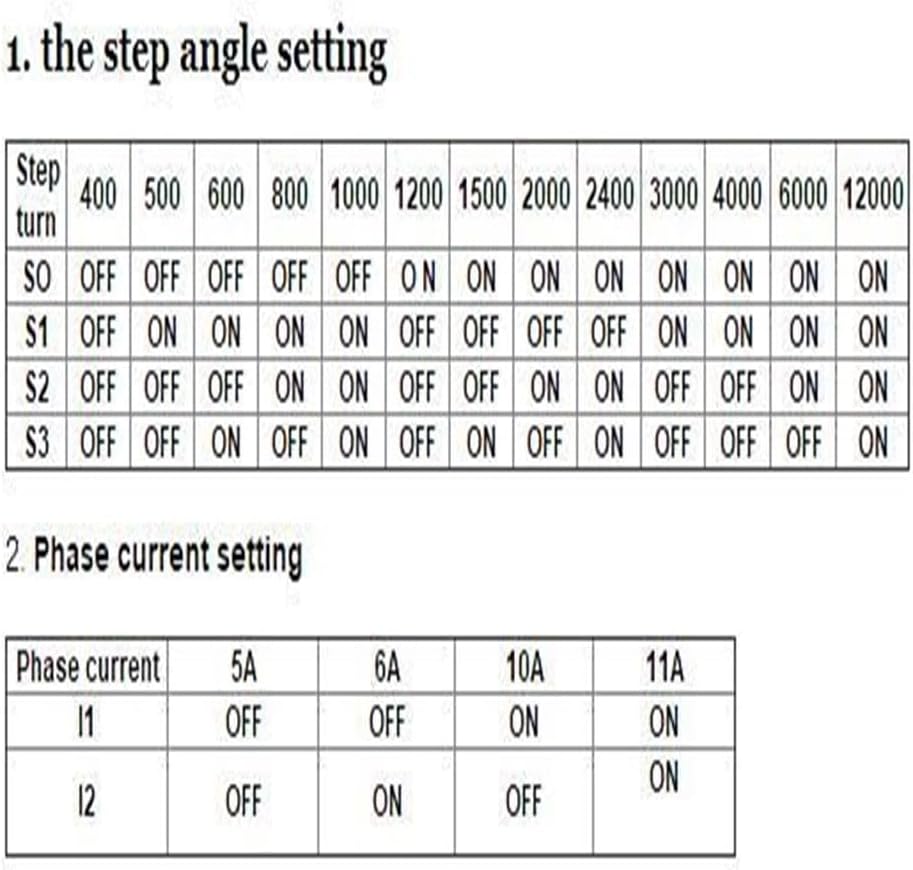
Figure 2: Configuration tables for step angle and phase current settings using DIP switches (S0-S3 for step angle, I1-I2 for phase current).
4.1. Step Angle Setting
The step angle determines the motor's resolution. Use the DIP switches S0, S1, S2, and S3 to select the desired step turn (steps per revolution). Consult the table in Figure 2 to match your motor's requirements.
- OFF: Switch is in the down position.
- ON: Switch is in the up position.
Example: To set the driver for 1000 steps per turn, set S0 to OFF, S1 to ON, S2 to ON, and S3 to ON.
4.2. Phase Current Setting
The phase current setting controls the current supplied to the motor windings, affecting torque and heat generation. Use DIP switches I1 and I2 to select the appropriate phase current (e.g., 5A, 6A, 10A, 11A). Refer to the table in Figure 2 for specific configurations.
- OFF: Switch is in the down position.
- ON: Switch is in the up position.
Example: To set the driver for 10A phase current, set I1 to ON and I2 to OFF.
5. Operating Instructions
- Power Connection: Connect the AC 220V power supply to the designated terminals on the driver. Ensure correct polarity and secure connections.
- Motor Connection: Connect your stepper motor to the motor output terminals (A, B, C, etc.) as indicated on the driver. Refer to your motor's wiring diagram for proper phase connections.
- Control Signal Connection: Connect your control signals (e.g., PUL, DIR, ENA) from your controller to the driver's input terminals.
- Initial Power-Up: After all connections are secure and verified, apply power to the driver. Observe for any unusual behavior or error indicators.
- Testing: Initiate a test sequence from your controller to verify motor movement and responsiveness. Adjust settings if necessary.
Safety Warning: Always disconnect power before making or changing any electrical connections to prevent electric shock or damage to the equipment.
6. Maintenance
The BAWAZINA HB-B3HL Stepper Motor Driver is designed for reliable operation with minimal maintenance. Follow these guidelines:
- Keep Clean: Regularly clean the driver's exterior, especially the cooling fan and heatsink fins, to ensure proper heat dissipation. Use a soft, dry cloth or compressed air.
- Environmental Conditions: Operate the driver within its specified temperature and humidity ranges. Avoid exposure to excessive dust, moisture, or corrosive substances.
- Connection Checks: Periodically inspect all electrical connections for tightness and signs of wear or corrosion.
- Ventilation: Ensure adequate airflow around the driver, especially if it is enclosed, to prevent overheating.
7. Troubleshooting
If you encounter issues with your HB-B3HL Stepper Motor Driver, consider the following common problems and solutions:
- Motor Not Moving:
- Check power supply connections and voltage.
- Verify motor wiring matches the driver's terminals and motor phase sequence.
- Ensure control signals (PUL, DIR, ENA) are correctly connected and active.
- Confirm step angle and phase current settings are appropriate for your motor.
- Motor Overheating:
- Reduce the phase current setting if it is too high for the motor.
- Ensure adequate ventilation and clear any obstructions from the cooling fan.
- Check for mechanical binding or excessive load on the motor.
- Erratic Motor Movement:
- Check for loose or intermittent control signal connections.
- Verify the integrity of the control signals from your controller.
- Ensure proper grounding of the system.
If problems persist, contact BAWAZINA customer support for further assistance.
8. Warranty and Support
BAWAZINA products are manufactured to high-quality standards. For warranty information and technical support, please refer to the official BAWAZINA website or contact your authorized dealer. Keep your purchase receipt as proof of purchase.
For technical inquiries or assistance, please provide your product model number (HB-B3HL) and a detailed description of the issue.