
Introduction
This manual provides comprehensive instructions for the installation, operation, and maintenance of your WOHPNLE Smart WiFi Programmable Boiler Thermostat. This device is designed to offer convenient and energy-efficient temperature control for your home's boiler system. It features remote control capabilities via the Tuya app, smart timer functions, programmable heating periods, precise temperature adjustment with a rotary knob, and flexible Celsius/Fahrenheit unit switching.
Setup
Package Contents
Before beginning installation, please verify that all components are present in the package:
- 1 x Thermostat Unit
- 1 x Wireless Receiver/Connector
- 1 x Instruction Manual
- 1 x USB Cable
- 1 x Connection Cable
- 2 x Screws

Image: The main product image displays the thermostat unit, the wireless receiver, a USB cable, a connection cable, and two mounting screws, representing the complete package contents.
Battery Installation
The thermostat unit requires 3 AAA dry batteries (not included) for operation. To install the batteries:
- Gently open the battery compartment cover located on the back of the thermostat unit.
- Insert 3 AAA batteries, ensuring correct polarity (+/-).
- Close the battery compartment cover securely.

Image: A close-up view of the open battery compartment on the back of the thermostat, showing the slots for three AAA batteries.
Physical Installation and Wiring
The wireless receiver connects to your boiler, and the thermostat communicates with the receiver wirelessly. Refer to the wiring diagram provided with your boiler for specific connection points. It is recommended to consult a qualified electrician for wiring if you are unsure.

Image: An illustration showing the WOHPNLE Smart Thermostat wirelessly controlling a boiler, with the receiver unit positioned near the boiler.
Tuya App Pairing
To enable remote control and smart features, pair your thermostat with the Tuya app:
- Download the Tuya Smart app from your device's app store (iOS or Android).
- Register or log in to your Tuya account.
- Follow the in-app instructions to add a new device. Ensure your thermostat is powered on and in pairing mode (refer to the thermostat display for pairing indicators).
- Connect the thermostat to your home's 2.4GHz WiFi network.

Image: A hand holding a smartphone displaying the Tuya app interface, showing temperature control settings for the WOHPNLE Smart Thermostat.
Operating Instructions
Display Overview
The thermostat features a clear display showing current room temperature, set temperature, time, day, WiFi status, and battery level.
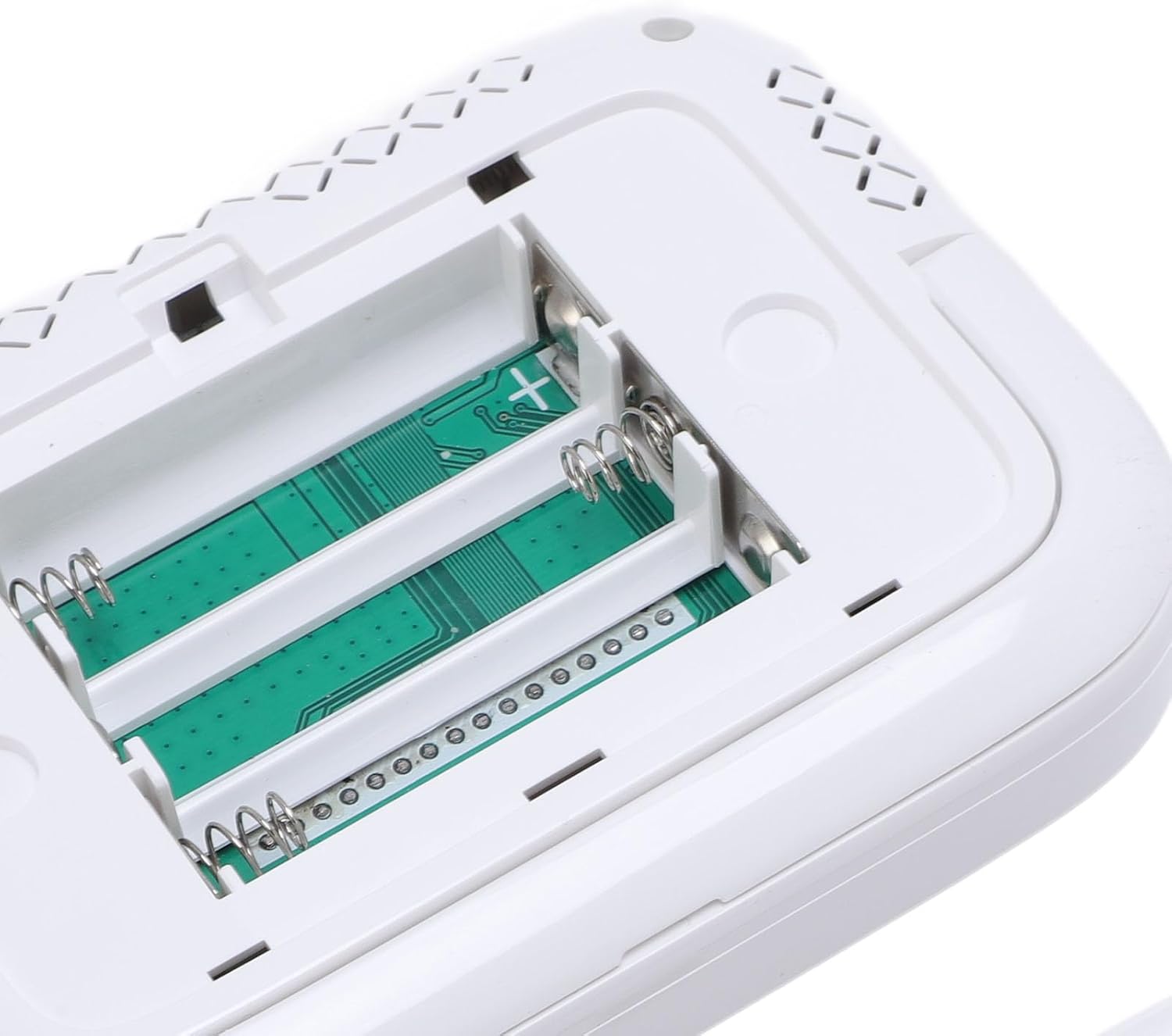
Image: A close-up view of the WOHPNLE Smart Thermostat's digital display, showing current room temperature, set temperature, time, day of the week, and various status icons.
Temperature Adjustment
Use the rotary knob on the thermostat unit to precisely adjust the desired temperature. Turning the knob clockwise increases the temperature, and counter-clockwise decreases it. The new set temperature will be displayed.
WiFi Remote Control
Once paired with the Tuya app, you can control your thermostat from anywhere using your smartphone. The app allows you to:
- Adjust the temperature.
- Set heating schedules.
- Monitor current room temperature.
- Access advanced settings.
Smart Timer and Programmable Time Periods
Utilize the smart timer function within the Tuya app to set customized heating schedules. You can program different temperature settings for various times of the day and days of the week, optimizing energy usage and ensuring comfort when needed.
Celsius/Fahrenheit Unit Switching
The thermostat supports switching between Celsius (°C) and Fahrenheit (°F) units. This setting can typically be adjusted through the Tuya app or directly on the thermostat unit via its menu options (refer to the on-screen prompts).
Smart Home Integration
The thermostat is compatible with popular smart home platforms, allowing for voice control and integration into broader home automation routines.

Image: The WOHPNLE Smart Thermostat positioned alongside various smart speakers, indicating its compatibility with smart home ecosystems.
Maintenance
Cleaning
To maintain the thermostat's appearance and functionality, wipe the unit with a soft, dry cloth. Avoid using abrasive cleaners, solvents, or chemical sprays, as these can damage the surface or internal components.
Battery Replacement
When the battery indicator on the display shows low power, replace the 3 AAA batteries promptly to ensure continuous operation. Follow the battery installation steps outlined in the Setup section.
Troubleshooting
No Power/Display Off
- Check if the 3 AAA batteries are correctly installed and not depleted. Replace if necessary.
- Ensure the wireless receiver is properly connected to the power supply and the boiler.
No WiFi Connection
- Verify that your home WiFi network is active and operating on a 2.4GHz frequency.
- Ensure the thermostat is within range of your WiFi router.
- Restart your router and attempt to re-pair the thermostat with the Tuya app.
Incorrect Temperature Readings
- Ensure the thermostat is not exposed to direct sunlight, drafts, or heat sources that could affect its sensor.
- Allow some time for the thermostat to stabilize after initial setup or relocation.
Boiler Not Responding
- Check the connection between the wireless receiver and the boiler.
- Ensure the thermostat and receiver are communicating (check their respective status indicators).
- Verify that the set temperature is above the current room temperature to trigger heating.
Specifications
| Feature | Detail |
|---|---|
| Model Number | WOHPNLEhi641yc5wm |
| Material | ABS |
| Controller Battery | 3 x AAA Dry Batteries (not included) |
| Power Consumption | 1W |
| Thermostat Weight | Approx. 365g / 12.88oz |
| Package Dimensions | 7.09 x 5.12 x 1.57 inches |
| Overall Item Weight | 12.9 ounces |

Image: A diagram illustrating the dimensions of both the WOHPNLE Smart Thermostat unit and its wireless receiver in millimeters and inches.
Warranty and Support
Warranty information for the WOHPNLE Smart WiFi Programmable Boiler Thermostat is typically provided at the point of purchase or can be found on the manufacturer's official website. For technical support, troubleshooting assistance, or warranty claims, please refer to the contact information provided with your product packaging or visit the WOHPNLE brand's support page online.