
Xelletye ZQ02790
Moving Head DJ Lights User Manual
Brand: Xelletye | Model: ZQ02790
Introduction
Thank you for purchasing the Xelletye Moving Head DJ Lights. This manual provides essential information for the safe and efficient operation of your new lighting fixture. Please read this manual thoroughly before installation and use, and retain it for future reference.
Important Safety Information
- This device is for indoor use only. Do not expose to rain or moisture.
- Ensure the power supply matches the voltage requirements of the fixture.
- Always disconnect from power before cleaning or servicing.
- Do not operate if the power cord is damaged.
- Maintain adequate ventilation around the unit.
- Laser Safety: This product contains a Class I laser. Output power is less than 0.39mW. Avoid direct eye exposure to the laser beam.
- Do not attempt to repair the unit yourself. Refer all servicing to qualified personnel.
Package Contents
Upon opening the package, please verify that all items listed below are present and in good condition:
- 1 x Xelletye Moving Head DJ Light Unit
- 1 x Remote Control (with 2 Lithium Ion batteries included)
- 1 x Power Cable
- 1 x User Manual (this document)
Product Overview
Familiarize yourself with the components and features of your Moving Head DJ Light.

Figure 1: Top view of the Xelletye Moving Head DJ Light, showing the central mirror and six articulating arms with individual light sources.

Figure 2: The Moving Head DJ Light unit alongside its dedicated remote control, illustrating the compact design and primary control method.

Figure 3: Detailed view of the control panel (top) with UP, DOWN, MENU, and ENTER buttons and LED display, and the rear panel (bottom) showing the POWER input, DMX IN, and DMX OUT ports.
- Control Panel: Features an LED display and four buttons (UP, DOWN, MENU, ENTER) for navigating settings and modes.
- Power Input: Standard AC power connection.
- DMX IN/OUT: XLR ports for DMX-512 signal connection, allowing professional control and daisy-chaining multiple units.
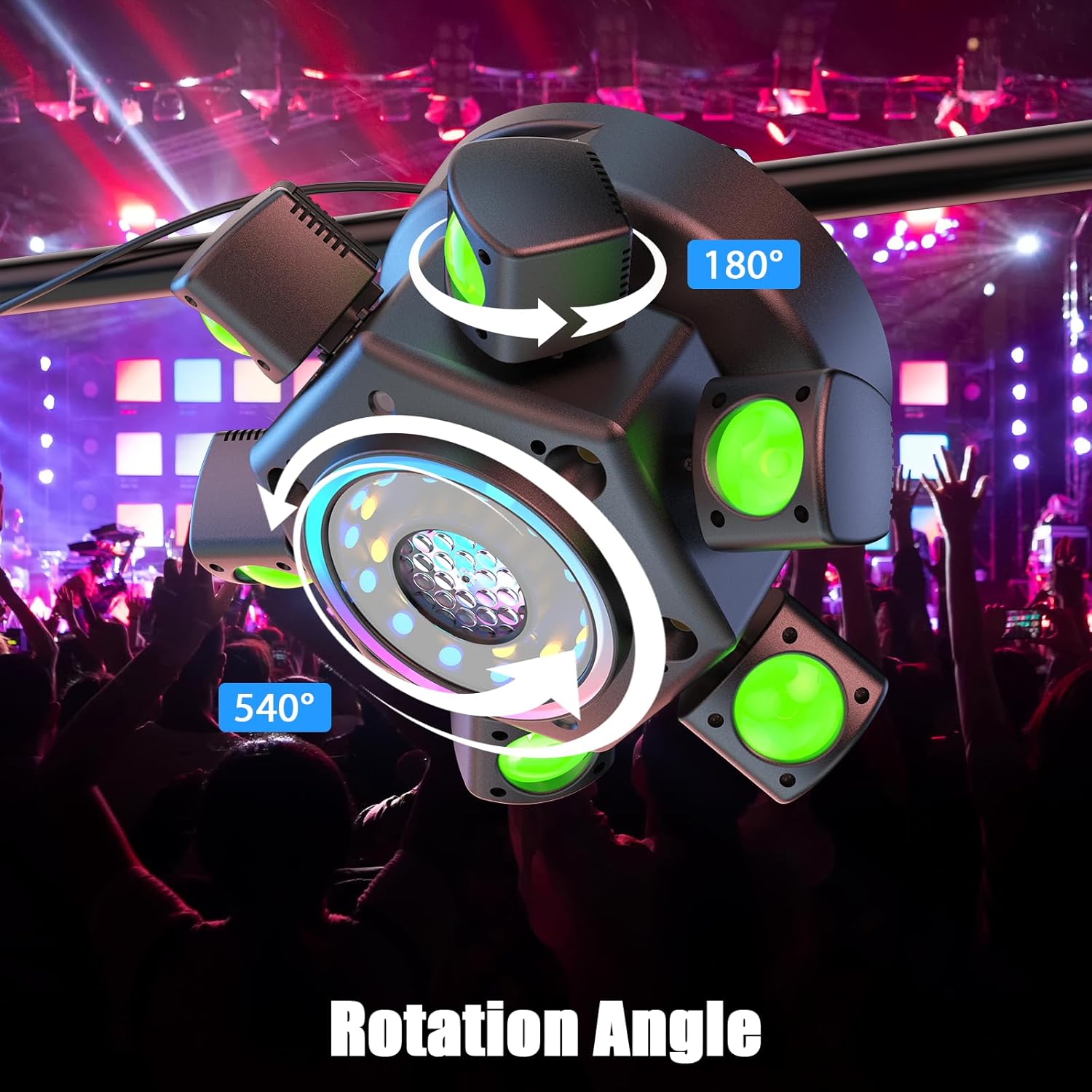
Figure 4: Illustration of the light's movement capabilities, showing a 180° vertical tilt for the arms and a 540° horizontal pan for the main body, enabling dynamic lighting effects.
Setup and Installation
- Unpacking: Carefully remove the light fixture and all accessories from the packaging. Inspect for any signs of damage during transit.
- Placement:
- Place the unit on a stable, flat surface, or securely mount it using appropriate clamps and safety cables (not included).
- Ensure there is adequate ventilation around the unit to prevent overheating. Do not block ventilation openings.
- Keep the unit away from flammable materials, heat sources, and water.
- Power Connection:
- Connect the provided power cable to the power input port on the rear of the unit (refer to Figure 3).
- Plug the other end of the power cable into a suitable power outlet.
- Remote Control Batteries: The remote control requires 2 Lithium Ion batteries, which are included. Ensure they are correctly inserted before use.
Operating Modes
The Xelletye Moving Head DJ Light offers five distinct operating modes:
1. Remote Control Mode
This mode allows for convenient control using the included wireless remote. Point the remote towards the front of the light fixture for optimal signal reception.
Key Remote Functions:
- ON/OFF: Powers the unit on or off.
- DMX: Switches to DMX control mode.
- AUTO: Activates self-propelled automatic programs.
- SOUND: Activates sound-activated mode.
- STROBE: Controls strobe effects.
- Numbers (0-9): May select specific programs or DMX addresses depending on the current mode.
- +/-: Adjusts parameters like speed or sensitivity.
2. DMX-512 Mode (22 Channels)
For professional control, connect the light to a DMX controller using standard XLR cables. The unit utilizes 22 DMX channels for comprehensive control over its various functions.
Setting DMX Address:
- Press the MENU button on the control panel until the display shows "AXXX" (where XXX is the current DMX address).
- Use the UP and DOWN buttons to set the desired DMX starting address.
- Press ENTER to confirm the setting.
Refer to the DMX Channel Chart (not provided in input, but would typically be here) for detailed channel assignments and values.
3. Sound Activated Mode
In this mode, the light reacts to ambient sound or music. The built-in microphone detects audio signals and triggers lighting effects accordingly.
Activation: Select "SOUND" mode via the remote control or the control panel. Adjust sensitivity if available through the remote or menu.
4. Master/Slave Mode
This mode allows multiple units to operate in synchronization without a DMX controller. One unit acts as the "Master" and controls all "Slave" units.
Setup:
- Connect the DMX OUT of the Master unit to the DMX IN of the first Slave unit.
- Daisy-chain subsequent Slave units by connecting the DMX OUT of one Slave to the DMX IN of the next.
- Set the Master unit to any desired operating mode (e.g., Auto, Sound Activated).
- Set all Slave units to "Slave" mode via their control panels.
5. Self-Propelled (Auto) Mode
The unit runs through a series of pre-programmed lighting sequences automatically. This mode is ideal for quick setup and dynamic effects without external control.
Activation: Select "AUTO" mode via the remote control or the control panel. Some units may allow selection of different auto programs via the control panel or remote.
Maintenance
Regular maintenance ensures optimal performance and extends the lifespan of your light fixture.
- Cleaning:
- Before cleaning, always disconnect the unit from the power supply.
- Use a soft, lint-free cloth dampened with a mild glass cleaner to wipe the lenses and casing.
- Do not use abrasive cleaners or solvents.
- Clean the ventilation openings regularly to prevent dust buildup.
- Storage:
- When not in use, store the unit in a dry, dust-free environment.
- Keep it in its original packaging or a suitable protective case to prevent damage.
- Periodic Inspection: Regularly check the power cable, DMX cables, and mounting hardware for any signs of wear or damage. Replace damaged components immediately.
Troubleshooting
If you encounter issues with your Xelletye Moving Head DJ Light, refer to the table below for common problems and solutions.
| Problem | Possible Cause | Solution |
|---|---|---|
| Unit does not power on. | No power supply; faulty cable; unit fuse blown. | Check power connection; try a different outlet; inspect power cable; contact support if fuse is suspected. |
| Lights not responding to remote. | Remote batteries low/dead; remote not pointed correctly; IR sensor blocked. | Replace remote batteries; ensure clear line of sight to the unit's IR sensor; try operating from closer distance. |
| DMX control not working. | Incorrect DMX address; faulty DMX cable; DMX controller issue; unit not in DMX mode. | Verify DMX address setting; check DMX cable connections; ensure unit is set to DMX mode; test with another DMX cable/controller. |
| Sound activated mode not reacting. | Low sound input; microphone blocked; sensitivity too low. | Increase music volume; ensure microphone is not covered; adjust sound sensitivity if possible. |
| Unit overheating. | Poor ventilation; blocked fan/vents. | Ensure adequate space around the unit; clean any dust from vents and fan. |
Specifications
| Brand | Xelletye |
| Model Number | ZQ02790 |
| Manufacturer | Shenzhen Zhuoqiong Technology Co., Ltd. |
| Light Source | RGBW LED, Laser (Class I, Output power: <0.39mW, Feasible distance: 100mm) |
| Lighting Effects | 8-in-1 Mixed Effects: Beam, pattern, wave dot, white light strobe, golden light strobe, light strip, abyss mirror |
| Operating Modes | Remote Control, DMX-512 (22 Channels), Sound Activated, Master/Slave, Self-Propelled (Auto) |
| Material | Plastic |
| Product Dimensions | 12.2"L x 12.2"W x 6.3"H (30.99 cm x 30.99 cm x 16.00 cm) |
| Item Weight | 5.7 Pounds (2.59 kg) |
| Batteries Required | 2 Lithium Ion batteries (for remote control, included) |
| Included Components | Light unit, Remote control, Power cable |
Warranty and Support
Xelletye products are manufactured to high quality standards. For information regarding warranty coverage, technical support, or service inquiries, please contact your retailer or the manufacturer directly.
Please have your product model number (ZQ02790) and purchase date available when contacting support.
Manufacturer: Shenzhen Zhuoqiong Technology Co., Ltd.
For further assistance, you may visit the Xelletye Store on Amazon.
Ask a question about this manual
Ask about setup, troubleshooting, compatibility, parts, safety, or missing instructions. Manuals+ will review the question and use this page’s manual context to help answer it.