
1. Introduction
Thank you for choosing the Xelletye ZQ02790 6-Arm Moving Head DJ Light. This versatile lighting fixture combines six distinct effects into one compact unit, offering dynamic illumination for various events. This manual provides essential information for safe operation, setup, and maintenance to ensure optimal performance and longevity of your device.
2. Safety Information
- Electrical Safety: Always connect the device to a grounded power outlet. Ensure the power supply matches the specified voltage (AC100-240V/50Hz). Disconnect power before cleaning or servicing.
- Laser Safety: This product contains lasers. Avoid direct eye exposure to laser beams. Do not open the housing or attempt to modify the laser components. Laser radiation can be harmful.
- Ventilation: Ensure adequate ventilation around the unit to prevent overheating. Do not block ventilation openings.
- Placement: Install the light in a stable location, away from flammable materials, excessive heat, moisture, or dust. Ensure it is securely mounted if suspended.
- Indoor Use Only: This device is designed for indoor use. Do not expose it to rain or moisture.
- Children: Keep out of reach of children.
3. Package Contents
Verify that all items are present in the package:
- Xelletye ZQ02790 Moving Head DJ Light
- Power Cord
- Remote Control (with 8 Lithium Ion batteries included)
- Mounting Hook Accessory
- Instruction Manual

Figure 3.1: Package Contents
4. Product Overview
The Xelletye ZQ02790 is a multi-functional stage light designed to create diverse visual effects. It features a central 'Bee-Eye' kaleidoscope lens, surrounded by six independently moving arms, each equipped with RGBW LEDs and integrated red and green lasers.

Figure 4.1: Front View of the DJ Light

Figure 4.2: Multi-Effect Features
Control Panel and Connections
The device features a digital display and control buttons for direct operation, along with standard DMX input/output ports for professional control.

Figure 4.3: Control Panel and Rear Connections
- Digital Display: Shows current mode and settings.
- UP/DOWN Buttons: Navigate menu options and adjust values.
- ENTER Button: Confirm selections.
- MENU Button: Access the main menu and cycle through options.
- Power Input: Standard AC power connection.
- DMX IN/OUT: 3-pin XLR connectors for DMX512 control.
5. Setup
Mounting
The Xelletye ZQ02790 can be placed on a flat surface or mounted using the included hook accessory. Ensure the mounting surface or truss is capable of supporting the device's weight (approximately 4.41 lbs / 2 kg).
- Tabletop Placement: Place the unit on a stable, level surface.
- Suspended Mounting: Attach the hook accessory to the bottom of the unit using the provided screws. Securely fasten the hook to a truss or ceiling T-bar. Always use a safety cable (not included) when suspending the unit.
Power Connection
Connect the included power cord to the power input on the rear of the unit and then to a suitable AC100-240V/50Hz power outlet.
DMX Connection (Optional)
For DMX control, connect a 3-pin XLR cable from your DMX controller's output to the DMX IN port on the light. If connecting multiple lights, daisy-chain them by connecting the DMX OUT of the first light to the DMX IN of the next.
6. Operating Modes
The Xelletye ZQ02790 offers multiple control options:
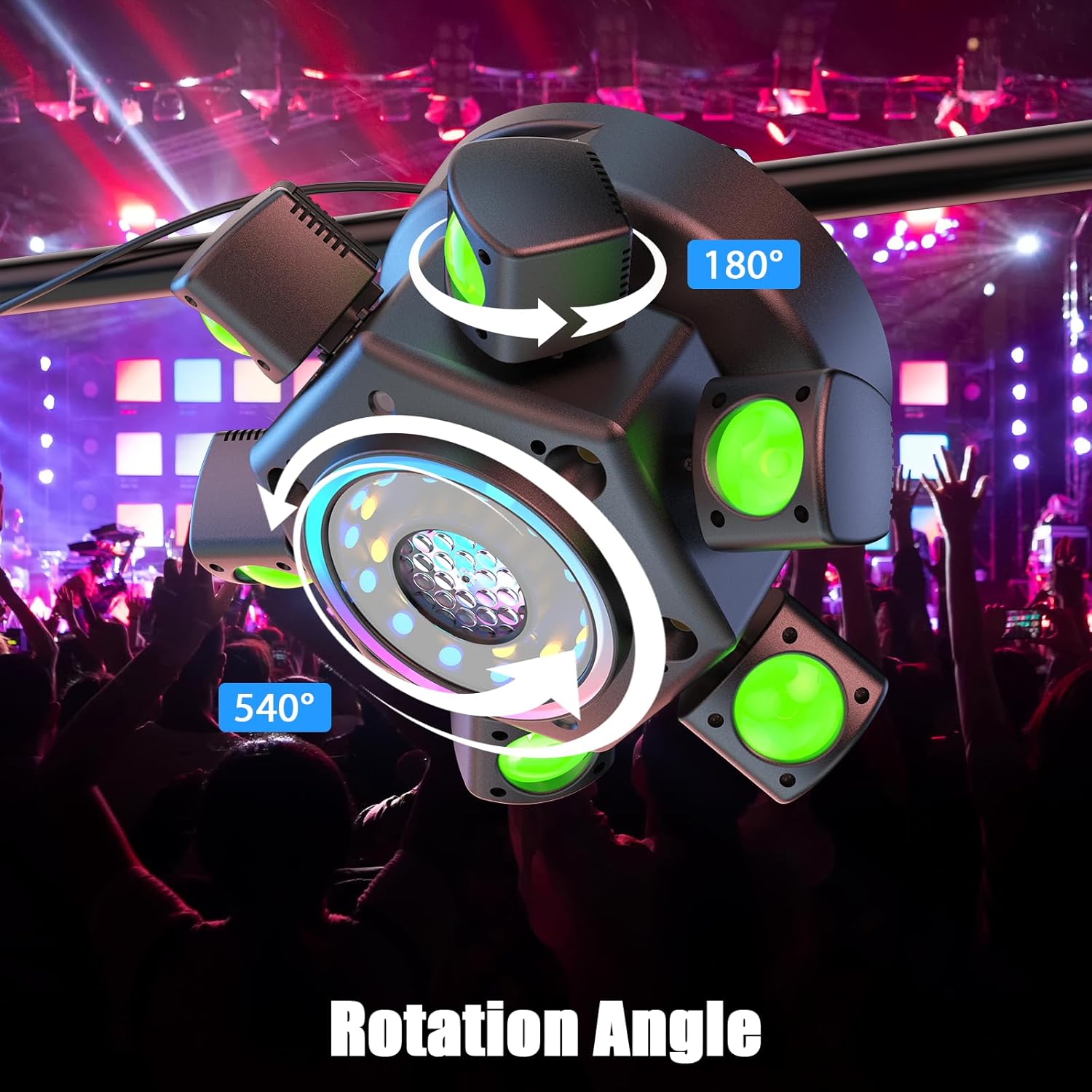
Figure 6.1: Dynamic Rotation Angles

Figure 6.2: RGBW 5-Effect Moving Head Light
6.1. Control Panel Operation
Use the UP, DOWN, ENTER, and MENU buttons on the unit's control panel to navigate and select operating modes and settings. The 4-digit digital display will show the current mode (e.g., 'A001' for Auto Mode, 'S001' for Sound Mode, 'd001' for DMX address).
6.2. Remote Control Operation
The included 433MHz remote control allows for convenient wireless operation up to 26 feet. Ensure the batteries are correctly inserted.

Figure 6.3: Remote Control Functions
- ON/OFF: Power on/off the light.
- AUTO: Activates automatic pre-programmed light shows (8 modes available).
- VOICE: Activates sound-activated mode (2 modes available).
- DMX: Switches to DMX control mode.
- SPEED +/-: Adjusts motor rotation speed.
- MIC +/-: Adjusts sound sensitivity in sound-activated mode.
- Number Buttons (0-9): Select specific auto or sound-activated programs.
6.3. Auto Mode
In Auto Mode, the light cycles through a variety of pre-programmed effects, including RGBW beam effects, laser patterns, and strobe sequences. This mode is ideal for hands-free operation.
6.4. Sound-Activated Mode
The built-in microphone detects ambient sound and music, synchronizing the light effects to the beat. Adjust sensitivity using the remote or control panel for optimal response.
6.5. Master/Slave Mode
For multi-light setups, connect multiple ZQ02790 units via DMX cables. Set one unit as 'Master' and others as 'Slave'. The slave units will mirror the master's effects, creating a synchronized light show without a DMX controller.
6.6. DMX512 Mode
For professional control, use a DMX512 controller. Set the DMX address for each light via the control panel. The ZQ02790 utilizes 26 DMX channels, allowing precise control over individual effects, colors, movement, dimming, and strobe functions.
Video 6.1: Demonstration of Xelletye ZQ02790 DJ Light's various effects and control modes, including DMX, Auto, and Remote control.
7. Maintenance
- Cleaning: Regularly clean the lenses and housing with a soft, lint-free cloth. Do not use abrasive cleaners or solvents. Ensure the unit is powered off and unplugged before cleaning.
- Fan Cleaning: Periodically check and clean the cooling fan and vents to prevent dust buildup, which can impair cooling performance.
- Storage: When not in use, store the light in a dry, cool place, protected from dust and extreme temperatures.
- Inspection: Periodically inspect power cables and DMX cables for any signs of damage. Replace damaged cables immediately.
8. Troubleshooting
| Problem | Possible Cause | Solution |
|---|---|---|
| No power | Power cable disconnected; no power from outlet; fuse blown. | Check power cable connection; test outlet; replace fuse if necessary. |
| No light output | Unit in standby; incorrect mode selected; LED/laser failure. | Ensure unit is powered on and not in standby; select an active mode (Auto, Sound, DMX); contact support if LEDs/lasers are faulty. |
| Remote control not working | Batteries dead or incorrectly inserted; remote out of range; IR sensor blocked. | Replace batteries; ensure correct polarity; operate within 26ft range; clear line of sight to IR sensor. |
| DMX control issues | Incorrect DMX address; faulty DMX cable; DMX controller issue; incorrect channel settings. | Verify DMX address matches controller; check DMX cables; ensure DMX controller is functioning; confirm channel assignments. |
| Light not responding to music | Sound-activated mode not active; microphone sensitivity too low; ambient noise too low. | Activate Sound-Activated mode; increase microphone sensitivity; ensure music source is close to the unit. |
9. Specifications
- Input Voltage: AC100-240V/50Hz
- Control Protocol: 433MHz (Remote), DMX512
- Effective Control Distance: 6-8 meters (Remote)
- Light Source: 6x10W RGBW LEDs, Red (100mW) & Green (50mW) Lasers, Strobes, RGB LED strips
- Average LED Life: 10,000 hours
- Dimming Curve: 0-100% linear dimming
- Strobe: 0-20Hz
- X-axis Rotation: 540°
- Y-axis Rotation (Arm Movement): 180°
- Control Channels: 26 DMX channels
- Data Connection: 3-pin XLR In/Out
- Display: 4-Digit Digital Display
- Protection Level: IP20
- Working Environment: -20°C to 40°C
- Material: Aluminum Alloy Structure / Plastic Shell
- Product Dimensions: 12.2"L x 12.2"W x 6.3"H (30.6 x 30.6 x 17.5 cm)
- Net Weight: 4.41 lbs (2 kg)

Figure 9.1: Product Dimensions and Weight
10. Warranty and Support
This Xelletye product is covered by a standard manufacturer's warranty. For specific warranty details, please refer to the documentation provided with your purchase or contact the seller directly. If you encounter any issues or require technical assistance, please reach out to the Xelletye customer support team or the retailer from whom you purchased the product. Please have your model number (ZQ02790) and purchase information ready when contacting support.