
1. Safety Information
Please read all instructions carefully before assembly and use. Keep this manual for future reference.
- Be cautious around the metal slats during assembly and use to avoid potential pinching.
- Do not exceed a total weight of 1,200 pounds on the bed frame.
- Ensure all connections are securely fastened before use.
- Keep children and pets away from the assembly area.
2. Package Contents
Verify that all components are present before beginning assembly. If any parts are missing or damaged, please contact Siihnon customer support.

Figure 2.1: All components and hardware included in the package.
3. Setup and Assembly
Assembly typically requires two people and can be completed in approximately 45 minutes. Follow the step-by-step instructions provided in the included installation manual. Ensure you have adequate space for assembly.
3.1 Assembly Steps Overview
- Unpack all components and lay them out on a clean, soft surface to prevent scratches.
- Attach the side rails to the headboard and footboard using the provided hardware.
- Install the central support beam and legs.
- Place the metal slats onto the frame and secure them. The unique sound-quieting slats are designed to minimize friction and noise.
- Connect the LED light strips and charging station cables as per the detailed instructions.

Figure 3.1: Visual guide for bed frame assembly.
3.2 Assembly Video Guide
For a visual walkthrough of the assembly process, please refer to the official Siihnon bed frame assembly video:
Video 3.1: Siihnon Bed Frame Assembly and LED Lights Overview. This video demonstrates the assembly process and highlights the LED lighting features.
4. Operating Instructions
4.1 LED Lighting System
The integrated LED lights can be controlled via a remote or a smartphone application. They offer over 60,000 colors and various modes, including Mic Mode, Music Mode, and a Timing Function.
- Power On/Off: Use the designated button on the remote or app.
- Color Selection: Choose from a wide spectrum of colors to match your preference.
- Brightness Adjustment: Adjust the intensity of the lights.
- Mode Selection: Activate Mic Mode (lights react to sound), Music Mode (lights sync with music), or set a timer for automatic shut-off.
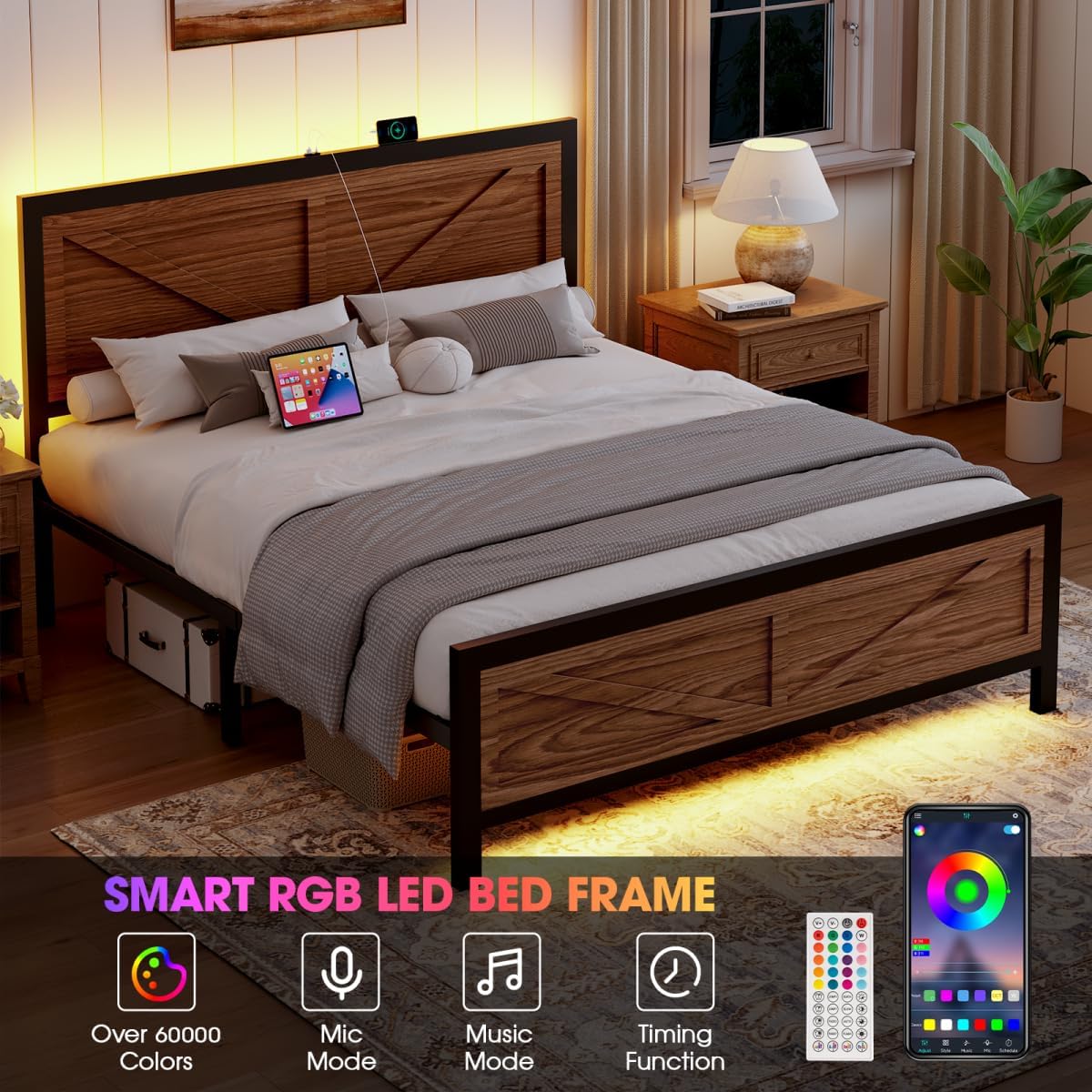
Figure 4.1: LED lighting features and control options.
4.2 Charging Station
The headboard features a convenient 2-in-1 charging station with one USB port and one Type-C port for charging your electronic devices.
- Locate the USB and Type-C ports on the headboard.
- Connect your device's charging cable to the appropriate port.
- Ensure the bed frame's power supply is connected to a wall outlet for the charging station to function.

Figure 4.2: Integrated USB and Type-C charging ports on the headboard.
5. Maintenance
Regular maintenance helps prolong the life and appearance of your bed frame.
- Cleaning: Wipe the metal frame with a soft, damp cloth. For the wooden panels, use a dry or slightly damp cloth. Avoid harsh chemicals or abrasive cleaners. The barn door design features waterproof wooden panels for easy cleaning.
- Fastener Check: Periodically check all bolts and screws to ensure they are tight. Re-tighten if necessary to maintain stability and prevent noise.
- Under-Bed Area: Utilize the 10.4 inches of under-bed clearance for storage. Keep this area tidy to facilitate cleaning and prevent dust accumulation.

Figure 5.1: Ample under-bed storage space.
6. Troubleshooting
If you encounter any issues, refer to the following troubleshooting guide:
| Problem | Possible Cause | Solution |
|---|---|---|
| Bed frame is squeaking or noisy. | Loose fasteners; friction between metal parts. | Ensure all bolts and screws are securely tightened. The bed frame is designed with sound-quieting slats, but re-tightening connections can resolve persistent noise. |
| LED lights are not working. | Power connection issue; remote control battery low; app connectivity problem. | Check if the bed frame's power cord is securely plugged into a working outlet. Ensure the LED strip connections are firm. Replace remote batteries if applicable. Re-pair the app if connectivity is lost. |
| Charging ports are not functioning. | Power connection issue; device cable fault. | Verify the bed frame is plugged in. Test with a different charging cable and device to rule out external issues. Ensure the charging port module is correctly installed and connected. |
| Mattress slides on the frame. | Lack of friction between mattress and slats. | Consider placing anti-slip pads or a non-slip mat between the mattress and the bed slats to prevent movement. |
7. Specifications
| Feature | Detail |
|---|---|
| Brand | Siihnon |
| Model Number | 002 |
| Size | Full |
| Product Dimensions (L x W x H) | 76.38" x 57.48" x 37.4" |
| Item Weight | 57.3 pounds |
| Weight Capacity | Up to 1,200 pounds |
| Special Feature | LED Lighting, Charging Station (USB & Type-C) |
| Color | Coffee |
| Headboard Material | Wood (Barn Door Design) |
| Frame Material | Metal |
| Under-Bed Clearance | 10.4 inches |
| Box Spring Required | No |
| Assembly Required | Yes |
| UPC | 738958956529 |
8. Warranty and Support
Warranty information for your Siihnon bed frame is typically included with the product packaging or can be found on the official Siihnon website. Please retain your proof of purchase for warranty claims.
For technical support, missing parts, or any other inquiries, please contact Siihnon customer service. Refer to the contact information provided in your product packaging or visit the Siihnon brand store online.
Siihnon Brand Store: Visit the Siihnon Store