
Introduction
The Ueteto Mechanical Metronome is a precision instrument designed to assist musicians in developing a consistent sense of rhythm and maintaining accurate tempo during practice. This device operates mechanically, requiring no batteries, and is suitable for a wide range of musical instruments including piano, violin, guitar, bass, and drums.
It features an audible click and an optional bell ring to mark beats, a wind-up mechanism for operation, and adjustable tempo settings from 40 to 208 beats per minute (BPM). Beat selections include 0, 2, 3, 4, and 6.

Image: Ueteto Mechanical Metronome showing its dimensions (9.8 inches height, 4.5 inches width, 3.9 inches depth) and key features like no battery need, spring mechanism, and 12-45 minute operating time per wind.
Product Overview
Familiarize yourself with the main components of your Ueteto Mechanical Metronome:
- Pendulum Hook: Secures the pendulum at the top.
- Meter Plate: Displays tempo markings (BPM) and musical terms.
- Pendulum: The oscillating arm that provides the visual beat.
- Pendulum Weight: Adjustable weight on the pendulum to set the tempo.
- Spring: The winding mechanism that powers the metronome.
- Beat Selector Knob: Used to choose the desired beat accent (e.g., 0, 2, 3, 4, 6).

Image: A detailed diagram labeling the various parts of the Ueteto Mechanical Metronome, including the pendulum hook, meter plate, pendulum, pendulum weight, spring, and beat selector knob.
Setup
Follow these steps to prepare your metronome for use:
- Remove the Cover: Gently slide off the clear plastic protective cover.
- Pull out the Brake: Locate the plastic brake tab, usually at the bottom of the pendulum, and pull it out to free the pendulum.
- Wind the Spring: Turn the winding key located on the side of the metronome clockwise until you feel resistance. Do not overwind. A full wind typically lasts at least 18 minutes depending on the tempo.
- Set the Tempo: Slide the pendulum weight up or down the pendulum rod to align with your desired BPM on the meter plate. Moving the weight up increases the tempo, and moving it down decreases it.
- Select the Beat: Use the beat selector knob to choose the desired beat pattern (e.g., 0 for no accent, 2 for an accent every two beats).

Image: A visual guide demonstrating the six simple steps for operating the metronome: removing the cover, pulling out the plug (brake), setting the tempo, winding the spring, selecting the beat, and moving to start.
Operating Instructions
Once set up, operating your metronome is straightforward:
- Start the Pendulum: Gently push the pendulum to one side to initiate its swing. It will begin to oscillate and produce a rhythmic click.
- Listen and Practice: Play your instrument in time with the metronome's clicks. The optional bell will provide an accent on the first beat of each measure, depending on your beat selection.
- Stop the Metronome: To stop the metronome, gently hold the pendulum until it ceases movement. Re-engage the plastic brake tab for storage.
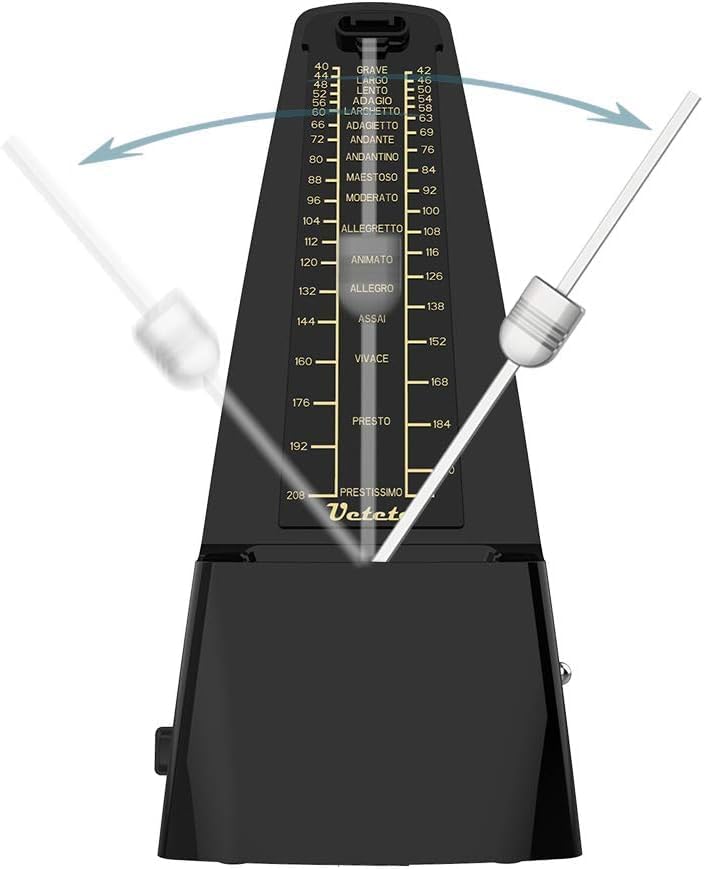
Image: The Ueteto Mechanical Metronome with its pendulum swinging, illustrating its primary function of keeping time.
Demonstration Video
Video: A demonstration of the Ueteto Mechanical Metronome's features, including how to set the tempo, wind the mechanism, and activate/deactivate the bell sound.
Maintenance
To ensure the longevity and optimal performance of your metronome, please observe the following maintenance guidelines:
- Avoid using the metronome in dusty or damp environments.
- Protect the metronome from drops or impacts.
- Always replace the plastic cover after use to prevent dust accumulation.
- Clean the metronome only with a soft, dry cloth.
Troubleshooting
If you encounter issues with your metronome, consider the following:
- Pendulum not swinging: Ensure the plastic brake tab has been fully removed. Gently push the pendulum to initiate movement.
- Irregular beat or stopping prematurely: Check if the spring is fully wound. If the metronome has been dropped or impacted, internal mechanisms may be affected.
- No bell sound: Verify that the beat selector knob is set to a position other than '0'.
Specifications
- Model: B0F8BLVJP1
- Brand: Ueteto
- Color: Black
- Material Type: Metal
- Item Weight: 1.2 pounds
- Package Dimensions: 9.49 x 4.96 x 4.41 inches
- Tempo Range: 40-208 BPM
- Beat Selection: 0, 2, 3, 4, 6
- Power Source: Mechanical wind-up (no batteries required)
Warranty and Support
For warranty information or product support, please refer to the documentation included with your purchase or contact the manufacturer directly. Keep your purchase receipt for any warranty claims.