
1. Introduction
The SETHDA ATS25 Max-Decoder ii Si4732 Radio Receiver is a versatile full-band radio designed for comprehensive signal reception and decoding. This upgraded V4.17 model features enhanced capabilities including HI-Z high impedance mode, 50ohm LNA mode, and a built-in band-pass filter circuit for improved interference shielding. It supports various modulation types such as FM, AM, SSB (LSB and USB), DIGI (PSK/FT4/FT8/RTTY L/RTTY U/HELL), SYNC, and CW, with integrated decoding functions. The device is equipped with a 2.4-inch touch screen, a 4000mAh rechargeable battery, and Bluetooth functionality.
2. Package Contents
Before proceeding with setup, please ensure all items listed below are present in your package:
- 1 x ATS25 Max-Decoder ii Radio Receiver
- 1 x Radio Antenna (Telescopic)
- 1 x WiFi Antenna
- 1 x Touch Pen (Stylus)
- 1 x USB Cable (Type-C)
- 1 x Mat (for placement)
- 1 x 20DB LNA (Low Noise Amplifier)
- 1 x SMA Cable
- Additional Antennas (as supplied)

Figure 2.1: Contents of the ATS25 Max-Decoder ii package. Includes the radio receiver, telescopic antenna, WiFi antenna, stylus, USB-C cable, and other accessories.
3. Setup
Follow these steps for initial setup of your ATS25 Max-Decoder ii Radio Receiver:
- Charge the Device: Connect the provided USB Type-C cable to the receiver's USB charge port and to a compatible power source (e.g., computer USB port, USB wall adapter). The LED charge indicator will illuminate during charging. Ensure the device is fully charged before first use for optimal battery life.
- Attach Antennas:
- For general reception, connect the telescopic radio antenna to the ANT port by rotating it clockwise until fully fastened.
- For Wi-Fi functionality, connect the WiFi antenna to the dedicated WiFi port.
- Power On: Locate the POWER OFF/ON switch on the device. Slide the switch to the 'ON' position to power on the receiver. The touch screen display will activate.

Figure 3.1: ATS25 Max-Decoder ii with telescopic and WiFi antennas attached.

Figure 3.2: Rear view of the ATS25 Max-Decoder ii, highlighting the ANT port, WiFi port, USB charge/download port, and POWER OFF/ON switch.
Video 3.1: Unboxing and initial antenna connection for the SI4732 ATS25 Max-Decoder II Shortwave Radio Receiver. Demonstrates attaching the antennas and powering on the device.
4. Operating Instructions
The ATS25 Max-Decoder ii features a user-friendly 2.4-inch touch screen interface and a tuning knob for navigation and control.
4.1 Basic Operation
- Touch Screen: Navigate menus and select options by tapping the corresponding icons on the screen using your finger or the provided stylus.
- Tuning Knob: Rotate the large knob on the right side to adjust frequency, volume, or other selected parameters. Press the knob to confirm selections or cycle through options in some menus.
- Volume Adjustment: Tap the 'VOL' button on the screen, then rotate the tuning knob to adjust the audio volume.
- Mute Function: Tap the 'MUTE' button to instantly mute or unmute the audio output.
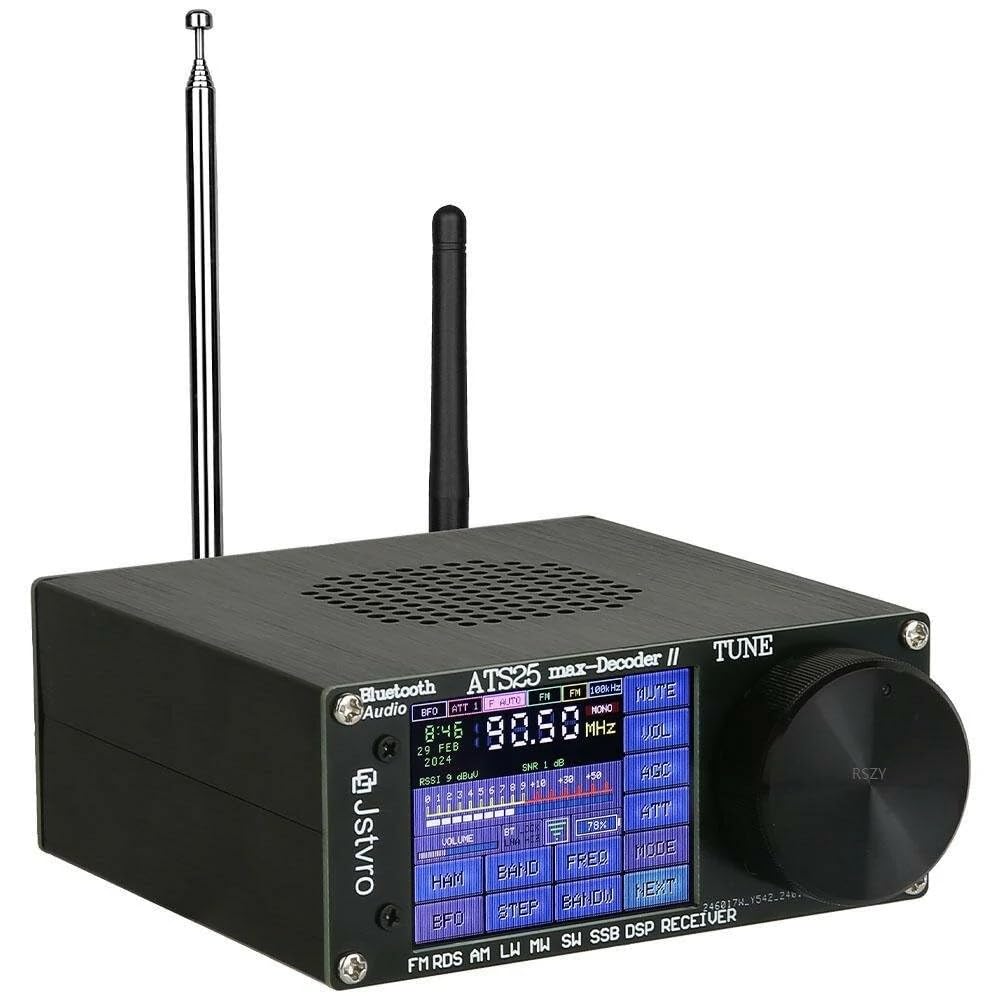
Figure 4.1: Front view of the ATS25 Max-Decoder ii, showing the touch screen interface and tuning knob.
4.2 Frequency Tuning and Band Selection
- Direct Frequency Input: Tap the 'FREQ' button to bring up a digital keypad. Enter the desired frequency and press 'OK' to tune.
- Band Selection: Tap the 'BAND' button to access predefined frequency bands (e.g., FM, LW, MW, SW, HAM bands). Select the desired band from the list.
- Step Tuning: Use the 'STEP' button to change the tuning step size (e.g., 1kHz, 10kHz, 100kHz).
- Scanning: Tap 'SCAN' to initiate an automatic scan for active stations within the current band.
4.3 Modulation Modes
The ATS25 Max-Decoder ii supports various modulation modes. Tap the 'MODE' button to cycle through or select from the following:
- FM (Frequency Modulation): For standard FM broadcasts (64-108MHz) with RDS function.
- AM (Amplitude Modulation): For medium wave (520-1710kHz) and shortwave (1730-30000KHz) broadcasts. AM bandwidth is adjustable from 1-6kHz.
- SSB (Single Sideband): For amateur radio and utility communications. Supports LSB (Lower Sideband) and USB (Upper Sideband). SSB bandwidth is adjustable from 0.5-4.0kHz.
- DIGI (Digital Modes): Supports various digital communication modes including PSK, FT4, FT8, RTTY L, RTTY U, and HELL.
- SYNC (Synchronous Detection): Improves AM reception by reducing fading and distortion.
- CW (Continuous Wave): For Morse code reception, with integrated decoding functions.
Video 4.1: Demonstration of ATS25 Max-Decoder II operation, including frequency input, band selection, and mode switching.
Video 4.2: Overview of features and operation for the All-New ATS25MAX FM AM Receiver, demonstrating various functions.
Video 4.3: General demonstration of the ATS25 Full Bands SDR Receiver, showcasing its capabilities across different bands.
4.4 Advanced Features
- HI-Z Antenna Input Impedance: Allows connection of high-impedance antennas for improved reception in certain scenarios.
- LNA Function: Low Noise Amplifier function enhances weak signal reception.
- 50ohm Mode: Standard 50-ohm input for common antennas.
- Band-Pass Filter Circuit: Built-in circuit helps shield against unwanted interference, improving signal clarity.
- Bluetooth Function: Supports Bluetooth connectivity for audio output or control (specific functionality may vary with firmware).
- Brightness Adjustment: Adjust the backlight brightness of the screen for comfortable viewing in various lighting conditions.
- Radio Frequency Spectrum Scanning: Visualize the radio spectrum to identify active signals.
- Battery Percentage & Voltage Display: Monitor the device's power status directly on the screen.

Figure 4.2: Comparison between ATS25 V1 and V2 versions, illustrating the added features in the upgraded model such as 50ohm mode, LNA function, HI-Z mode, 4000mAh battery, Bluetooth, and built-in band-pass filtering circuit.
5. Frequency Ranges
The ATS25 Max-Decoder ii supports the following frequency ranges:
- FM: 64-108MHz (with RDS function)
- LW (Long Wave): 153-500KHz
- MW (Medium Wave): 520-1710kHz
- SW (Short Wave): 1730-30000KHz
- SSB: 17030kHz (specific range within SW for SSB modes)
6. Maintenance
To ensure the longevity and optimal performance of your ATS25 Max-Decoder ii, follow these maintenance guidelines:
- Battery Care: The device has a built-in 4000mAh rechargeable battery. Charge it regularly using the provided USB Type-C cable. Avoid fully discharging the battery frequently to prolong its lifespan.
- Cleaning: Use a soft, dry cloth to clean the device's exterior and screen. Avoid using abrasive cleaners or solvents that may damage the finish or display.
- Storage: When not in use for extended periods, store the receiver in a cool, dry place away from direct sunlight and extreme temperatures.
- Antenna Handling: Handle antennas with care. Avoid bending or forcing them, especially the telescopic antenna, to prevent damage.
7. Troubleshooting
If you encounter issues with your ATS25 Max-Decoder ii, refer to the following common problems and solutions:
- Device does not power on:
- Ensure the battery is charged. Connect the device to a power source using the USB-C cable.
- Verify the POWER OFF/ON switch is in the 'ON' position.
- Poor reception:
- Ensure antennas are securely connected to the correct ports (ANT for radio, WiFi for Wi-Fi).
- Extend the telescopic antenna fully for better reception, especially on shortwave bands.
- Try repositioning the device or antenna to minimize local interference.
- Adjust the AM bandwidth or enable SYNC mode for AM reception.
- Utilize the HI-Z or 50ohm modes with appropriate external antennas for specific band optimization.
- Touch screen unresponsive:
- Use the provided stylus for precise input.
- Power cycle the device (turn off, then on again).
- No audio output:
- Check the volume level and ensure the device is not muted.
- If using headphones, ensure they are properly connected to the 'phone head' port.
8. Specifications
| Feature | Detail |
|---|---|
| Model Number | ATS25 |
| Brand | SETHDA |
| Display | 2.4-inch Touch Screen |
| Battery Capacity | 4000mAh (Built-in) |
| Charging Port | USB Type-C |
| Frequency Range FM | 64-108MHz (with RDS) |
| Frequency Range LW | 153-500KHz |
| Frequency Range MW | 520-1710kHz |
| Frequency Range SW | 1730-30000KHz |
| Frequency Range SSB | 17030kHz (within SW) |
| Supported Modes | FM, AM, SSB (LSB, USB), DIGI (PSK/FT4/FT8/RTTY L/RTTY U/HELL), SYNC L, SYNC U, CW, DSP |
| Special Features | HI-Z Antenna Input, LNA Function, 50ohm Mode, Band-Pass Filter, Bluetooth, Morse Code & Digital Communication Decoder, Brightness Adjustment, RF Spectrum Scanning |
| Item Weight | 1.2 pounds |
| Package Dimensions | 7 x 6 x 5 inches |
9. Warranty and Support
Your SETHDA ATS25 Max-Decoder ii Radio Receiver comes with a standard manufacturer's warranty. For specific warranty details, please refer to the documentation included in your package or contact SETHDA customer support.
For technical assistance, troubleshooting, or any product-related inquiries, please visit the official SETHDA website or contact their customer service department. Keep your purchase receipt and product model number handy when seeking support.


