1. Introduction
Thank you for purchasing the Generic 42 Inch 3 Blade Matte Black DC Motor Modern Contemporary LED Ceiling Fan. This manual provides essential information for the safe installation, operation, and maintenance of your new ceiling fan. Please read these instructions thoroughly before installation and keep them for future reference.
This ceiling fan features a high-quality DC motor for powerful and quiet air movement, 6-speed control, reversible motor function, and an integrated LED light with dimmable and color temperature adjustment capabilities. It is designed for indoor use only.
2. Safety Information
- Read all instructions: Before beginning installation, read all instructions and safety information.
- Electrical Safety: All electrical wiring must be performed by a qualified electrician and conform to all local and national electrical codes. Disconnect power at the main circuit breaker before installation or servicing.
- Mounting: The fan must be mounted to a structurally sound ceiling joist or outlet box capable of supporting the fan's weight (approximately 10.34 pounds). Ensure the mounting location is suitable for the fan's dimensions (42 x 42 x 14.76 inches).
- Blade Clearance: Ensure there is adequate clearance from the fan blades to any walls or obstructions.
- Indoor Use Only: This fan is designed for indoor use in dry locations. Do not install in damp or wet environments.
- Light Source: Do not attempt to replace the integrated LED light source. Contact qualified service personnel if the light source fails.
- Remote Control: Keep the remote control out of reach of children.

Image: This diagram indicates the fan is for indoor use only, suitable for average rooms up to 18 ft x 18 ft, and shows both down rod and 15-degree slope mounting configurations.
3. Package Contents
Please check to ensure all components are present and undamaged before beginning installation. If any parts are missing or damaged, contact customer support.
- DC Motor Housing with Integrated LED Light
- Fan Blades (3)
- Down Rod
- Mounting Bracket
- Canopy
- Remote Control with Wall Cradle
- AAA Battery for Remote Control
- Hardware Pack (screws, washers, wire nuts, etc.)
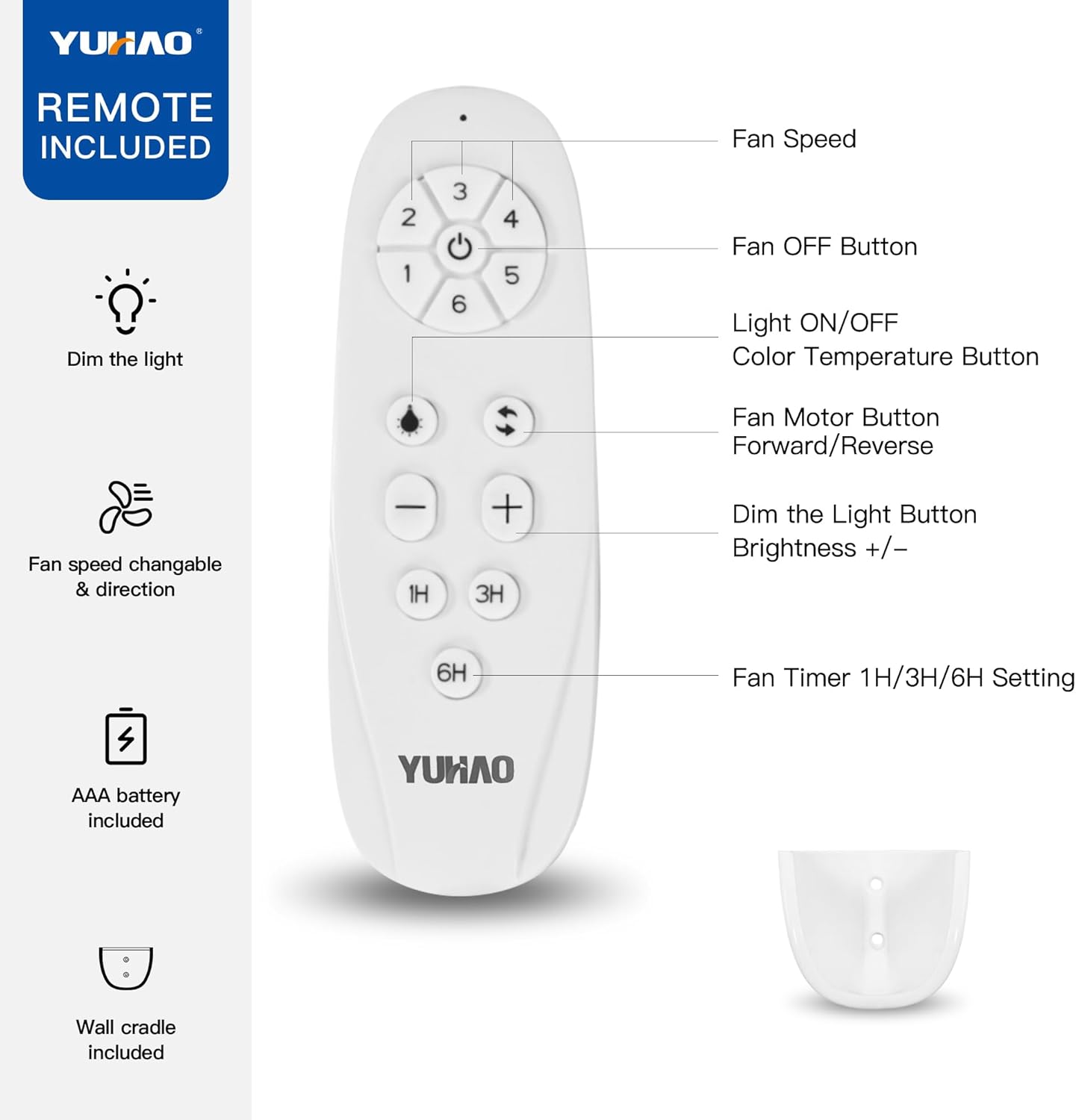
Image: The remote control is included, along with an AAA battery and a wall cradle for convenient storage.
4. Specifications
| Feature | Detail |
|---|---|
| Brand | Generic |
| Color | Black |
| Material | Acrylonitrile Butadiene Styrene |
| Room Type | Living Room (Recommended for rooms up to 18 ft x 18 ft) |
| Power Source | AC/DC |
| Mounting Type | Down Rod Mount, 15° Slope Mount |
| Product Dimensions | 42 x 42 x 14.76 inches |
| Item Weight | 10.34 pounds |
| Maximum Airflow | 5000 CFM |
| Special Feature | 6-speed fan control, Reversible motor, 3-light dimmable LED, Fan timing function |
| Safety Listing | ETL Safety Listing |

Image: This diagram illustrates the fan's dimensions, including the 42-inch total diameter, 19.2-inch blade length, 8.7-inch light diameter, and 15-inch total height from the ceiling.
5. Setup and Installation
Before you begin: Ensure power is disconnected at the circuit breaker. Consult a qualified electrician if you are unsure about wiring procedures.
- Prepare Mounting Location: Securely attach the mounting bracket to a ceiling joist or an approved outlet box. Ensure the box can support the fan's weight.
- Assemble Down Rod: Insert the down rod through the canopy and connect it to the fan motor housing. Secure with pins and screws as per instructions.
- Hang Fan: Carefully lift the fan assembly and hang it from the mounting bracket.
- Wiring: Connect the fan's electrical wires to the household wiring according to the wiring diagram provided in the full installation guide (not included in this summary). Ensure all connections are secure and insulated.
- Secure Canopy: Slide the canopy up to the ceiling and secure it to the mounting bracket, covering the wiring connections.
- Attach Blades: Securely attach the three fan blades to the motor housing.
- Install Light Shade: Attach the smooth white acrylic light shade to the fan motor housing.

Image: The 42-inch matte black ceiling fan installed in a dining room, showcasing its modern design and integrated LED light.
6. Operating Instructions
Your ceiling fan is operated using the included remote control. Ensure the AAA battery is correctly installed in the remote.
6.1 Remote Control Functions
Image: This image details the functions of the remote control, including fan speed, light control, motor direction, dimming, and timer settings.
- Fan Speed (1-6): Press buttons 1 through 6 to select the desired fan speed, with 6 being the highest.
- Fan OFF Button: Press to turn the fan off.
- Light ON/OFF / Color Temperature Button: Press once to turn the light on/off. Press and hold to cycle through the three light color temperatures (Warm White, Natural White, Cool White).
- Fan Motor Button (Forward/Reverse): Press to change the direction of the fan blades. This function is used to switch between Summer and Winter modes.
- Dim the Light Button (+/-): Press '+' to increase light brightness and '-' to decrease light brightness.
- Fan Timer (1H/3H/6H): Press to set the fan to turn off automatically after 1, 3, or 6 hours.
6.2 Summer and Winter Modes
The reversible motor allows for optimal air circulation throughout the year.

Image: This diagram explains the fan's reversible motor function, showing how downdraft (forward) creates a cooling breeze for summer and updraft (reverse) circulates warm air for winter.
- Summer Mode (Forward/Downdraft): Blades rotate counter-clockwise, pushing air downwards to create a cooling breeze. Use this mode during warmer months.
- Winter Mode (Reverse/Updraft): Blades rotate clockwise, pulling air upwards to circulate warm air trapped near the ceiling. Use this mode during colder months to improve heating efficiency.
6.3 Adjustable Light Color Temperature
The integrated LED light offers three color temperature options to suit your preference and room ambiance.

Image: This image demonstrates the three adjustable light color temperatures: Warm White (3000K), Natural White (4000K), and Cool White (6500K), as seen in a living room.
- Warm White (3000K): Provides a cozy and inviting atmosphere.
- Natural White (4000K): Offers a balanced and neutral light, ideal for general tasks.
- Cool White (6500K): Delivers a bright and crisp light, suitable for focused activities.
7. Maintenance
- Cleaning: To clean the fan, wipe with a soft, damp cloth. Do not use abrasive cleaners or solvents. Ensure power is off before cleaning.
- Blade Care: Periodically check the fan blades for dust buildup. Clean them gently to maintain balance and airflow.
- Tighten Fasteners: Periodically check all screws and fasteners on the fan and mounting hardware to ensure they are secure.
- No Lubrication Needed: The DC motor is permanently lubricated and does not require additional oiling.
8. Troubleshooting
| Problem | Possible Cause | Solution |
|---|---|---|
| Fan does not start | No power to the fan; Loose wire connections; Remote control battery dead. | Check circuit breaker; Verify all wire connections; Replace remote control battery. |
| Fan makes noise | Loose screws; Blades unbalanced; Motor housing rubbing. | Tighten all screws; Check blade balance and alignment; Ensure no parts are touching. |
| Light does not work | No power to the light; Loose wire connection; Faulty LED driver. | Check power supply; Verify light wiring; Contact customer support for LED driver issues. |
| Remote control not working | Dead battery; Remote not paired (if applicable); Obstruction between remote and receiver. | Replace battery; Refer to pairing instructions (if any); Ensure clear line of sight. |
9. Warranty and Support
For warranty information or technical support, please refer to the documentation included with your purchase or contact the seller directly. Keep your purchase receipt as proof of purchase.
If you encounter any issues not covered in this manual, please reach out to the manufacturer's customer service for assistance.


