
NBDDIGITAL MC-S100-WM-US-2506-fff
NBDDIGITAL 4K Digital Camera User Manual
Model: MC-S100-WM-US-2506-fff
Introduction
This manual provides comprehensive instructions for the NBDDIGITAL 4K Digital Camera, Model MC-S100-WM-US-2506-fff. Designed for photography enthusiasts and vloggers, this camera features 4K video recording, 48MP photo resolution, a 180° flip screen, Wi-Fi connectivity, and includes wide-angle and macro lenses. Please read this manual thoroughly before using your camera to ensure proper operation and to maximize its capabilities.
Package Contents
Upon unboxing, please verify that all components are present:
- NBDDIGITAL 4K Digital Camera Body
- Standard Lens
- Wide-Angle Lens
- Macro Lens
- 2 x 1500mAh Li-Ion Batteries
- Battery Charger
- 32GB Micro SD Card
- USB 2.0 Card Reader
- USB Cable
- Camera Strap
- User Manual
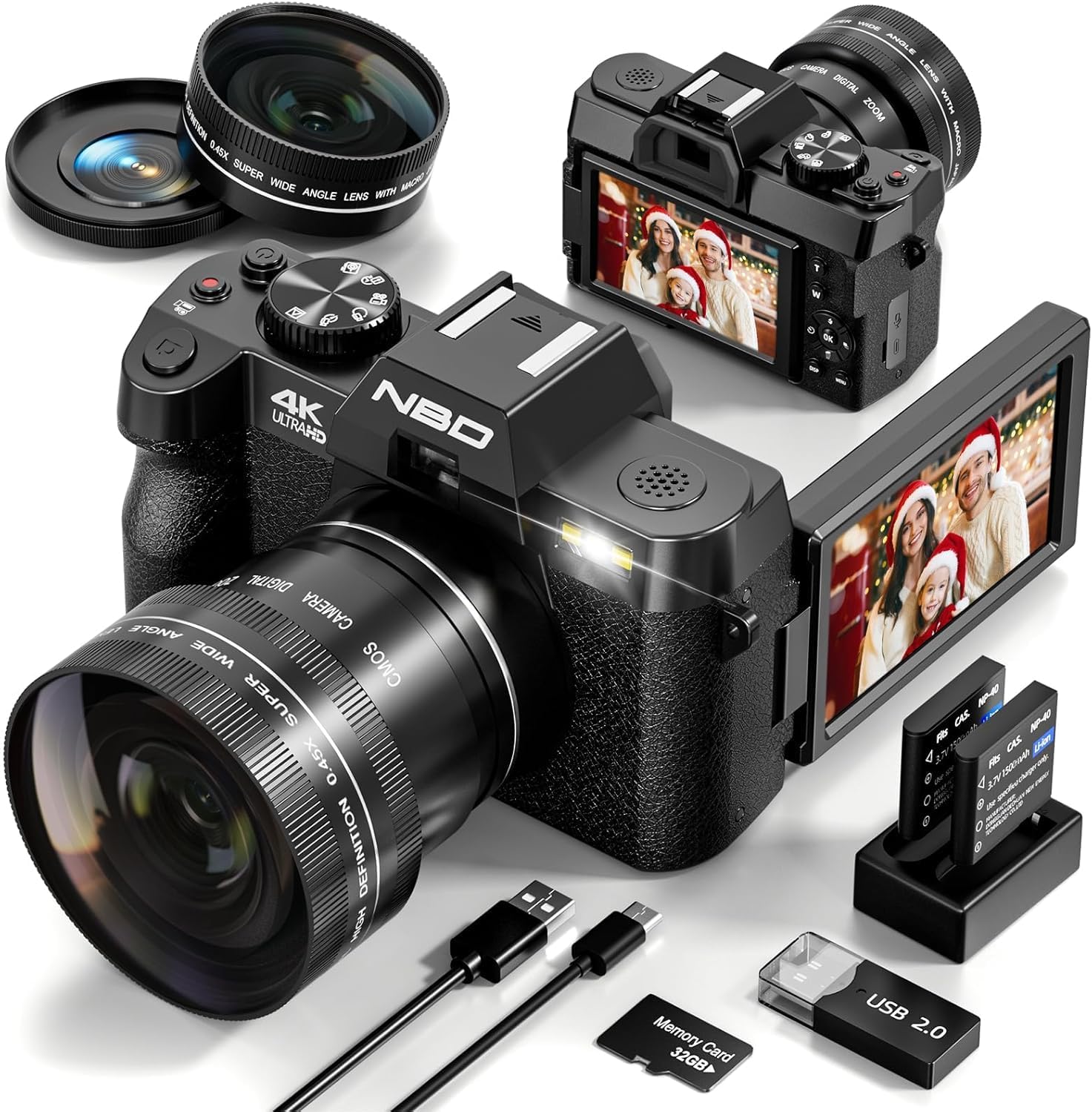
Image: The NBDDIGITAL 4K Digital Camera shown with its full set of accessories, including the camera body, wide-angle and macro lenses, two rechargeable batteries, a battery charger, USB cables, and a 32GB memory card.
Setup
1. Charging the Batteries
Insert the provided Li-Ion batteries into the battery charger. Connect the charger to a power source using the USB cable. The indicator light on the charger will show the charging status. Ensure batteries are fully charged before first use.

Image: Two camera batteries are shown inserted into the dual battery charger, ready for charging. This image also displays the included 32GB memory card and a USB 2.0 card reader.
2. Inserting the Memory Card
Locate the memory card slot on the camera. Insert the 32GB Micro SD card with the gold contacts facing down until it clicks into place. Important: Format the memory card in the camera's settings menu before its first use to ensure compatibility and optimal performance.
3. Attaching Lenses
The camera comes with a standard lens, a wide-angle lens, and a macro lens. To attach a lens, align the mounting marks on the lens with those on the camera body and twist gently until it locks. The wide-angle and macro lenses can be attached to the standard lens for expanded functionality.

Image: A visual guide demonstrating the attachment of the 52mm wide-angle and macro lenses, which screw onto the main lens of the camera. The image also illustrates the camera's 4X, 8X, and 16X digital zoom capabilities.
Operating Instructions
1. Powering On/Off
Press and hold the power button located on the top of the camera to turn it on or off.
2. Using the 180° Flip Screen
The 3-inch LCD screen can be flipped 180 degrees, making it ideal for vlogging and selfies. Simply pivot the screen to your desired angle.
Video: A demonstration of the camera's 180-degree flip screen functionality, showcasing its utility for vlogging and self-recording.
3. Taking Photos and Recording Videos
Switch between photo and video modes using the dedicated mode dial or button. Press the shutter button halfway to focus (autofocus feature) and fully press to capture a photo or start/stop video recording.

Image: An overview of the camera's diverse shooting modes and features, including anti-shake, flash, slow-motion, time-lapse, playback, photo, interval photography, and video recording.
4. Digital Zoom
Utilize the zoom lever to adjust the 16X digital zoom. Note that digital zoom may affect image quality compared to optical zoom.
5. Wi-Fi Connectivity and App Control
The camera supports Wi-Fi for easy transfer of photos and videos to your smartphone or tablet. Download the companion app by scanning the QR code displayed on the camera screen or in the manual. Follow the app's instructions to connect and control your camera remotely.

Image: The camera's screen shows Wi-Fi connection details (SSID: 4K_WIFI, PWD: 12345678) and a QR code. A smartphone screen next to it displays Wi-Fi settings, indicating how to connect and download the mobile app for camera control and picture transfer. The QR code links to https://qr19.cn/BIamDW.
6. Webcam Functionality
Connect the camera to your PC using the USB cable. Select "PC Camera" mode on the camera to use it as a webcam for video calls or live streaming. Alternatively, select "Mass Storage Mode" to transfer files to your computer.

Image: The camera is connected to a laptop via a USB cable, demonstrating its dual functionality for fast picture transfer and as a webcam for video conferencing.
Maintenance
- Keep the camera and lenses clean using a soft, lint-free cloth.
- Avoid exposing the camera to extreme temperatures, dust, or moisture.
- Store the camera in a dry, cool place when not in use.
- Remove batteries if the camera will not be used for an extended period.
Troubleshooting
| Problem | Possible Cause / Solution |
|---|---|
| Camera does not power on. | Battery is dead or not inserted correctly. Ensure batteries are charged and properly seated. |
| Cannot take photos/record videos. | Memory card is full or not formatted. Format the card or delete unnecessary files. Check if the camera is in the correct mode (photo/video). |
| Poor image quality. | Lens may be dirty. Clean the lens. Ensure sufficient lighting. Digital zoom can reduce quality; try to minimize its use if possible. |
| Wi-Fi connection issues. | Ensure Wi-Fi is enabled on the camera and your device. Re-enter Wi-Fi password. Check app compatibility and updates. |
Specifications
| Feature | Detail |
|---|---|
| Brand | NBDDIGITAL |
| Model Name | S100 |
| Item Model Number | MC-S100-WM-US-2506-fff |
| Video Resolution | 4K (60FPS) |
| Image Resolution | 48MP |
| Digital Zoom | 16X |
| Screen | 3-inch 180° Flip LCD |
| Lenses Included | Wide-Angle, Macro |
| Connectivity | Wi-Fi, USB |
| Storage | Supports Micro SD (32GB card included) |
| Batteries | 2 x 1500mAh Li-Ion |
| Special Features | Autofocus, Anti-Shake, Webcam Functionality |
Warranty and Support
For warranty information and technical support, please refer to the contact details provided on the product packaging or visit the official NBDDIGITAL website. Keep your purchase receipt as proof of purchase for warranty claims.
You can also visit the NBDDIGITAL Store on Amazon for more product information and support resources.
Related Documents - MC-S100-WM-US-2506-fff
 |
Digital Camera Easy Guide: Setup, Operation, and Troubleshooting Comprehensive easy guide for your digital camera, covering warnings, precautions, system requirements, camera parts, charging, power, setup, memory card usage, shooting modes, focusing, fill light, media playback, computer connection, WiFi app, cleaning, maintenance, troubleshooting, and supplementary notes. |
 |
Oiadek DC101L-AF 4K Digital Camera User Manual: Setup, Operation, and Features Comprehensive user manual for the Oiadek DC101L-AF 4K digital camera, covering battery installation, charging, SD card usage, formatting, autofocus, playback, downloading files, and webcam functionality. |
 |
Oiadek 4K Digital Camera User Manual User manual for the Oiadek 4K Digital Camera, covering battery insertion and removal, charging, TF card usage, formatting, autofocus, playback, deletion, and using the camera as a webcam. |
 |
Video Camera Camcorder 4K 48MP 30FPS with IR Night Vision, 18X Digital Zoom Camera Recorder 3.0" LCD Touch Screen Vlogging Camera for YouTube with Remote Controller, 2 Batteries, 32GB SD Card User manual for the 4K Video Camera Camcorder featuring 48MP, 30FPS, IR Night Vision, 18X Digital Zoom, 3.0" LCD Touch Screen, Vlogging capabilities, remote controller, and support for 2 batteries and 32GB SD card. Provides detailed instructions on setup, operation, shooting modes, settings, connectivity, and troubleshooting. |
 |
Delmodes DV081 4K Digital Video Camera Instruction Manual Comprehensive instruction manual for the Delmodes DV081 4K digital video camera. Learn about battery installation and charging, memory card usage, basic camera operations, shooting modes, connecting to computers and TVs, and important safety precautions. |
 |
Commander S100 User Guide: Variable Speed A.C. Drive for Induction Motors Comprehensive user guide for the Nidec Control Techniques Commander S100 Variable Speed A.C. drive. Covers installation, setup, operation, safety, and technical specifications for induction motors. |
Ask a question about this manual
Ask about setup, troubleshooting, compatibility, parts, safety, or missing instructions. Manuals+ will review the question and use this page’s manual context to help answer it.