
1. Introduction
The MIETUBL Automatic Pet Feeder is designed to provide scheduled and monitored feeding for your pets. Featuring dual 1080P HD cameras with night vision, two-way audio, and smart app control, this feeder allows you to manage your pet's meals remotely. It supports both 2.4GHz and 5GHz WiFi for stable connectivity and includes a slow-feed mode for healthier digestion.

Image 1.1: MIETUBL Automatic Pet Feeder with dual cameras and app interface.
2. Safety Instructions
- Read all instructions before using the appliance.
- Keep the feeder indoors in a dry place. Do not expose to rain or moisture.
- Do not use wet pet food or kibble with a diameter over 15mm to prevent jamming.
- Ensure the power adapter is securely connected. Use the recommended power supply.
- If using batteries for backup power, ensure they are correctly installed and replaced when low. Batteries are not included.
- The main body containing electronic components is not washable. Clean with a damp cloth.
- Keep out of reach of children and pets to prevent tampering.
3. Package Contents
Verify that all items are present in the package:
- Dual-Camera Wi-Fi Automatic Cat Food Feeder (1)
- User Guide (1)
- Desiccant Bag (1)
- Charger (1)
4. Product Overview
The MIETUBL Automatic Pet Feeder consists of several key components designed for ease of use and pet comfort.
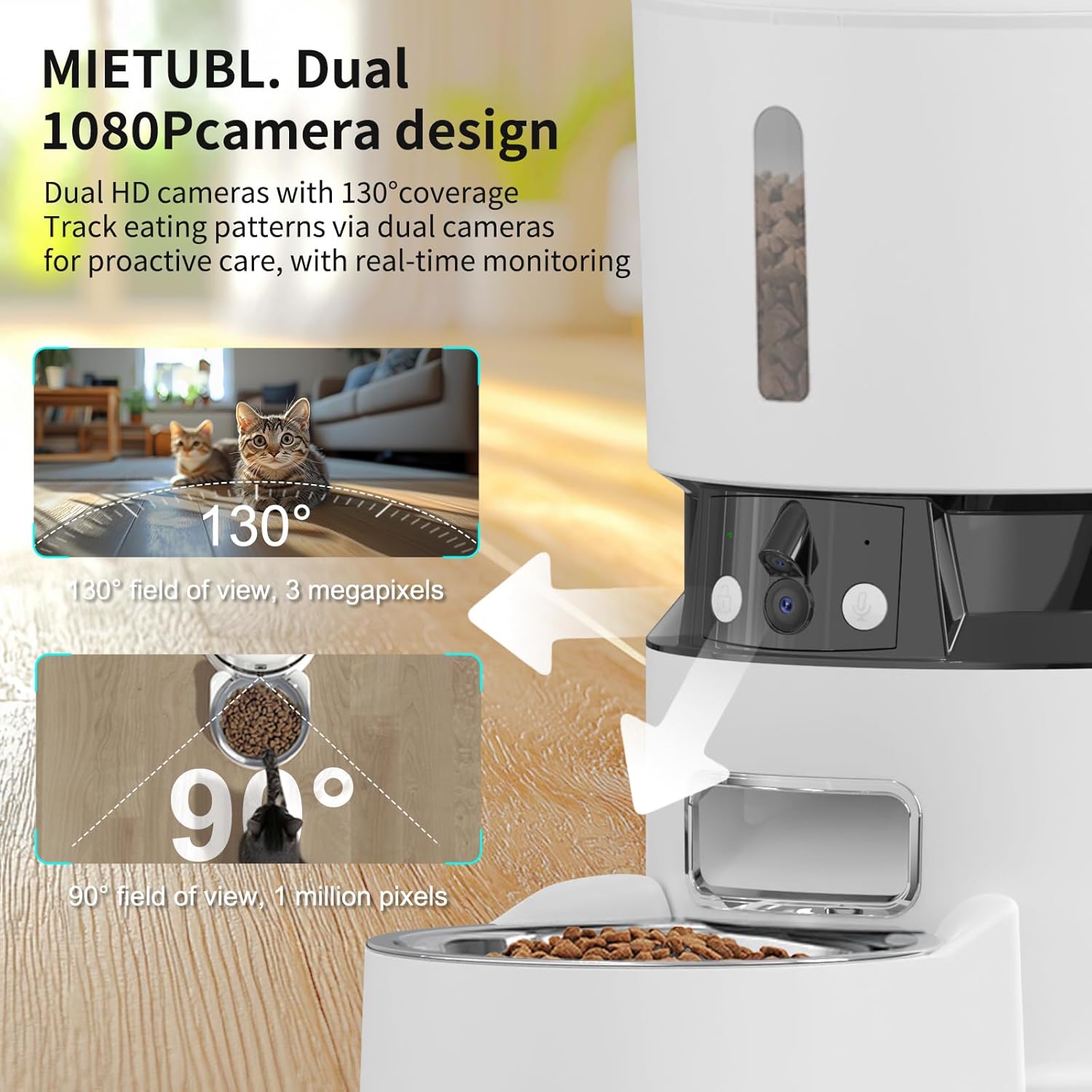
Image 4.1: Dual 1080P HD camera design with wide-angle views.
Key Components:
- Food Storage Tank: Large capacity (4L) for dry pet food, with a transparent window to monitor food levels.
- Lid with Desiccant Compartment: Features a safety twist-lock lid and a dedicated compartment for a desiccant bag to keep food fresh.
- Dual HD Cameras: Two cameras provide a 90° view of the food bowl and a 130° wide-angle view of the surrounding area, both with night vision.
- Control Panel: Includes reset and record buttons.
- Stainless Steel Food Bowl: Detachable and easy to clean, designed with an 8° tilt for comfortable eating.
- Dual Power Supply: Supports both DC 5V/1A adapter and 3 AA batteries (not included) for backup power.

Image 4.2: Detailed view of feeder features including lid, outlet, desiccant, and sealing ring.

Image 4.3: Transparent food tank for easy monitoring of food levels.
5. Setup Instructions
5.1 Assembly
- Turn the top cover counter-clockwise to remove it.
- Take out all internal accessories, including the stainless steel bowl and desiccant bag.
- Securely attach the food bowl to the main unit.
- Fill the food tank with dry pet food (kibble size 2-15mm).
- Place the desiccant bag into its designated compartment in the lid.
- Turn the lid clockwise to close and secure it.

Image 5.1: Step-by-step assembly guide for the pet feeder.
5.2 Power Connection
Connect the feeder to a power source using the provided DC 5V/1A adapter. For uninterrupted operation during power outages, install 3 AA batteries (not included) in the designated battery compartment at the bottom of the unit.

Image 5.2: Dual power supply options for continuous operation.
5.3 App Connection and WiFi Setup
- Download the companion app (e.g., 'JINK' or similar smart home app) from your smartphone's app store.
- Register or log in to your account.
- Ensure your phone is connected to a 2.4GHz WiFi network. The feeder supports both 2.4GHz and 5GHz, but initial setup often requires 2.4GHz. If your router is 5GHz, please set it to 2.4GHz first for pairing.
- In the app, tap 'Add Device' or the '+' icon.
- Follow the on-screen instructions to connect the feeder to your WiFi network. This typically involves entering your WiFi password and waiting for the indicator light on the feeder to enter a fast flashing mode (WiFi pairing mode).
- Once connected, you can customize the device name in the app.

Image 5.3: App connection process for the pet feeder.

Image 5.4: The feeder supports both 2.4GHz and 5GHz WiFi for enhanced stability and range.
Video 5.1: Product overview and app connection demonstration.
6. Operating Instructions
6.1 Programmable Feeding Schedule
Set up to 8 meals daily with 1-20 portions each to customize your pet's feeding routine. This feature promotes regular eating habits and healthier digestion.
- Open the app and navigate to the 'Meal Plan' section.
- Select the desired feeding times and the number of servings for each meal.
- The app allows for easy modification and cancellation of feeding schedules.

Image 6.1: User-friendly app interface for programming feeding times and portions.
6.2 Manual Feeding
You can dispense food instantly using the app's 'Feed' button. This is useful for providing extra treats or adjusting meals on the fly.
6.3 Dual HD Cameras & Night Vision
Monitor your pet's eating habits and activity with the integrated dual 1080P HD cameras. The cameras offer a 90° view of the food bowl and a 130° wide-angle view of the room. Night vision ensures clear visibility even in low-light conditions.
- Access live camera feeds through the app.
- Record 10-second video clips or capture photos.

Image 6.2: Night vision functionality for monitoring pets in the dark.
6.4 Two-Way Voice and Audio
Engage with your pet remotely using the two-way audio feature. Record personalized voice messages (up to 10 seconds) to call your pet for meals or soothe them.
- Use the microphone icon in the app to speak to your pet.
- Record and play back custom voice messages.

Image 6.3: Personalized meal calls and two-way audio for pet interaction.
6.5 Portion Control and Slow-Feed Mode
The feeder allows precise portion control, dispensing 1-20 portions per meal. This is beneficial for managing your pet's weight and preventing rapid eating. Refer to the recommended daily feeding portions table for guidance.

Image 6.4: Recommended daily feeding portions table.
7. Maintenance
7.1 Cleaning
The feeder features a detachable design for easy cleaning. The stainless steel food bowl and the food storage tank can be removed and washed. The main body, which contains electronic components, should not be submerged in water. Wipe it clean with a damp cloth.

Image 7.1: Detachable food tank and bowl for convenient cleaning.
7.2 Desiccant Replacement
The desiccant bag helps keep the pet food fresh and crunchy. Replace the desiccant bag periodically (e.g., every 1-2 months) to maintain optimal freshness. The desiccant compartment is located in the lid of the food storage tank.

Image 7.2: Desiccant compartment in the feeder lid.
7.3 Recommended Food Types
The feeder is compatible with dry kibble ranging from 2-15mm in diameter. It can dispense various dry food types, including freeze-dried, air-dried, and mixed food. Avoid using wet food or kibble larger than 15mm to prevent blockages.

Image 7.3: Guide to recommended kibble sizes and types for optimal feeder performance.
8. Troubleshooting
- Feeder not dispensing food: Check if the food tank is empty. Ensure kibble size is within 2-15mm. Verify power connection and app schedule. Try manual feeding via the app.
- App connectivity issues: Ensure the feeder is within WiFi range. Confirm your phone is connected to a 2.4GHz WiFi network during initial setup. Restart the feeder and your router. Re-pair the device if necessary.
- Camera not working: Check network connection. Ensure there is sufficient lighting (night vision activates automatically in low light).
- Food not staying fresh: Ensure the lid is securely closed and the desiccant bag is active (replace if needed).
- Power issues: Verify the power adapter is plugged in correctly. If using batteries, check their charge level and replace if necessary.
9. Specifications
| Feature | Detail |
|---|---|
| Brand | MIETUBL |
| Model Number | BM-4GG9-CTR6 |
| Item Weight | 4 Pounds |
| Product Dimensions (LxWxH) | 7.48 x 6.88 x 14.4 inches |
| Material | Acrylonitrile Butadiene Styrene, Stainless Steel |
| Color | White |
| Food Tank Capacity | 4 Liters (approx. 5 pounds of dry food) |
| Kibble Size Compatibility | 2-15 mm |
| Camera Resolution | 1080P HD (Dual Cameras) |
| Camera Field of View | 90° (bowl view) + 130° (wide-angle) |
| Connectivity | 5G/2.4G WiFi |
| Power Supply | DC 5V/1A Adapter, 3 AA Batteries (backup, not included) |
| Special Features | Night Vision, Two-Way Audio, Programmable Schedule, Slow-Feed Mode, Detachable Design |
10. Warranty Information
This product comes with a 1-year warranty from the date of purchase. The warranty covers manufacturing defects and malfunctions under normal use. Please retain your proof of purchase for warranty claims. The warranty does not cover damage caused by misuse, accidents, unauthorized modifications, or improper maintenance.
11. Customer Support
For technical assistance, troubleshooting, or warranty inquiries, please contact MIETUBL customer support through the following channels:
- Email: support@mietubl.com (example email, replace with actual if available)
- Website: Visit the official MIETUBL website for FAQs and support resources.
- In-App Support: Check the 'Settings' or 'About' section within the companion app for direct support options.
Thank you for choosing MIETUBL. We hope you and your pet enjoy the convenience and peace of mind our automatic feeder provides.