
TUSITA T00119D
TUSITA Backpack Tether Accessory Instruction Manual
Model: T00119D
1. Introduction
This manual provides detailed instructions for the TUSITA Backpack Tether Accessory, designed for secure and convenient attachment of your Garmin inReach Mini 1 or 2 satellite communicator to a backpack strap. This accessory ensures your device is readily accessible while remaining securely tethered during outdoor activities.
2. Package Contents
Please verify that all items listed below are included in your package:
- 1 x Backpack Tether Mount
- 1 x Quarter-turn Bike Mount
- 1 x Detachable Retractable Tether
3. Setup Instructions
3.1 Attaching the Backpack Tether Mount to your Backpack Strap
- Open the hook-and-loop fasteners on the backpack tether mount.
- Position the mount on your backpack shoulder strap. The non-slip material on the back of the mount should face the strap to prevent sliding.
- Wrap the fasteners securely around the strap, ensuring a snug fit. The adjustable shoulder pad accommodates strap widths from 2.5 inches (6.35 cm) to 3.5 inches (8.9 cm).
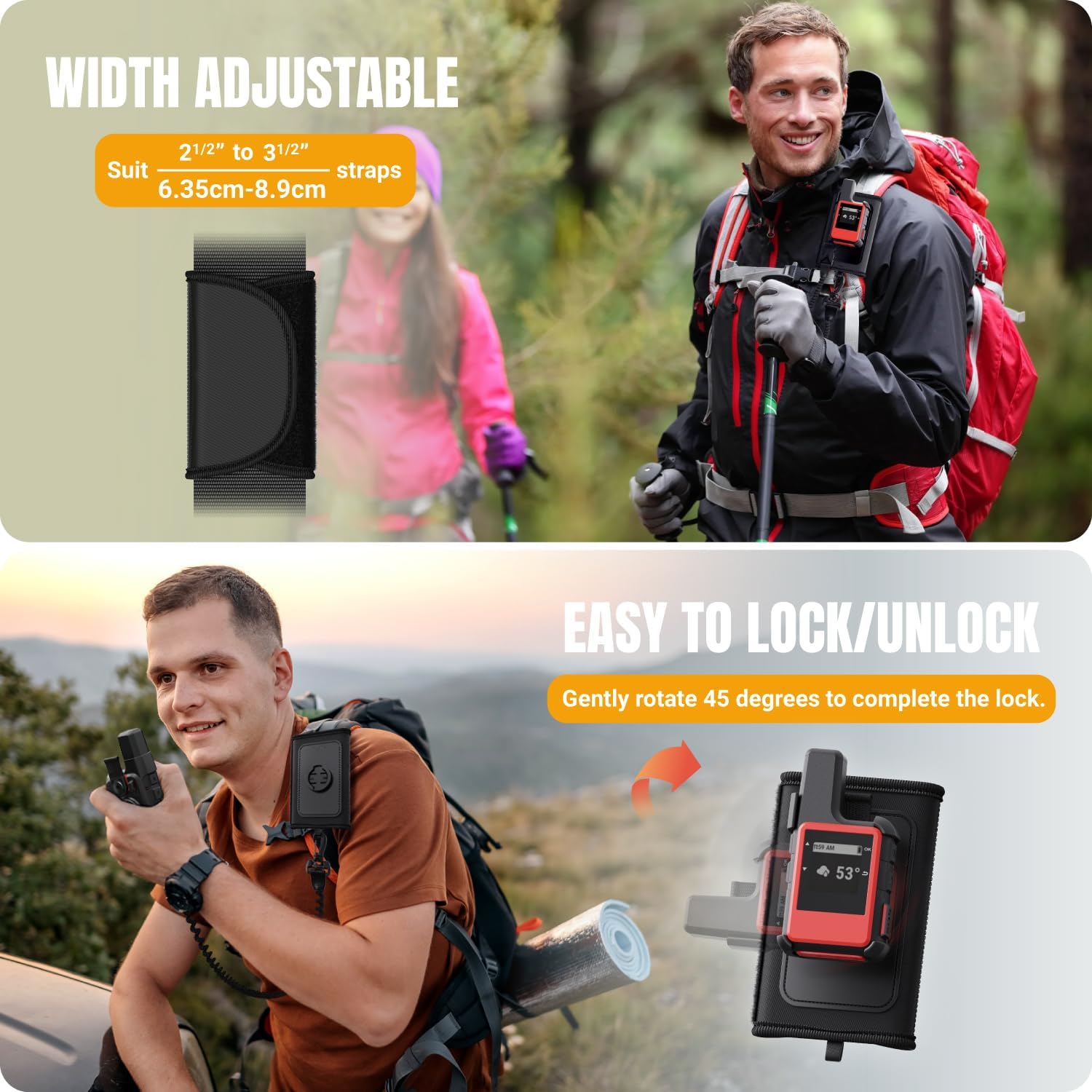
Figure 3.1: Adjustable width and attachment to backpack strap.
3.2 Attaching your Garmin inReach Mini to the Mount
- Align the spine mount on your Garmin inReach Mini with the quick-release receiver on the backpack tether mount.
- Gently press the device into the receiver and rotate it 45 degrees until it clicks securely into place. This completes the lock.

Figure 3.2: Garmin inReach Mini attached to the backpack tether mount.
3.3 Attaching the Detachable Retractable Tether
- Attach one end of the detachable retractable tether to the designated loop on the backpack tether mount.
- Attach the other end of the tether to your Garmin inReach Mini. This provides an additional layer of security, preventing accidental drops. The lanyard cord is adjustable in length from 2 inches to 14 inches.

Figure 3.3: Components of the tether accessory.
4. Operating Instructions
4.1 Quick Release Functionality
To detach your Garmin inReach Mini from the backpack tether mount, rotate the device 45 degrees in the opposite direction of attachment. The quick-release mechanism allows for immediate access to your device for optimal GPS performance or communication, while the retractable tether maintains connection to your backpack.
Figure 4.1: Easy lock/unlock mechanism.
4.2 Adjustable Tether for Viewing
The detachable retractable tether features an elastic cord that can stretch from an unstretched length of 25 cm to an extreme stretch of 150 cm. This allows you to extend your device for easy viewing or operation without fully detaching it from your backpack.

Figure 4.2: Adjustable tether length.
4.3 Versatility with Quarter-turn Bike Mount
The included Quarter-turn Bike Mount allows for flexible use across different activities. You can easily switch your Garmin inReach Mini from the backpack tether mount to the bike mount, providing secure attachment for cycling adventures.

Figure 4.3: Switching between bike mount and backpack stand.
5. Maintenance
To ensure the longevity and proper function of your TUSITA Backpack Tether Accessory, follow these simple maintenance guidelines:
- Cleaning: Wipe the plastic and fabric components with a damp cloth as needed. Avoid harsh chemicals or abrasive cleaners.
- Inspection: Periodically inspect the quick-release mechanism, tether cord, and hook-and-loop fasteners for any signs of wear or damage.
- Storage: Store the accessory in a clean, dry place when not in use.
6. Troubleshooting
If you encounter any issues with your TUSITA Backpack Tether Accessory, please refer to the following common solutions:
- Device not securing to mount: Ensure the Garmin inReach Mini's spine mount is correctly aligned with the quick-release receiver and rotated a full 45 degrees until a click is heard. Check for any obstructions in the receiver.
- Mount sliding on backpack strap: Verify that the hook-and-loop fasteners are tightly secured around the backpack strap. The non-slip backing should be in direct contact with the strap.
- Tether cord not retracting: Check the tether for any twists or knots. Ensure it is not snagged on any objects.
If the problem persists, please contact TUSITA customer support for further assistance.
7. Specifications
| Feature | Detail |
|---|---|
| Brand | TUSITA |
| Model Number | T00119D |
| Compatible Devices | Garmin inReach Mini 1, Garmin inReach Mini 2 |
| Mounting Type | Backpack Strap Mount |
| Additional Features | Quick-release mount, Detachable Retractable Tether |
| Material | Polyformaldehyde Plastic & Polyester Fabric |
| Adjustable Strap Width | 2.5 inches (6.35 cm) to 3.5 inches (8.9 cm) |
| Tether Length (Unstretched) | 2 inches (5 cm) |
| Tether Length (Extreme Stretch) | 14 inches (35.5 cm) |
8. Warranty and Support
8.1 Warranty Information
This TUSITA product comes with an 18-month warranty from the date of purchase. This warranty covers manufacturing defects and material flaws under normal use. Please retain your proof of purchase for warranty claims.
8.2 Customer Support
For any questions, technical assistance, or warranty claims, please contact TUSITA customer support through the retailer where the product was purchased or visit the official TUSITA website for contact information.
no relevant documents