
JCZWJICBW-2-16A
ETEK RCBO Low Voltage Residual Current Circuit Breaker User Manual
Model: EKL13 (JCZWJICBW-2-16A)
1. Product Overview
This manual provides essential information for the safe and effective installation, operation, and maintenance of the ETEK RCBO (Residual Current Circuit Breaker with Overcurrent Protection). This device is designed to protect against electrical shock due to leakage current and to prevent damage from short circuits and overloads in electrical systems.
Key Features:
- Provides protection against electrical shock caused by residual current.
- Offers overcurrent protection against short circuits and overloads.
- Constructed with insulating and flame-retardant materials for enhanced safety and durability.
- UV-resistant housing suitable for various installation environments, including solar applications.
- Features screw-type terminals for secure and stable electrical connections.
- Suitable for use with solar inverters, charge controllers, and battery banks.
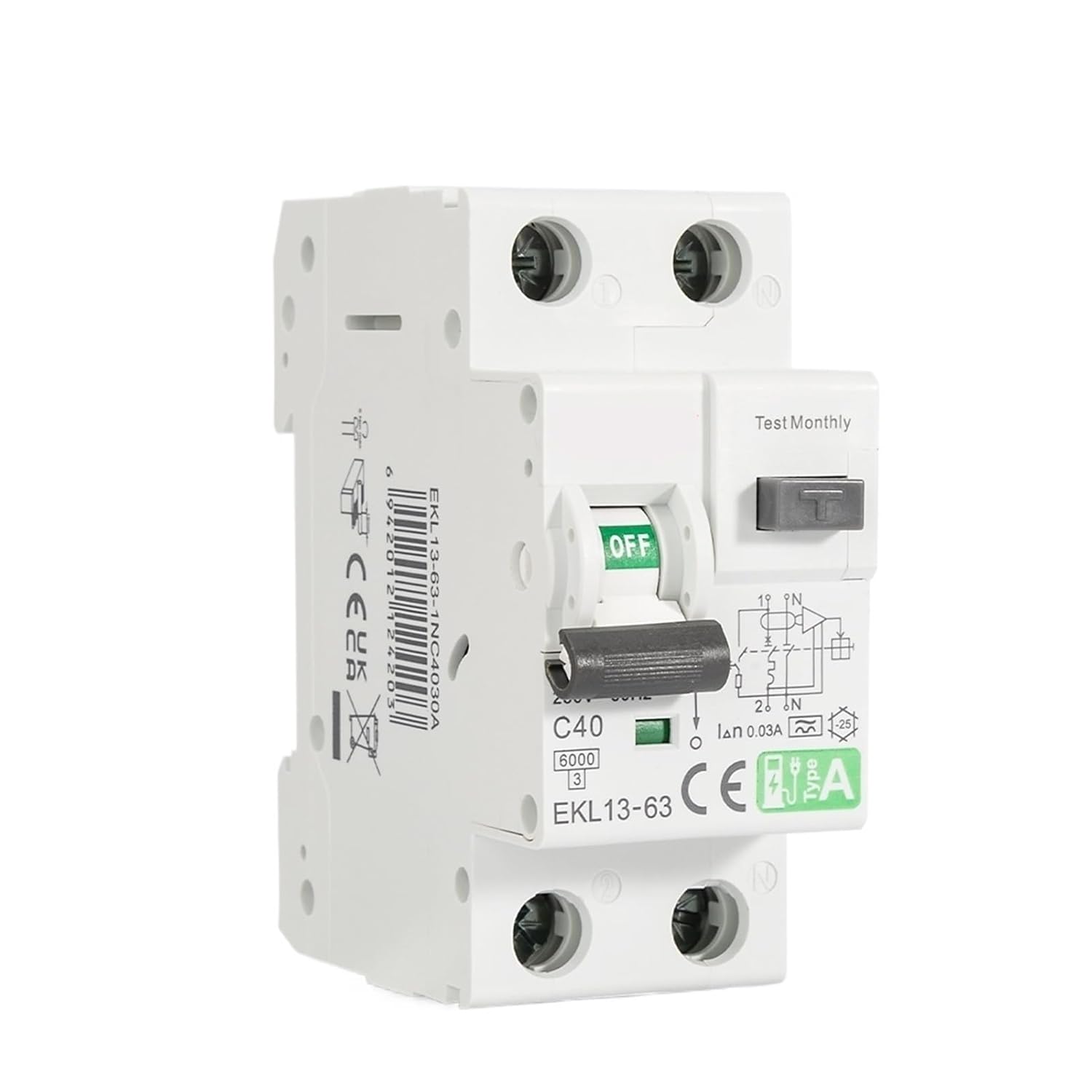
Figure 1.1: Front view of the ETEK RCBO Low Voltage Residual Current Circuit Breaker.
2. Safety Information
Please read and understand all safety instructions before installing or operating this device. Failure to follow these instructions may result in electric shock, fire, or serious injury.
- DANGER: Risk of electric shock. Installation and maintenance must be performed by qualified personnel only.
- Always disconnect power before working on the circuit breaker or associated wiring.
- Ensure the device's ratings (voltage, current, sensitivity) match the requirements of your electrical system.
- Do not use the device if it appears damaged or has been dropped.
- Do not attempt to open or repair the device. Refer to qualified service personnel.
- Ensure proper grounding as per local electrical codes.
- The product is designed for indoor use or protected outdoor environments. Ensure it is not exposed to direct water or extreme temperatures beyond its operating range.
3. Product Components and Identification
Familiarize yourself with the different parts of the RCBO and their functions.

Figure 3.1: Labeled diagram of the ETEK RCBO components.
- Product Handle: Used to switch the circuit breaker ON (up) or OFF (down).
- Test Button: Used to manually test the residual current protection function. Press monthly.
- Product Parameters: Displays key specifications such as rated current (e.g., C40), breaking capacity (e.g., 6000), and model (EKL13-63).
- Product Wiring Diagram: Illustrates the correct wiring connections for the device.
- CE Certification Mark: Indicates compliance with European safety standards.
- Barcode/Product Identifier: The side of the unit may feature a barcode and product identifier such as 6942012124203.
4. Technical Specifications
Refer to the table below for detailed technical specifications of the EKL13 RCBO.
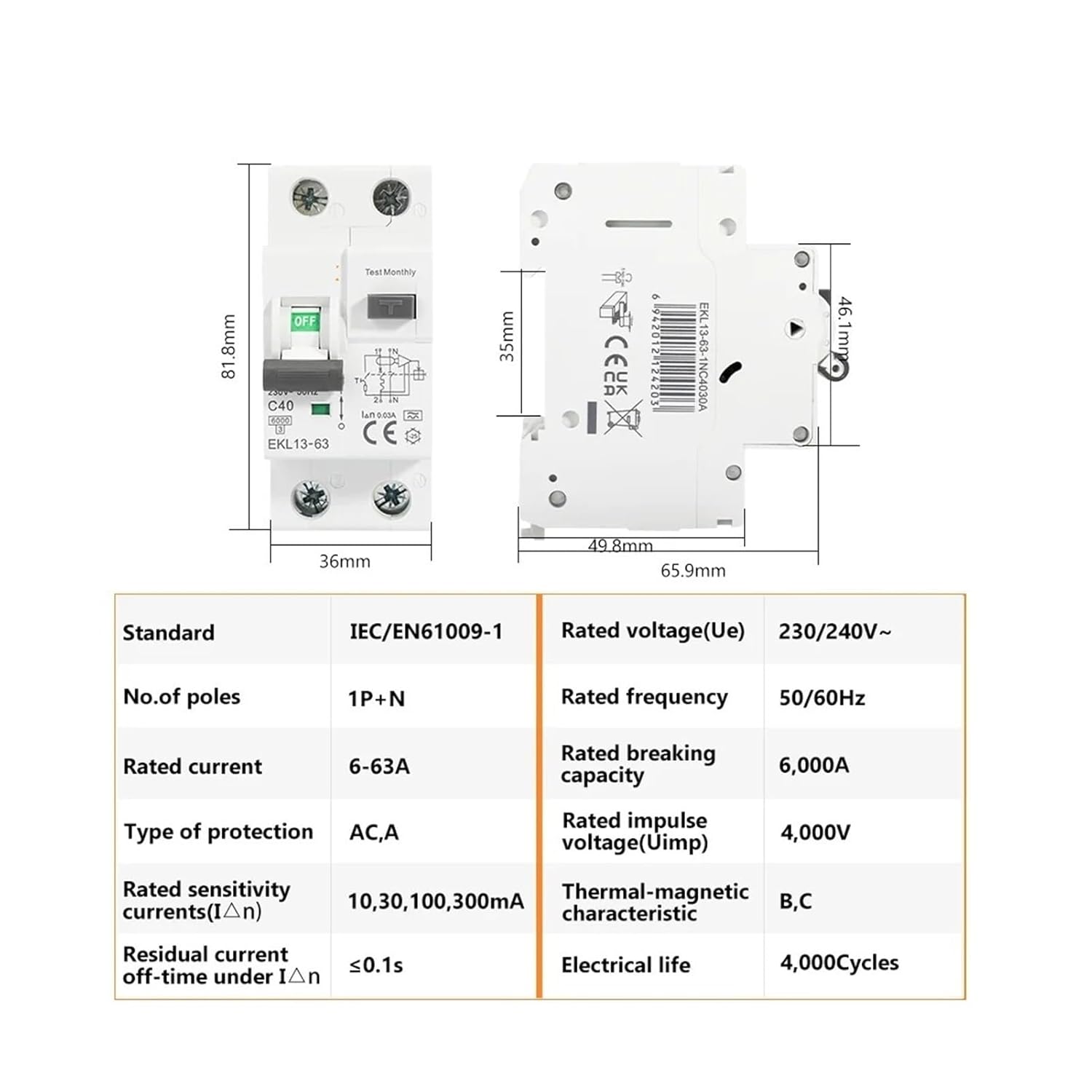
Figure 4.1: Dimensions and detailed technical specifications.
| Parameter | Value | Parameter | Value |
|---|---|---|---|
| Standard | IEC/EN61009-1 | Rated voltage (Ue) | 230/240V~ |
| No. of poles | 1P+N | Rated frequency | 50/60Hz |
| Rated current | 6-63A (This model: 16A) | Rated breaking capacity | 6,000A |
| Type of protection | AC, A | Rated impulse voltage (Uimp) | 4,000V |
| Rated sensitivity currents (IΔn) | 10, 30, 100, 300mA (This model: 30mA) | Thermal-magnetic characteristic | B, C |
| Residual current off-time under IΔn | ≤0.1s | Electrical life | 4,000 Cycles |
Dimensions: Approximately 81.8mm (Height) x 36mm (Width) x 65.9mm (Depth).
Item Model Number: JCZWJICBW-2-16A
5. Installation Guide
Follow these steps carefully for proper installation. Ensure power is disconnected before beginning any work.
5.1 Wiring Diagram:
Figure 5.1: Wiring diagram for the ETEBO RCBO. Note the input (top) and output (bottom) terminals, and the neutral connection.
5.2 Installation Steps:
- Power Disconnection: Ensure the main power supply to the installation area is completely turned off and locked out. Verify with a voltage tester.
- Mounting: Mount the RCBO onto a standard DIN rail within an appropriate enclosure. Ensure it is securely clipped into place.
- Wiring Connections:
- Connect the incoming live (L) wire to the top left terminal (marked '1').
- Connect the incoming neutral (N) wire to the top right terminal (marked 'N').
- Connect the outgoing live (L) wire to the bottom left terminal (marked '2').
- Connect the outgoing neutral (N) wire to the bottom right terminal (marked 'N').
- Ensure all screw terminals are tightened securely to prevent loose connections and overheating.
- Verification: Double-check all wiring connections against the diagram and ensure no bare wires are exposed.
- Enclosure Closure: Close the electrical enclosure securely.
- Power Restoration: Restore power to the main supply.
6. Operation
Operating the RCBO is straightforward. Follow these steps for normal use and testing.
6.1 Switching ON/OFF:
- To turn the circuit ON, push the product handle upwards to the "ON" position.
- To turn the circuit OFF, push the product handle downwards to the "OFF" position.
- In case of an overload, short circuit, or earth leakage, the RCBO will automatically trip to the "OFF" position.
6.2 Testing the RCBO:
It is crucial to test the RCBO regularly to ensure its residual current protection function is working correctly. Perform this test monthly.
- Ensure the RCBO is in the "ON" position and the circuit is live.
- Press the "Test Monthly" button (T button) located on the front of the device.
- The RCBO should immediately trip to the "OFF" position. This indicates the residual current protection mechanism is functioning.
- To reset, push the handle fully down to the "OFF" position, then push it back up to the "ON" position.
- If the RCBO does not trip when the test button is pressed, it may be faulty and should be replaced immediately by a qualified electrician.
7. Maintenance
The ETEK RCBO requires minimal maintenance. Regular checks ensure its longevity and reliable operation.
- Regular Testing: As mentioned in Section 6.2, test the RCBO monthly using the test button.
- Visual Inspection: Periodically inspect the device for any signs of physical damage, discoloration, or loose connections. Ensure the terminals are clean and free from dust or corrosion.
- Cleaning: If necessary, gently clean the exterior of the RCBO with a dry, soft cloth. Do not use abrasive cleaners or solvents. Ensure power is off before cleaning.
- Environmental Conditions: Ensure the operating environment remains within the specified temperature and humidity ranges to prevent premature wear.
8. Troubleshooting
This section provides solutions to common issues you might encounter with your RCBO.
| Problem | Possible Cause | Solution |
|---|---|---|
| RCBO trips frequently. | Overload, short circuit, or earth leakage fault in the circuit. |
|
| RCBO does not trip when test button is pressed. | Faulty RCBO. | The RCBO is not providing protection. It must be replaced immediately by a qualified electrician. |
| RCBO cannot be reset (handle won't stay ON). | Persistent fault (overload, short circuit, or earth leakage) or internal damage. |
|
9. Warranty and Support
This product is manufactured to high-quality standards. For specific warranty details, please refer to the purchase documentation or contact your retailer.
Customer Support:
If you encounter any issues or have questions regarding the installation or operation of your ETEK RCBO, please contact your point of purchase or a qualified electrician for assistance.
For technical inquiries, please provide the model number (JCZWJICBW-2-16A) and any relevant details about your electrical system.
Ask a question about this manual
Ask about setup, troubleshooting, compatibility, parts, safety, or missing instructions. Manuals+ will review the question and use this page’s manual context to help answer it.