1. Important Safety Instructions
Please read all instructions carefully before using your ElecKeys K10 Cordless Vacuum Cleaner. Retain this manual for future reference.
- Do not use the appliance outdoors or on wet surfaces.
- Do not allow to be used as a toy. Close attention is necessary when used by or near children.
- Use only as described in this manual. Use only manufacturer's recommended attachments.
- Do not use with damaged cord or plug. If appliance is not working as it should, has been dropped, damaged, left outdoors, or dropped into water, return it to a service center.
- Do not pull or carry by cord, use cord as a handle, close a door on cord, or pull cord around sharp edges or corners. Do not run appliance over cord. Keep cord away from heated surfaces.
- Do not unplug by pulling on cord. To unplug, grasp the plug, not the cord.
- Do not handle plug or appliance with wet hands.
- Do not put any object into openings. Do not use with any opening blocked; keep free of dust, lint, hair, and anything that may reduce air flow.
- Keep hair, loose clothing, fingers, and all parts of body away from openings and moving parts.
- Do not pick up anything that is burning or smoking, such as cigarettes, matches, or hot ashes.
- Use extra care when cleaning on stairs.
- Do not use to pick up flammable or combustible liquids, such as gasoline, or use in areas where they may be present.
- Do not use without dust cup and/or filters in place.
- Prevent unintentional starting. Ensure the switch is in the off-position before picking up or carrying the appliance.
- Recharge only with the charger specified by the manufacturer.
- Under abusive conditions, liquid may be ejected from the battery; avoid contact. If contact accidentally occurs, flush with water. If liquid contacts eyes, additionally seek medical help.
2. Product Overview and Included Components
The ElecKeys K10 Cordless Vacuum Cleaner is designed for efficient home cleaning. Below is an overview of the main unit and all included accessories.

Image: All included components of the ElecKeys K10 Cordless Vacuum Cleaner.
Included Components:
- K10 Rechargeable Cordless Vacuum Cleaner Main Unit (1)
- Independent Rechargeable Battery (1)
- Floor Brush Head (including Roller Brush) (1)
- Telescopic Pole (1)
- Cleanable Filter (2)
- Filter Cotton (2)
- 1.8L Dust Cup (with Filter) (1)
- Instruction Manual (1)
- Adapter (1)
- Hair Cleaning Tool (1)
- Quick Guide (1)
- Telescopic Hose (1)
- Long Crevice Nozzle (1)
- Pet Sofa Brush (1)
- Wall Mounting Plate (with Screws) (1)
3. Assembly
Follow these steps to assemble your ElecKeys K10 Cordless Vacuum Cleaner:
- Attach the Telescopic Pole: Insert the telescopic pole into the main unit until it clicks securely into place. Ensure the red button on the pole aligns with the connection point on the main unit.
- Attach the Floor Brush Head: Connect the floor brush head to the bottom of the telescopic pole. Push firmly until it clicks, indicating a secure connection.
- Install the Battery: Slide the independent rechargeable battery into the designated slot on the main unit until it locks.
- Attach Accessories: For handheld use, you can directly attach the crevice tool, pet sofa brush, or 2-in-1 brush to the main unit. For extended reach, attach them to the telescopic hose or directly to the telescopic pole.

Image: The ElecKeys K10 vacuum cleaner shown with different attachments and in stick and handheld modes.
4. Charging
Ensure your vacuum is fully charged before first use to maximize battery life and performance.
Charging Options:
- Direct Charging: Plug the adapter directly into the charging port on the main unit.
- Separate Battery Charging: Remove the battery from the main unit and plug the adapter directly into the battery.
- Wall-Mounted Charging: Install the wall mounting plate in a convenient location. The vacuum can be stored on the mount and charged simultaneously by plugging the adapter into the main unit while mounted.
A full charge takes approximately 4 hours and provides up to 70 minutes of runtime in hard floor mode.

Image: Visual representation of the three charging methods for the vacuum cleaner.
5. Operating Instructions
Familiarize yourself with the controls and features for optimal cleaning performance.
Powering On/Off and Suction Modes:
- Power On: Press the power button on the handle once to turn on the vacuum. The LED smart screen will display the current suction mode and battery level.
- Switch Modes: Use the mode switch button on the LED smart screen to cycle through 'Bare Floor', 'Carpet', and 'Turbo' suction modes.
- Power Off: Press the power button again to turn off the vacuum.

Image: The LED smart screen displays real-time battery status, cleaning modes, and maintenance alerts.
Using Attachments:
The K10 can easily convert to a handheld vacuum for versatile cleaning. Attach the desired tool directly to the main unit or the telescopic pole/hose.
- Long Crevice Nozzle: Ideal for narrow gaps, corners, and hard-to-reach areas like between sofa cushions or car seats.
- Pet Sofa Brush: Designed to effectively pick up pet hair from upholstery, curtains, and other fabric surfaces.
- 2-in-1 Brush: Features both a soft brush and a wide nozzle for cleaning delicate surfaces, keyboards, or car interiors.
- Telescopic Hose: Provides flexibility and extended reach for cleaning high areas or inside vehicles.
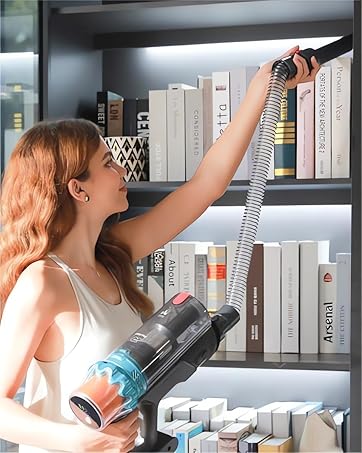
Image: The vacuum used with a flexible hose and crevice tool for cleaning high shelves.
Special Features:
- Self-Standing Design: The vacuum is designed to stand upright on its own, allowing you to pause cleaning without needing to lean it against a wall or furniture.
- LED Headlight: The floor brush head features green LED lights that illuminate dust and debris on the floor, making it easier to spot and clean hidden dirt, especially in dimly lit areas.
- Auto Suction Burst Self-Cleaning: When turning off the vacuum in bare floor mode, it automatically triggers a 3-second strong suction burst. This helps clear hair and debris from the roller brush and air duct, preventing clogs and dust spills.
Video: Demonstration of the ElecKeys K10 vacuum cleaner's performance on pet hair and dust in a real-use scenario.
6. Maintenance
Regular maintenance ensures optimal performance and extends the lifespan of your vacuum cleaner.
Emptying the Dustbin:
The 1.8L dustbin is designed for easy, hygienic emptying.
- Hold the main unit over a trash can.
- Press the one-click button located on the dustbin to release the bottom flap and empty the contents.
- Close the flap securely after emptying.

Image: Instructions for one-click dustbin emptying.
Cleaning Filters:
The 7-stage cyclone filtration system includes washable filters.
- Twist and remove the dust cup from the main unit.
- Remove the internal filters (HEPA filter, sponge filter, metal mesh filter, filter cone, baffle filter).
- Tap off loose dirt and rinse the filters under running water. Do not use detergent.
- Allow filters to air dry completely for at least 24 hours before reassembling. Ensure they are completely dry to prevent damage and maintain suction.

Image: Detailed view of the 7-layer filtration system components.
Cleaning the Floor Brush Head:
The V-shaped anti-tangle roller brush is designed to minimize hair wrap, but occasional cleaning may be necessary.
- Ensure the vacuum is turned off and disconnected from power.
- Locate the release mechanism on the side of the floor brush head.
- Twist or slide the mechanism to detach the roller brush.
- Remove any tangled hair or debris from the roller brush and the brush head cavity using the provided hair cleaning tool.
- Reinsert the roller brush and secure the release mechanism until it clicks.

Image: The V-shaped anti-tangle brush design, highlighting its effectiveness against pet hair.
7. Troubleshooting
If you encounter any issues with your ElecKeys K10, please refer to the following common solutions:
| Problem | Possible Cause | Solution |
|---|---|---|
| Vacuum does not turn on | Battery is not charged or not properly installed. | Ensure battery is fully charged and securely clicked into place. |
| Low suction power | Dustbin is full; Filters are clogged; Blockage in the nozzle, pole, or hose. | Empty the dustbin. Clean or replace filters. Check for and remove any blockages. |
| Brush roller not rotating | Hair or debris tangled in the brush; Brush roller is not properly installed. | Remove any tangled hair or debris from the brush roller. Ensure the brush roller is correctly installed and secured. |
| Vacuum shuts off unexpectedly | Battery is low; Overheating due to blockage or clogged filters. | Recharge the battery. Check for and clear any blockages, and clean filters. Allow the unit to cool down. |
If the problem persists after trying these solutions, please contact ElecKeys customer support.
8. Specifications
| Feature | Specification |
|---|---|
| Brand | ElecKeys |
| Model Name | K10 |
| Motor | 600W Brushless Motor |
| Suction Power | Up to 50,000Pa |
| Runtime | Up to 70 minutes (in hard floor mode) |
| Battery | 8x2200mAh High-Capacity Lithium Batteries (removable) |
| Charging Time | 4 hours |
| Dustbin Capacity | 1.8 Liters |
| Filtration System | 7-stage Cyclone Filtration with High-Efficiency Filter |
| Noise Level | < 65 dB |
| Weight | 6.6 pounds |
| Control Method | Touch (LED Smart Screen) |
| Special Features | V-shaped Anti-Tangle Roller Brush, LED Headlight, Self-Standing Design, Auto Suction Burst Self-Cleaning |
9. Warranty and Support
ElecKeys is committed to your satisfaction. Your K10 Cordless Vacuum Cleaner comes with a 2-year warranty.
For any questions, technical support, or warranty claims, please contact our dedicated customer support team. We offer 24-hour service to ensure your cleaning experience remains effortless.
Contact information can be found on the official ElecKeys website or in the Quick Guide included with your product.


