
FFW718 & FFW718LA Wireless Portable Fish Finder
User Instruction Manual
Model: FFW718, FFW718LA | Brand: KKKMart
1. Introduction
This manual provides comprehensive instructions for the safe and effective operation, setup, and maintenance of your KKKMart FFW718 and FFW718LA Wireless Portable Fish Finder. Please read this manual thoroughly before using the device to ensure optimal performance and longevity.
2. Product Overview
The KKKMart FFW718 and FFW718LA are advanced wireless portable fish finders designed to assist anglers in locating fish and understanding underwater topography. They feature a high-contrast FSTN LCD display and a wireless sonar sensor for accurate readings.

Figure 2.1: FFW718LA Wireless Portable Fish Finder, showing the display unit and the wireless sonar sensor.
Key Features:
- Display: 2.2-inch high-contrast Dot matrix FSTN LCD with On/LED backlighting.
- Depth Capability: Up to 135 feet (45 meters).
- Wireless Operational Range: FFW718LA up to 493 feet (150 meters), FFW718 up to 400 feet (120 meters).
- Wireless Sonar: 90-degree beam angle at 125KHz.
- Waterproof Design: Level-4 (spray-water-proof).
- Data Display: Water depth, water temperature, fish location, and bottom contour.
- User Settings: Selectable sensitivity, zoom, units, depth range, shallow alarm, fish alarm, and chart speed.
- Memory: Built-in memory stores sonar settings when powered off.
- Operational Temperature: 14°F to 122°F (-10°C to 50°C).

Figure 2.2: Included components: display unit, wireless sensor, charging cables, and user manual.
3. Setup
3.1. Power Requirements
The display unit requires 4x AAA alkaline batteries (not included). Ensure batteries are inserted with correct polarity as indicated inside the battery compartment.
The wireless sensor is rechargeable. Connect the sensor to the provided charging cable and a suitable USB power adapter (not included) to charge it before first use. The charging indicator (red light) will illuminate during charging.
3.2. Sensor Activation
The wireless sensor is designed to activate automatically when its contacts are submerged in water. There is no need to manually screw down or open the cover for activation. It will turn off automatically when removed from water.
Note: New and old models of the sensor may be shipped randomly. Some older models might require screwing down the cover to prevent water ingress, but the upgraded version activates upon water contact.
3.3. Initial Connection
Once the display unit is powered on and the wireless sensor is activated in water, the two units will automatically attempt to establish a connection. The "Sensor connect indicator" on the display will show the connection status.
4. Operating Instructions
The display unit provides various controls and indicators to help you interpret underwater data.

Figure 4.1: Display unit held in hand, showing the screen and control buttons.
4.1. Display Elements and Controls:
- Water Depth: Current depth reading.
- Water Temperature: Current water temperature.
- Small Fish Symbol: Indicates detection of smaller fish.
- Bottom Contour: Graphical representation of the seabed.
- W-sensor Battery Strength Indicator: Shows remaining battery life of the wireless sensor.
- Sensor Connect Indicator: Displays connection status between display and sensor.
- Power/Menu Key: Press to power on/off or access menu settings.
- Left Arrow Key: Navigate menu options or adjust settings.
- Monitor Battery Strength Indicator: Shows remaining battery life of the display unit.
- Sensitivity Indicator: Displays current sensitivity level.
- Upper Zoom Range: Top limit of the zoomed depth range.
- Water Surface Line: Indicates the water surface.
- Medium with Depth: Indicates fish at medium depth.
- Right Arrow Key: Navigate menu options or adjust settings.
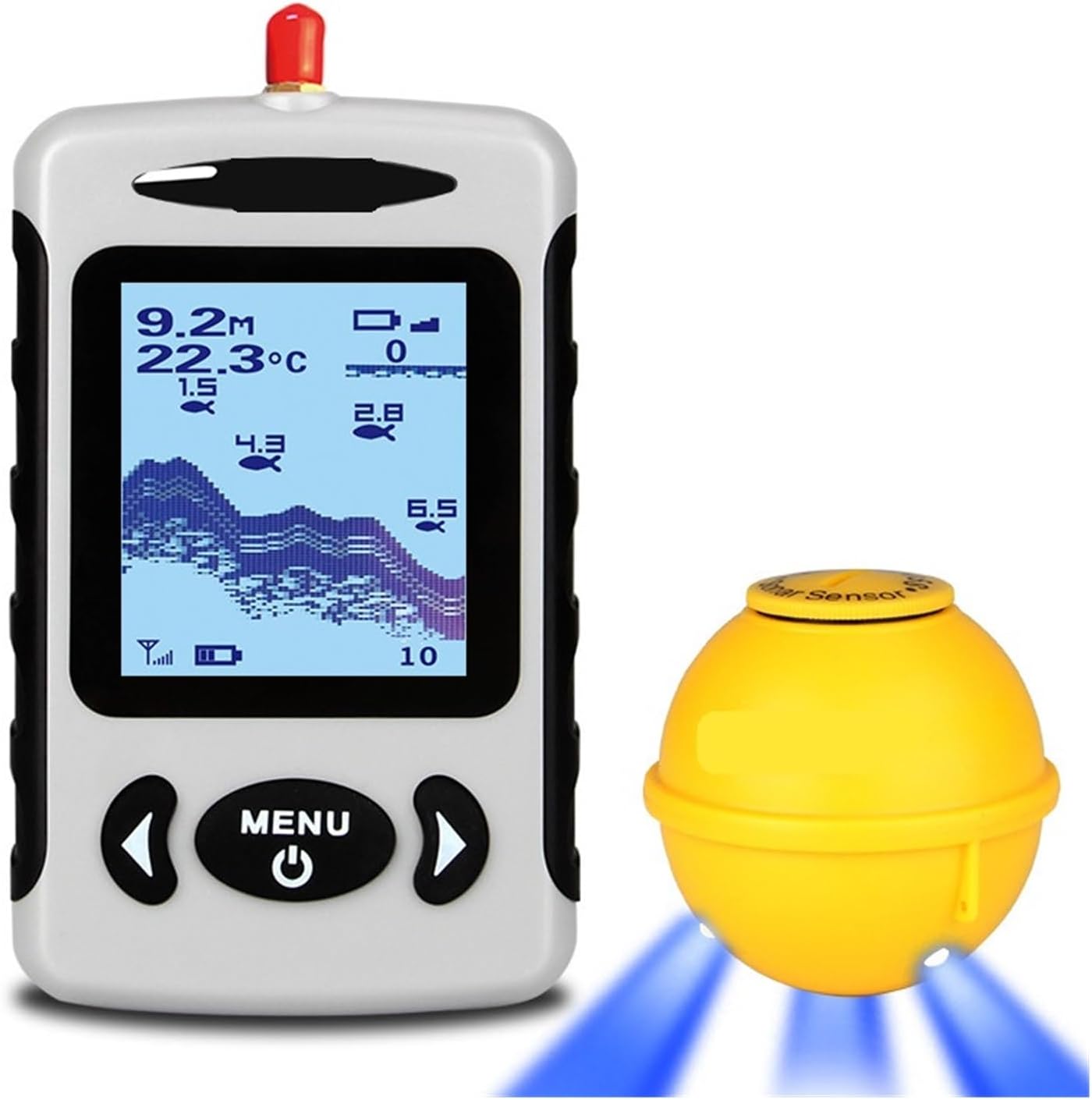
Figure 4.2: Wireless sensor in operation, emitting blue light (indicating sonar activity).
4.2. Adjusting Settings:
Press the Power/Menu Key to access the settings menu. Use the Left Arrow Key and Right Arrow Key to navigate through options such as:
- Sensitivity: Adjust the sensitivity (5 levels available) to filter out unwanted signals or detect smaller fish schools more easily. Higher sensitivity detects more, but may also pick up more noise.
- Zoom: Focus on a specific depth range for more detailed bottom and fish information.
- Units: Switch between metric (meters, Celsius) and imperial (feet, Fahrenheit) units.
- Depth Range: Manually set the maximum depth displayed.
- Shallow Alarm: Set an alarm to sound when the water depth falls below a specified value.
- Fish Alarm: Set an alarm to sound when fish are detected.
- Chart Speed: Adjust the speed at which the sonar history scrolls across the screen.
4.3. Casting the Sensor:
Cast the wireless sensor into the water where you intend to fish. Ensure it floats freely and is not obstructed. The sensor will automatically begin transmitting data to the display unit.
4.4. Fishing Applications:
The fish finder is versatile and can be used in various fishing scenarios:
- Night Fishing: The backlit display and sensor's operational light assist in low-light conditions.
- Turbid Water Fishing: Sonar technology is effective in murky waters where visibility is poor.
- Ice Fishing: The device operates effectively in temperatures down to -10°C (14°F), making it suitable for ice fishing by placing the sensor in a hole in the ice.
5. Maintenance
5.1. Cleaning:
After each use, especially in saltwater, rinse the wireless sensor and display unit with fresh water. Wipe both units dry with a soft, clean cloth. Do not use abrasive cleaners or solvents.
5.2. Storage:
When not in use, ensure the wireless sensor is dry to prevent accidental activation and battery drain. Remove AAA batteries from the display unit if storing for extended periods to prevent leakage. Store the device in a cool, dry place, away from direct sunlight and extreme temperatures.
5.3. Battery Care:
Recharge the wireless sensor's battery regularly, even if not frequently used, to maintain battery health. Avoid fully discharging the sensor's battery for prolonged periods.
6. Troubleshooting
6.1. No Display/Power:
- Display Unit: Check if AAA batteries are inserted correctly and are not depleted. Replace with fresh batteries if necessary.
- Wireless Sensor: Ensure the sensor is fully charged. Verify that the sensor's contacts are fully submerged in water for activation.
6.2. No Sonar Readings/Connection Issues:
- Sensor Submersion: Ensure the wireless sensor is fully in the water and its contacts are wet.
- Range: Check if the display unit is within the operational range (150m for FFW718LA, 120m for FFW718) of the sensor. Obstructions between the sensor and display can reduce range.
- Interference: Move away from other electronic devices that might cause interference.
- Sensor Battery: Check the W-sensor battery strength indicator on the display. Recharge the sensor if the battery is low.
6.3. Inaccurate Readings:
- Sensitivity: Adjust the sensitivity setting. Too low sensitivity might miss fish, too high might show noise.
- Water Conditions: Very turbulent water or excessive air bubbles near the sensor can affect readings.
- Sensor Orientation: Ensure the sensor is floating upright and not tilted.
7. Specifications
| Feature | Specification |
|---|---|
| Display | 2.2-inch high-contrast Dot matrix FSTN LCD |
| Backlighting | On/LED |
| Depth Capability | 135 feet (45 meters) |
| Wireless Operational Range (FFW718LA) | 493 feet (150 meters) |
| Wireless Operational Range (FFW718) | 400 feet (120 meters) |
| Wireless Sonar Beam Angle | 90 degrees at 125KHz |
| Display Power Requirement | 4x AAA alkaline batteries (not included) |
| Wireless Sensor Power | Rechargeable (built-in) |
| Waterproof Design | Level-4 (spray-water-proof) |
| Operational Temperature | 14°F to 122°F (-10°C to 50°C) |
| Item Weight | 500 Grams |
8. Warranty and Support
Information regarding product warranty and customer support was not available in the provided product data. Please refer to the product packaging or the manufacturer's official website for details on warranty coverage and how to obtain support for your KKKMart FFW718/FFW718LA Wireless Portable Fish Finder.