
Introduction
Welcome to the instruction manual for your METEESER Motorcycle Front and Rear Dash Cam. This device is designed to record your rides with high-definition video, providing security and peace of mind. It features dual cameras, a 2-inch touch screen, G-Sensor, GPS, loop recording, and a waterproof design for reliable performance in various conditions.
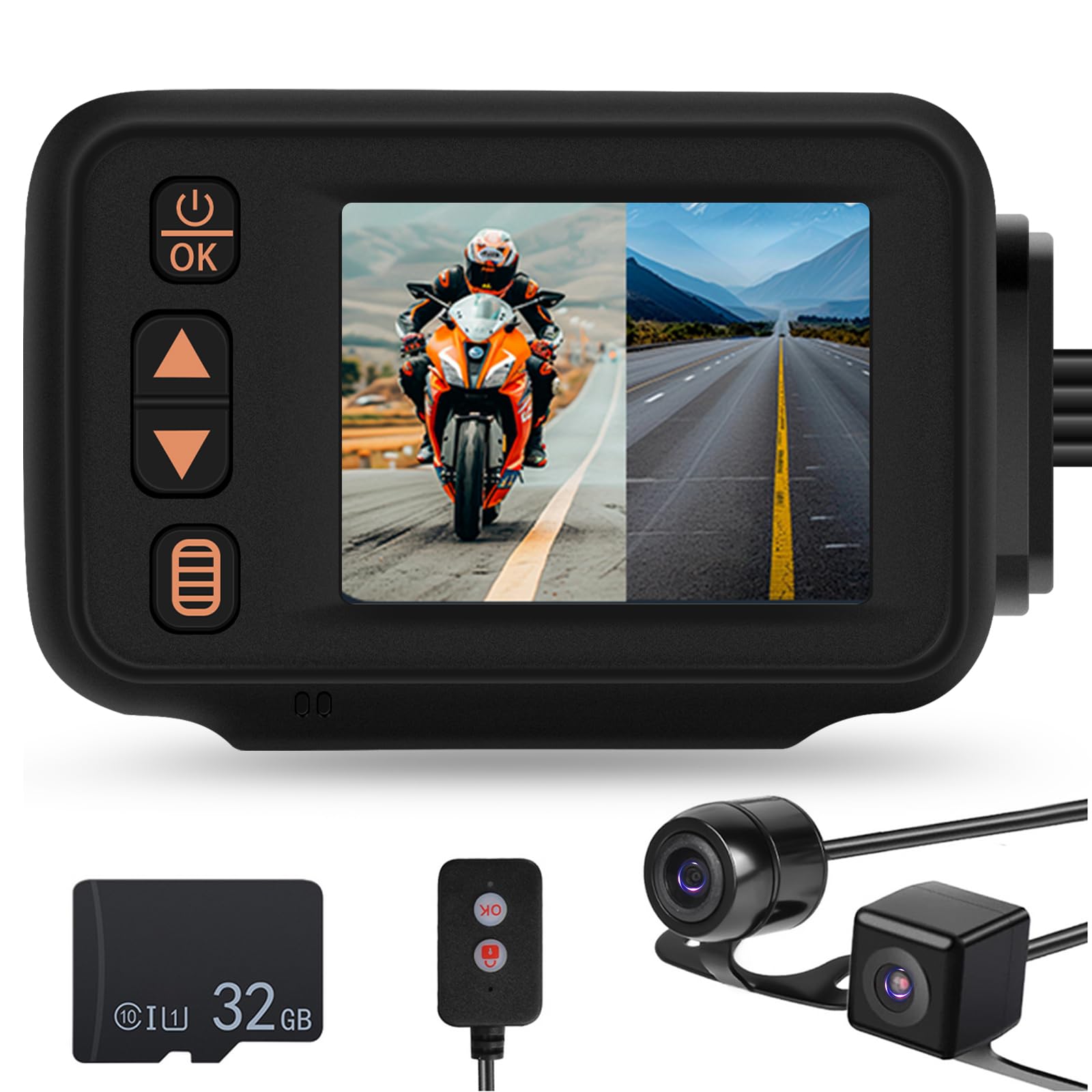
The METEESER Motorcycle Front and Rear Dash Cam main unit with its 2-inch display, showing a motorcycle on screen, surrounded by icons representing key features like 1080P recording, wire controllers, automatic shutdown, parking monitoring, dynamic induction, button sound, free 32G TF card, gravity sensors, IP65 waterproof rating, and loop recording.
Package Contents
Please verify that all items listed below are present in your package:
- 1 X Main Unit
- Front Camera
- Rear Camera
- Step-Down Cable
- USB Data Cable
- Wired Controller
- Manual

An image displaying the complete package contents of the METEESER Motorcycle Dash Cam, including the main unit, front and rear cameras, power cord, extension cords, mounting brackets, control line, USB data cable, rubber mat, user manuals, and a 32GB TF card.
Product Features
The METEESER Motorcycle Dash Cam is equipped with a range of features designed to enhance your riding safety and recording experience:
- HD Recording and Wide Angle View: Features a 1080P front camera and 720P rear camera, both with a 120° wide-angle lens, ensuring comprehensive coverage of the road ahead and behind.
- Waterproof and Dustproof Design: With an IP65 rating, the dash cam is built to withstand rain, snow, mud, and dust, ensuring reliable operation in diverse weather and road conditions.
- Dual Camera Comprehensive Coverage: The front and rear cameras provide full coverage, with a 2-inch HD display supporting split-screen preview to view both camera feeds simultaneously.
- Loop Recording & Emergency Lock: The system automatically overwrites older files on the included 32GB TF card to ensure continuous recording. A high-sensitivity G-Sensor and parking monitor detect collisions, triggering an emergency lock to protect critical video footage.
- Wired Remote Control: A convenient wired remote can be mounted on handlebars, allowing riders to easily start/stop recording, lock videos, or take snapshots without distraction.
- Compact Design & Easy Installation: The cameras are designed to be compact and unobtrusive, facilitating discreet installation and a straightforward setup process with all necessary accessories included.
- Connectivity: Supports Bluetooth, Wi-Fi, and USB for versatile data transfer and control options.
- Screen: Equipped with a 2-inch IPS display for clear viewing.
- Memory: Supports 4GB~32GB TF cards, with a 32GB card included.
- Additional Special Features: Includes 4 Kinds of Switching Screens, Automatic shutdown, Parking monitoring, Button sound, Gravity sensors, and Dynamic induction.

An image highlighting the main features of the METEESER Motorcycle Dash Cam, including 1080P resolution, wired controllers, automatic shutdown, parking monitoring, dynamic induction, button sound, free 32GB TF card, gravity sensors, IP65 waterproof rating, and loop recording.

A visual representation of the dash cam's HD 1080P video resolution, showing a motorcycle rider's view from the front camera at 1080P and another rider's view from the rear camera at 720P.

The dash cam's 2-inch display showing different camera views: front only, front and rear split-screen, and rear only, illustrating the dual camera comprehensive coverage.

An image demonstrating the "Super Night Vision" feature with brightness compensation, showing a motorcycle riding at night with enhanced visibility.

An illustration of the loop recording and WiFi connectivity features, showing video playback on the dash cam and a smartphone, with a 32GB TF card icon.

An image depicting the motion detection feature, showing a locked icon over a scene of cars, indicating that recording starts automatically when motion is detected and stops when none is present.

A motorcycle with the wired remote controller shown next to the dash cam, illustrating the "Lock" and "Start/Stop" functions for easy control while riding.
Setup and Installation
Follow these steps to install your METEESER Motorcycle Dash Cam. Ensure your motorcycle is turned off before beginning installation.
- Mount the Main Unit: Choose a secure, accessible location for the main unit, such as under the seat or on the handlebars. Ensure the 2-inch screen is visible if desired for real-time monitoring.
- Install Front Camera: Mount the front camera in a position that provides a clear, unobstructed view of the road ahead. Secure it firmly.
- Install Rear Camera: Mount the rear camera to capture the view behind your motorcycle. Ensure it is securely attached and provides a wide view.
- Connect Cameras to Main Unit: Connect the front and rear camera cables to their respective ports on the main unit.
- Connect Power: Use the provided step-down cable to connect the main unit to your motorcycle's power source. Ensure proper wiring to avoid electrical issues.
- Install Wired Remote Control: Mount the wired remote control on your handlebars for easy access to recording and locking functions.
- Insert TF Card: Insert the included 32GB TF card into the designated slot on the main unit.
- Cable Management: Secure all cables neatly using cable ties or clips to prevent interference with motorcycle operation and protect them from damage.

A detailed wiring diagram showing the connection points for the METEESER Motorcycle Dash Cam components on a motorcycle, including the logger mainframe, front shot camera, rear shot camera, pressure drop line, wire controllers, and extension cords.
Operating Instructions
Understand the basic functions to operate your dash cam effectively:
- Power On/Off: The device typically powers on automatically with your motorcycle's ignition. To manually power on/off, press and hold the power button on the main unit.
- Start/Stop Recording: Once powered on, the dash cam will automatically begin loop recording. You can manually start or stop recording using the wired remote control or the main unit's buttons.
- Lock Video (Emergency Recording): In case of an incident, press the "Lock" button on the wired remote control to protect the current recording from being overwritten by loop recording. The G-Sensor will also automatically trigger emergency recording upon detecting a collision.
- Switch Display Modes: Use the buttons on the main unit or the wired remote to cycle through different display modes: front camera view, rear camera view, or split-screen view (front and rear simultaneously).
- Access Settings: Navigate through the menu using the touch screen or physical buttons to adjust settings such as video resolution, loop recording duration, G-Sensor sensitivity, and parking monitor.
- Playback: Connect the device to a computer via USB or use the WiFi feature to view recorded footage on your smartphone.
Settings and Functions
Customize your dash cam's performance to suit your preferences:
Video Settings
- Resolution: Adjust video quality (e.g., 1080P for front, 720P for rear). Higher resolution consumes more storage space.
- Loop Recording: Set the duration of each video segment (e.g., 1, 3, or 5 minutes). When the TF card is full, the oldest unlocked files will be overwritten automatically.
Safety Features
- G-Sensor: Configures the sensitivity of the gravity sensor. A higher sensitivity will trigger emergency recording more easily upon impact.
- Parking Monitor: When enabled, the dash cam will automatically start recording if it detects vibrations or impacts while the motorcycle is parked, providing 24-hour surveillance.
- Dynamic Induction (Motion Detection): The recorder starts recording upon detecting nearby moving objects and automatically stops when no motion is detected, conserving storage.
System Settings
- Date/Time: Set the correct date and time for accurate timestamps on all recordings.
- Automatic Shutdown: Configure the device to automatically power off after a specified period of inactivity to save power.
- Button Sound: Enable or disable audible feedback for button presses.
- Language: Select your preferred language for the menu interface.
Maintenance
Proper care ensures the longevity and optimal performance of your dash cam:
- TF Card Formatting: Regularly format your TF card (at least once a month) to ensure optimal performance, prevent data corruption, and clear unnecessary files.
- Cleaning: Use a soft, dry cloth to gently clean the main unit and camera lenses. Avoid using abrasive cleaners, solvents, or harsh chemicals that could damage the device.
- Firmware Updates: Check the official METEESER website periodically for any available firmware updates. Updates can improve performance, add new features, or fix bugs.
- Cable Inspection: Periodically inspect all cables for signs of wear, fraying, or damage, especially after long rides or exposure to harsh weather conditions. Replace damaged cables immediately.
Troubleshooting
Refer to this table for solutions to common issues:
| Problem | Possible Cause | Solution |
|---|---|---|
| Device does not power on | No power connection; loose cable | Check power cable connections; ensure motorcycle ignition is on and providing power. |
| Recording stops unexpectedly | TF card full or corrupted; G-Sensor triggered | Format the TF card regularly; reduce G-Sensor sensitivity if false triggers occur. |
| Poor video quality | Dirty lens; low resolution setting | Clean camera lenses thoroughly; ensure video resolution is set to 1080P for the front camera. |
| Cannot connect via Bluetooth/Wi-Fi | Incorrect settings; interference | Ensure Bluetooth/Wi-Fi is enabled on both devices; try restarting both devices and reconnecting. |
| Screen frozen | Software glitch | Press and hold the power button to force restart the device. |
If issues persist after attempting these solutions, please contact customer support for further assistance.
Specifications
Detailed technical specifications for your METEESER Motorcycle Dash Cam:
| Feature | Detail |
|---|---|
| Brand | METEESER |
| Model Name | Motorcycle Dash Cam Front + Rear Camera 2 inch Display Motorbike DVR System |
| Vehicle Service Type | Motorcycle |
| Connectivity Technology | Bluetooth, Wi-Fi, USB |
| Video Capture Resolution | Front: 1080p, Rear: 720p |
| Field Of View | 120 Degrees |
| Control Method | Touch |
| Screen Size | 2 Inches |
| Display Type | IPS |
| Flash Memory Type | microSD |
| Included Memory Card Size | 32 GB |
| Flash Memory Supported Size Maximum | 32 GB |
| Auto Part Orientation | Front & Rear |
| Frame Rate | 30 fps |
| Item Dimensions (D x W x H) | 4"D x 1.73"W x 1.97"H |
| Item Weight | 0.5 Kilograms |
| Special Features | 4 Kinds of Switching Screens, Automatic shutdown, Parking monitoring, Button sound, Gravity sensors, Wire controllers, Dynamic induction, IP65 Waterproof, Loop video |
Note: Specifications are subject to change without prior notice.
Warranty Information
This METEESER product comes with a 2-year warranty from the date of purchase. This warranty covers manufacturing defects and malfunctions under normal use.
For warranty claims or service, please retain your proof of purchase and contact customer support. The warranty does not cover damage caused by misuse, accidents, unauthorized modifications, or improper installation.
Customer Support
If you have any questions, require technical support, or need further assistance with your METEESER Motorcycle Dash Cam, please visit the official METEESER store on Amazon or contact their customer service directly.