
DPDPD DPDPD
F722 BLS 50A Stack Flight Controller and 4in1 ESC Combo User Manual
Brand: DPDPD | Model: DPDPD
1. Product Overview
The F722 BLS 50A Stack is a high-performance flight controller and 4-in-1 ESC combo designed for FPV freestyle drones. This integrated unit simplifies the build process and enhances flight stability, making it suitable for a wide range of drone frames. It supports 3-6S LiPo batteries and features a compact 30.5x30.5mm mounting pattern.
- Explore compatibility with the TAKER F722 BLS stack designed for FPV freestyle drones using 3-6S batteries.
- Experience advanced flight control features with the GEP-F722-HD V2 flight controller ensuring responsiveness in the air.
- Utilizes BLHELI_S firmware on the 50A 4in1 ESC providing smooth acceleration and better motor performance for your drone.
- Enjoy an efficient power management system with the stack’s 50A capacity allowing for high-performance flights without compromising.
- Install easily thanks to the standardized 30x30mm dimensions making it a fit for a wide range of drone frames.
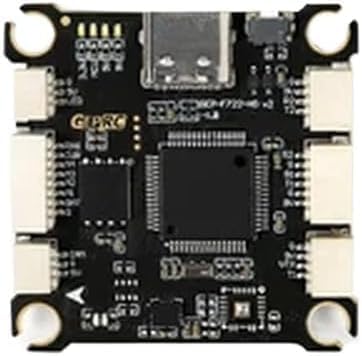
Figure 1: The F722 BLS 50A Stack, featuring the GEP-F722-HD V2 Flight Controller and the GEP-BLS50A-4IN1 ESC. This image highlights the compact design, various connection points, and the Type-C USB interface.
2. Setup and Installation
This section provides general guidelines for setting up and installing your F722 BLS 50A Stack. Always refer to specific drone frame manuals for detailed assembly instructions.
- Mounting: Secure the F722 BLS 50A Stack onto your drone frame using appropriate standoffs and screws. Ensure proper orientation as indicated by markings on the board. The standardized 30.5x30.5mm mounting hole pattern ensures compatibility with many frames.
- Power Connection: Connect your 3-6S LiPo battery to the ESC's main power pads. Ensure correct polarity to prevent damage.
- Motor Connections: Solder the motor wires to the corresponding motor pads on the 4-in-1 ESC. Verify motor order and direction according to your flight controller software configuration (e.g., Betaflight).
- Air Unit/Receiver Connection: Connect your FPV air unit (if applicable) directly to the designated port on the flight controller. Connect your radio receiver (e.g., SBUS, CRSF, ELRS) to the appropriate UART on the flight controller.
- Peripheral Connections: Connect any additional peripherals such as GPS, VTX, camera, or LEDs to the available UARTs or dedicated pads as required.
- Firmware Configuration: Connect the flight controller to your computer via the Type-C USB interface. Use BetaFlight Configurator or similar software to flash the latest firmware, configure settings, calibrate sensors, and set up modes.
3. Operating Instructions
Once the F722 BLS 50A Stack is installed and configured, follow these general steps for operation:
- Pre-Flight Check: Before each flight, ensure all connections are secure, propellers are correctly installed and tightened, and the battery is fully charged.
- Arming: Arm the drone using the designated switch on your radio transmitter, as configured in your flight controller software. Ensure you are in a safe environment before arming.
- Flight: Operate the drone using your radio transmitter. The advanced flight control features of the GEP-F722-HD V2 flight controller provide stable and responsive flight characteristics.
- Disarming: Disarm the drone after landing using the designated switch. Always disarm before approaching the drone.
- Post-Flight: Disconnect the battery immediately after flight. Inspect the drone for any damage or loose connections.
4. Maintenance
Proper maintenance ensures the longevity and optimal performance of your F722 BLS 50A Stack.
- Regular Inspection: Periodically inspect the flight controller and ESC for any signs of physical damage, loose solder joints, or debris.
- Cleaning: Gently clean the boards with a soft brush or compressed air to remove dust and dirt. Avoid using liquids directly on the electronics.
- Firmware Updates: Keep the flight controller and ESC firmware updated to the latest versions to benefit from performance improvements and bug fixes.
- Storage: When not in use, store the drone and its components in a dry, cool place, away from direct sunlight and extreme temperatures.
5. Troubleshooting
This section addresses common issues you might encounter with your F722 BLS 50A Stack.
- No Power/No Lights:
- Check battery connection and polarity.
- Verify main power lead solder joints on the ESC.
- Ensure the battery is charged.
- Motors Not Spinning/Spinning Incorrectly:
- Check motor wire connections to the ESC.
- Verify motor direction and order in BetaFlight Configurator.
- Ensure ESC calibration is correct.
- Check for bent motor shafts or damaged propellers.
- No Connection to BetaFlight Configurator:
- Ensure correct USB cable is used (data cable, not just charging).
- Install necessary VCP (Virtual COM Port) drivers.
- Try a different USB port on your computer.
- Ensure the flight controller is powered (either via USB or battery).
- Unstable Flight:
- Check for loose components or frame damage.
- Verify PID tuning settings in BetaFlight.
- Ensure propellers are balanced and undamaged.
- Recalibrate accelerometer and gyroscope.
6. Specifications
Detailed technical specifications for the F722 BLS 50A Stack:
| Component | Specification |
|---|---|
| Flight Controller Model | GEP-F722-HD v2 |
| MCU | STM32F722 |
| IMU | ICM42688-P (SPI) |
| Air Unit Connection | Directly plugged into the Air Unit |
| Black Box | 16M onboard |
| USB Interface | Type-C |
| OSD | BetaFlight OSD with AT7456E chip |
| BEC | 5V@3A, 9V@2.5A dual BEC |
| FC Size | 36.85×36.85mm |
| Mounting Hole (FC) | 30.5×30.5mm |
| Input Voltage (FC) | 3-6S LiPo |
| UARTs | 5 |
| Power Filter | Integrated filter |
| FC Weight | 8.1g |
| ESC Model | GEP-BLS50A-4IN1 |
| Input Voltage (ESC) | 3-6S LiPo |
| Continuous Current | 50A |
| Burst Current | 55A (5 seconds) |
| Support Protocol | Dshot 150/300/600 |
| ESC Size | 42.9×39.7mm |
| Mounting Hole (ESC) | 30.5×30.5mm |
| ESC Weight | 13.7g |
| Package Dimensions | 0.39 x 0.39 x 0.39 inches |
| Item Weight (Total) | 1.76 ounces |
| Manufacturer | DPDPD |
| Country of Origin | China |
7. Warranty and Support
Specific warranty information and detailed support contacts are not provided within the product details. For warranty claims or technical assistance, please refer to the seller's or manufacturer's official website, or contact the point of purchase.
Ask a question about this manual
Ask about setup, troubleshooting, compatibility, parts, safety, or missing instructions. Manuals+ will review the question and use this page’s manual context to help answer it.