
1. Introduction
The EFUZCOCI KWS-1902C is a versatile Type-C USB Tester designed to monitor various electrical parameters of your charging devices and power sources. Featuring a 0.96-inch colorful display, this compact device provides real-time data on voltage, current, power, capacity, and more. It is an essential tool for diagnosing charging issues, evaluating charger performance, and understanding the power consumption of your USB-C devices.

This image demonstrates the KWS-1902C USB Tester in operation, connected between a USB-C charger and a device, showing real-time charging data on its colorful display.
2. Specifications
Below are the detailed technical specifications for the KWS-1902C Type-C USB Tester:
| Feature | Specification |
|---|---|
| Model Number | KWS-1902C |
| Display Screen | 0.96" Colorful Screen |
| Voltage Range | 4-30V |
| Voltage Resolution | 0.002A (Note: This is likely a typo in source, typically 0.002V) |
| Current Range | 0-5A |
| Current Resolution | 0.002A |
| Power Range | 0-150W |
| Capacitance Range | 0-999999mWh |
| Load Resistance Range | 1-9999.9Ω |
| Temperature Range | 0-80°C / 32-176°F |
| Time Range | 0-99h |
| Interface Type | USB-C 24pin |
| Testing Direction | Two-way |
| Material | Plastic + Metal |
| Dimensions | 55 x 26.5mm / 2.1 x 1.04in |
| Item Weight | 1.76 ounces (50 Grams) |
| Package Dimensions | 0.39 x 0.39 x 0.39 inches |
3. Setup
Setting up your KWS-1902C USB Tester is straightforward:
- Connect to Power Source: Plug the male USB-C connector of the KWS-1902C tester into a Type-C power source, such as a wall charger, power bank, or computer's USB-C port.
- Connect Device: Plug the device you wish to test (e.g., smartphone, tablet, laptop) into the female USB-C port of the KWS-1902C tester.
- Monitor Display: The tester's colorful display will immediately activate and begin showing real-time measurements of voltage, current, power, and other relevant data.
4. Operating Instructions
The KWS-1902C USB Tester features a single button for navigation and control. Refer to the image below for a visual guide to its functions:
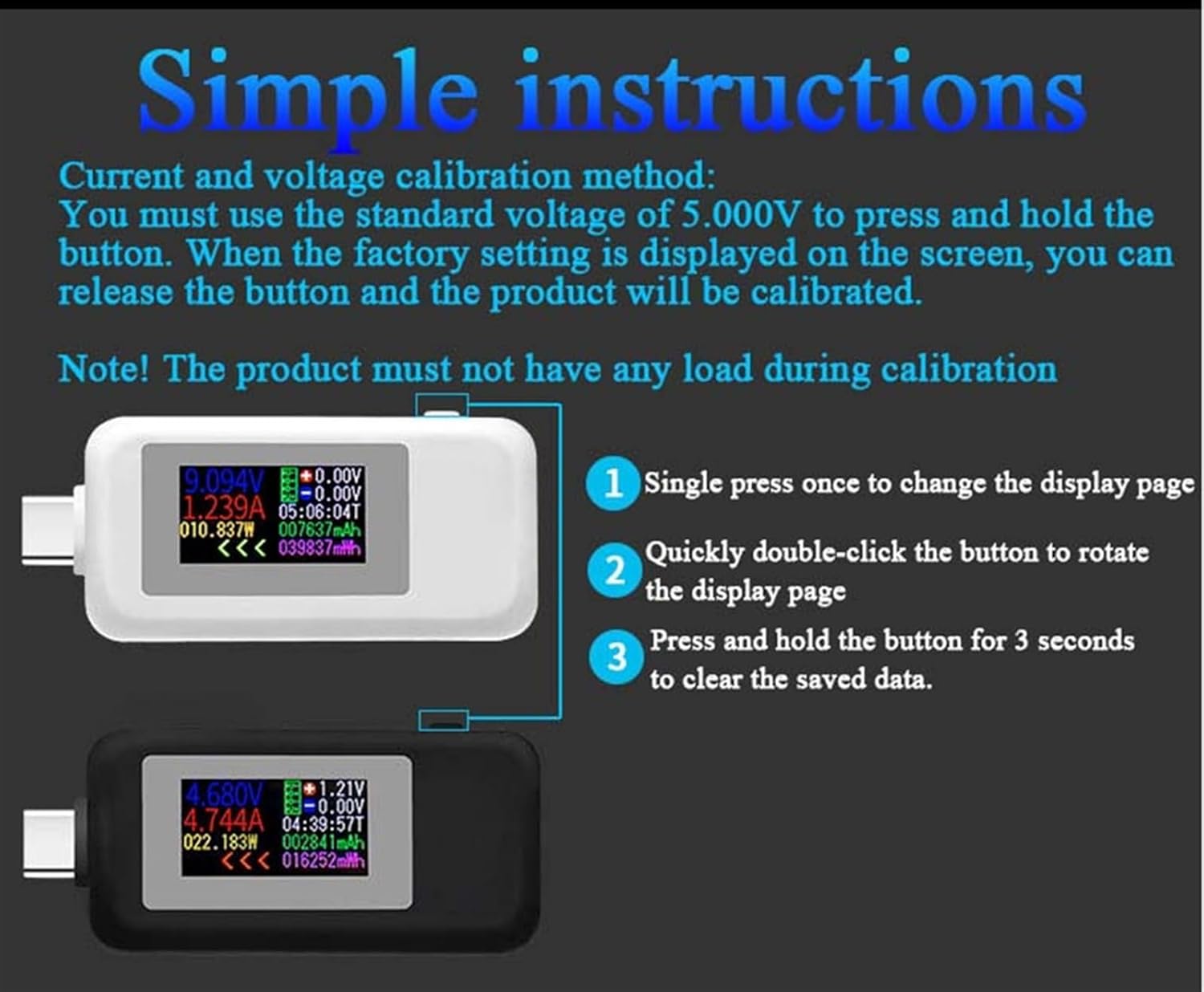
This image illustrates the basic operations of the KWS-1902C USB tester, detailing button functions for display navigation and data clearing.
- 1. Single Press: A single, short press of the button will cycle through different display pages, showing various measurement parameters.
- 2. Quickly Double-Click: A quick double-click of the button will rotate the orientation of the display page, which can be useful depending on how the tester is positioned.
- 3. Press and Hold (3 Seconds): Press and hold the button for approximately 3 seconds to clear all saved data, such as accumulated capacity (mWh) and time.
5. Calibration Method
To ensure accurate readings, you can calibrate the KWS-1902C USB Tester:
- Prepare for Calibration: Ensure the product has no load connected to its output port during the calibration process.
- Apply Standard Voltage: Connect the tester to a stable power source providing a standard voltage of 5.000V.
- Initiate Calibration: Press and hold the button on the tester.
- Complete Calibration: Continue holding the button until the factory setting display appears on the screen. Once this display is visible, you can release the button. The product will then be calibrated.
6. Power-off Storage Function
The KWS-1902C USB Tester is equipped with a convenient power-off storage function. This feature ensures that your measured capacity and energy data are retained even when the mobile power source is disconnected or loses power. This allows for easy and convenient review of energy measurements from your mobile power source at any time.

This image highlights the power-off storage capability of the KWS-1902C USB tester, allowing data retention even when power is disconnected.
7. Measurement Accuracy
The KWS-1902C USB Tester is designed for precise measurements, featuring 4-bit measurement accuracy. This high level of precision ensures more accurate detection of data errors and provides reliable, consistent measurement results for voltage, current, and power.

This image illustrates the high precision of the KWS-1902C USB tester, featuring 4-bit measurement accuracy for more reliable data.
8. Troubleshooting
- No Display: Ensure the tester is securely plugged into a working USB-C power source. Check if the power source itself is active.
- Incorrect Readings: Verify all connections are firm. If readings seem consistently off, perform the calibration procedure as described in Section 5. Ensure no load is connected during calibration.
- Data Not Clearing: Ensure you are pressing and holding the button for the full 3 seconds required to clear saved data.
- Device Not Charging: Confirm that the device being tested is properly connected to the tester's output port. Check if the power source is providing sufficient power for the device.
9. Maintenance
To ensure the longevity and optimal performance of your KWS-1902C USB Tester:
- Cleaning: Use a soft, dry cloth to clean the device. Avoid using liquid cleaners or abrasive materials.
- Storage: Store the tester in a cool, dry place away from direct sunlight and extreme temperatures.
- Handling: Handle the device with care. Avoid dropping it or subjecting it to strong impacts.
- Avoid Moisture: Do not expose the device to water or high humidity.
10. Warranty and Support
For any questions, technical support, or warranty claims regarding your EFUZCOCI KWS-1902C Type-C USB Tester, please refer to the contact information provided with your purchase or visit the official EFUZCOCI website. Please retain your proof of purchase for warranty purposes.