
1. Introduction
Thank you for choosing the ECHOMUSSY Wireless Microphones. This manual provides essential information for the safe and efficient use of your device. Please read it thoroughly before operation and retain it for future reference.

Image 1.1: ECHOMUSSY Wireless Microphones and Receiver. This image displays the two wireless microphones in white with rose gold grilles, alongside the compact black and white receiver unit.
The ECHOMUSSY Wireless Microphones feature upgraded connection technology with dual intelligent high-speed processing chips for stable and fast connectivity, offering ultra-low latency. Designed for true wireless freedom, these microphones provide a transmission range of up to 200 feet (60 meters). They incorporate a rose gold openwork head and gradient breathing lights for visual appeal, and a cardioid polar pattern for clear vocal capture with minimal background noise. Each microphone includes a 1200mAh rechargeable battery, providing up to 40 hours of continuous use, with USB-C fast charging. The system is plug-and-play, offering automatic pairing and universal compatibility with various audio systems.
2. Setup Instructions
- Charge the Devices: Before first use, fully charge both wireless microphones and the receiver using the provided USB-C cable. A full charge typically takes 3-4 hours.
- Connect the Receiver: Insert the receiver into the microphone input jack (3.5mm or 6.35mm) of your compatible audio device (e.g., speaker, PA system, mixer, amplifier, karaoke machine).
- Power On Microphones: Press and hold the power button on each microphone to turn them on.
- Automatic Pairing: The microphones and receiver are designed for automatic pairing. Once powered on, they should connect wirelessly within seconds. The receiver's indicator lights will confirm a successful connection. The one-to-one chip connection technology ensures a stable link.

Image 2.1: One-to-One Chip Connection. This diagram illustrates the dedicated wireless connection between each microphone and the receiver, highlighting the 9ms ultra-low latency.
The system is compatible with a wide range of audio equipment. Ensure your device has a suitable microphone input.
3. Operating Instructions
3.1. Power On/Off
- To power on, press and hold the power button on the microphone until the indicator light illuminates.
- To power off, press and hold the power button again until the indicator light turns off.
3.2. Volume Control
- Use the '+' button on the microphone to increase the volume.
- Use the '-' button on the microphone to decrease the volume.
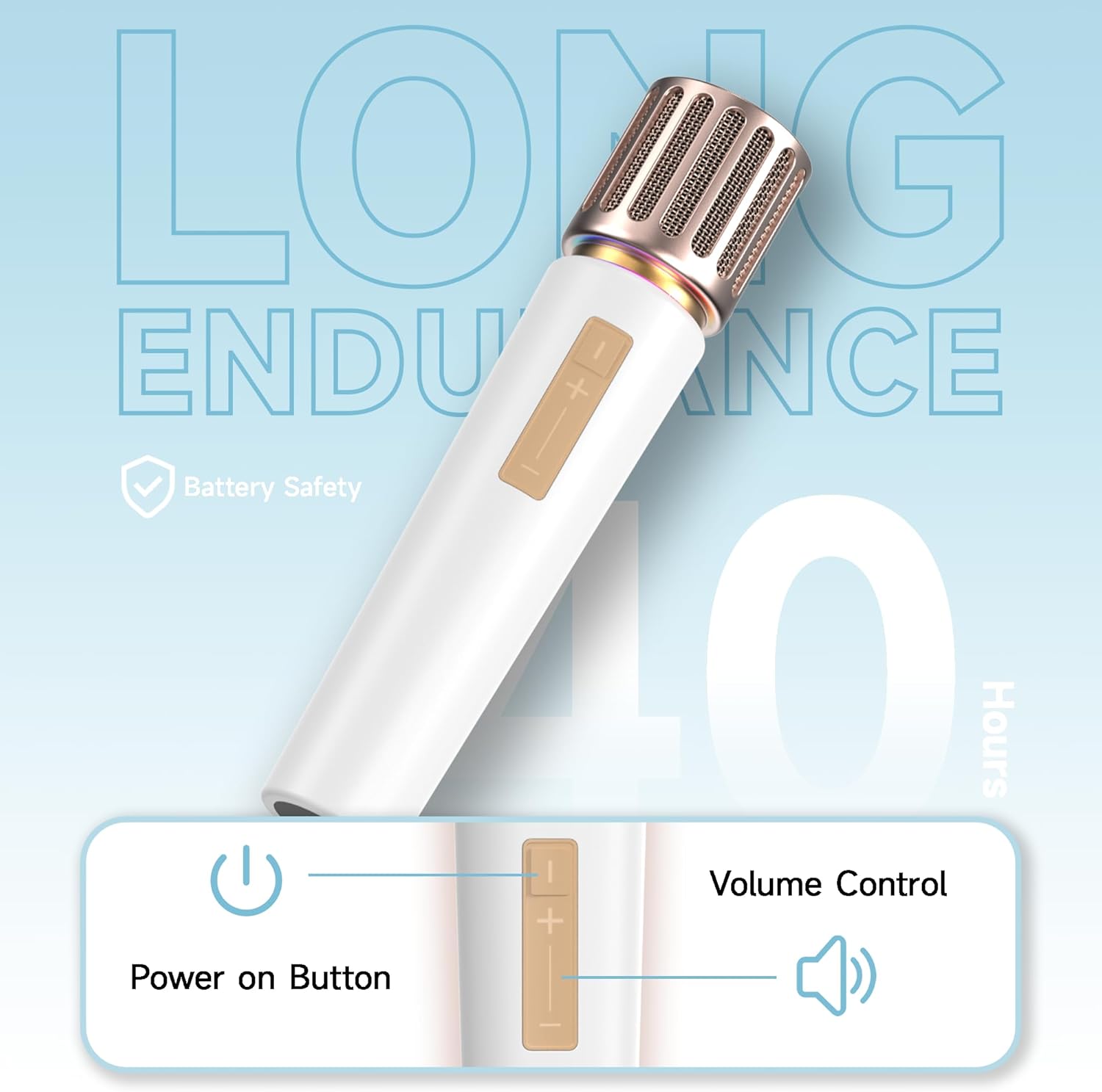
Image 3.1: Microphone Controls. This image highlights the power button and the '+' and '-' volume control buttons located on the microphone body.
3.3. LED Lighting Effects
- The microphones feature controllable gradient breathing lights.
- Double-tap the LED button (if present, or refer to specific button for LED control) to cycle through different lighting modes. The lights can sync to your rhythm for an immersive experience.

Image 3.2: Colorful Lighting Design. This image shows the microphone's grille with dynamic multi-color gradient and solid-color gradient lighting effects.
3.4. Optimal Performance
- For best sound quality, hold the microphone approximately 2-6 inches from your mouth.
- The cardioid pickup pattern is designed to capture sound primarily from the front, minimizing background noise.
- Maintain a clear line of sight between the microphone and receiver for optimal transmission range (up to 200 feet).

Image 3.3: Cardioid Pickup. This image demonstrates the microphone's cardioid pickup pattern, designed to focus on the speaker's voice while reducing ambient sound.

Image 3.4: 200FT Extra Long Transmission Distance. This image illustrates the extended wireless range of the microphone system, allowing for freedom of movement during use.
4. Maintenance
4.1. Charging
- Use only the provided USB-C cable for charging.
- Connect the USB-C cable to the charging port on the microphone and receiver, then to a standard USB power adapter (not included).
- The indicator lights will show charging status and turn off or change color when fully charged.
- Avoid overcharging the devices.
4.2. Cleaning and Storage
- Wipe the microphones and receiver with a soft, dry cloth. Do not use liquid cleaners or abrasive materials.
- Avoid exposing the devices to extreme temperatures, humidity, or direct sunlight.
- Store the microphones and receiver in a cool, dry place when not in use.
5. Troubleshooting
| Problem | Possible Cause | Solution |
|---|---|---|
| No sound from microphone | Microphone or receiver not powered on; Not paired; Low battery; Incorrect connection to audio device. | Ensure both microphone and receiver are powered on. Check battery levels. Verify receiver is securely plugged into the correct input on your audio device. Re-pair if necessary (power cycle both devices). |
| Sound is distorted or unclear | Microphone too close/far from mouth; Volume too high/low; Interference; Obstructions. | Adjust microphone distance. Adjust volume on microphone and audio device. Move closer to the receiver. Ensure no large obstructions between microphone and receiver. Check for other wireless devices causing interference. |
| Microphone disconnects frequently | Out of range; Low battery; Interference. | Stay within the 200ft operating range. Charge batteries fully. Minimize interference from other 2.4GHz devices. |
| LED lights not working | Feature not activated; Malfunction. | Double-tap the LED control button to cycle through modes. If problem persists, contact customer support. |
6. Specifications
| Feature | Detail |
|---|---|
| Model Number | YA08-1 |
| Brand | ECHOMUSSY |
| Connectivity Technology | 2.4GHz Wireless (One-to-One Chip Connection) |
| Transmission Range | Up to 200 feet (60 meters) |
| Latency | 9ms Ultra-low latency |
| Battery Capacity | 1200mAh (per microphone) |
| Battery Life | Up to 40 hours (continuous use) |
| Charging Port | USB-C (fast charging) |
| Polar Pattern | Unidirectional (Cardioid) |
| Special Features | Noise Reduction, RGB Light, Volume Control |
| Connector Type | 3.5 mm Jack, 6.35 mm Jack |
| Compatible Devices | Audio Mixer, Karaoke Machine, PA System, Speaker, Amplifier, Streaming Equipment |
| Material | Metal |
| Item Weight | 0.5 Kilograms (per microphone, approx.) |
| Included Components | 2 Wireless Microphones, 1 Receiver, 1 USB-C Cable, 1 User Manual |
7. Warranty and Support
ECHOMUSSY is committed to providing high-quality products and excellent customer service.
- 365-Day Warranty: Your ECHOMUSSY Wireless Microphones are covered by a 365-day warranty from the date of purchase. This warranty covers manufacturing defects and ensures product quality.
- Lifetime Technical Support: ECHOMUSSY offers lifetime technical support for its products. If you encounter any issues or have questions regarding the operation, maintenance, or troubleshooting of your microphones, please do not hesitate to contact our support team.
- Customer Satisfaction: Our primary goal is your satisfaction. We are dedicated to assisting you with any concerns.

Image 7.1: ECHOMUSSY Customer Care. This image highlights the brand's commitment to customer support, including a 365-day warranty and lifetime technical assistance.
For support, please visit the official ECHOMUSSY store on Amazon or refer to the contact information provided in the product packaging.
Link to ECHOMUSSY Store: ECHOMUSSY Store