
Introduction
This manual provides comprehensive instructions for the iOOiQQ GCBLTV6EA-C4 replacement remote control. Designed for ease of use, this remote requires no programming or complex setup. It is compatible with a range of CHIQ and Saba television models, offering a straightforward solution for your TV control needs.
Compatible TV Models:
- CHIQ: U75G8, U70G8, U50G9, U55G7, U55G6, L43G5, U43E6000, U49G6000
- Saba: SB55UHD19, SBA43UHD194
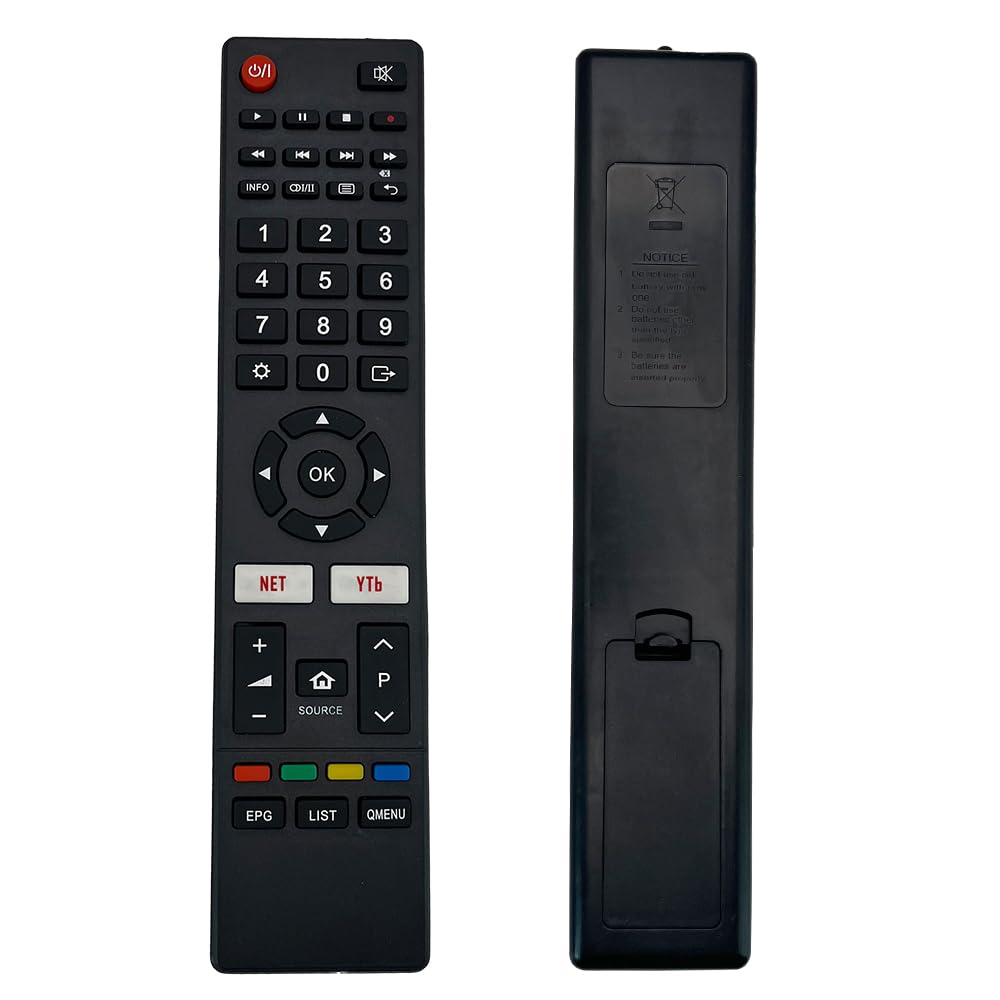
Image: Front view of the iOOiQQ GCBLTV6EA-C4 remote control, showing all buttons and ergonomic design.
Package Contents
- 1 x iOOiQQ GCBLTV6EA-C4 Remote Control
- Note: AAA batteries are not included and must be purchased separately.
Setup
The iOOiQQ GCBLTV6EA-C4 remote control is designed for immediate use without any programming or complex configuration. Simply install the batteries, and it will be ready to operate your compatible TV.
Battery Installation
- Locate the battery compartment on the back of the remote control.
- Press down on the tab and slide the battery cover downwards to open it.
- Insert two (2) AAA alkaline batteries, ensuring the positive (+) and negative (-) terminals match the diagrams inside the compartment.
- Slide the battery cover back into place until it clicks securely.

Image: Back view of the iOOiQQ GCBLTV6EA-C4 remote control, illustrating the battery compartment and installation instructions.
Once batteries are installed, the remote is ready for use with your compatible CHIQ or Saba TV.
Operating Instructions
This remote control provides standard functionality for navigating and controlling your television. Point the remote directly at your TV's infrared receiver for optimal performance.
Key Functions Overview
- Power Button (⏻): Turns the TV on or off.
- Number Buttons (0-9): For direct channel selection.
- Volume Up/Down (+/-): Adjusts the sound volume.
- Channel Up/Down (P▲/P▼): Changes TV channels.
- Navigation Pad (◄ ▲ ► ▼): Navigates through menus and options.
- OK Button: Confirms selections.
- Source Button (⌂ SOURCE): Selects input sources (HDMI, AV, etc.).
- NET / YTb Buttons: Direct access to network features or YouTube (functionality depends on TV model).
- EPG / LIST / QMENU: Accesses Electronic Program Guide, Channel List, or Quick Menu (functionality depends on TV model).
- Mute Button (🔇): Mutes or unmutes the TV sound.
- Playback Controls (◀◀, ▶▶, ■, ▶): Control media playback (e.g., pause, play, stop, fast forward, rewind).
Maintenance
Proper care and maintenance will extend the life of your remote control.
- Cleaning: Wipe the remote with a soft, dry cloth. Do not use liquid cleaners or abrasive materials.
- Battery Care:
- Replace batteries when the remote's response becomes sluggish or stops working.
- Always replace both batteries at the same time with new ones of the same type (AAA alkaline).
- Remove batteries if the remote will not be used for an extended period to prevent leakage.
- Dispose of used batteries according to local regulations.
- Storage: Store the remote in a cool, dry place away from direct sunlight and extreme temperatures.
- Avoid Drops: Protect the remote from physical impact, as this can damage internal components.
Troubleshooting
If you encounter issues with your remote control, please refer to the following common solutions:
- Remote not responding:
- Check if the batteries are inserted correctly with the correct polarity (+/-).
- Replace old batteries with new AAA alkaline batteries.
- Ensure there are no obstructions between the remote control and the TV's infrared receiver.
- Make sure you are within the effective range of the TV's IR receiver.
- Limited functionality or some buttons not working:
- Verify that your TV model is listed as compatible in the "Introduction" section.
- Some advanced functions may be specific to the original TV remote or require TV settings adjustments.
- Remote LED indicator not lighting up (if applicable):
- This usually indicates dead or incorrectly installed batteries. Replace them.
If the problem persists after trying these steps, please contact customer support.
Specifications
| Feature | Detail |
|---|---|
| Brand | iOOiQQ |
| Model Name | GCBLTV6EA-C4 |
| Connectivity Technology | Infrared (IR) |
| Compatible Devices | Television (CHIQ, Saba) |
| Number of Supported Devices | 1 |
| Special Feature | No Programming Required |
| Battery Type | 2 x AAA Alkaline batteries (not included) |
| Product Dimensions (L x W x H) | 212mm x 48mm x 20mm (approx.) |
| Manufacturer | Yangzhou Wuming Electronic Technology Co., Ltd. |
| Country of Origin | China |
Warranty and Support
Your iOOiQQ GCBLTV6EA-C4 remote control is designed for reliable performance. While specific warranty details are not provided, customer satisfaction is important.
Customer Support: If you encounter any issues with your product or service, please contact the seller or manufacturer. We aim to provide a satisfactory response within 24 hours to address your concerns.