
1. Introduction
The YPMart S4-LCD Leakage Voltage Detector Tester is a versatile and essential tool designed for identifying AC voltage and circuit continuity. It features a non-contact design for safe operation, a wide voltage range of 0-300V, and a user-friendly display with backlight for clear readings in various conditions. This manual provides detailed instructions for the safe and effective use of your device.

Figure 1: YPMart S4-LCD Leakage Voltage Detector Tester and included items.
2. Safety Information
Always observe the following safety precautions to prevent personal injury or damage to the device:
- WARNING: Use extreme caution when testing AC voltages above 36 volts, as such voltages pose a risk of electric shock.
- Do not use the device if it appears damaged or is not operating correctly.
- Do not attempt to open or repair the device. Refer all servicing to qualified personnel.
- Keep the device dry and clean.
- Always follow local safety regulations and electrical codes.
- This device is intended for professional and informed DIY use. If you are unsure about any electrical task, consult a qualified electrician.
3. Setup
3.1 Charging the Battery
The S4-LCD features a built-in rechargeable 400mAh Li-ion battery. Before first use, or when the battery indicator shows low power, charge the device using the provided USB cable.
- Locate the charging port on the side of the device.
- Connect the USB charging cable to the device and a suitable USB power source (e.g., computer USB port, USB wall adapter).
- The charging indicator light will illuminate during charging.
- Once fully charged, the indicator light may change color or turn off, depending on the model.

Figure 2: Charging the S4-LCD via USB cable.
3.2 Powering On/Off
Press and hold the power button (usually marked with a power symbol) to turn the device on or off. The LCD screen will illuminate upon activation.
4. Operating Instructions
4.1 Non-Contact Voltage (NCV) Detection
The NCV mode allows for safe detection of AC voltage without direct contact with live wires. This feature is crucial for identifying live circuits before performing any electrical work.
- Ensure the device is powered on.
- Bring the tip of the detector close to the wire, outlet, or electrical component you wish to test.
- If AC voltage is detected, the device will display a red screen, emit an alarm buzzer sound, and the red backlight will blink.
- The intensity of the signal (buzzer frequency and backlight blinking speed) indicates the strength of the detected voltage.

Figure 3: NCV detection in progress, showing red screen and alarm for live voltage.
4.2 Leakage Detection
This function helps identify electrical leakage by touching the tip of the pen to the surface of an appliance or component.
- Power on the device.
- Gently touch the metal tip of the detector to the surface of the appliance or area suspected of leakage.
- The device will indicate the presence of leakage, often through visual cues on the display or an audible alarm.

Figure 4: Detecting electrical leakage by touching the pen tip to an appliance surface.
4.3 Zero/Fire Line Identification
The S4-LCD can intelligently distinguish between the live (fire) line and the neutral (zero) line in an electrical circuit, offering a safer alternative to traditional contact methods.
- Select the LIVE zero Firewire distinction function (refer to device buttons for specific mode selection).
- Insert the pen needle into the hole of the outlet or terminal for identification.
- For the Zero line, the device will typically show no response or a green indication.
- For the Firing line, the backlight will change to red and an alarm sound will be emitted.
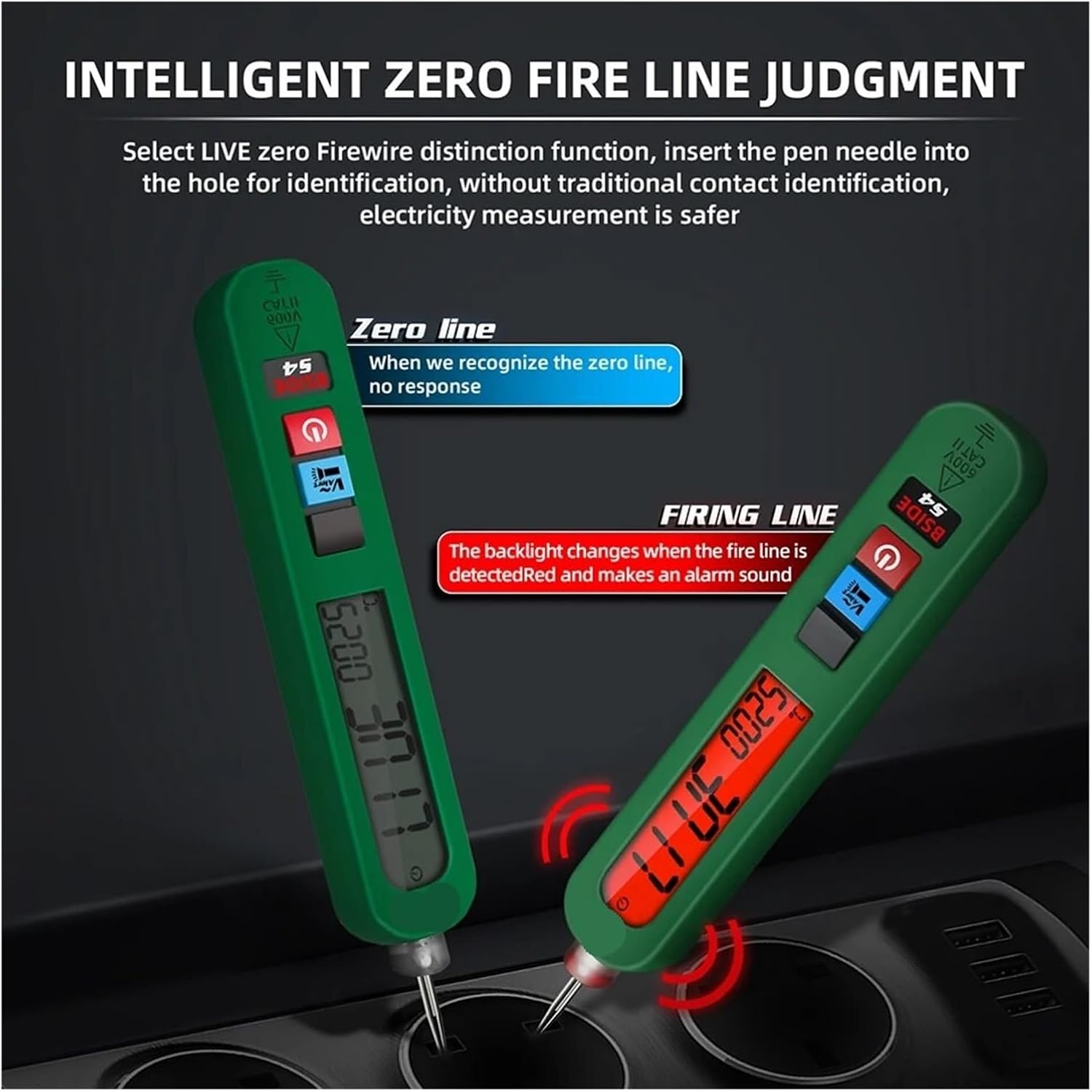
Figure 5: Identifying zero and firing lines using the S4-LCD.
4.4 Route Breakpoint Detection
In NCV non-contact voltage detection mode, the S4-LCD can help locate breakpoints in a charged single-strand wire.
- Ensure the wire you are testing is charged (electrified).
- Activate NCV mode.
- Move the tip of the detector along the length of the wire.
- The device will indicate voltage presence up to the breakpoint. Beyond the breakpoint, where the wire is no longer electrified, the indication will cease.

Figure 6: Locating a breakpoint in an electrified cable.
5. Maintenance
- Cleaning: Wipe the device with a dry, soft cloth. Do not use abrasive cleaners or solvents.
- Battery Care: Recharge the battery regularly, especially if the device will not be used for an extended period, to maintain battery health. Avoid fully discharging the battery frequently.
- Storage: Store the device in a cool, dry place, away from direct sunlight and extreme temperatures.
- Inspection: Periodically inspect the device for any signs of damage, such as cracks in the casing or frayed cables. Do not use if damaged.
6. Troubleshooting
| Problem | Possible Cause | Solution |
|---|---|---|
| Device does not power on. | Low or depleted battery. | Charge the device fully using the provided USB cable. |
| Inaccurate or inconsistent readings. | Interference from other electrical fields; device not held correctly; dirty tip. | Move away from other electrical devices; ensure proper grip; clean the tip. |
| No NCV detection. | No AC voltage present; NCV mode not active; distance too far. | Verify power to the circuit; ensure NCV mode is selected; bring the tip closer to the source. |
| Backlight not working. | Low battery; device malfunction. | Charge the battery. If problem persists, contact support. |
7. Specifications
| Feature | Detail |
|---|---|
| Model Number | S4-LCD |
| Voltage Range | 0-300V AC |
| Display Type | Analog and Digital with Backlight |
| Battery | Built-in 400mAh Li-ion Rechargeable Battery |
| Dimensions | 16.6 x 2.8 x 2.3 cm |
| Item Weight | 500 Grams |
| Operating Temperature | 0°C to 40°C (32°F to 104°F) |
| Storage Temperature | -20°C to 60°C (-4°F to 140°F) |
| Manufacturer | YPMart |
8. Warranty and Support
YPMart products are manufactured to high-quality standards. For specific warranty information, please refer to the documentation included with your purchase or contact YPMart customer support.
If you encounter any issues or have questions regarding the operation or maintenance of your S4-LCD Leakage Voltage Detector Tester, please contact the retailer or YPMart customer service for assistance.