
1. Introduction
Thank you for choosing the TK16 Smart Watch. This device is designed to enhance your daily life with advanced health monitoring, communication features, and fitness tracking capabilities. Please read this manual carefully to understand the watch's functions and ensure proper usage.
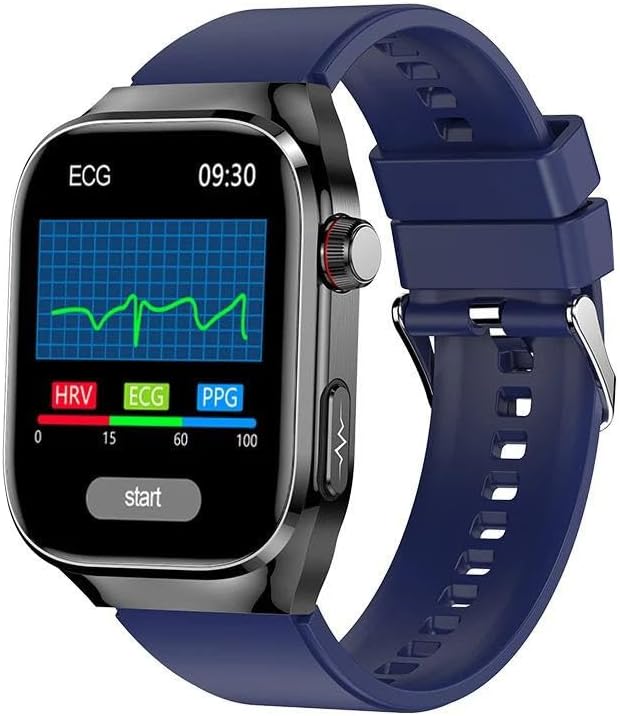
Image: The TK16 Smart Watch with a blue band, showcasing its ECG monitoring display.
2. What's in the Box
Ensure all the following items are present in your package:
- TK16 Smart Watch
- Charging Cable
- User Manual (this document)
- Watch Band
3. Setup Guide
3.1 Charging the Device
Before first use, fully charge your TK16 Smart Watch. Connect the magnetic charging cable to the charging contacts on the back of the watch and plug the USB end into a standard USB power adapter (not included).
- Charging Time: Approximately 2-3 hours for a full charge.
- Battery Life: Up to 7 days depending on usage.
3.2 Powering On/Off
- Power On: Press and hold the side button for 3-5 seconds until the screen lights up.
- Power Off: Press and hold the side button, then select 'Power Off' on the screen.
3.3 App Download and Pairing
To unlock the full potential of your TK16 Smart Watch, download the DeepFit application on your smartphone.
- Scan the QR code in the watch's settings or search for "DeepFit" in your smartphone's app store (iOS/Android).
- Install and open the DeepFit app.
- Enable Bluetooth on your smartphone.
- In the DeepFit app, navigate to 'Device' and select 'Add Device'.
- Select 'TK16' from the list of available devices to pair. Follow the on-screen prompts to complete the pairing process.
4. Operating Instructions
4.1 Basic Navigation
The TK16 Smart Watch features a 2.04-inch AMOLED full touch screen for intuitive navigation.
- Swipe Up/Down: Scroll through menus and notifications.
- Swipe Left/Right: Access quick functions or different screens.
- Tap: Select an item or confirm an action.
- Side Button: Press to return to the home screen or wake the device.
4.2 Bluetooth Call Functionality
The TK16 Smart Watch supports Bluetooth calls, allowing you to make and receive calls directly from your wrist when connected to your smartphone.

Image: The TK16 Smart Watch displaying an incoming call and an SOS emergency call interface, with a smartphone showing call logs.
- Making Calls: Access the dialer or contact list on the watch to initiate a call.
- Receiving Calls: Tap the green icon on the watch screen to answer incoming calls.
- Emergency Call (SOS): Long press the designated button or navigate to the SOS function to quickly dial a pre-set emergency contact. Ensure emergency contacts are configured in the DeepFit app.
4.3 Health Monitoring
The TK16 Smart Watch provides comprehensive health monitoring features. For accurate readings, ensure the watch is worn snugly on your wrist.

Image: A collage showing the TK16 Smart Watch displaying various health metrics such as Body Index, Uric Acid, ECG, and Blood Fat, with corresponding smartphone app screens.
- Heart Rate Monitor: Real-time heart rate tracking.
- Blood Oxygen Monitor (SpO2): Measures blood oxygen saturation levels.
- Blood Pressure Monitor: Provides estimated blood pressure readings.
- Body Temperature Monitor: Tracks your body temperature.
- Sleep Monitor: Analyzes sleep patterns and quality.
- ECG: Electrocardiogram function for heart health assessment.
- Body Index, Uric Acid, Blood Fat: Advanced metrics available through the DeepFit app, requiring specific measurement procedures.
Note: The health monitoring data provided by this device is for reference only and should not be used for medical diagnosis or treatment. Consult a medical professional for any health concerns.
4.4 Activity Tracking and Sport Modes
Track your daily activities and workouts with precision.
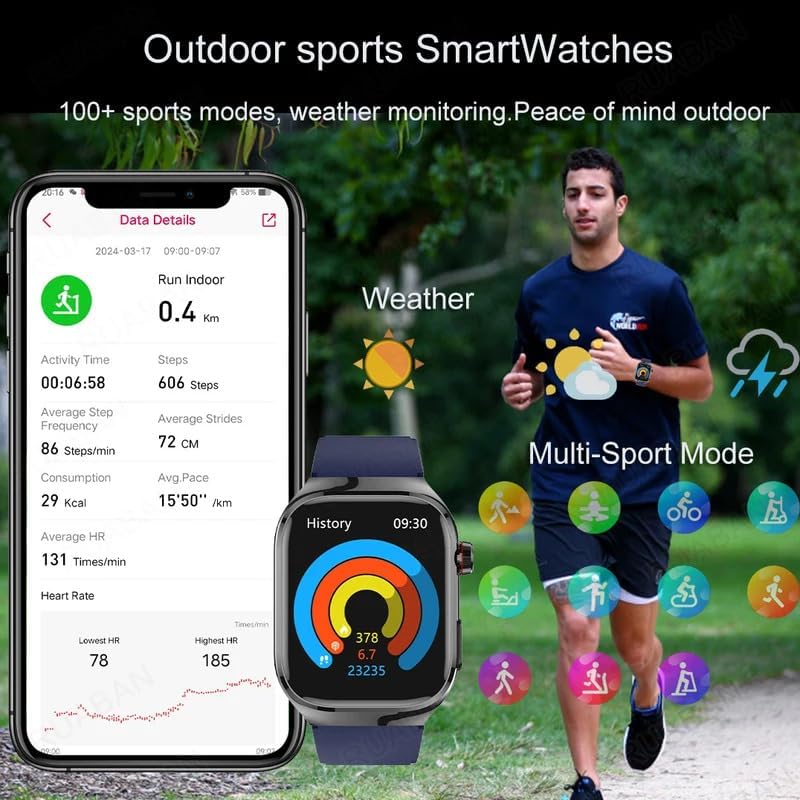
Image: The TK16 Smart Watch showing activity data like steps, calories, and heart rate, alongside a person running and icons representing various multi-sport modes.
- Steps Tracker: Counts your daily steps.
- Calorie Tracker: Estimates calories burned.
- Activity Tracker: Monitors overall activity levels.
- Multi-Sport Mode: Select from over 100 sports modes to get specific data for your workouts.
4.5 AI Voice Assistant
The TK16 Smart Watch features a built-in AI voice assistant. Activate it by a specific gesture or button press (refer to on-screen prompts) to control watch functions or get information hands-free.
5. Maintenance
5.1 Cleaning
Regularly clean your watch and band to prevent skin irritation and maintain device performance.
- Wipe the watch screen and body with a soft, lint-free cloth.
- For the band, use a mild soap and water solution, then rinse thoroughly and dry completely before reattaching to the watch.
5.2 Waterproof Grade
The TK16 Smart Watch has a 'Life Waterproof' rating. This means it is resistant to splashes, rain, and brief immersion in shallow water. It is not suitable for swimming, diving, hot showers, or saunas, as steam and high pressure can damage the seals.
5.3 Battery Care
- Avoid fully discharging the battery frequently.
- Do not expose the watch to extreme temperatures.
- Use only the provided charging cable.
6. Troubleshooting
6.1 Watch Not Turning On
- Ensure the watch is fully charged. Connect it to the charger for at least 30 minutes.
- Press and hold the side button for 10-15 seconds to attempt a forced restart.
6.2 Unable to Pair with Smartphone
- Make sure Bluetooth is enabled on your smartphone and the watch.
- Ensure the DeepFit app is running and has necessary permissions.
- Restart both the watch and your smartphone.
- Forget the device in your phone's Bluetooth settings and try pairing again.
6.3 Inaccurate Health Readings
- Ensure the watch is worn snugly on your wrist, not too loose or too tight.
- Clean the sensor on the back of the watch.
- Avoid excessive movement during measurements.
6.4 Notifications Not Appearing
- Check notification permissions for the DeepFit app on your smartphone.
- Ensure the watch is connected via Bluetooth.
- Verify notification settings within the DeepFit app.
7. Specifications
| Feature | Specification |
|---|---|
| Model | TK16 |
| Display Size | 2.04-inch AMOLED Full Touch Screen |
| Resolution | 368 * 448 |
| Battery Capacity | >450mAh (Typical: 650mAh) |
| Battery Life | Up to 7 days (typical usage) |
| Bluetooth Version | 5.1 |
| Waterproof Grade | Life Waterproof |
| App Name | DeepFit |
| Case Material | Alloy |
| Band Material | STAINLESS STEEL (or Silicone, depending on variant) |
| Weight | 178g (approx.) |
| Compatibility | All Compatible (Android Wear 1.0 system) |

Image: The TK16 Smart Watch in grey, highlighting its AMOLED display, 650mAh battery, body temperature sensor, and AI voice assistant.
8. Warranty and Support
8.1 Warranty Information
This product comes with a standard manufacturer's warranty. Please refer to the warranty card included in your package or contact your retailer for specific terms and conditions. The warranty typically covers manufacturing defects but does not cover damage caused by misuse, accidents, or unauthorized modifications.
8.2 Customer Support
For any questions, technical assistance, or issues not covered in this manual, please contact the retailer or manufacturer's customer support. Keep your purchase receipt and product model number handy when contacting support.


