
1. Introduction
This manual provides comprehensive instructions for the installation, operation, maintenance, and troubleshooting of your TWSYOXPR 2MP AHD PTZ Camera, Model C-PTZ-201. Please read this manual thoroughly before using the product to ensure correct usage and optimal performance. Retain this manual for future reference.
2. Safety Information
- Power Supply: Use only the specified power adapter. Incorrect voltage may damage the camera or pose a safety risk.
- Installation: Ensure the camera is securely mounted to prevent it from falling. Professional installation is recommended for outdoor or high-altitude placements.
- Environment: Do not expose the camera to extreme temperatures, humidity, or corrosive environments.
- Cleaning: Disconnect power before cleaning. Use a soft, dry cloth. Avoid harsh chemicals.
- Disassembly: Do not attempt to disassemble or modify the camera. This will void the warranty and may cause damage.
3. Package Contents
Please check the package contents upon receipt. If any items are missing or damaged, contact your retailer.
- TWSYOXPR 2MP AHD PTZ Camera (C-PTZ-201)
- Mounting Accessories (screws, wall plugs)
- User Manual
4. Product Overview
The TWSYOXPR C-PTZ-201 is a 2MP AHD PTZ camera designed for security surveillance. It features 360° pan/tilt capabilities, dual infrared LED lights for night vision, coaxial control, and an IP66 weatherproof rating.

Figure 4.1: Front view of the TWSYOXPR 2MP AHD PTZ Camera, showing the lens and LED illuminators.
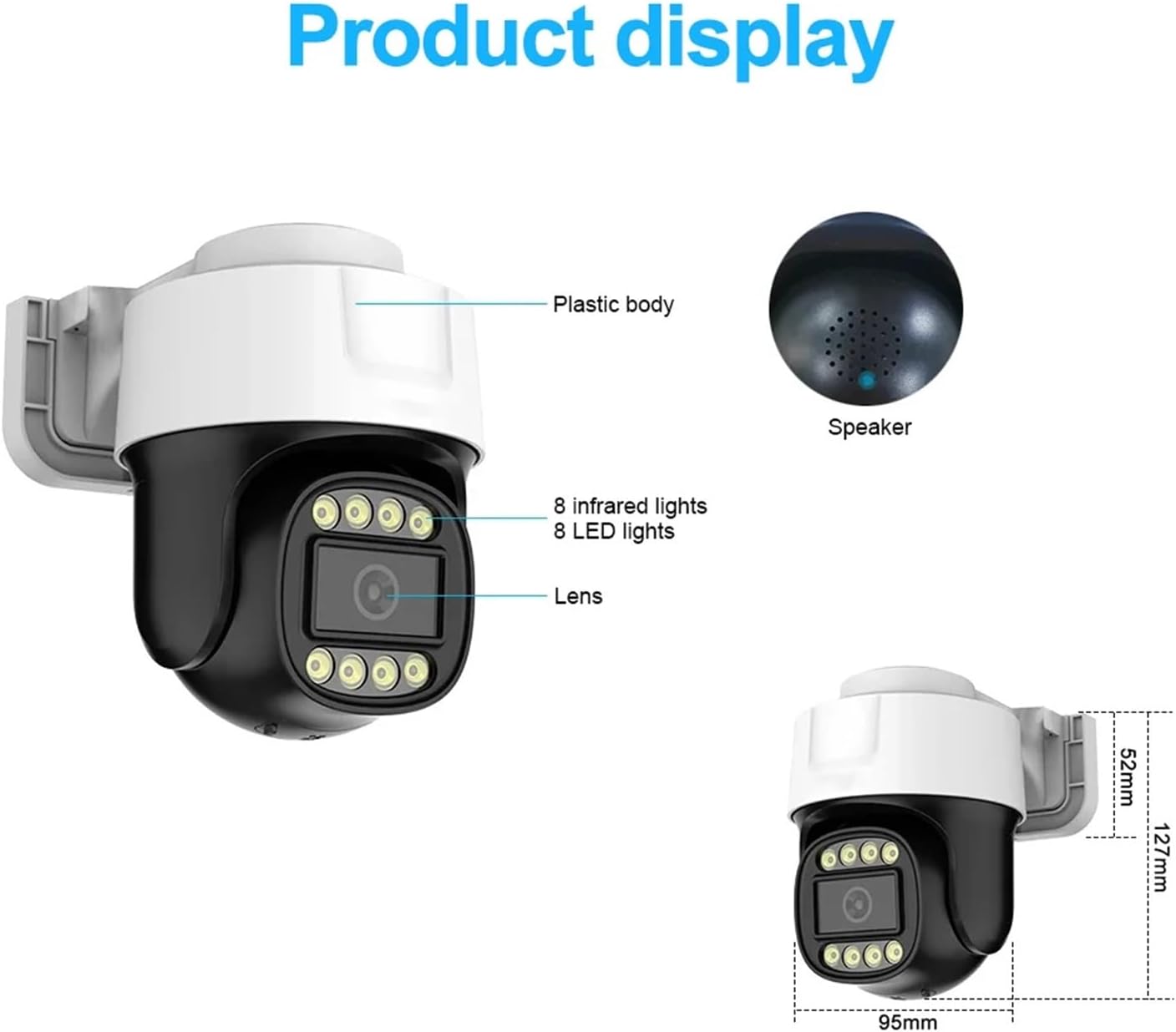
Figure 4.2: Diagram illustrating the camera's components (plastic body, speaker, lens, infrared lights, LED lights) and dimensions (127mm height, 95mm width).
Key Features:
- 2MP AHD High-Definition: Delivers clear and detailed 1080P images via coaxial transmission.
- 360° Pan-Tilt: Offers extensive coverage with 360° horizontal rotation.
- Dual Infrared Night Vision: Equipped with 2 infrared LED lights for clear surveillance in dark conditions.
- Coaxial Control (UTC): Allows PTZ operation and menu access directly through a compatible DVR via the coaxial cable.
- Built-in Microphone: Supports coaxial audio for synchronized sound recording.
- IP66 Weatherproof: Durable housing suitable for both indoor and outdoor use, resistant to dust and water.
5. Setup
5.1 Mounting the Camera
- Choose a suitable mounting location that provides the desired field of view and is within reach of power and coaxial cables.
- Use the provided mounting template (if applicable) or mark the drill holes on the wall or ceiling.
- Drill holes and insert wall plugs if necessary.
- Securely attach the camera bracket to the mounting surface using the screws.
- Adjust the camera's angle as needed after wiring.
5.2 Wiring Connections
The camera uses a BNC connector for video and coaxial control, and a DC power input.

Figure 5.1: Connection diagram for UTC Coaxial PTZ Control. Connect the camera's BNC output to the AHD DVR's BNC input. Ensure the DVR supports PTZ Coaxial Control. Connect the camera to a power source.

Figure 5.2: Connection diagram for TVI Coaxial Audio. The camera's built-in microphone transmits audio over the same coaxial cable as video. Connect the camera's BNC output to a DVR that supports coaxial audio functionality to obtain video with sound.
- Connect the BNC cable from the camera to a compatible AHD DVR's video input.
- Connect the power adapter to the camera's DC input and then plug it into a power outlet.
- Ensure all connections are secure before powering on the system.
6. Operating Instructions
6.1 PTZ Control
The camera supports PTZ (Pan, Tilt, Zoom) control via the coaxial cable (UTC Coaxial Control). This functionality requires a compatible DVR that supports UTC.
- Access the PTZ control interface on your DVR.
- Use the directional controls to pan (left/right) and tilt (up/down) the camera.
- If supported by your DVR and camera, use the zoom controls to adjust the optical zoom.
- The coaxial menu can also be accessed through the DVR's PTZ control interface for advanced settings.
6.2 Night Vision Modes
The camera offers different night vision modes to adapt to varying light conditions.

Figure 6.1: Illustration of different night vision modes. Top: Infrared night vision (black and white). Middle: Full color night vision (color image with white light). Bottom: Alarm message sent automatically upon detection.
- Infrared Night Vision: In low-light or dark conditions, the camera automatically activates its infrared LEDs, providing a clear black-and-white image.
- Full Color Night Vision: The camera can utilize its built-in white LED lights to provide a full-color image even in darkness. This mode may be activated automatically or manually via the DVR's settings.
- Smart Night Vision: Some DVRs may offer smart modes that switch between infrared and full-color based on detected motion or specific settings.
6.3 Coaxial Audio
The integrated microphone allows the camera to capture audio, which is transmitted over the same coaxial cable as the video signal. Ensure your DVR supports coaxial audio input to record and playback audio.
6.4 Weatherproof Features
The camera is rated IP66, indicating its resistance to dust and water ingress. This makes it suitable for various outdoor environments.

Figure 6.2: Visual representation of the camera's IP66 weatherproof capabilities, including resistance to water, sun, cold, and dust.
7. Maintenance
7.1 Cleaning
- Regularly clean the camera lens with a soft, lint-free cloth to ensure clear image quality.
- For stubborn dirt, use a lens cleaning solution specifically designed for optical surfaces.
- Wipe the camera body with a damp cloth. Avoid abrasive cleaners or solvents.
7.2 Environmental Considerations
- While IP66 rated, avoid direct exposure to high-pressure water jets.
- Ensure proper ventilation if installed in an enclosed space to prevent overheating.
8. Troubleshooting
If you encounter issues with your camera, refer to the following common problems and solutions:
- No Image on DVR:
- Check power connection to the camera.
- Verify BNC cable connection between camera and DVR.
- Ensure the DVR input channel is correctly selected.
- Confirm the camera's video format (AHD, TVI, CVI, CVBS) is compatible with the DVR input.
- PTZ Control Not Responding:
- Ensure your DVR supports UTC (Up The Coax) PTZ control.
- Check the coaxial cable for damage.
- Verify PTZ settings on the DVR are correctly configured for the camera.
- Poor Night Vision:
- Ensure the camera lens is clean.
- Check for obstructions blocking the infrared or white LED lights.
- Verify night vision mode settings on the DVR.
- No Audio:
- Confirm your DVR supports coaxial audio input.
- Check audio settings on the DVR.
- Ensure the camera's microphone is not obstructed.
If the problem persists after trying these steps, contact customer support.
9. Specifications
| Feature | Specification |
|---|---|
| Model | C-PTZ-201 |
| Resolution | 2MP (1080P AHD) |
| Sensor | CMOS |
| Lens | 3.6mm |
| Pan/Tilt | 360° Pan, Tilt functionality |
| Night Vision | Dual Infrared LED lights, Full Color Night Vision |
| Audio | Built-in microphone, Coaxial Audio (TVI) |
| Connection | BNC Coaxial (AHD, TVI, CVI, CVBS 4-in-1) |
| Control | UTC Coaxial PTZ Control |
| Weatherproof Rating | IP66 |
| Installation Method | Normal (Wall/Ceiling Mount) |
| Dimensions | Approx. 127mm (H) x 95mm (W) |
| Item Weight | Approx. 50 Grams (1.76 ounces) |
10. Warranty and Support
For warranty information and technical support, please refer to the documentation provided with your purchase or contact your retailer. Keep your proof of purchase for warranty claims.


