
1. Introduction
This manual provides essential information for the safe and efficient operation, installation, and maintenance of your Glintique Logo! 230RC PLC. This Programmable Logic Controller is designed for various industrial automation applications and is compatible with 6ED1052-1FB00-0BA6, 0BA5, and 0BA4 series modules. Please read this manual thoroughly before using the device.
2. Safety Information
Always observe the following safety precautions to prevent injury and damage to the device:
- Ensure the power supply is disconnected before installation, wiring, or maintenance.
- Only qualified personnel should perform installation and wiring procedures.
- Verify all wiring connections are correct and secure before applying power.
- Do not operate the PLC in environments exceeding its specified temperature, humidity, or vibration limits.
- Protect the device from moisture, dust, and corrosive substances.
3. Product Overview
The Glintique Logo! 230RC PLC is a robust programmable logic controller featuring 8 digital inputs (DI) and 4 digital outputs (DO) with 115V/230V/RELAY capabilities. It is designed for reliable and efficient performance in various industrial control systems. This unit is compatible with Siemens Logo! 230RC series, specifically models 6ED1052-1FB00-0BA6, 0BA5, and 0BA4.
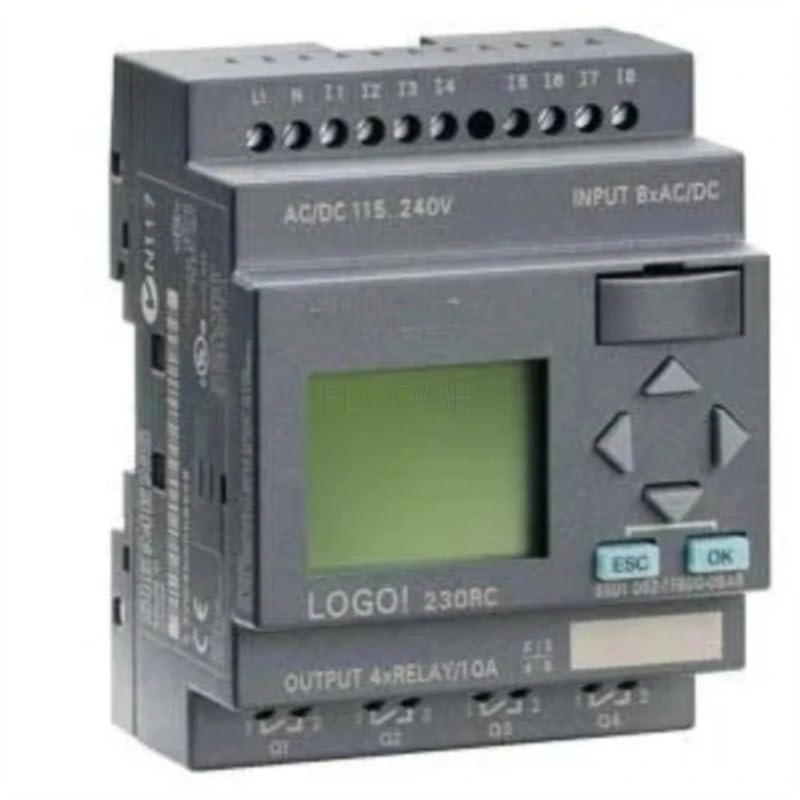
Figure 3.1: Glintique Logo! 230RC PLC module. This image shows the Glintique Logo! 230RC PLC module, a programmable logic controller designed for industrial automation applications. The module features input/output terminals and status indicators.
4. Setup
4.1 Mounting
Mount the PLC on a standard DIN rail in a control cabinet. Ensure adequate ventilation around the unit to prevent overheating. Maintain proper clearance from other heat-generating components.
4.2 Wiring
Connect the power supply to the designated terminals. The unit supports 115V/230V AC input. Connect your digital input devices (e.g., sensors, switches) to the 8 DI terminals and your output devices (e.g., relays, contactors) to the 4 DO relay terminals. Refer to the wiring diagram provided with your specific application for detailed connections. Ensure all connections are tight and correctly polarized.
- Power Supply: Connect 115V/230V AC to the L1 and N terminals.
- Digital Inputs (DI): Connect input signals to I1-I8.
- Digital Outputs (DO): Connect loads to Q1-Q4 relay outputs.
5. Operating
5.1 Programming
The Glintique Logo! 230RC PLC is programmed using compatible software (e.g., Siemens LOGO! Soft Comfort). Connect the PLC to your computer via the programming cable (sold separately). Develop your control logic using function block diagrams (FBD) or ladder logic (LAD) and download the program to the PLC.
5.2 Run Mode
After downloading the program, switch the PLC to RUN mode. The PLC will execute the loaded program, controlling the connected input and output devices according to your logic. Monitor the status indicators on the PLC for operational feedback.
5.3 Monitoring
Use the programming software to monitor the status of inputs, outputs, and internal variables in real-time. This helps in debugging and verifying the correct operation of your automation system.
6. Maintenance
6.1 Cleaning
Periodically clean the exterior of the PLC with a soft, dry cloth. Do not use abrasive cleaners or solvents. Ensure no dust or debris accumulates in the ventilation openings.
6.2 Inspection
Regularly inspect all wiring connections for tightness and signs of wear or damage. Check for any discoloration or unusual odors, which may indicate overheating. Ensure the operating environment remains within specified conditions.
6.3 Firmware Updates
Check the manufacturer's website for any available firmware updates. Follow the provided instructions carefully when performing updates to ensure proper functionality and security.
7. Troubleshooting
If you encounter issues with your Glintique Logo! 230RC PLC, refer to the following common troubleshooting steps:
- No Power: Verify the power supply connections and ensure the voltage is within the specified range (115V/230V AC). Check fuses or circuit breakers.
- Inputs Not Responding: Check the wiring of input devices. Ensure the input signals are within the PLC's specifications. Verify the program logic for correct input handling.
- Outputs Not Activating: Check the wiring of output devices. Ensure the loads are within the relay output ratings. Verify the program logic for correct output control.
- Communication Errors: Ensure the programming cable is securely connected. Verify the communication settings in the programming software.
- PLC Not Running Program: Ensure the PLC is in RUN mode. Check for any error indicators on the device. Re-download the program if necessary.
If the problem persists, contact technical support for further assistance.
8. Specifications
| Feature | Specification |
|---|---|
| Brand Name | Glintique |
| Part Number | Glintique-001 |
| Model | Glintique-001 |
| Unit Count | 1.0 Count |
| Manufacturer | Glintique |
| ASIN | B0F8451XQN |
| Digital Inputs (DI) | 8 |
| Digital Outputs (DO) | 4 (Relay) |
| Voltage | 115V/230V AC |
| Compatibility | 6ED1052-1FB00-0BA6, 0BA5, 0BA4 |
9. Warranty and Support
For warranty information, please refer to the terms and conditions provided at the time of purchase or contact your vendor. Glintique products are designed for durability and functionality. For technical support, troubleshooting assistance, or inquiries regarding your Glintique Logo! 230RC PLC, please contact Glintique customer service through their official channels.
Manufacturer: Glintique