
Tangkula AM10982HM
Tangkula 10 FT Solar Cantilever Patio Umbrella User Manual
Model: AM10982HM | Brand: Tangkula
Introduction
This manual provides detailed instructions for the assembly, operation, maintenance, and troubleshooting of your Tangkula 10 FT Solar Cantilever Patio Umbrella. Please read this manual thoroughly before assembly and use to ensure proper function and longevity of your product. This umbrella is designed to provide ample shade and ambient lighting for your outdoor spaces.
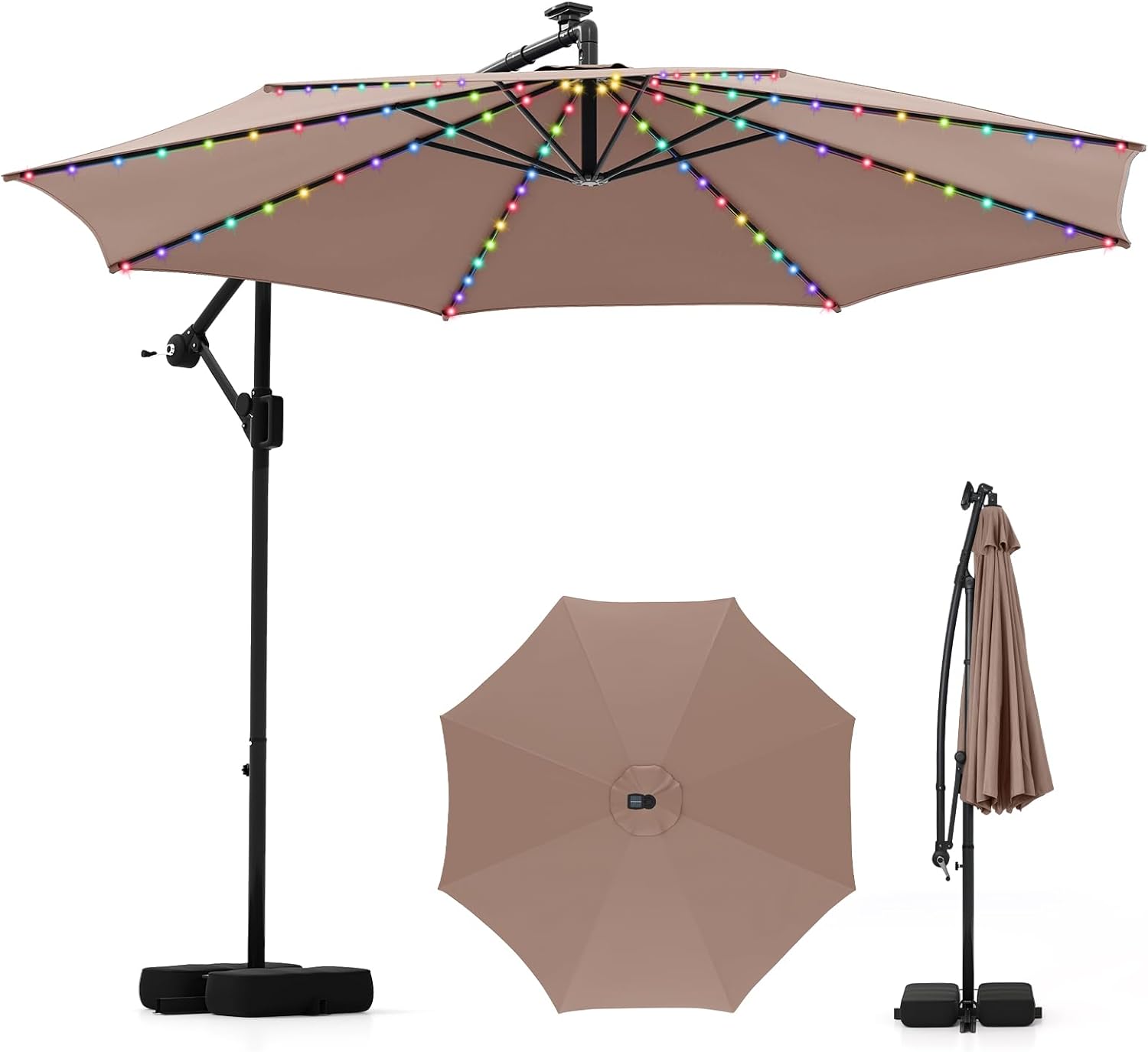
Image: The Tangkula 10 FT Solar Cantilever Patio Umbrella in its full form, showcasing its design and integrated LED lights.
Safety Information
- Always close the umbrella in severe weather conditions, including strong winds, heavy rain, or snow, to prevent damage to the umbrella and potential injury.
- Ensure the base is properly weighted with sandbags (up to 155 lbs) or other suitable weights to maintain stability.
- Do not hang objects from the umbrella ribs or frame.
- Keep children and pets away from the umbrella during opening, closing, and adjustment to prevent accidents.
- Regularly inspect all components for wear and tear. Do not use if any parts are damaged.
Package Contents
Please verify that all parts are present before beginning assembly:
- 1 x Patio Offset Umbrella
- 1 x User’s Manual
- 2 x Sandbags (for base weighting)
- Cross Base (pre-attached or separate, refer to specific packaging)
- All necessary hardware for assembly
Setup and Assembly
Assembly Instructions
Follow these steps to assemble your cantilever patio umbrella:
- Unpack all components and lay them out on a clean, flat surface. Identify all parts against the package contents list.
- Assemble the cross base if it is not pre-assembled. Ensure all connections are secure.
- Attach the main pole of the umbrella to the assembled cross base. Secure it firmly using the provided hardware.
- Carefully lift and attach the umbrella canopy assembly to the main pole. Ensure the locking mechanisms are engaged.
- Position the solar panel on top of the umbrella canopy, ensuring it is facing upwards to receive maximum sunlight. Connect any necessary wiring for the LED lights.
- Once assembled, ensure all bolts and fasteners are tightened securely.

Image: Illustration of the umbrella's robust metal ribs and the stable crossed base with sandbags, highlighting its sturdy construction.
Base Weighting
For optimal stability, especially in breezy conditions, fill the two included sandbags. Each sandbag can hold a significant amount of sand, with a combined capacity to withstand up to 155 lbs. Place the filled sandbags securely on the cross base.
Operating Instructions
Opening and Closing the Umbrella
The umbrella features a convenient crank handle for easy operation:
- To open the umbrella, turn the crank handle clockwise until the canopy is fully extended.
- To close the umbrella, turn the crank handle counter-clockwise until the canopy is fully retracted.
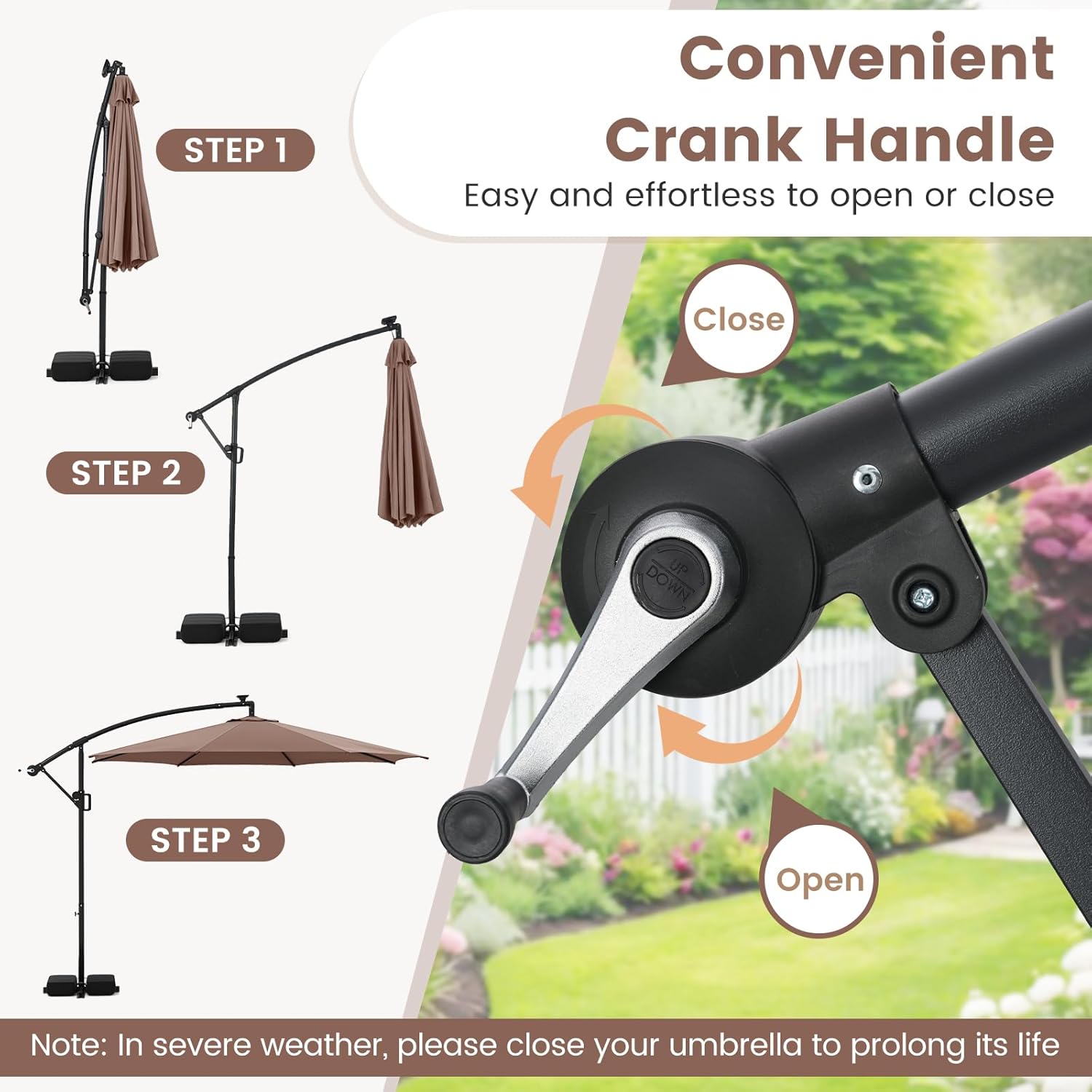
Image: Visual guide demonstrating the steps to open and close the umbrella using the crank handle.
Adjusting Tilt and Rotation
The umbrella offers infinite tilt and 360° rotation for optimal shade coverage throughout the day:
- To tilt the canopy, locate the locking mechanism on the main pole. Loosen the mechanism, then move the handle up or down to achieve the desired tilt angle. Securely tighten the locking mechanism once the desired angle is set.
- To rotate the canopy 360°, loosen the rotation locking mechanism (usually located near the base of the main pole). Gently rotate the entire canopy to the desired position, then tighten the locking mechanism to secure it.
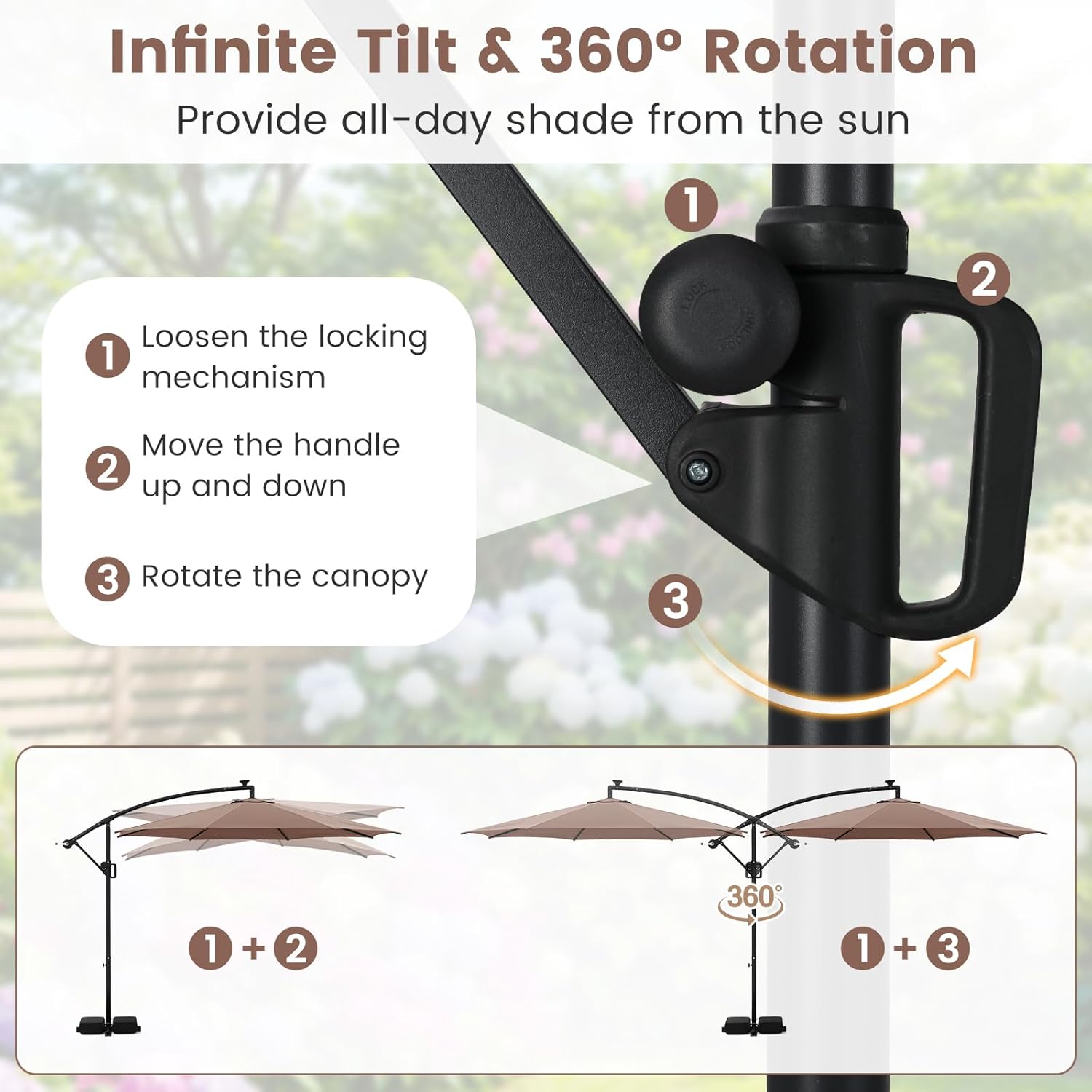
Image: Diagram illustrating the steps to loosen the locking mechanism, adjust the tilt, and rotate the umbrella canopy for 360-degree shade.
LED Lighting Operation
The umbrella is equipped with 96 multi-colored LED lights powered by a solar panel:
- Ensure the solar panel on top of the umbrella receives direct sunlight during the day for optimal charging. A full charge provides approximately 5 hours of illumination.
- To turn the lights on/off, use the handy switch located on the umbrella frame. A long press will toggle power.
- To adjust lighting modes, short press the switch. There are 9 available modes, including 4 static colors (red, blue, green, white), 4 dynamic modes, and 1 multi-color mode.

Image: Close-up views of the energy-saving solar panel, the 96 bright LED lights integrated into the ribs, and the handy control switch.
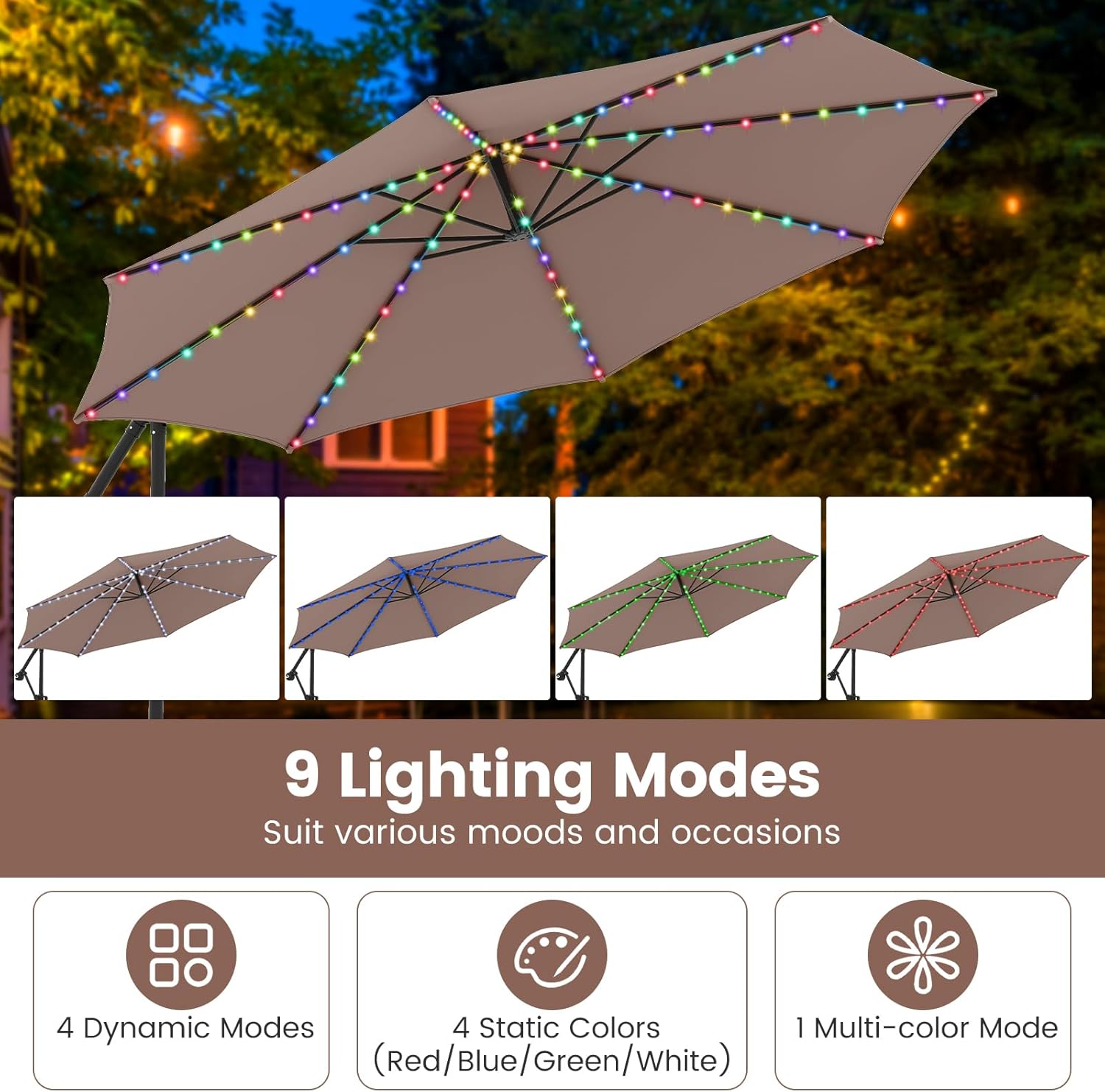
Image: Visual representation of the 9 different lighting modes available, including static colors and dynamic patterns.
Maintenance and Care
Canopy Care
The canopy is made of premium polyester fabric, designed to be sun-protective, fade-resistant, water-repellent, and tear-resistant.
- To clean the canopy, use a mild soap solution and a soft brush or cloth. Rinse thoroughly with clean water. Do not use harsh chemicals or abrasive cleaners.
- Allow the canopy to dry completely before closing or storing to prevent mildew.
- Regularly check the fabric for any signs of wear or damage.

Image: Close-up of the premium polyester fabric and an illustration of the top air vent for optimal airflow and heat dissipation.
Storage
When not in use for extended periods, or during off-season, it is recommended to:
- Close the umbrella completely.
- Cover the umbrella with a protective cover (not included) to shield it from dust, dirt, and harsh weather elements.
- Store the umbrella in a dry, sheltered location to prolong its lifespan.
Troubleshooting
If you encounter any issues with your umbrella, refer to the following common problems and solutions:
| Problem | Possible Cause | Solution |
|---|---|---|
| LED lights not working. | Solar panel not charged; switch off; faulty connection. | Ensure solar panel receives direct sunlight for several hours. Check if the switch is in the ON position. Verify all connections are secure. |
| Umbrella is unstable or tips over. | Insufficient base weight; strong winds. | Ensure sandbags are filled to maximum capacity (155 lbs total) and placed correctly on the cross base. Close the umbrella in windy conditions. |
| Crank handle is stiff or difficult to turn. | Mechanism needs lubrication; obstruction. | Apply a silicone-based lubricant to the moving parts of the crank mechanism. Check for any obstructions preventing smooth operation. |
| Canopy does not tilt or rotate smoothly. | Locking mechanism not fully loosened; debris. | Ensure the tilt and rotation locking mechanisms are fully loosened before attempting adjustment. Clean any debris from the adjustment areas. |
Specifications
| Feature | Detail |
|---|---|
| Product Dimensions | 10 x 8.5 ft (Dia. x H) |
| Umbrella Rim Height | 6.7 ft |
| Folding Size | 3 x 3 x 8.1 ft (L x W x H) |
| Net Weight | 33 lbs |
| Canopy Material | Polyester Fabric |
| Frame Material | Metal |
| Ribs | 8 Heavy-Duty Metal Ribs |
| LED Lights | 96 Multi-Colored Flowing LED Lights |
| Lighting Modes | 9 (4 static, 4 dynamic, 1 multi-color) |
| Power Source | Solar Panel |
| Base Weight Capacity | Up to 155 lbs (with 2 sandbags) |
| Tilt Adjustment | Infinite Tilt |
| Rotation | 360° Rotation |
| Model Number | AM10982HM |

Image: Detailed diagram showing the key dimensions of the umbrella, including diameter, height, and folded size.
Warranty and Support
For warranty information or technical support, please contact Tangkula customer service. Refer to your purchase documentation for specific warranty terms and contact details. You can also visit the official Tangkula store on Amazon for further assistance and product information:
Ask a question about this manual
Ask about setup, troubleshooting, compatibility, parts, safety, or missing instructions. Manuals+ will review the question and use this page’s manual context to help answer it.