
1. Introduction
This manual provides detailed instructions for the ZLKJ ZL-SW8 Smartwatch. Please read this manual thoroughly before using your device to ensure proper operation and to maximize its features. Keep this manual for future reference.

Image 1.1: Front view of the ZLKJ ZL-SW8 Smartwatch, showcasing its octagonal design, digital display with various metrics, and a pink silicone strap.
2. Package Contents
Verify that all items are present in your product package:
- ZLKJ ZL-SW8 Smartwatch
- Magnetic Charging Cable
- User's Manual (this document)
3. Product Overview
The ZLKJ ZL-SW8 is a 1.39-inch HD touchscreen smartwatch designed for versatile use. It features built-in GPS, Bluetooth calling, an AI voice assistant, and comprehensive health tracking capabilities. The watch is built with durability in mind, offering 3ATM waterproof protection and a rugged design suitable for various environments.

Image 3.1: Overview of the ZL-SW8 Smartwatch, emphasizing its 1.39-inch HD display, integrated GPS for precise positioning, and a 530 mAh battery for extended use.
4. Setup
4.1. Charging the Smartwatch
Before initial use, fully charge your ZL-SW8 Smartwatch. Connect the magnetic charging cable to the charging points on the back of the watch and plug the USB end into a standard USB power adapter (not included).
- Ensure the charging pins are clean and properly aligned.
- A charging indicator will appear on the watch screen.
- Full charge typically takes approximately 2 hours.
4.2. App Installation and Pairing
The ZL-SW8 Smartwatch uses the Da Fit application for full functionality and synchronization with your smartphone.
- Download the App: Search for "Da Fit" in the Apple App Store (for iOS devices) or Google Play Store (for Android devices) and install it.
- Create Account: Open the Da Fit app and follow the on-screen instructions to create an account or log in.
- Pair Device:
- Ensure your phone's Bluetooth is enabled.
- In the Da Fit app, navigate to the "Device" section and tap "Add Device."
- Select "ZL-SW8" from the list of available devices.
- Confirm the pairing request on both your phone and the smartwatch.
- Enable Bluetooth Calling: After initial pairing, go to your phone's Bluetooth settings and manually connect to "ZL-SW8_CALL" to enable the calling feature.
4.3. Customizing Watch Faces
Personalize your smartwatch by changing the watch face. The ZL-SW8 offers a variety of pre-installed faces and allows for custom options through the Da Fit app.
- On the Watch: Long-press the current watch face on the screen, then swipe left or right to browse and select a new face.
- Via Da Fit App: In the app, go to the "Dial Market" or "Watch Faces" section to explore over 100 styles or upload your own photo as a custom background.

Image 4.1: Examples of customizable watch faces available for the ZL-SW8 Smartwatch, including options for displaying various data points and personal images.
5. Operating Instructions
5.1. Basic Navigation
The ZL-SW8 features a responsive 1.39-inch HD touchscreen for intuitive control:
- Swipe Up/Down: Access quick settings or notifications.
- Swipe Left/Right: Navigate through widgets and main functions (e.g., activity tracking, heart rate, weather).
- Tap: Select an item or open an application.
- Press Side Buttons: The physical buttons on the side can be used for power on/off, returning to the home screen, or quick access to specific functions.
5.2. Bluetooth Calling
Once paired, you can make and receive calls directly from your wrist.
- Answering Calls: When a call comes in, tap the green answer icon on the watch screen.
- Making Calls: Access the dial pad or contact list on the watch to initiate a call.
- The built-in microphone and speaker allow for hands-free communication.

Image 5.1: Demonstration of Bluetooth calling and real-time notification display on the ZL-SW8 Smartwatch, showing how to manage calls and view messages directly from the wrist.
5.3. AI Voice Assistant
The ZL-SW8 integrates an AI voice assistant for convenient control.
- Activation: Access the AI voice assistant feature from the app menu or via a designated shortcut.
- Commands: Use voice commands to control music, check weather, set alarms, or ask general questions.

Image 5.2: The ZL-SW8's AI voice assistant in action, showing a query and its response, highlighting the quick answer feature.
5.4. Sport Modes and GPS Tracking
The smartwatch supports 107 sport modes and features built-in GPS for accurate activity tracking.
- Selecting a Mode: Navigate to the "Sport" menu on the watch and select your desired activity (e.g., running, cycling, swimming).
- GPS Tracking: For outdoor activities, the built-in GPS will record your route, distance, and pace without needing your phone.
- Data Sync: All activity data will sync to the Da Fit app for detailed analysis.

Image 5.3: The ZL-SW8 Smartwatch tracking various sports activities, demonstrating its capability to monitor steps, distance, calories, and duration across 100+ modes.
5.5. Health Monitoring
Monitor your daily steps, sleep patterns, and other health metrics.
- Step Tracking: The watch automatically counts your steps throughout the day.
- Sleep Tracking: Wear the watch to bed to monitor your sleep quality and patterns.
- View detailed reports in the Da Fit app.
5.6. Real-Time Notifications
Receive alerts for calls, messages, and app notifications directly on your wrist.
- Ensure notifications are enabled in the Da Fit app and your phone's settings.
- Customize which app notifications you wish to receive.
5.7. Tactical Flashlight
The ZL-SW8 includes a tactical flashlight function with multiple modes.
- SOS Mode: Three long flashes, three short flashes, three long flashes.
- High Beam: Constant bright light.
- Low Beam: Constant dim light.
- Warning Mode: Flashing alternately.
- Activate and cycle through modes by clicking the power button in the flashing state or on/off key.
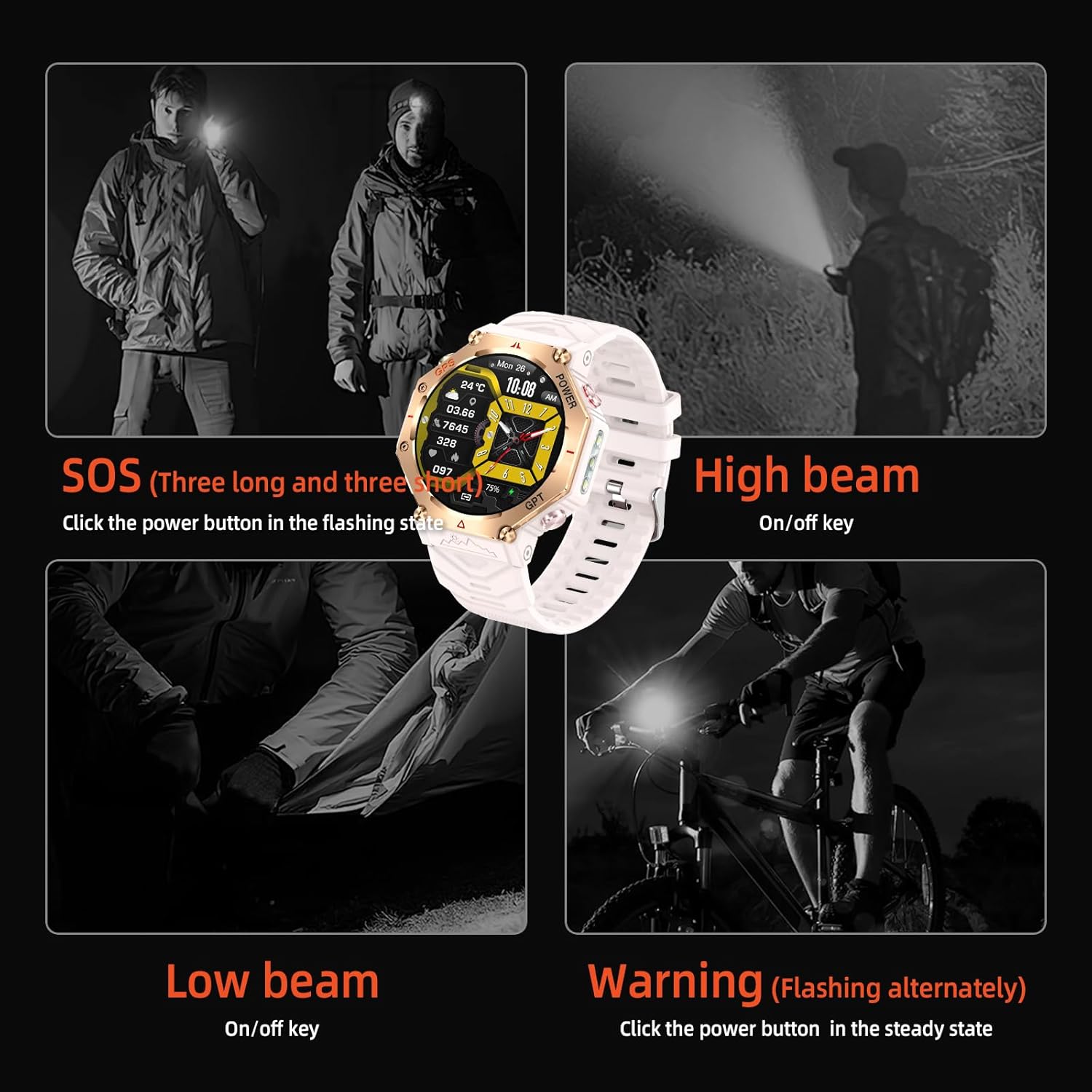
Image 5.4: Illustration of the ZL-SW8's tactical flashlight capabilities, including SOS, high beam, low beam, and warning (alternating flash) functions.
5.8. Other Applications
The smartwatch offers various built-in applications to enhance daily life.
- Games
- Female Physiology Tracker
- Camera Control
- Stocks
- World Clock
- Sedentary Reminder
- Smart Stopwatch
- Calculator
- Phone Finder
- Music Control
- Weather Updates
- Alarm Clock
- Do Not Disturb Mode
- Power Saving Mode
- Raise-to-Wake Function

Image 5.5: A visual representation of the diverse applications integrated into the ZL-SW8 Smartwatch, providing practical tools for daily use.
6. Maintenance
6.1. Water Resistance
The ZL-SW8 Smartwatch is rated 3ATM waterproof, meaning it can withstand splashes, rain, and brief immersion in water up to 30 meters. It is suitable for swimming.
- Do NOT use the watch in hot water, saunas, or steam rooms, as steam can penetrate the seals and cause damage.
- Avoid pressing buttons underwater.
- After exposure to saltwater, rinse the watch with fresh water and dry thoroughly.

Image 6.1: The ZL-SW8 Smartwatch demonstrating its IP68 waterproof capability during swimming, indicating its resilience against water exposure.
6.2. Cleaning
Regularly clean your smartwatch to maintain its appearance and functionality.
- Wipe the screen and body with a soft, damp, lint-free cloth.
- Clean the charging contacts periodically with a dry cloth to ensure good connection.
- Avoid using harsh chemicals or abrasive materials.
6.3. Battery Care
To prolong battery life:
- Avoid extreme temperatures.
- Do not leave the watch fully discharged for extended periods.
- Charge the watch regularly, even if not in daily use.

Image 6.2: Information on the ZL-SW8's long-lasting battery, detailing 30 days of standby time, 7-10 days of daily use, and 20 hours in GPS mode.
7. Troubleshooting
If you encounter issues with your ZL-SW8 Smartwatch, refer to the following common solutions:
7.1. Device Not Turning On
- Ensure the watch is fully charged. Connect it to the magnetic charging cable and a power source for at least 30 minutes.
- Press and hold the power button for 10-15 seconds to attempt a forced restart.
7.2. Pairing Issues / Bluetooth Disconnection
- Ensure Bluetooth is enabled on your smartphone and the watch is within range.
- Restart both your smartphone and the smartwatch.
- Forget the device in your phone's Bluetooth settings and re-pair through the Da Fit app.
- Ensure the Da Fit app has all necessary permissions enabled (location, Bluetooth, notifications).
7.3. Notifications Not Appearing
- Verify that notifications are enabled in the Da Fit app (Device > Notifications).
- Check your phone's system settings to ensure the Da Fit app has permission to send notifications.
- Ensure the watch is not in "Do Not Disturb" mode.
- Confirm the watch is properly connected via Bluetooth.
7.4. Inaccurate Health Tracking (Steps, Heart Rate, Sleep)
- Ensure the watch is worn snugly on your wrist, about one finger's width above the wrist bone.
- Clean the sensor on the back of the watch.
- Ensure your personal information (height, weight, age) is accurately entered in the Da Fit app.
- For sleep tracking, ensure you wear the watch continuously throughout the night.
7.5. Screen Unresponsive
- Restart the smartwatch.
- Ensure the screen is clean and dry.
8. Specifications
Key technical specifications for the ZLKJ ZL-SW8 Smartwatch:
| Feature | Specification |
|---|---|
| Model Number | ZL-SW8 |
| Display | 1.39 Inches HD Touchscreen (360*360 pixel resolution) |
| Connectivity | Bluetooth |
| Battery Capacity | 530 Milliamp Hours (Lithium Ion) |
| Battery Life | 7-10 Days (Daily Use), 30 Days (Standby), 20 Hours (GPS Mode) |
| Water Resistance | 3ATM |
| GPS | Built-in GPS (Dual-frequency, five-star, track return, track deviation) |
| Operating System | RTOS |
| Memory Storage Capacity | 128 MB |
| RAM Memory Installed Size | 578 KB |
| Compatibility | iOS 9 and above, Android 4.4 and above |
| Item Weight | 64 Grams (2.26 ounces) |
| Wrist Strap Size | 150-260mm |

Image 8.1: Product dimensions and key parameters of the ZL-SW8 Smartwatch.
9. Warranty and Support
Every ZLKJ ZL-SW8 Smartwatch undergoes rigorous quality checks. For your peace of mind, we provide comprehensive post-sale support.
- Warranty: The product includes a one-year warranty from the date of purchase.
- Customer Service: A dedicated customer service team is available 24/7 to assist you with any issues or questions. Please refer to the contact information provided with your purchase or on the official ZLKJ website for support.