
1. Product Overview
The Tangkula 10 FT Solar Patio Umbrella is designed to provide shade and ambient lighting for outdoor spaces. It features a cantilever design, a 10-foot diameter canopy, and integrated solar-powered LED lights with multiple lighting modes. The umbrella includes a cross base and sandbags for stability, and offers tilt adjustment and 360-degree rotation for optimal sun protection.

Image 1.1: The Tangkula 10 FT Solar Patio Umbrella providing shade and illumination in an outdoor setting.
2. Safety Instructions
- Always ensure the umbrella base is properly weighted and stable before use. The included sandbags are designed to hold up to 155 lbs of sand for enhanced stability.
- Do not use the umbrella in strong winds, heavy rain, or other severe weather conditions. Close and secure the umbrella to prevent damage or injury.
- Keep children and pets away from the umbrella during opening, closing, and adjustment to prevent accidents.
- Regularly inspect all components for wear, damage, or loose connections. Do not use if any part is compromised.
- Ensure adequate clearance around the umbrella when rotating or tilting to avoid striking objects or people.
3. Package Contents
Verify that all components are present before beginning assembly:
- 1 x Patio Offset Umbrella Canopy and Frame Assembly
- 1 x Cross Base
- 2 x Sandbags (for weighting the base)
- 1 x User’s Manual (this document)
4. Assembly Instructions
Assembly of the Tangkula Solar Patio Umbrella is straightforward. Follow these steps:
- Prepare the Base: Place the cross base in your desired location. Fill the two included sandbags with sand (up to 155 lbs total) and place them securely onto the cross base to provide stability.
- Attach the Main Pole: Insert the main pole of the umbrella frame into the center of the weighted cross base. Secure it using the provided washers and bolts. Ensure the pole is firmly attached and upright.
- Position the Umbrella: Ensure the umbrella canopy is positioned on the opposite side of the crank handle for correct operation.
- Final Checks: Double-check all connections to ensure they are tight and secure before proceeding to operate the umbrella.
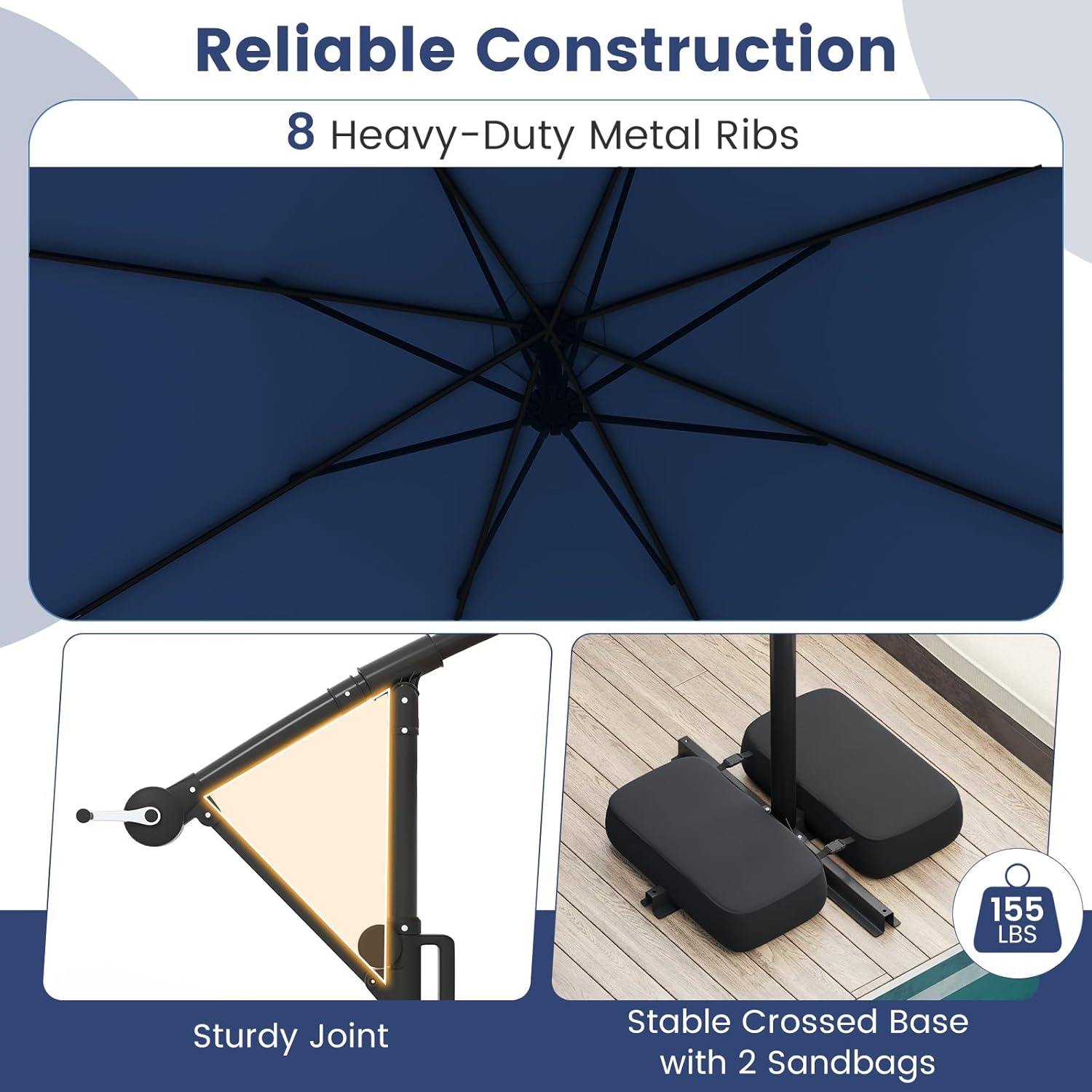
Image 4.1: Illustration of the umbrella's robust construction, including metal ribs and the weighted cross base.
5. Operating Instructions
5.1. Opening and Closing the Umbrella
The umbrella features a convenient crank handle for easy operation.
- To Open: Rotate the crank handle clockwise until the canopy is fully extended.
- To Close: Rotate the crank handle counter-clockwise until the canopy is fully retracted.
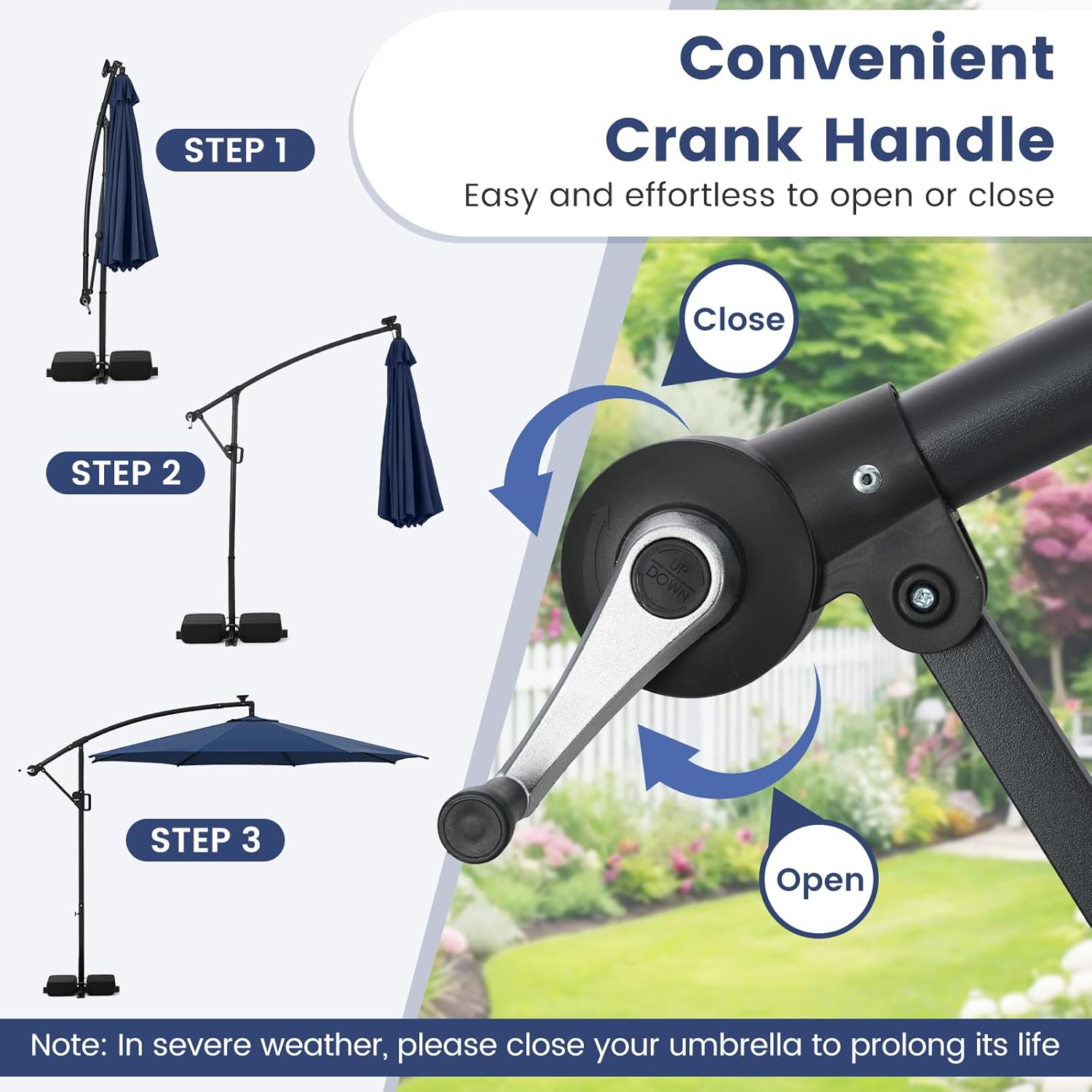
Image 5.1: Visual guide for operating the crank handle to open and close the umbrella.
5.2. Adjusting Tilt and Rotation
The umbrella offers infinite tilt and 360-degree rotation for flexible shade coverage.
- To Tilt: Loosen the locking mechanism on the main pole. Move the handle up or down to achieve the desired tilt angle. Once set, tighten the locking mechanism to secure the position.
- To Rotate: Loosen the locking mechanism on the main pole. Carefully rotate the entire canopy to the desired direction. Once positioned, tighten the locking mechanism to secure it.

Image 5.2: Instructions for adjusting the umbrella's tilt and 360-degree rotation.
5.3. Using the LED Lights
The umbrella is equipped with 96 multi-colored LED lights powered by a solar panel.
- Charging: Ensure the solar panel located on top of the umbrella receives direct sunlight during the day for optimal charging. A full charge provides approximately 5 hours of illumination.
- Operation: Use the handy switch located on the umbrella frame to control the lights.
- Modes: Short press the switch to cycle through 9 lighting modes, including 4 static colors (red, blue, green, white), 4 dynamic modes, and 1 multi-color mode. Long press the switch to turn the lights on or off.

Image 5.3: Overview of the 9 distinct lighting modes for the LED lights.
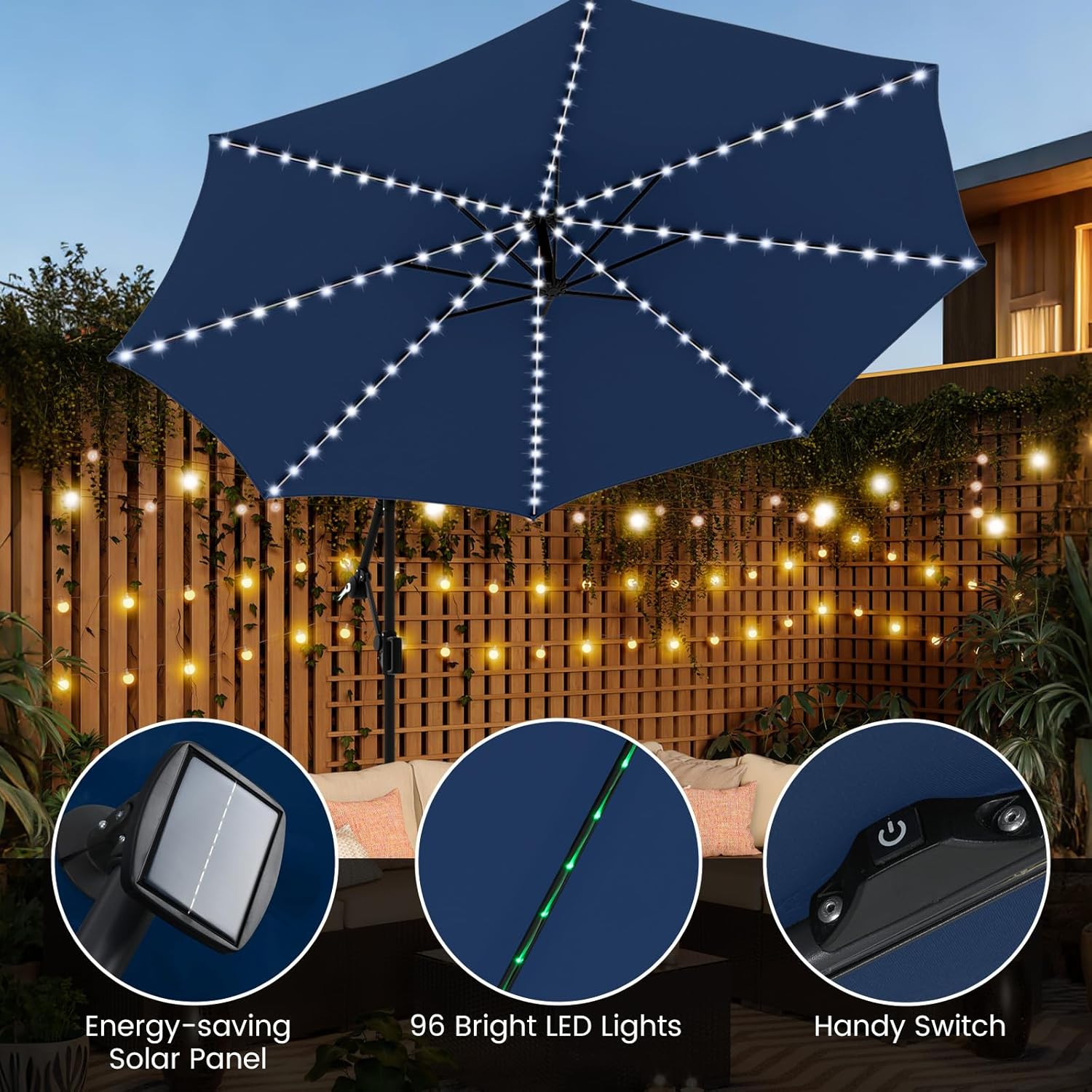
Image 5.4: Details of the solar panel, LED lights, and control switch.
Video 5.1: Demonstration of the multi-colored flowing LED lights on the umbrella.
6. Maintenance and Care
- Cleaning: Wipe the canopy and frame with a damp cloth as needed. For stubborn dirt, use a mild soap solution and rinse thoroughly. Allow to air dry completely before closing or storing.
- Storage: When not in use for extended periods or during severe weather, close the umbrella and store it in a dry, protected area. Consider using a protective cover to prolong its lifespan.
- Inspection: Periodically check all screws, bolts, and connections to ensure they remain tight. Inspect the canopy fabric for any tears or damage.
- Solar Panel: Keep the solar panel clean and free of debris to ensure efficient charging of the LED lights.
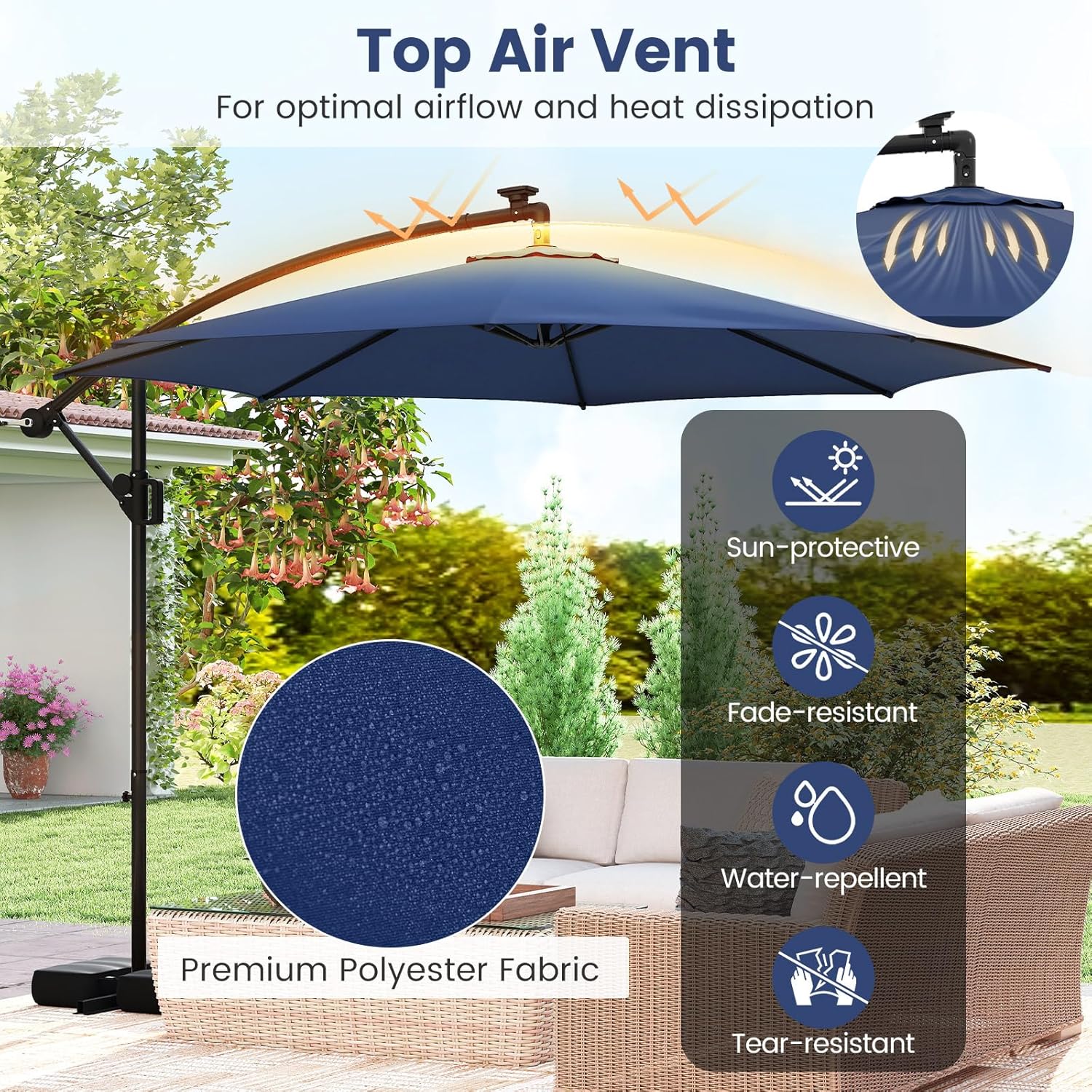
Image 6.1: Features of the canopy fabric, highlighting its durability and weather resistance.
7. Troubleshooting
| Problem | Possible Cause | Solution |
|---|---|---|
| Umbrella is unstable or sways in light wind. | Base not sufficiently weighted. | Ensure sandbags are filled to their maximum capacity (155 lbs total) and properly placed on the cross base. |
| Difficulty opening or closing the umbrella. | Crank mechanism may be stiff or obstructed. | Apply a silicone-based lubricant to the crank mechanism. Check for any obstructions in the canopy's movement. |
| LED lights are not turning on or are dim. | Insufficient solar charge; dirty solar panel; switch off. | Ensure the solar panel is clean and exposed to direct sunlight for several hours. Verify the handy switch is in the 'ON' position. |
| Umbrella does not hold its tilted or rotated position. | Locking mechanism is loose. | Tighten the locking mechanism firmly after adjusting the tilt or rotation. |
8. Specifications

Image 8.1: Detailed product dimensions of the umbrella.
| Feature | Detail |
|---|---|
| Brand | Tangkula |
| Model Number | AM10982HM |
| Color | Navy |
| Product Dimensions (Dia. x H) | 10 ft x 8.5 ft |
| Umbrella Rim Height | 6.7 ft |
| Folding Size (L x W x H) | 3 ft x 3 ft x 8.1 ft |
| Net Weight | 33 lbs |
| Canopy Material | Polyester Fabric |
| Frame Material | Metal |
| Shaft Material | Metal |
| Handle Material | Plastic |
| Special Features | Cantilever, Solar-powered LED Lights (96 lights, 9 modes), Tilt Adjustment, 360° Rotation, Air Vent |
| Opening Mechanism | Crank Lift |
| Umbrella Tilt Mechanism | Manual Tilt |
| Base Weight Capacity | Up to 155 lbs (with sandbags) |
9. Warranty and Support
For warranty information or technical support, please refer to the purchase documentation or contact Tangkula customer service directly. Contact details can typically be found on the retailer's website or your order confirmation.