
DongBlitz B0F83XBPQK
DongBlitz Phone Game Controller Instruction Manual
Model: B0F83XBPQK
Product Overview
The DongBlitz Phone Game Controller is designed to transform your mobile device into a powerful gaming console. It offers precise control and an ergonomic design for extended gaming sessions. This controller is compatible with a wide range of mobile devices, including Android phones, iPhone 15/16 series, and certain iPad Mini and Android tablets.

Image: The DongBlitz Phone Game Controller in black, holding a smartphone horizontally, showcasing its design and how a phone fits into the device.
Key Features:
- Dual Connectivity: Supports both USB Type-C wired and wireless connections for versatile compatibility.
- Ergonomic Design: Lightweight with an extended grip and laser-engraved textured surface for comfortable long gaming sessions.
- Audio Support: Integrated 3.5mm headphone jack for immersive audio and clear communication.
- Pass-through Charging: Allows charging your device while playing, ensuring uninterrupted gameplay.
- Wide Game Compatibility: Standard button layout and dual joysticks support a broad range of mobile games and emulators.
- Turbo Function: Customizable Turbo function for enhanced gameplay.
- Hall Effect Joysticks & Triggers: Features dual Hall Effect joysticks for no dead zone and no drift, and double mode Hall Effect triggers for precise control in various game genres.
- Programmable Macro Keys: Adjustable macro back keys for personalized control.
- Interchangeable Components: D-pad and left stick are interchangeable, as are the A-B-X-Y button layouts.
Setup Guide
Follow these steps to set up your DongBlitz Phone Game Controller for optimal use.
1. Device Compatibility
The controller is compatible with:
- Android devices
- iPhone 15/16 series
- iPad Mini 6/7
- Mini Android Tablets
- Supports PS Remote Play.

Image: The controller shown with both a smartphone and a tablet, illustrating its multi-device compatibility.

Image: A diagram illustrating the adjustable phone slot of the controller, indicating compatibility with phones ranging from 4.5 to 7.5 inches, including those with multiple cameras and cases.
2. Connecting Your Device
The controller offers both wired and wireless connection options:
- Wired Connection (USB Type-C): Simply insert your compatible smartphone or tablet into the controller's USB-C port. The controller is plug-and-play, meaning it should be recognized automatically by your device.
- Wireless Connection: The controller also supports wireless connectivity. Refer to your device's Bluetooth settings to pair the controller. Note: Some games may only support Bluetooth mode or direct connection mode. If a game does not respond, try switching connection modes.

Image: A close-up of the controller's right grip, illustrating the USB-C port for wired connection and an icon representing wireless connection, emphasizing dual connectivity.
3. Charging and Audio
- Pass-through Charging: The controller features a Type-C charging port. Connect your device's charging cable to this port to charge your phone or tablet while actively gaming. This ensures uninterrupted gameplay during long sessions.
- 3.5mm Audio Jack: For an immersive audio experience, plug your headphones into the 3.5mm audio jack located on the controller. This allows for clear game audio and communication in multiplayer games.

Image: Two detailed views of the controller's features: one showing the 3.5mm audio jack with a headphone plug inserted, and another showing the Type-C charging port with a charging cable connected, highlighting pass-through charging.
Operating Instructions
Familiarize yourself with the controller's functions and advanced features.
1. Basic Controls
The controller features a standard button layout including X, Y, A, B buttons, a D-pad, and dual joysticks. These are universally recognized by most mobile games and emulators.

Image: The controller with a phone and tablet displaying various gaming platforms, including PS Remote Play, Xbox Remote Play, Steam Link, Rainway, Google Stadia, Nvidia GeForce Now, X-box Game Pass, and Amazon Luna, indicating broad compatibility.
2. Advanced Features
- Dual Hall Effect Joysticks: These joysticks provide high-precision control with no dead zone and no drift, ensuring accurate and responsive movements in games.
- Double Mode Hall Effect Triggers: The triggers offer both analog mode (ideal for racing games) and hair trigger mode (perfect for FPS and action games), allowing for versatile gameplay.
- Programmable Macro Back Keys: The controller features customizable back keys. Adjust them according to your preferences to enhance gameplay smoothness and execute complex commands with ease.
- Turbo Function: Activate the Turbo function by setting the M + A/B/X/Y/LB/RB/LT/RT buttons. This allows for rapid, repeated input of a button press. To change the ABXY layout, press M+A.
- Interchangeable D-pad and Left Stick: Customize your control scheme by swapping the D-pad and left joystick positions.
- Interchangeable A-B-X-Y Layout: The physical A, B, X, Y buttons can be reconfigured to match different regional layouts or personal preferences.
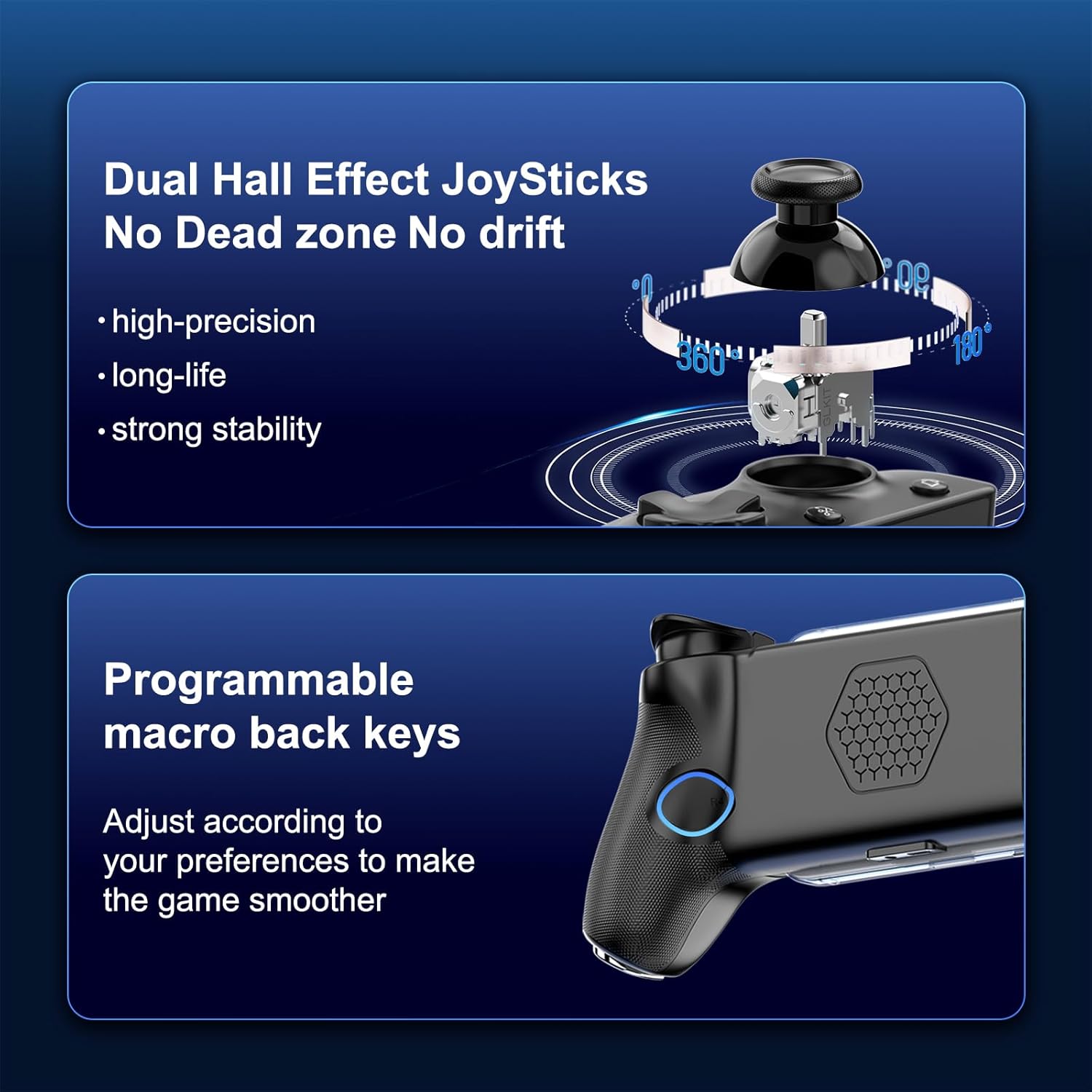
Image: Diagrams illustrating the internal mechanism of the Dual Hall Effect Joysticks for precision and stability, and a view of the programmable macro back keys on the controller's grip.

Image: A cutaway view of the controller's trigger mechanism, demonstrating the Double Mode Hall Effect Triggers with examples for analog mode (racing) and hair trigger mode (FPS/action).

Image: A collage of six images demonstrating advanced features: Anti-Slide design, Heat Dissipation Holes, Programmable macro back keys, Turbo/Auto function, D-pad and Left stick interchangeability, and Interchangeable A-B-X-Y button layout.
Maintenance
Proper maintenance ensures the longevity and optimal performance of your DongBlitz Phone Game Controller.
- Cleaning: Use a soft, dry cloth to wipe down the controller regularly. For stubborn dirt, slightly dampen the cloth with water. Avoid using harsh chemicals, abrasive cleaners, or solvents, as these can damage the surface and internal components.
- Storage: When not in use, store the controller in a cool, dry place away from direct sunlight, extreme temperatures, and excessive humidity.
- Handling: Avoid dropping the controller or subjecting it to strong impacts, which can damage internal circuitry or external components.
- Port Care: Keep the USB-C port and 3.5mm audio jack free of dust and debris. Use a can of compressed air if necessary to clear out any obstructions.
Troubleshooting
If you encounter issues with your controller, refer to the following common troubleshooting steps.
- Controller Not Responding:
- Ensure your device is securely connected to the controller via USB-C or properly paired via Bluetooth.
- Check if your device's operating system (Android/iOS) is up to date.
- Restart your mobile device and the controller.
- Verify that the game you are playing supports external controllers. Some games may require specific settings to enable controller input.
- Lag or Input Delay:
- If using a wireless connection, ensure there are no strong interference sources nearby.
- Try switching to a wired USB-C connection to eliminate potential wireless interference.
- Close any unnecessary background applications on your mobile device to free up resources.
- Buttons or Joysticks Not Working Correctly:
- Ensure no debris is lodged around the buttons or joysticks.
- Test the controller with a different game or application to determine if the issue is specific to one game.
- Perform a factory reset on the controller if such a function is available (refer to specific product documentation if provided, otherwise assume general reset).
- Charging Issues:
- Ensure the USB-C cable is fully inserted into both the controller's pass-through port and the power source.
- Try a different USB-C cable and power adapter.
- Clean the USB-C port on the controller and your device.
If these steps do not resolve your issue, please contact customer support for further assistance.
Specifications
| Attribute | Detail |
|---|---|
| Model Number | B0F83XBPQK |
| Brand | DongBlitz |
| Product Dimensions | 8.5 x 4.3 x 2.3 inches |
| Item Weight | 10.8 ounces |
| Connectivity | USB Type-C Wired, Wireless |
| Audio Port | 3.5mm Headphone Jack |
| Charging | Pass-through Type-C Charging |
| Joystick Type | Hall Effect Joysticks (No Dead Zone, No Drift) |
| Trigger Type | Double Mode Hall Effect Triggers (Analog/Hair Trigger) |
| Compatibility | Android, iPhone 15/16 Series, iPad Mini 6/7, Mini Android Tablets, PS Remote Play |
| Special Features | Programmable Macro Back Keys, Turbo Function, Interchangeable D-pad/Left Stick, Interchangeable A-B-X-Y Layout, Anti-Slide Design, Heat Dissipation Holes |
| First Available Date | May 8, 2025 |
Warranty and Support
Warranty Information
This product may be eligible for extended protection plans. Please refer to your purchase documentation or the retailer's website for details on available warranty and protection plan options.
- 2-Year Protection Plan: Available for purchase.
- 3-Year Protection Plan: Available for purchase.
- Complete Protect: A monthly plan covering eligible past and future purchases.
Standard return policy allows for refund/replacement within 30 days of purchase.
Customer Support
For technical assistance, troubleshooting not covered in this manual, or warranty claims, please contact DongBlitz customer support. Refer to the contact information provided with your product packaging or visit the official DongBlitz website for support details.
Manufacturer: DongBlitz
Ask a question about this manual
Ask about setup, troubleshooting, compatibility, parts, safety, or missing instructions. Manuals+ will review the question and use this page’s manual context to help answer it.