
1. Safety Instructions
Please read all safety instructions carefully before using the ZYXMLZ Desk Fan FT06. Keep this manual for future reference.
- Do not insert fingers or foreign objects into the fan grille.
- Keep the fan away from water or other liquids to prevent electric shock.
- Do not use the fan in excessively humid or dusty environments.
- Ensure the power source matches the fan's voltage requirements.
- Unplug the fan before cleaning or when not in use for extended periods.
- Do not attempt to disassemble or repair the fan yourself. Contact qualified service personnel.
- Keep out of reach of children and pets.
2. Package Contents
Verify that all items are present in the package:
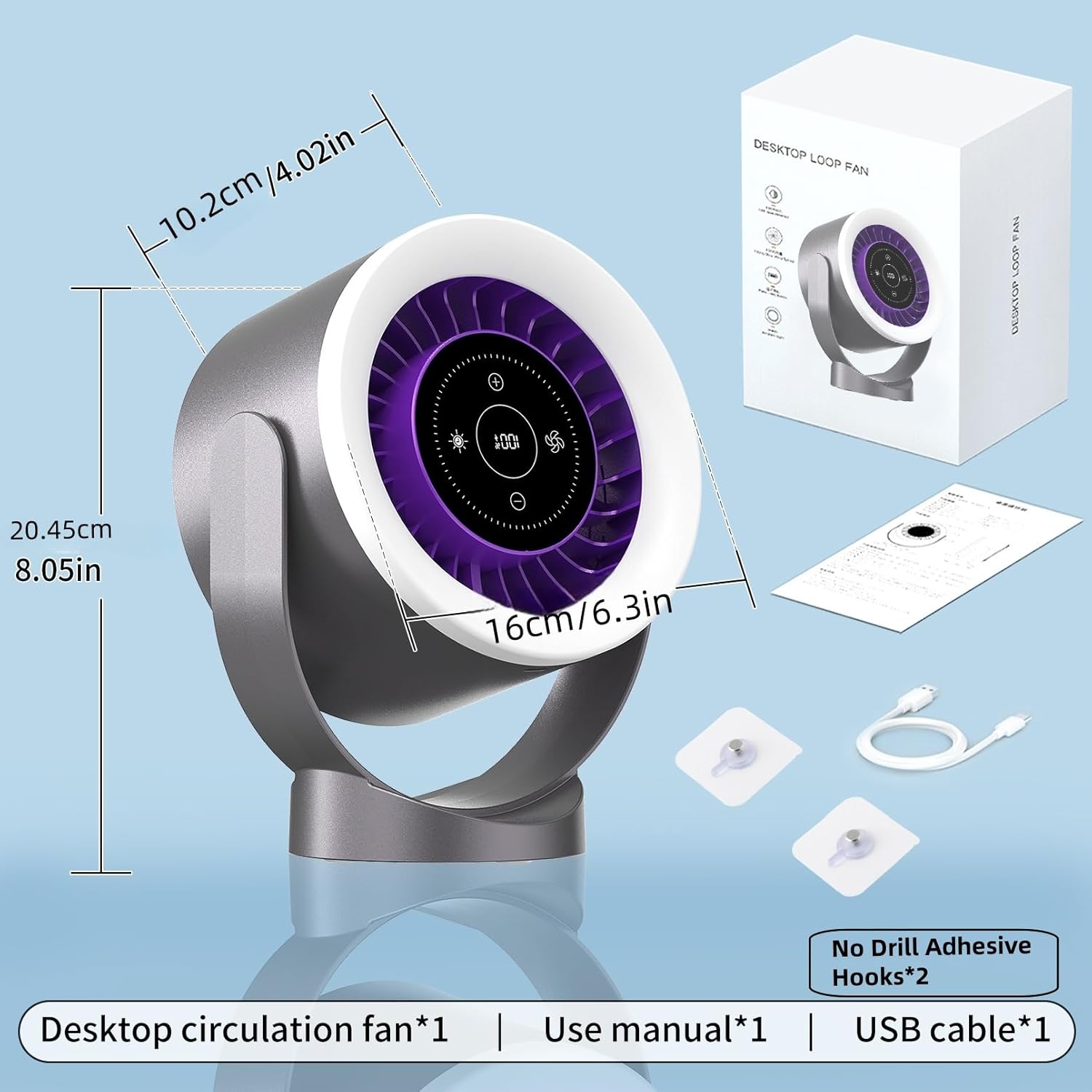
- ZYXMLZ Desk Fan FT06 (1 unit)
- USB Type-C Charging Cable (1 unit)
- No-Drill Adhesive Hooks (2 units)
- User Manual (1 unit)

3. Product Overview
Familiarize yourself with the components of your ZYXMLZ Desk Fan FT06.

Control Panel Features:
- Power Button: Turns the fan on or off.
- Fan Speed Adjustment (+/-): Increases or decreases fan speed (1-100 levels).
- Night Light Button: Activates or deactivates the night light.
- Night Light Brightness Adjustment (+/-): Adjusts night light brightness (1-100%).
- Timer Button: Sets the automatic shut-off timer.
- Battery Level Indicator: Displays current battery charge.
4. Setup
4.1 Tabletop Placement
Place the fan on a stable, flat surface. Adjust the fan head to your desired angle for optimal airflow. The fan supports 360° manual angle adjustment.

4.2 Wall Mount Installation
The fan can be mounted on a wall using the provided adhesive hooks. Ensure the surface is clean and dry before applying the hooks.
- Clean the desired wall surface thoroughly.
- Peel off the protective backing from the adhesive hooks.
- Press the hooks firmly onto the wall, ensuring they are level and spaced appropriately for the fan's mounting holes.
- Wait for at least 24 hours for the adhesive to fully cure before hanging the fan.
- Carefully hang the fan onto the hooks.

5. Operating Instructions
5.1 Power On/Off
Lightly touch the power button icon on the LED touch screen to turn the fan on or off.
5.2 Fan Speed Adjustment
The fan offers 1 to 100 speed levels. Use the '+' and '-' icons on the touch screen to increase or decrease the fan speed. The current speed level will be displayed digitally.
5.3 Night Light Control
Touch the light bulb icon to turn the night light on or off. Use the '+' and '-' icons next to the light bulb to adjust the brightness from 1% to 100%. The night light provides a soft, ambient glow.

5.4 Timer Function
Press the timer icon to set an automatic shut-off timer. Available timer settings typically range from 30 to 180 minutes. The fan will automatically turn off after the set duration.
5.5 Memory Function
The fan remembers your last used fan speed and night light settings, eliminating the need to reconfigure them each time you turn it on.
6. Charging
The ZYXMLZ Desk Fan FT06 is equipped with a 4000 mAh rechargeable battery and supports USB Type-C fast charging.
- Connect the provided USB Type-C cable to the charging port on the fan.
- Connect the other end of the cable to a compatible USB power adapter (not included) or a computer USB port.
- The battery level indicator on the LED screen will show the charging status.
- A full charge typically takes approximately 3 hours.
- The fan can be used while charging.
7. Maintenance
Regular cleaning helps maintain optimal performance and extends the lifespan of your fan.
- Cleaning the Exterior: Wipe the exterior surfaces with a soft, damp cloth. Do not use abrasive cleaners or solvents.
- Cleaning the Fan Grille: Use a soft brush or a vacuum cleaner with a brush attachment to remove dust from the fan grille. Do not attempt to remove the grille or fan blades.
- Storage: When not in use, store the fan in a cool, dry place, away from direct sunlight and extreme temperatures.
8. Troubleshooting
Refer to the table below for common issues and their solutions.
| Problem | Possible Cause | Solution |
|---|---|---|
| Fan does not turn on. | Low battery or not charged. | Charge the fan using the USB Type-C cable. |
| Fan does not turn on. | Power button not pressed correctly. | Ensure a firm touch on the power icon on the LED screen. |
| Weak airflow. | Low fan speed setting. | Increase the fan speed using the '+' icon on the touch screen. |
| Weak airflow. | Fan grille is obstructed or dirty. | Clean the fan grille to remove dust or obstructions. |
| Night light not working. | Night light is turned off or brightness is set to 0%. | Touch the light bulb icon to turn on the night light and adjust brightness with the '+' icon. |
| Fan makes unusual noise. | Foreign object in the fan. | Turn off and unplug the fan. Carefully check for and remove any foreign objects. If noise persists, contact support. |
9. Specifications
Detailed technical specifications for the ZYXMLZ Desk Fan FT06.
| Feature | Detail |
|---|---|
| Brand | ZYXMLZ |
| Model Number | FT06 |
| Model Name | FAN-THS |
| Color | Iron Gray |
| Power Source | Battery Powered (USB Rechargeable) |
| Battery Capacity | 4000 mAh |
| Charging Time | Approx. 3 hours |
| Operating Time | 3 hours (high speed) to 13 hours (low speed) |
| Fan Speed Levels | 1-100 |
| Noise Level | <30 dB |
| Control Method | Touch Screen |
| Special Features | Adjustable Tilt (360°), LED Night Light (1-100% brightness), Portable, Quiet Operation, Timer (30-180 min), Memory Function |
| Mounting Type | Tabletop Mount, Wall Mount |
| Product Dimensions (D x W x H) | 4.01" x 6.3" x 8.05" (10.2cm x 16cm x 20.45cm) |
| Item Weight | 0.76 Kilograms (1.68 lbs) |
| Material | Plastic |
10. Warranty and Support
The ZYXMLZ Desk Fan FT06 comes with a standard manufacturer's warranty. For specific warranty details, please refer to the warranty card included in your package or contact ZYXMLZ customer support.
If you encounter any issues or have questions regarding your product, please contact our customer support team:
- Email: support@zyxmlz.com
- Website: www.zyxmlz.com/support
Please have your model number (FT06) and purchase date ready when contacting support.