
MechLands AF98 Plus
AJAZZ AF98 Plus Membrane Keyboard User Manual
Model: AF98 Plus
1. Introduction
The AJAZZ AF98 Plus is a versatile tri-mode wireless gaming keyboard designed for a smooth and quiet typing experience. It features a high-quality membrane structure, offering tactile feedback with reduced noise and finger fatigue. This keyboard supports Bluetooth 5.0, 2.4G wireless, and USB-C wired connections, making it compatible with Windows, Mac, and iOS devices. Key features include a 4000mAh battery, customizable RGB backlighting, a convenient volume knob, and adjustable ergonomics for extended comfort.

The AJAZZ AF98 Plus keyboard highlighting its key features: Tri-Mode Connectivity, Volume Knob, Shortcut Buttons, Adjustable Ergonomics, 4000mAh Battery, and RGB Backlighting.
2. Setup
2.1. Unboxing and Package Contents
Upon opening the package, ensure all components are present:
- AJAZZ AF98 Plus Keyboard
- USB-C Cable
- 2.4G Wireless Receiver (typically stored in the keyboard's receiver slot)
- User Manual (this document)

Image showing the AJAZZ AF98 Plus keyboard, USB cable, and user manual, representing the typical packing list.
2.2. Initial Charging
Before first use, it is recommended to fully charge the keyboard. Connect the provided USB-C cable to the keyboard's USB-C port and the other end to a USB power source (e.g., computer USB port, wall adapter). The charging indicator will show the charging status.
2.3. Adjusting Kickstands
For ergonomic comfort, the keyboard features adjustable kickstands on the underside. Flip them out to achieve your preferred typing angle.

Close-up view of the adjustable kickstands on the underside of the keyboard, allowing users to set their preferred typing angle.
3. Operating Instructions
3.1. Tri-Mode Connectivity
The AF98 Plus keyboard offers three connection modes: 2.4G Wireless, Bluetooth, and Wired (USB-C). Use the mode switch buttons located near the volume knob to select your desired connection.

Diagram illustrating the tri-mode connectivity of the keyboard, compatible with Windows, Android, Mac OS, iOS, and various devices like Tablets, Laptops, Phones, and PCs.
3.1.1. 2.4G Wireless Mode
- Locate the 2.4G wireless receiver, usually stored in a dedicated slot on the keyboard's underside.
- Plug the 2.4G receiver into an available USB port on your computer.
- Slide the mode switch on the keyboard to the '2.4G' position. The keyboard will automatically connect.

Image showing the dedicated storage slot for the 2.4G wireless receiver on the underside of the keyboard.
3.1.2. Bluetooth Mode
The keyboard supports two Bluetooth connections (BT1 and BT2).
- Slide the mode switch on the keyboard to either 'BT1' or 'BT2' position.
- Press and hold the corresponding Bluetooth switch button (BT1 or BT2) for 3-5 seconds until the indicator light flashes rapidly, indicating pairing mode.
- On your device (computer, tablet, smartphone), go to Bluetooth settings and search for 'AJAZZ AF98 Plus' (or similar).
- Select the keyboard to pair. The indicator light will become solid once connected.
- To switch between paired Bluetooth devices, simply press the BT1 or BT2 button once.
3.1.3. Wired (USB-C) Mode
- Connect the provided USB-C cable to the keyboard's USB-C port.
- Connect the other end of the USB-C cable to a USB port on your computer.
- The keyboard will automatically switch to wired mode and function as a plug-and-play device.

Close-up view of the keyboard's connectivity hub, showing the USB-C port and the ON/OFF/mode switches.
3.2. Multimedia Controls
The AF98 Plus features a multi-functional volume knob and dedicated shortcut keys for enhanced control.
- Volume Knob: Rotate clockwise to increase volume, counter-clockwise to decrease volume. Press the knob to mute/unmute audio.
- Shortcut Keys: Dedicated keys provide quick access to functions like play/pause and screen lock, streamlining your workflow.
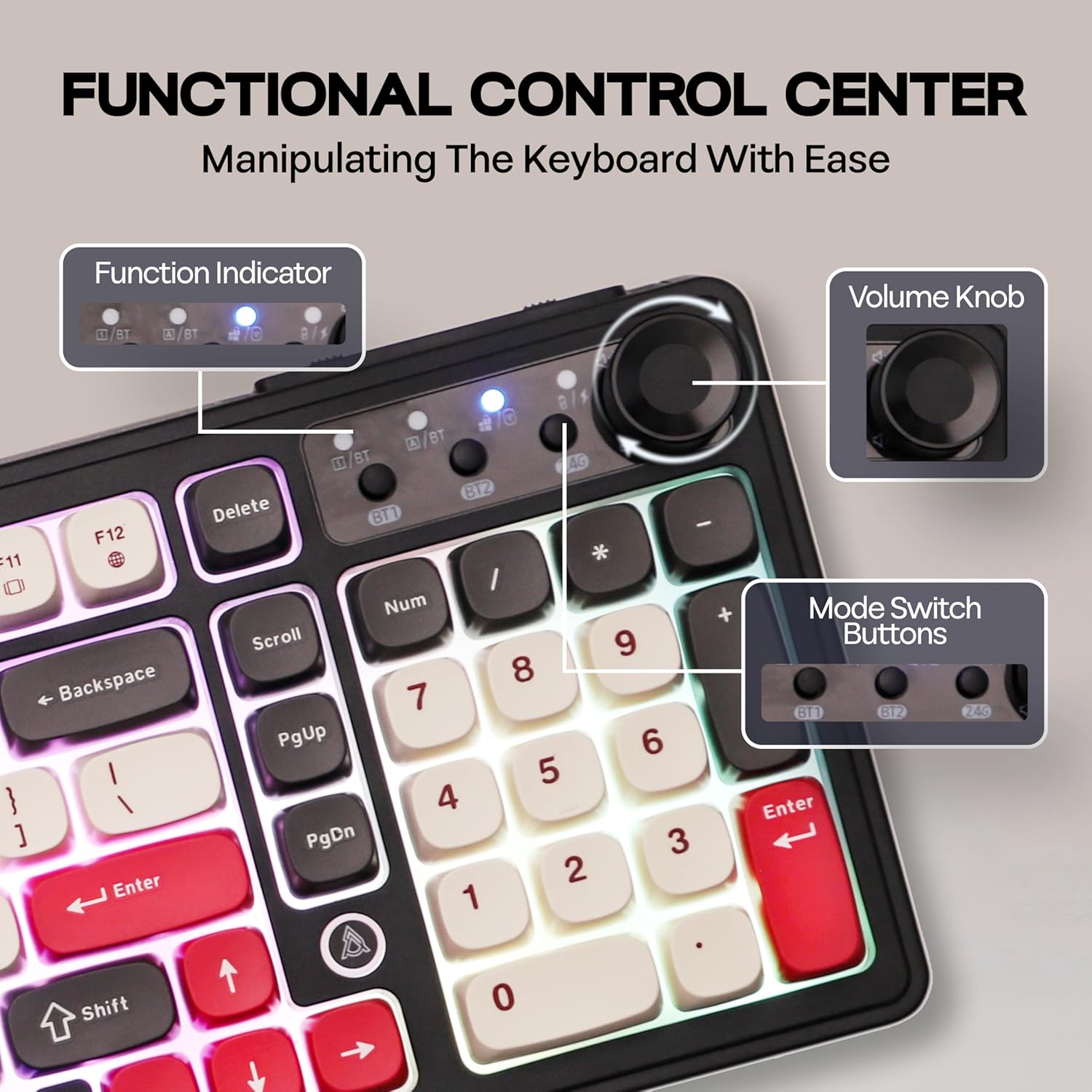
Detailed view of the keyboard's functional control center, highlighting the function indicators, volume knob, and mode switch buttons (BT1, BT2, 2.4G).
3.3. RGB Backlighting
The keyboard features 16.8 million RGB backlights with various customizable options.
- Toggle Backlight Effects: Press Fn + |\ to cycle through different lighting effects.
- Toggle Backlight Colors: Press Fn + O to change the backlight color.
- Turn Lights ON/OFF: Press Fn + P to turn the backlighting on or off.
For advanced customization, you can use the online software provided by the manufacturer. This software allows for detailed system and backlight settings.

The keyboard displaying its vibrant 16.8M RGB backlights, with key combinations for toggling effects, colors, and turning lights on/off.

Screenshot of the online software interface, demonstrating options for system settings and backlight customization for the gaming keyboard.
4. Maintenance
4.1. Cleaning the Keyboard
The AF98 Plus features floating color-blocked ABS keycaps, which make cleaning easier.
- Disconnect the keyboard from all power sources before cleaning.
- Use a soft, lint-free cloth slightly dampened with water or a mild cleaning solution to wipe down the keycaps and chassis.
- For dust and debris between keys, use compressed air or a small brush.
- Avoid using harsh chemicals or abrasive materials that could damage the keyboard's finish or keycap legends.

Image illustrating the membrane structure of the keyboard and the different profiles of the ABS keycaps (R1-R5), highlighting their design for efficient and comfortable typing.
4.2. Battery Care
The keyboard is equipped with a 4000mAh battery for long-lasting use.
- To maximize battery life, avoid fully discharging the battery frequently.
- Charge the keyboard using the provided USB-C cable and a compatible power source.
- Store the keyboard in a cool, dry place when not in use for extended periods.

Visual representation of the keyboard's built-in 4000mAh battery, indicating approximate usage times: 60 hours with RGB backlight ON and 400 hours with RGB backlight OFF.
5. Troubleshooting
If you encounter issues with your AJAZZ AF98 Plus keyboard, refer to the following common problems and solutions:
- Keyboard not connecting via 2.4G/Bluetooth:
- Ensure the keyboard is in the correct mode (2.4G or BT1/BT2).
- For Bluetooth, ensure the keyboard is in pairing mode (indicator flashing rapidly).
- Check if the receiver is properly plugged in for 2.4G mode.
- Try restarting your device and the keyboard.
- Ensure the keyboard battery has sufficient charge.
- Keys not responding:
- Check the connection (wired, 2.4G, or Bluetooth).
- Ensure the keyboard is powered on.
- If in wired mode, try a different USB port or cable.
- A low battery can cause intermittent key responses; charge the keyboard.
- Backlighting not working or inconsistent:
- Ensure backlighting is turned on (Fn + P).
- Check battery level; low battery may disable backlighting.
- Try cycling through backlight effects (Fn + |\) or colors (Fn + O).
- Lag or input delay:
- Ensure there are no strong wireless interferences nearby.
- Move closer to the receiver/device for better signal strength.
- Ensure other Bluetooth devices are not causing interference.
- Try switching to wired mode to see if the issue persists.
6. Specifications
| Model | AJAZZ AF98 Plus |
| Connectivity | Bluetooth 5.0, 2.4G Wireless, USB-C Wired |
| Keyboard Layout | 97 Keys Compact Layout (US Layout) |
| Key Type | Membrane with tactile feel (Brown mechanical switch emulation) |
| Backlighting | RGB (16.8M colors) |
| Battery Capacity | 4000mAh |
| Compatible Devices | Gaming Console, Laptop, PC, Smartphone, Tablet |
| Operating Systems | Windows, Mac, iOS |
| Dimensions (L x W x H) | 16.26 x 5.79 x 1.65 inches (41.3 x 14.7 x 4.2 cm) |
| Item Weight | 1.87 pounds (0.85 kg) |

Detailed diagram showing the US Layout 97 Keys + 1 Knob, along with precise measurements for length, width, height, and weight of the keyboard.
7. Warranty and Support
The AJAZZ AF98 Plus keyboard is manufactured by MechLands. For any product-related inquiries, technical support, or warranty information, please refer to the official MechLands support channels or visit their store page on Amazon.
Visit the MechLands Store for more information and support resources.
Related documentsAF98 Plus


Ask a question about this manual
Ask about setup, troubleshooting, compatibility, parts, safety, or missing instructions. Manuals+ will review the question and use this page’s manual context to help answer it.