
1. Introduction
Thank you for choosing the Claiks Zero Gravity Recliner Chair. This electric recliner is designed to provide ultimate comfort and support, featuring a zero-gravity recline function, integrated USB and Type-C charging ports, and convenient side pockets. Please read this manual thoroughly before assembly and operation to ensure safe and proper use of your new recliner chair.

Image: The Claiks Zero Gravity Recliner Chair in a living room setting, showcasing its grey corduroy fabric and modern design.
2. Safety Instructions
- Ensure all components are present and undamaged before assembly. Do not use if any parts are missing or broken.
- Keep children and pets away from the chair during assembly and operation to prevent injury.
- Do not allow children to play on or with the recliner.
- Ensure the power cord is not pinched or damaged. Plug into a grounded outlet.
- Avoid placing the chair near heat sources or in direct sunlight for prolonged periods.
- Do not stand on the footrest or armrests.
- Maximum weight capacity for this chair is 360 lbs. Do not exceed this limit.
- Always ensure there is sufficient clear space around the chair when reclining to avoid obstruction or damage.
3. Package Contents
Your Claiks Zero Gravity Recliner Chair is typically delivered in two separate boxes. Please verify that all the following components are included:
- Recliner Backrest
- Recliner Seat Base with Armrests
- Power Adapter and Cord
- Lumbar Cushion (if applicable)
- Headrest Cushion (if applicable)
- Instruction Manual

Image: Diagram showing the product dimensions and indicating that the chair is delivered in two boxes.
4. Setup and Assembly
Assembly of your Claiks recliner is designed to be straightforward and tool-free. Please follow these steps:
- Unpack Components: Carefully remove all parts from the packaging. Place them on a soft, clean surface to prevent scratches.
- Attach Backrest: Align the metal brackets on the backrest with the corresponding slots on the seat base. Slide the backrest down firmly until it clicks securely into place. You may need to apply gentle pressure.
- Connect Power Cables: Locate the power cables extending from the backrest and the seat base. Connect them firmly. Ensure the connection is snug to prevent power interruptions.
- Connect Power Adapter: Plug the power adapter into the chair's main power input, usually located at the rear or underside of the seat base. Then, plug the power cord into a standard wall outlet.
- Final Check: Ensure all connections are secure and the chair is stable before sitting in it.
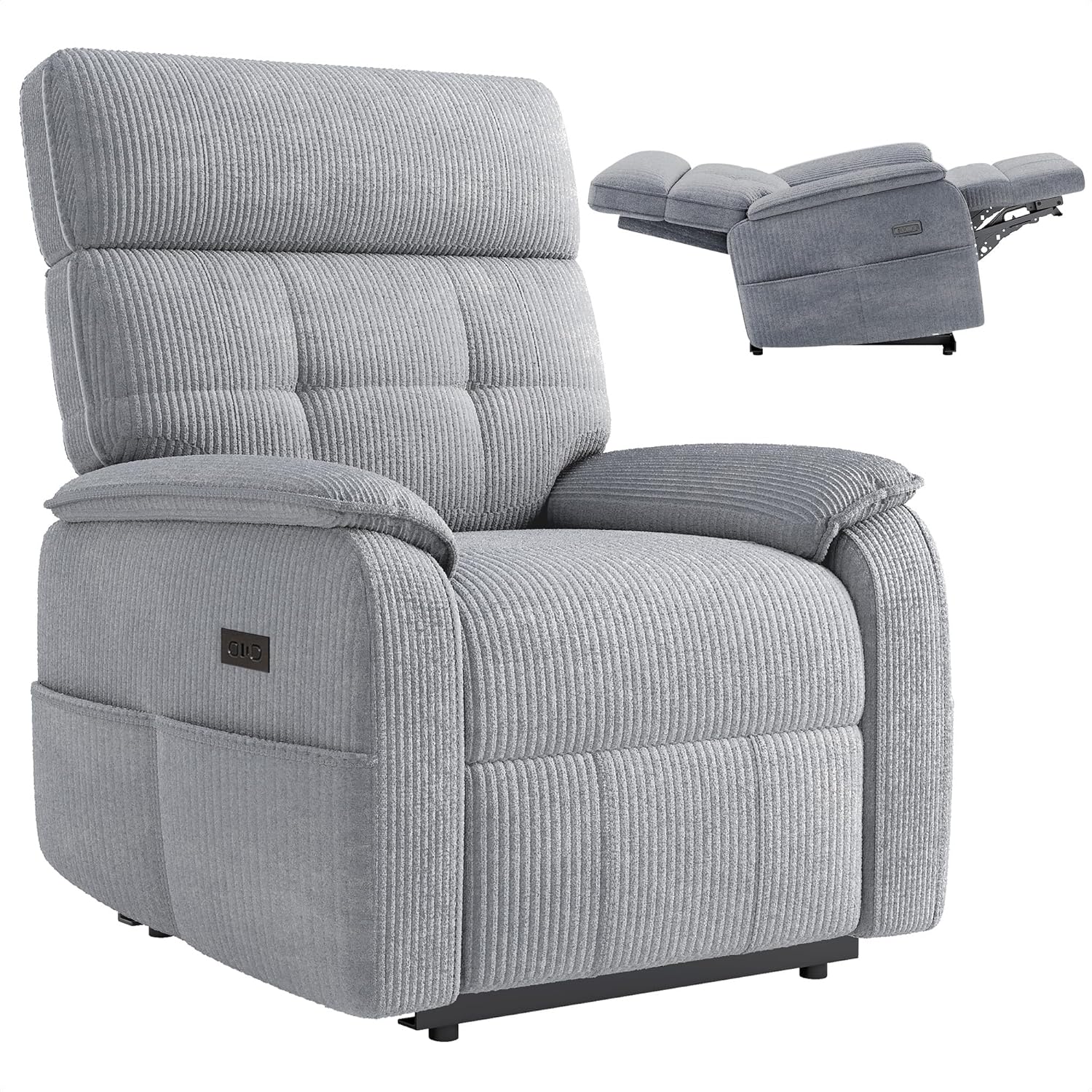
Image: The Claiks recliner chair in its upright position, with a smaller inset image demonstrating the fully reclined state.
5. Operating Instructions
Your Claiks Zero Gravity Recliner Chair features easy-to-use controls for a personalized comfort experience.
5.1 Reclining Function
The chair is equipped with one-touch motorized controls for smooth adjustment of the backrest and footrest.
- To Recline: Press and hold the "Down" button on the control panel. The backrest will recline and the footrest will extend simultaneously. Release the button when you reach your desired position, up to 160 degrees for a zero-gravity experience.
- To Return Upright: Press and hold the "Up" button on the control panel. The footrest will retract and the backrest will return to the upright position. Release the button when desired.

Image: A detailed view of the control panel, showing the 'Up' and 'Down' buttons, along with the integrated USB and Type-C charging ports.
5.2 USB & Type-C Charging Ports
Conveniently located on the control panel, the built-in USB and Type-C ports allow you to charge your electronic devices while relaxing in the chair. Simply plug your device's charging cable into the appropriate port.

Image: A woman comfortably reclined in the chair, illustrating the zero-gravity position and the chair's overall comfort.
5.3 Side Pockets
The recliner features integrated side pockets for convenient storage of remotes, magazines, books, or other small items, keeping them within easy reach.

Image: A close-up shot of the recliner's side pocket, showing a magazine stored inside, highlighting its practical storage feature.
6. Maintenance and Care
Proper care will extend the life and appearance of your Claiks recliner.
- Cleaning Fabric: The chair features removable, machine-washable covers and wipeable surfaces. For general cleaning, gently wipe the fabric with a damp cloth and mild soap. For deeper cleaning, remove the covers and follow the washing instructions on the care label. Allow to air dry completely before reattaching.
- Frame Care: Periodically check all bolts and connections to ensure they are tight. Tighten if necessary.
- Power Cord: Inspect the power cord regularly for any signs of damage. If damaged, discontinue use and contact customer support for a replacement.
- Spills: Blot spills immediately with a clean, dry cloth. Do not rub, as this can spread the stain.
7. Troubleshooting
If you encounter any issues with your recliner, please refer to the following common problems and solutions:
| Problem | Possible Cause | Solution |
|---|---|---|
| Chair does not recline or move. | No power; loose connection; motor issue. | Ensure power cord is securely plugged into the wall outlet and the chair. Check for tripped circuit breaker. If problem persists, contact customer support. |
| Reclining motion is jerky or noisy. | Obstruction in mechanism; loose bolts; motor wear. | Check for any objects obstructing the reclining mechanism. Ensure all assembly bolts are tightened. If noise continues, contact customer support. |
| USB/Type-C ports not charging. | Chair not powered; faulty cable; device incompatibility. | Ensure the chair is powered on. Try a different charging cable or device. If still not working, contact customer support. |
8. Specifications
| Feature | Detail |
|---|---|
| Brand | Claiks |
| Model Name | CL-RC-YZ-LZL |
| Color | Grey |
| Product Dimensions (D x W x H) | 37.4"D x 29.5"W x 39.8"H |
| Seat Depth | 22.4 inches |
| Item Weight | 77 pounds |
| Maximum Load Capacity | 360 lbs |
| Recline Angle | 105-160 degrees |
| Charging Ports | USB, Type-C |
| Material | High-density foam, breathable fabric (Corduroy), reinforced steel frame |
9. Warranty Information
Claiks stands behind the quality of its products. For specific warranty terms and conditions, please refer to the warranty card included with your purchase or visit the official Claiks website. Please retain your proof of purchase for any warranty claims.
10. Customer Support
If you have any questions, require assistance with assembly, or need troubleshooting support not covered in this manual, please contact Claiks customer service through the retailer where you purchased the product or visit the official Claiks support page for further assistance.