
SOBATTY AV-302
SOBATTY AV-302 5.1 Channel 8K Ultra HD Home Theater Receiver User Manual
Model: AV-302
1. Introduction
Thank you for purchasing the SOBATTY AV-302 5.1 Channel 8K Ultra HD Home Theater Receiver. This manual provides essential information for the safe and efficient operation of your new audio-video receiver. Please read this manual thoroughly before use and retain it for future reference.
The AV-302 is designed to deliver a high-quality home theater experience with advanced connectivity options, including 8K HDMI 2.1, Bluetooth 5.0, and various digital and analog audio inputs. It features professional-grade bass management and supports lossless music formats.
2. Important Safety Instructions
To reduce the risk of electric shock, fire, or damage to the unit, please observe the following safety precautions:
- Power Source: Connect the unit only to an AC power outlet of the specified voltage (110V/60Hz).
- Ventilation: Ensure adequate ventilation. Do not block ventilation openings. Maintain a minimum distance of 10 cm (4 inches) around the unit for proper airflow.
- Water and Moisture: Do not expose the unit to rain, moisture, dripping, or splashing. Do not place objects filled with liquids, such as vases, on the unit.
- Heat: Do not place the unit near heat sources such as radiators, heat registers, stoves, or other apparatus (including amplifiers) that produce heat.
- Cleaning: Unplug the unit from the wall outlet before cleaning. Use a dry cloth only.
- Servicing: Do not attempt to service this product yourself. Refer all servicing to qualified service personnel.
- Overload: Do not overload wall outlets or extension cords as this can result in a risk of fire or electric shock.
- Foreign Objects: Never push objects of any kind into this product through openings as they may touch dangerous voltage points or short-out parts that could result in a fire or electric shock.
3. Package Contents
Verify that all items are present in the package:
- SOBATTY AV-302 Amplifier x1
- Remote Control x1
- User Manual x1
4. Product Overview
4.1 Front Panel

Image: Front view of the SOBATTY AV-302 receiver, showing the display, input selection buttons, volume knobs, and USB port.
- Power Button: Turns the unit on or off.
- Display Screen: Shows current input, volume level, and other status information.
- Input Selector Buttons: HDMI, KTV, USB, etc., to switch between audio/video sources.
- Volume Knobs: Separate controls for Microphone Adjustment and Music Multifunctional Adjustment (Master Volume).
- USB-A Port: For connecting USB storage devices to play audio files.
- Microphone Inputs (MIC1, MIC2): For connecting microphones.
- Navigation Buttons (PREV, P/P, NEXT): For media playback control.
- MIC-MENT / MUSIC-MENT Buttons: For adjusting microphone and music settings.
4.2 Rear Panel
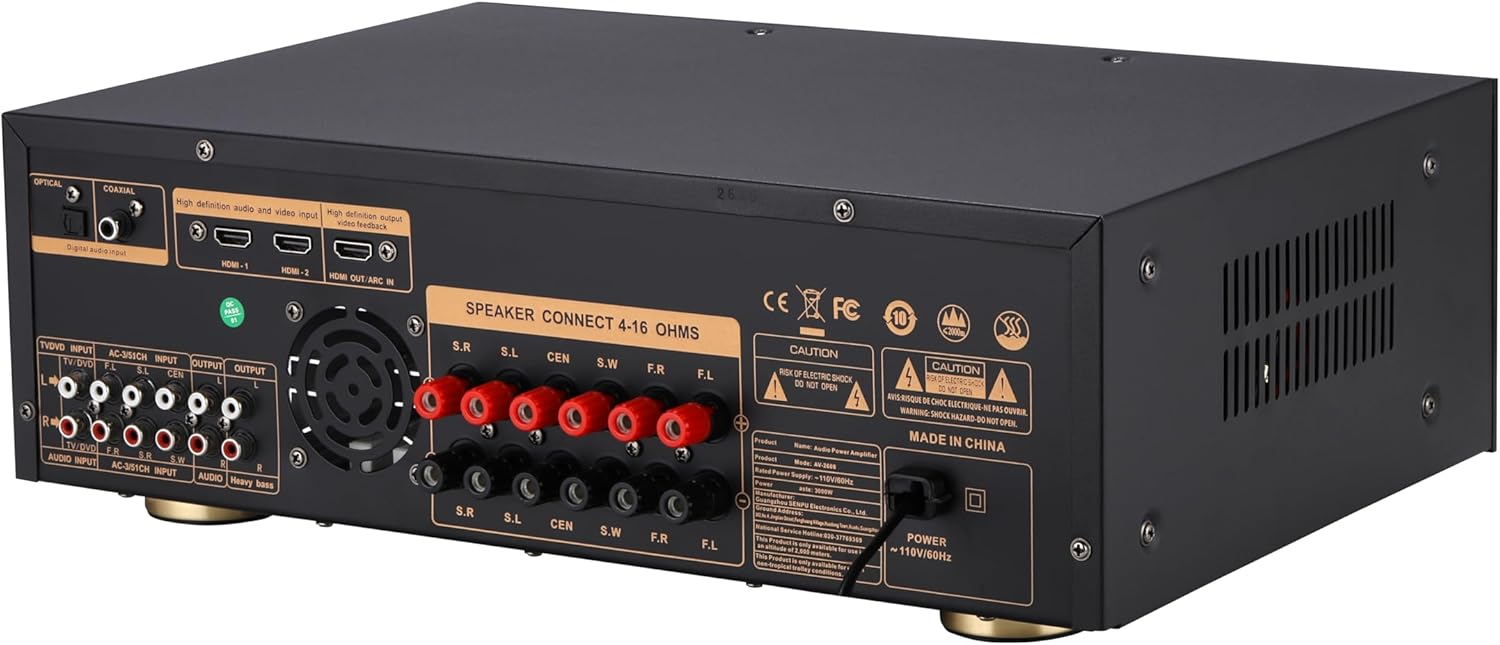
Image: Rear view of the SOBATTY AV-302 receiver, displaying various input and output ports including HDMI, optical, coaxial, RCA, and speaker terminals.
- Digital Audio Inputs: Optical, Coaxial for multi-channel PCM signals.
- HDMI Inputs (HDMI-1, HDMI-2): For connecting HDMI source devices.
- HDMI OUT (ARC IN): For connecting to a TV, supporting Audio Return Channel (ARC).
- Analog RCA Inputs (TV/DVD, AC-3/5.1CH, AUDIO INPUT): For connecting analog audio sources.
- Analog RCA Outputs (OUTPUT, AUDIO, Heavy bass): For connecting to other audio devices or a dedicated subwoofer.
- Speaker Terminals (S.R, S.L, CEN, S.W, F.R, F.L): For connecting 4-16 Ohm speakers.
- Power Input: AC 110V/60Hz.
5. Setup and Connections
Follow these steps to set up your SOBATTY AV-302 receiver:
5.1 Speaker Connection
Connect your speakers to the corresponding terminals on the rear panel. Ensure correct polarity (+ to + and - to -) for each speaker. The receiver supports 4-16 Ohm speakers.
- Front Left (F.L) & Front Right (F.R): Connect your main stereo speakers.
- Center (CEN): Connect your center channel speaker.
- Surround Left (S.L) & Surround Right (S.R): Connect your surround speakers.
- Subwoofer (S.W): Connect your passive subwoofer. For a powered subwoofer, use the "Heavy bass" RCA output.
Note: This unit simulates 5.1 channels. Actual surround channels are 2.1 channels, meaning independent adjustment for surround and center channels is not available.
5.2 HDMI Connections
The AV-302 features HDMI 2.1 for 8K/60Hz and 4K/120Hz video passthrough.
- Connect your HDMI source devices (e.g., Blu-ray player, game console, streaming device) to the HDMI-1 or HDMI-2 input ports.
- Connect the HDMI OUT (ARC IN) port to your TV's HDMI ARC/eARC input. This allows audio from your TV to be sent back to the receiver.
5.3 Digital Audio Connections
For devices with optical or coaxial digital audio outputs:
- Connect an optical cable from your source device to the OPTICAL input on the receiver.
- Alternatively, connect a coaxial cable from your source device to the COAXIAL input on the receiver.
5.4 Analog Audio Connections
For devices with analog RCA audio outputs:
- Connect RCA cables from your source device (e.g., CD player, turntable with pre-amp) to the TV/DVD, AC-3/5.1CH, or AUDIO INPUT ports.
5.5 Power Connection
Once all audio and video connections are made, connect the power cord to the receiver's power input and then to a standard AC 110V/60Hz wall outlet.
6. Operating Instructions
6.1 Power On/Off
Press the POWER button on the front panel or the remote control to turn the receiver on or off.
6.2 Input Selection
Press the corresponding INPUT button on the front panel or the remote control (e.g., HDMI, KTV, USB, Bluetooth, Optical, Coaxial, TV/DVD, AC-3/5.1CH, AUDIO INPUT) to select your desired audio/video source.
6.3 Volume Adjustment
- Master Volume: Use the large "MUSIC MULTIFUNCTIONAL ADJUSTMENT" knob on the front panel or the Master Volume buttons on the remote control to adjust the overall volume.
- Treble and Bass: These can be adjusted directly via the remote control.
- Subwoofer Volume (SUB): This can be adjusted through the music menu button on the receiver. Press the music menu button once to cycle through functions, then use the master volume knob to adjust the subwoofer level.
6.4 Sound Field Modes
The receiver offers 8 different sound field modes. Use the SOUND FIELD MODE button on the remote control to cycle through these modes. Press the SOUND FIELD MODE OFF button to restore the default setting.
6.5 Bluetooth Operation
- Select Bluetooth as the input source using the input selector. The display will show "BLUE" or a similar indicator.
- On your mobile device, enable Bluetooth and search for available devices.
- Select "SOBATTY AV-302" (or similar name) from the list to pair.
- Once paired, you can stream audio from your device to the receiver.
- The receiver supports Bluetooth 5.0 aptX HD for 24-bit lossless wireless streaming.
6.6 USB Playback
- Insert a USB storage device into the front-panel USB-A port.
- Select USB as the input source.
- Use the PREV, P/P (Play/Pause), and NEXT buttons on the front panel or remote control to navigate and play audio files.
- The receiver supports PCM/DSD256/FLAC/WAV formats up to 32-bit/384kHz.
6.7 Bass Management
The dedicated LFE subwoofer output features an adjustable crossover (40-200Hz) and ±6dB gain control. Activate Bass Boost Mode to dynamically enhance low-frequency impact. This is compatible with all powered subwoofers.
7. Maintenance
- Cleaning: Disconnect the power cord before cleaning. Use a soft, dry cloth to wipe the exterior surfaces. Do not use liquid cleaners or aerosol cleaners.
- Ventilation: Regularly check that the ventilation openings are clear of dust and debris to prevent overheating.
- Storage: If storing the unit for an extended period, unplug it from the power outlet and store it in a cool, dry place.
8. Troubleshooting
If you encounter issues with your receiver, refer to the following table for common problems and solutions:
| Problem | Possible Cause | Solution |
|---|---|---|
| No power | Power cord not connected; Power outlet faulty | Ensure power cord is securely connected. Test the outlet with another device. |
| No sound | Incorrect input selected; Volume too low; Speakers not connected properly; Mute function active | Select the correct input source. Increase volume. Check speaker connections and polarity. Deactivate mute. |
| No video output via HDMI | Incorrect HDMI input/output selected; HDMI cable faulty; TV input not set correctly | Ensure correct HDMI input on receiver and TV. Try a different HDMI cable. Check TV's input selection. |
| Bluetooth pairing fails | Receiver not in Bluetooth mode; Device too far; Interference | Ensure receiver is in Bluetooth input mode. Move device closer. Avoid sources of interference. |
| USB playback issues | Unsupported file format; USB device not recognized; Corrupt files | Ensure files are supported (PCM/DSD256/FLAC/WAV). Try a different USB device or reformat. |
| Remote control not working | Batteries depleted; Obstruction; Remote not pointed at receiver | Replace batteries. Remove any obstructions. Point remote directly at the receiver's sensor. |
If the problem persists after trying these solutions, please contact customer support.
9. Specifications
| Model Number | AV-302 |
| Product Dimensions | 12 x 16.93 x 5.91 inches |
| Item Weight | 6.34 pounds |
| Connectivity Technology | Bluetooth, HDMI, Optical, Coaxial, USB, RCA |
| Bluetooth Version | 5.0 aptX HD |
| HDMI Version | 2.1 (8K/60Hz & 4K/120Hz passthrough) |
| Total HDMI Ports | 3 (2 In, 1 Out with ARC) |
| USB Audio Support | PCM/DSD256/FLAC/WAV (up to 32-bit/384kHz) |
| Speaker Impedance | 4-16 Ohms |
| Subwoofer Crossover | Adjustable (40-200Hz) |
| Power Supply | 110V/60Hz |
| Surround Sound Channel Configuration | 2.1 (Simulated 5.1) |
10. Warranty and Support
SOBATTY products are designed and manufactured to the highest quality standards. For information regarding warranty coverage and customer support, please refer to the warranty card included with your product or visit the official SOBATTY website.
For technical assistance or inquiries, please contact SOBATTY customer service.
Ask a question about this manual
Ask about setup, troubleshooting, compatibility, parts, safety, or missing instructions. Manuals+ will review the question and use this page’s manual context to help answer it.