1. Introduction
The fanxiang MP400 is a high-performance M.2 NVMe SSD enclosure designed for external data storage and transfer. It supports USB4 with theoretical speeds up to 40Gbps, ensuring rapid data access. Featuring a built-in cooling fan and durable aluminum alloy construction, the MP400 provides efficient heat dissipation and protection for your SSD. This manual provides detailed instructions for installation, operation, and maintenance of your fanxiang MP400 enclosure.
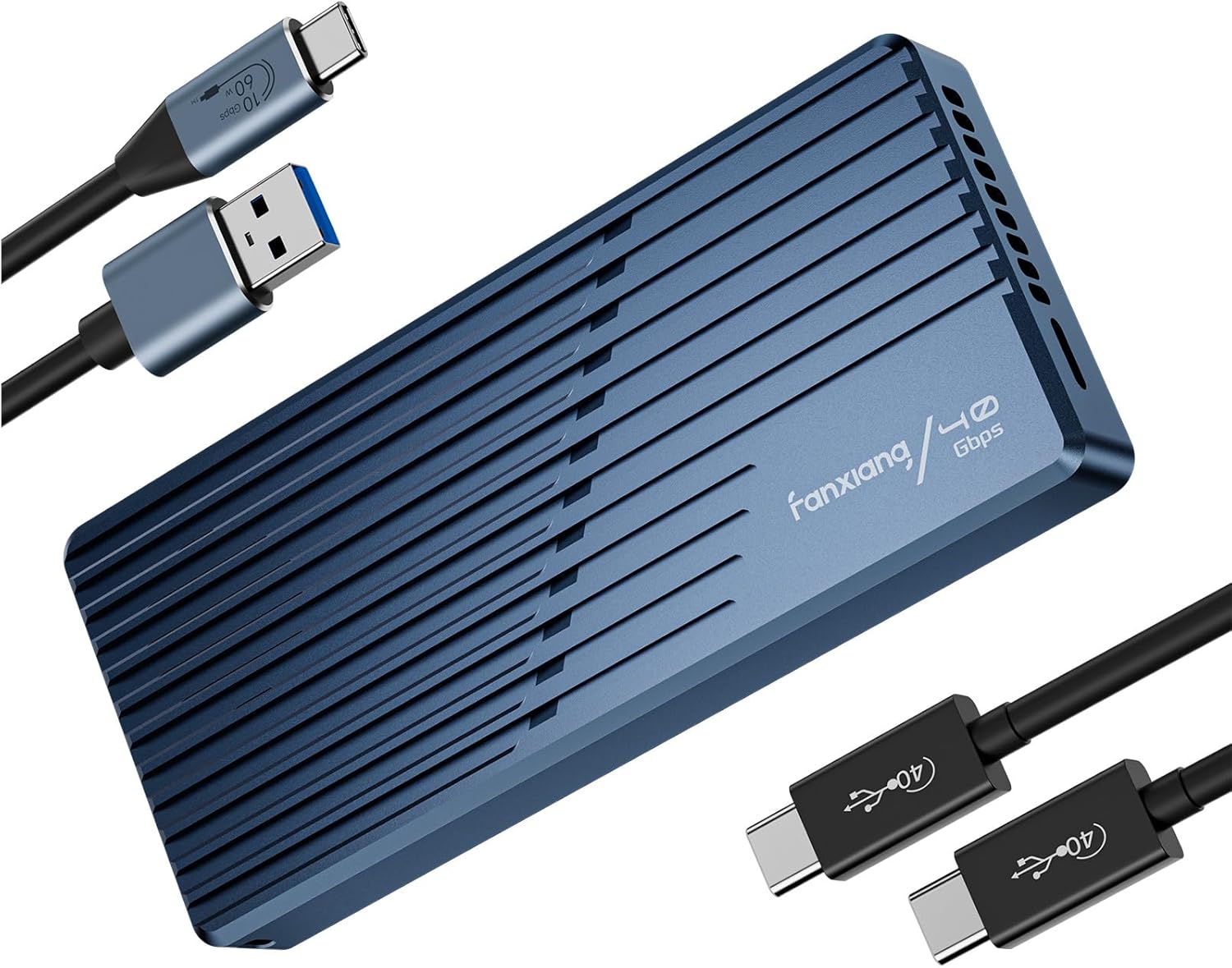
Image 1.1: The fanxiang MP400 40Gbps M.2 NVMe SSD Enclosure, showcasing its sleek design and the accompanying USB-C and USB-A cables.
2. Package Contents
Please verify that all items listed below are included in your package. If any items are missing or damaged, please contact customer support.
- fanxiang MP400 SSD Enclosure
- 1x 40Gbps USB-C to USB-C Cable
- 1x 10Gbps USB-A to USB-C Cable
- Thermal Pad
- Screwdriver
- Mounting Screws
- Lanyard
- User Manual (this document)
- After-sales Card

Image 2.1: Visual representation of all items included in the fanxiang MP400 package, including the enclosure, cables, tools, and documentation.
3. Specifications
| Feature | Detail |
|---|---|
| Model Number | MP400 |
| Data Transfer Rate | Up to 40 Gigabits Per Second (USB4) |
| Compatible SSDs | M.2 NVMe M Key SSDs (2230, 2242, 2260, 2280 sizes) up to 8TB |
| Hardware Interface | USB 3.2 Gen 2 (backward compatible), USB4, Thunderbolt 3/4 |
| Compatible Devices | Desktop, Gaming Console (PS5/PS4, Xbox Series), Laptop, Smartphone (with OTG), Tablet, Television |
| Cooling System | Built-in Cooling Fan, Thermal Pad, Aluminum Shell |
| Material | Aluminum Alloy |
| Product Dimensions | 4.72 x 2.09 x 0.64 inches (120 x 53 x 16.2 mm) |
| Item Weight | 5.3 ounces (151 Grams) |
| Controller Chip | ASMedia 2464 |
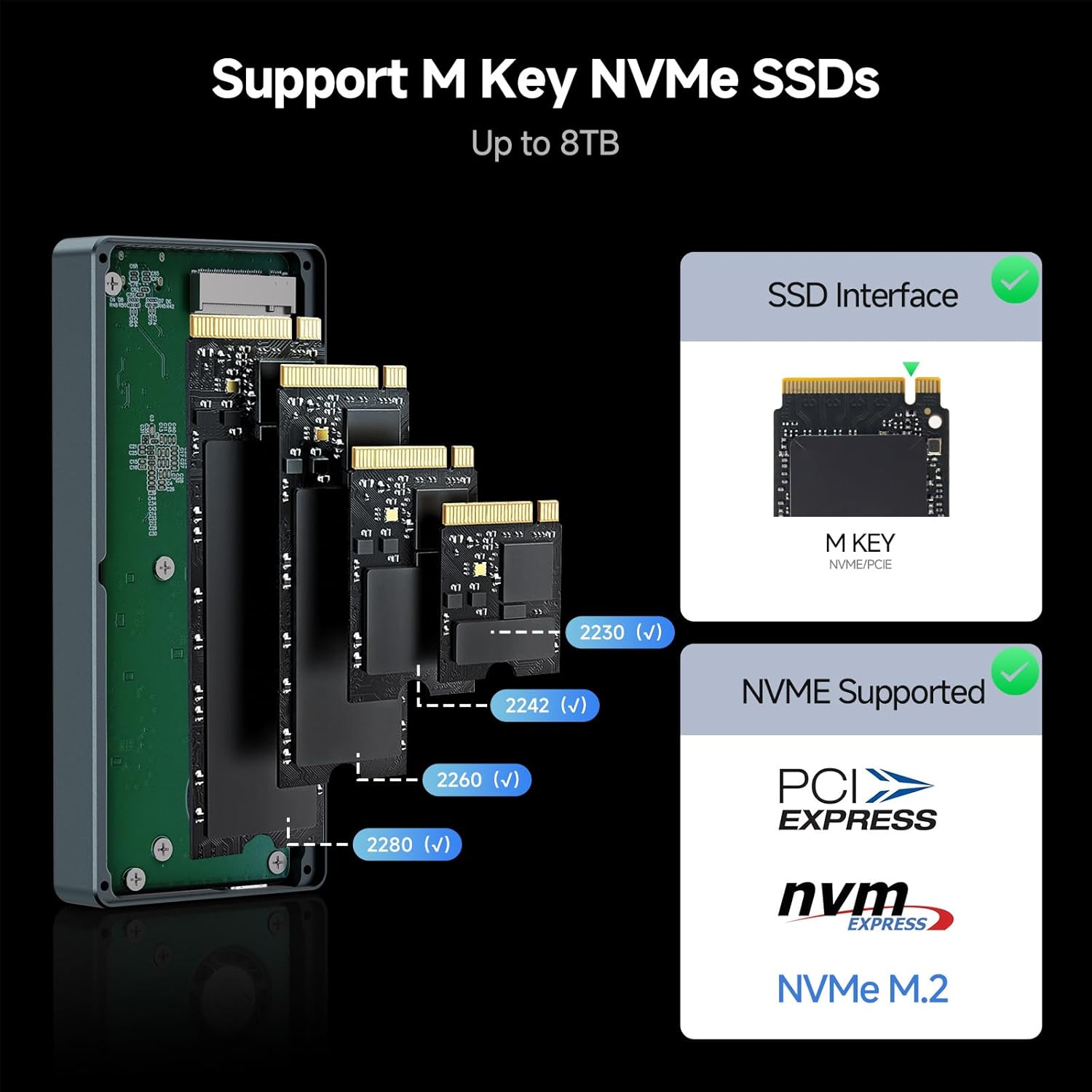
Image 3.1: Close-up view of the fanxiang MP400's internal circuitry, highlighting the ASMedia 2464 controller chip responsible for high-speed performance.
4. Setup and Installation
Follow these steps to install your M.2 NVMe SSD into the fanxiang MP400 enclosure.
- Open the Enclosure: Use the provided screwdriver to carefully remove the screws securing the enclosure cover. Gently slide open the enclosure.
- Insert the SSD: Align your M.2 NVMe SSD (M Key, 2230/2242/2260/2280 size) with the slot inside the enclosure. Insert the SSD firmly but gently into the M.2 slot at an angle. Once seated, push down the other end of the SSD and secure it with the provided screw.
- Apply the Thermal Pad: Peel off the protective films from both sides of the thermal pad. Carefully place the thermal pad onto the top surface of the installed SSD. This helps in heat transfer to the enclosure for efficient cooling.
- Close the Enclosure: Carefully slide the enclosure cover back into place and secure it with the screws you removed earlier.

Image 4.1: Illustrated guide showing the four simple steps for SSD installation: opening the enclosure, inserting the SSD, applying the thermal pad, and completing the installation.
Supported SSD Types: The MP400 enclosure supports M Key NVMe SSDs of various lengths: 2230, 2242, 2260, and 2280. Ensure your SSD is an M Key NVMe type for compatibility.
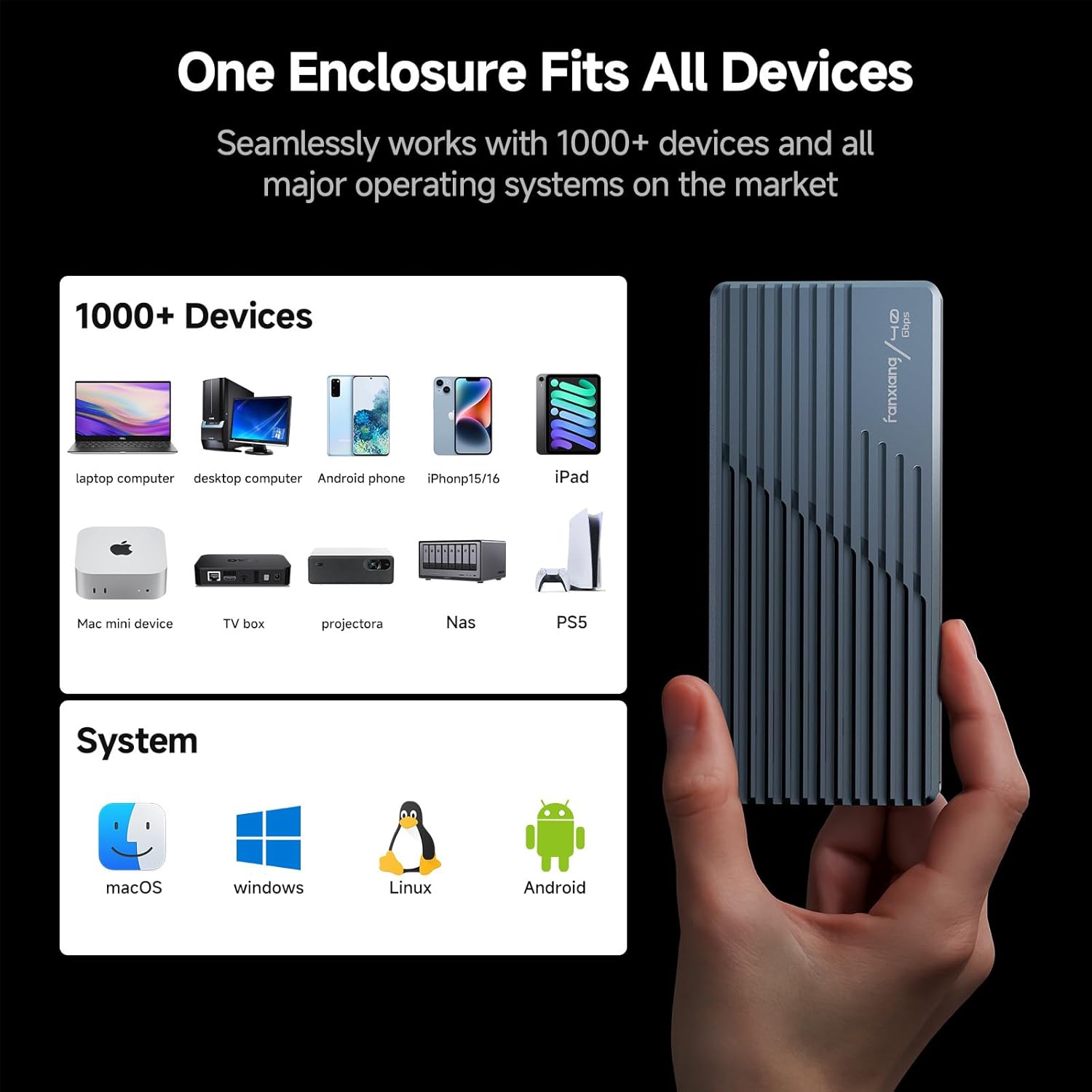
Image 4.2: A visual representation detailing the supported M.2 NVMe SSD form factors (2230, 2242, 2260, 2280) and confirming M Key NVMe compatibility.
5. Operating Instructions
Once your SSD is installed, the fanxiang MP400 is ready for use.
- Connect to Device: Use one of the provided USB cables (USB-C to USB-C for 40Gbps or USB-A to USB-C for 10Gbps) to connect the enclosure to your computer or compatible device.
- Plug and Play: The enclosure is plug-and-play, requiring no additional drivers for most operating systems. Your device should automatically detect the SSD.
- Initialization (New SSDs): If you are using a brand new SSD, it may need to be initialized and formatted before it appears as a usable drive. Refer to your operating system's disk management tools for this process.
- Data Transfer: You can now transfer files to and from the SSD at high speeds. The enclosure supports USB4 (40Gbps) and is backward compatible with USB 3.2/3.1/3.0 and Thunderbolt 3/4.

Image 5.1: A graphical representation illustrating the extreme speed capabilities of the fanxiang MP400, achieving up to 3793MB/s with USB 4.0.
Cooling System
The fanxiang MP400 features an integrated cooling fan, thermal pad, and aluminum shell to maintain optimal operating temperatures for your SSD, even during intensive data transfers. This triple heat dissipation system helps prevent thermal throttling and extends the lifespan of your SSD.
Note: The enclosure's fan produces 30-40 dB of sound during operation. This is normal and indicates the cooling system is active.

Image 5.2: An exploded view demonstrating the fanxiang MP400's cooling components, including the internal fan, thermal pad, and the heat-dissipating aluminum casing.
6. Compatibility
The fanxiang MP400 enclosure offers broad compatibility with various devices and operating systems.
Device Compatibility
- Traditional Laptops and Desktops
- Smart TVs
- Gaming Consoles (PS5/PS4 Pro, Xbox Series)
- Macs (Thunderbolt 3/4 compatible)
- Select Android Smartphones with OTG functionality
Operating System Compatibility
- Windows 7 and above
- macOS
- Linux
- Android
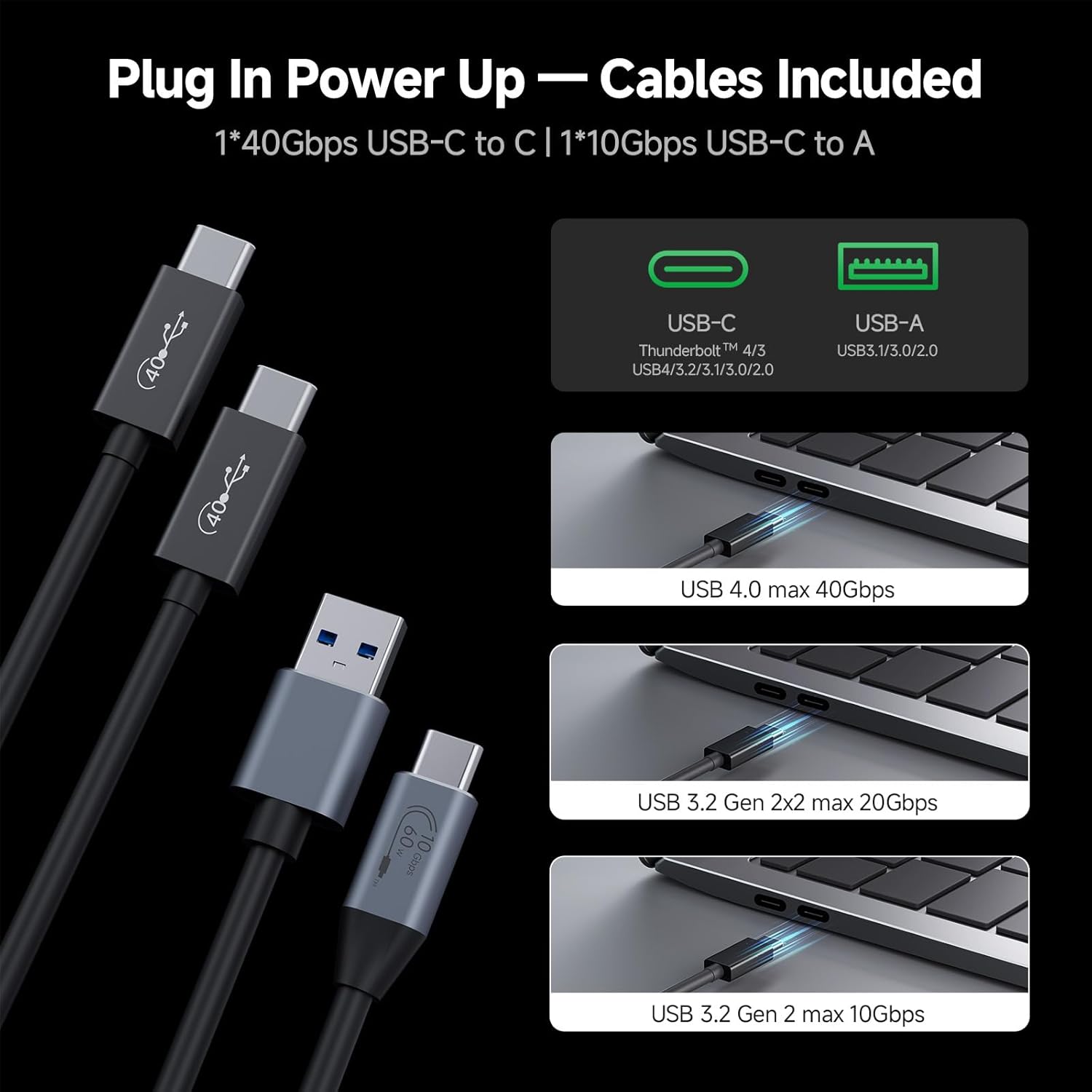
Image 6.1: A comprehensive visual guide demonstrating the fanxiang MP400's compatibility with over 1000 devices and major operating systems like macOS, Windows, Linux, and Android.
Cable Compatibility
The enclosure comes with two cables to ensure broad connectivity:
- 40Gbps USB-C to USB-C Cable: For connecting to USB4 or Thunderbolt 3/4 ports, achieving maximum transfer speeds.
- 10Gbps USB-A to USB-C Cable: For connecting to standard USB-A ports (USB 3.2/3.1/3.0) on older devices.

Image 6.2: A visual guide to the included USB-C to USB-C (40Gbps) and USB-A to USB-C (10Gbps) cables, illustrating their connection to various host ports.
7. Maintenance
To ensure the longevity and optimal performance of your fanxiang MP400 SSD enclosure, follow these maintenance guidelines:
- Cleaning: Use a soft, dry cloth to wipe the exterior of the enclosure. Avoid using liquid cleaners or solvents, as they may damage the finish or internal components.
- Storage: When not in use, store the enclosure in a cool, dry place away from direct sunlight and extreme temperatures.
- Handling: Handle the enclosure with care. While designed to be shock-resistant, excessive force or drops can cause damage.
- Cable Care: Avoid bending or crimping the USB cables excessively. Store them neatly to prevent damage.
8. Troubleshooting
If you encounter issues with your fanxiang MP400 enclosure, please refer to the following common problems and solutions:
- Problem: The enclosure is not detected by my computer.
- Solution:
- Ensure the USB cable is securely connected to both the enclosure and your computer's USB port.
- Try a different USB port on your computer.
- Try a different USB cable (e.g., the other cable provided).
- If it's a new SSD, ensure it has been initialized and formatted in your operating system's disk management utility.
- Verify that your SSD is an M Key NVMe type and correctly installed in the enclosure.
- Problem: Data transfer speeds are slower than expected.
- Solution:
- Ensure you are using the 40Gbps USB-C to USB-C cable and connecting to a USB4 or Thunderbolt 3/4 port on your host device for maximum speed.
- Older USB ports (e.g., USB 3.0/3.1 Gen 1) will operate at lower speeds.
- The performance of the SSD itself can affect speeds. Ensure your NVMe SSD is capable of high speeds.
- Other devices connected to the same USB controller can impact performance.
- Problem: The enclosure feels warm during operation.
- Solution:
- It is normal for the enclosure to generate heat during high-speed data transfers, especially with NVMe SSDs. The aluminum casing and cooling fan are designed to dissipate this heat.
- Ensure the thermal pad is correctly applied to the SSD inside the enclosure.
- The built-in fan will operate to keep temperatures in check. The fan noise (30-40 dB) is normal.
If these solutions do not resolve your issue, please contact fanxiang customer support for further assistance.
9. Warranty and Support
fanxiang provides a 5-year service warranty for the MP400 SSD enclosure. This warranty covers manufacturing defects and ensures reliable operation under normal use conditions.
For technical support, warranty claims, or any inquiries, please contact fanxiang customer service through the official channels provided on the after-sales card included in your package or visit the fanxiang official website.
Please retain your proof of purchase for warranty service.


