
1. Introduction
This manual provides detailed instructions for the installation, operation, and maintenance of the PLPFUDVDZZ HS800-3 3-Axis Digital Readout (DRO) and Linear Scale Encoder System. Please read this manual thoroughly before using the product to ensure correct operation and to prevent damage.
2. Product Overview
The HS800-3 system is designed for precise measurement and display of linear movements on machine tools. It includes a 3-axis digital readout display and three linear scale encoders with a resolution of 0.001mm (1/5um).
Key Features:
- High Accuracy: 0.001mm (1/5um) resolution for precise measurements.
- Versatile Lengths: Linear scales available from 50mm to 1000mm.
- Comprehensive Functions: Full-featured DRO for various machining operations.
- Compact Design: Easy to integrate into existing machine setups.
- TTL Signal Output: Standard signal interface for reliable data transmission.
3. Specifications
| Parameter | Value |
|---|---|
| Model Number | HS800-3 |
| Input Voltage | AC80-250V 50/60HZ |
| Signal Type | TTL |
| Power Consumption | 25VA |
| Output | 5VDC |
| Resolution | 0.001mm (1/5um) |
| Available Travel Length | 50mm-1000mm |
| Cable Length | 3 meters |
| Cross Section Size (Linear Scale) | 21.5mm x 33.5mm |
| Item Weight | 11.02 pounds (approx. 5 kg) |
| Package Dimensions | 0.39 x 0.39 x 0.39 inches (Note: This dimension may refer to a component, not the full package.) |
4. Setup and Installation
4.1 Linear Scale Mounting
Mount the linear scales securely to the machine axes using appropriate brackets and fasteners. Ensure the scales are parallel to the axis of motion and the reading head moves smoothly along the scale. Refer to the dimension diagram for mounting hole locations and overall dimensions.
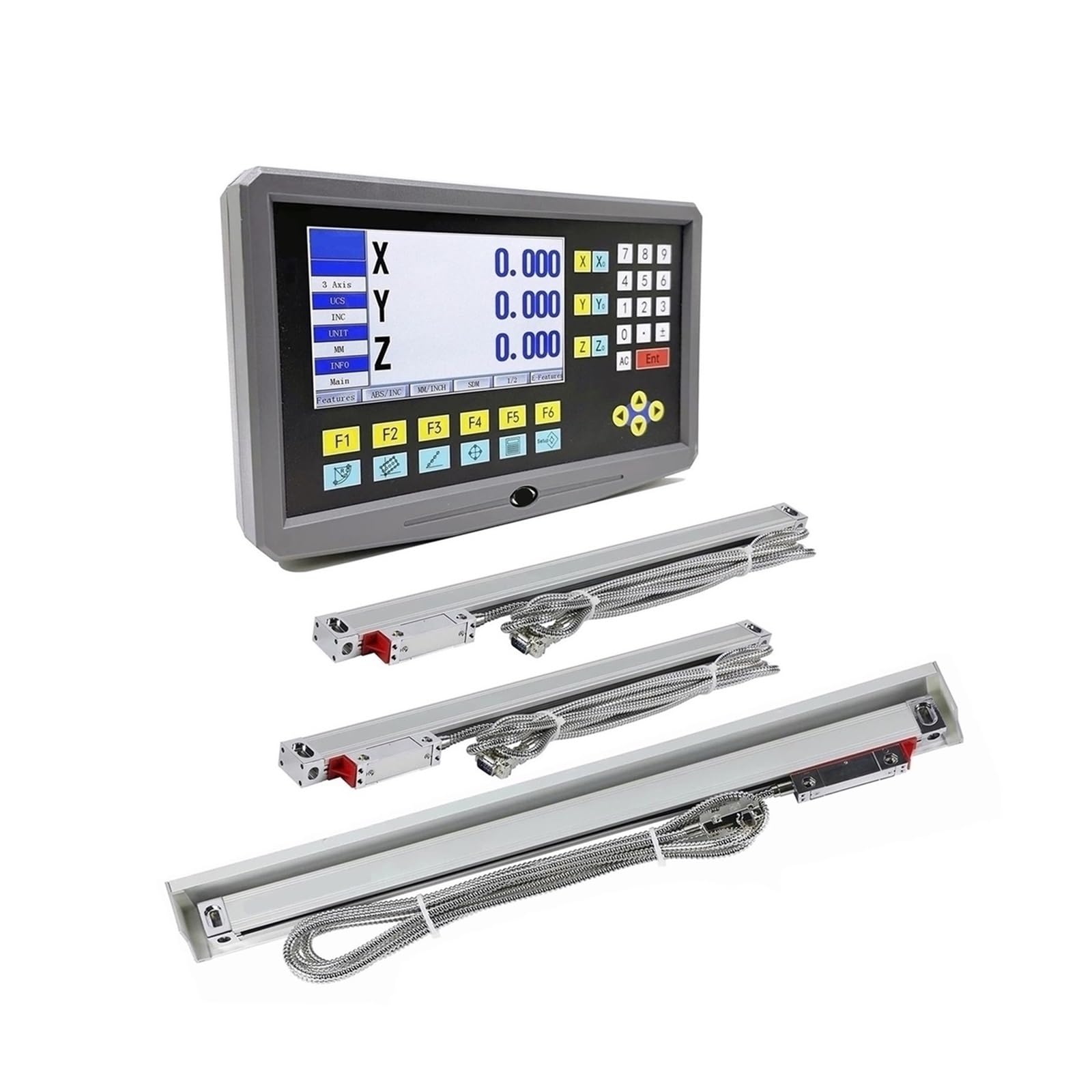
Figure 1: Linear Scale Dimensions. This diagram illustrates the physical dimensions of the linear scale, including total length (L+142), mounting hole spacing, and cross-section size (21.5mm x 33.5mm). The 'L' refers to the available travel length of the scale.
4.2 Electrical Connections
Connect the linear scale encoders to the HS800-3 Digital Readout unit using the provided cables. Ensure all connections are firm and correct according to the DB-9 pinout diagram for TTL signals.

Figure 2: DB-9 Connection Method of TTL Signals. This table details the pin assignments for the DB-9 connector, showing which pin corresponds to 0V, Ground, +5V, A, B, and R signals for the TTL interface.
DB-9 Pinout for TTL Signals:
| Pin | Signal |
|---|---|
| 1 | N/A |
| 2 | 0V |
| 3 | N/A |
| 4 | Ground |
| 5 | N/A |
| 6 | A |
| 7 | +5V |
| 8 | B |
| 9 | R |
4.3 Power Connection
Connect the DRO unit to a compatible AC power source (AC80-250V 50/60HZ). Ensure the power supply is stable and meets the specified requirements.
5. Operating Instructions
5.1 Power On/Off
Press the power button on the DRO unit to turn it on. The display will illuminate and show the current axis readings. Press the power button again to turn off the unit.
5.2 Zeroing Axes
To set an axis to zero, move the machine to the desired starting position. Press the corresponding axis button (e.g., X, Y, Z) followed by the "ZERO" button. The display for that axis will reset to 0.000.
5.3 Setting Resolution
The system is configured for 0.001mm (1/5um) resolution. Refer to the DRO unit's specific menu or button functions for any advanced resolution settings or unit conversions (e.g., mm/inch).
5.4 Basic Measurement
Once zeroed, move the machine along the desired axis. The DRO display will show the displacement from the zero point. The system supports various functions such as absolute/incremental modes, diameter/radius display, and more. Consult the DRO unit's specific user interface for detailed function access.
6. Maintenance
6.1 Cleaning Linear Scales
Regularly clean the surface of the linear scales and reading heads to ensure accurate operation. Use a soft, lint-free cloth and a mild cleaning solution (e.g., isopropyl alcohol). Avoid abrasive materials or harsh chemicals that could damage the scale surface.
6.2 Cable Inspection
Periodically inspect all cables for signs of wear, cuts, or damage. Ensure connectors are securely fastened. Damaged cables can lead to intermittent readings or system failure.
6.3 Environmental Considerations
Operate the system in a clean, dry environment. Protect the linear scales from excessive dust, coolant, and physical impact, which can affect accuracy and lifespan.
7. Troubleshooting
7.1 No Display on DRO Unit
- Check if the power cable is securely connected to both the DRO unit and the power outlet.
- Verify that the power outlet is functional.
- Ensure the power switch on the DRO unit is in the "ON" position.
7.2 Inaccurate or Intermittent Readings
- Inspect linear scales and reading heads for dirt, debris, or damage. Clean as per maintenance instructions.
- Check all cable connections between the scales and the DRO unit for looseness or damage.
- Ensure the linear scales are properly aligned and mounted parallel to the machine's axis of motion.
- Verify that the reading head moves freely along the scale without obstruction.
7.3 Axis Not Responding
- Confirm the linear scale for the non-responsive axis is correctly plugged into the DRO unit.
- Check the cable for any visible damage.
- If possible, swap the scale with a known working one to isolate the issue to either the scale or the DRO unit.
8. Warranty and Support
This PLPFUDVDZZ product is covered by a standard manufacturer's warranty. For specific warranty terms and conditions, please refer to the documentation included with your purchase or contact PLPFUDVDZZ customer support. For technical assistance, troubleshooting beyond this manual, or spare parts, please contact your vendor or the manufacturer directly.
Manufacturer: PLPFUDVDZZ
Model: HS800-3