
1. Introduction
This manual provides detailed instructions for the installation, operation, maintenance, and troubleshooting of the ATUUKOPC SU600 Variable Frequency Drive (VFD), specifically the 1.5KW 220V model. Please read this manual thoroughly before using the device to ensure safe and efficient operation.
2. Safety Information
Always observe the following safety precautions to prevent personal injury or damage to the equipment:
- Ensure power is disconnected before installation, wiring, or maintenance.
- Only qualified personnel should perform installation and wiring.
- Proper grounding is essential to prevent electric shock.
- Do not touch internal components immediately after power-off, as residual voltage may be present. Wait at least 5 minutes.
- Protect the VFD from moisture, dust, and corrosive gases.
- Do not operate the VFD with damaged cables or components.
3. Setup and Installation
3.1 Unpacking and Inspection
Upon receiving the SU600 VFD, carefully unpack it and inspect for any signs of damage during transit. Verify that all components are present according to the packing list.
3.2 Mounting
Mount the VFD in a vertical position on a stable, non-flammable surface. Ensure adequate ventilation around the unit to prevent overheating. Maintain sufficient clearance from other equipment and walls for proper airflow.
3.3 Wiring Diagram
Refer to the following diagram for correct wiring connections:

Figure 3.3.1: Wiring Diagram
Comprehensive wiring diagram illustrating connections for input power (R, S/L1, T/L2), output power to motor (U, V, W), ground wire, and optional brake resistor (P+, PB) for CNC machine tool selection.
3.4 Electrical Connections
- Input Power Connection (R, S/L1, T/L2): Connect the single-phase 220V AC power supply to the R and S/L1 terminals.
- Output Power Connection (U, V, W): Connect the three-phase motor to the U, V, and W terminals.
- Ground Wire: Connect the ground terminal to a reliable earth ground. This is crucial for safety.
- Brake Resistor Connection (P+, PB): For applications requiring rapid deceleration or braking, connect an external brake resistor to the P+ and PB terminals. This is typically selected for CNC machine tools.
3.5 Internal Components Overview
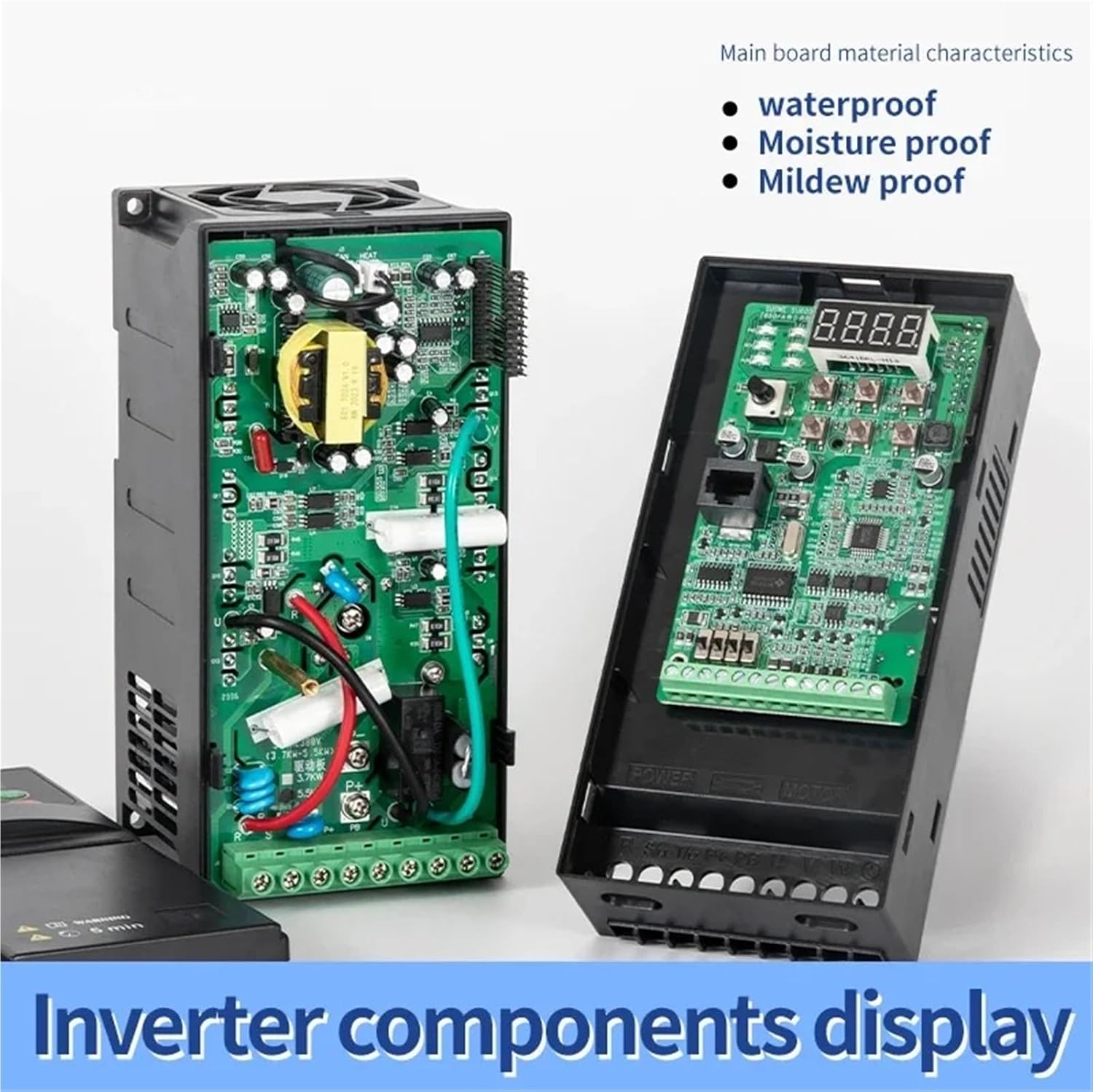
Figure 3.5.1: Inverter Components Display
View of the internal electronic components of the SU600 inverter, highlighting the main board's waterproof, moisture-proof, and mildew-proof characteristics, ensuring durability in various environments.
4. Operating Instructions
4.1 Control Panel Overview
The SU600 VFD features an intuitive control panel for easy operation and monitoring:
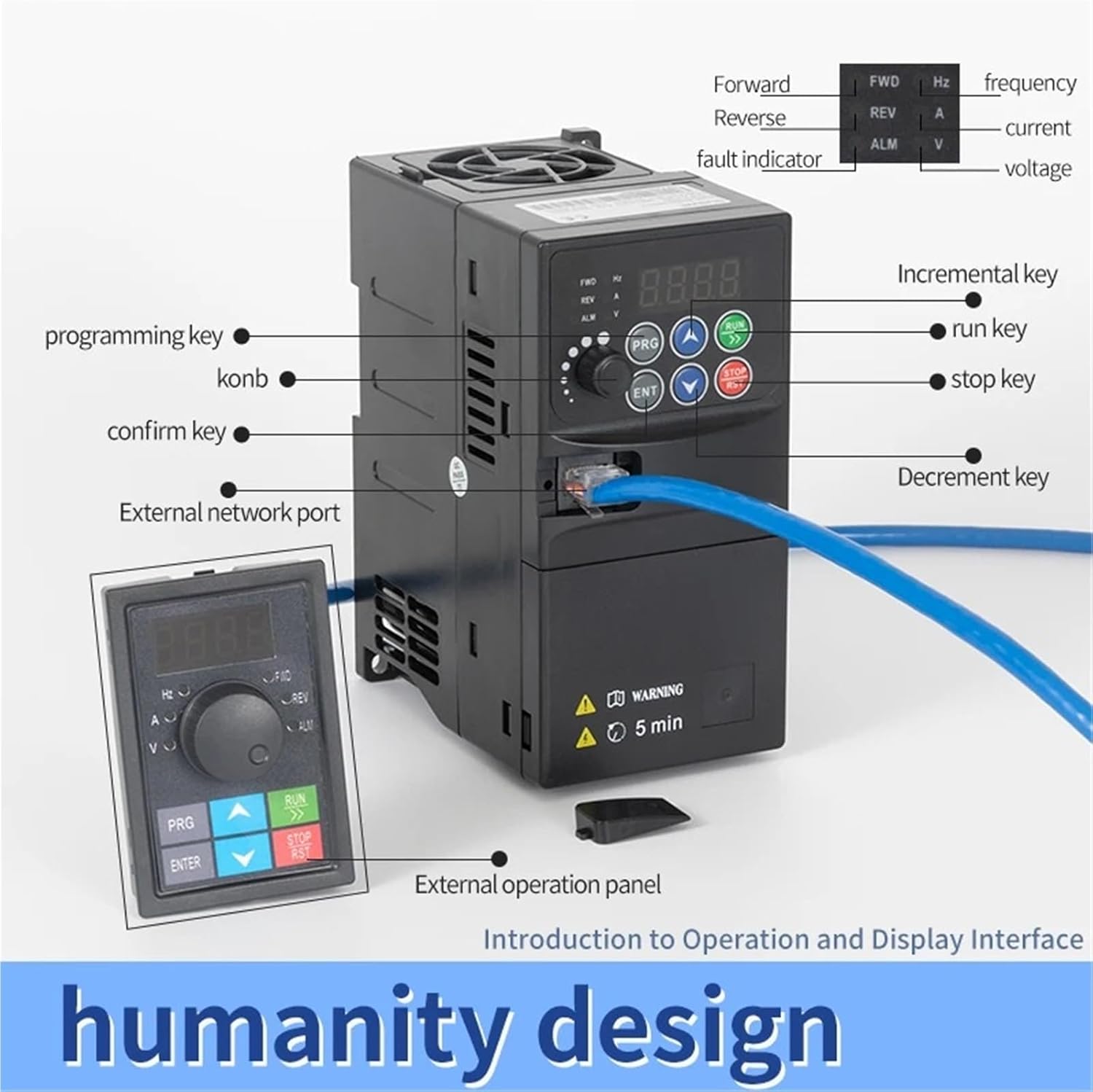
Figure 4.1.1: Operation and Display Interface
Detailed view of the SU600's control panel, showing the digital display, frequency, current, voltage indicators, programming key (PRG), run key (RUN), stop key (STOP/RST), confirm key (ENT), incremental/decrement keys, and external network port. An optional external operation panel is also shown.
- Digital Display: Shows operating frequency, parameters, and fault codes.
- Indicators (FWD, REV, HZ, A, V, ALM): Indicate forward/reverse direction, frequency, current, voltage, and alarm status.
- Knob: Used for frequency adjustment.
- PRG (Programming Key): Enters/exits parameter programming mode.
- RUN (Run Key): Starts the motor.
- STOP/RST (Stop/Reset Key): Stops the motor or resets fault alarms.
- ENT (Confirm Key): Confirms parameter settings.
- Up/Down Arrows: Used to navigate parameters and adjust values.
- External Network Port: For remote control or communication.
4.2 Basic Operation
- Power On: Apply power to the VFD. The digital display will light up.
- Frequency Setting: Use the knob or the Up/Down arrow keys to set the desired output frequency.
- Start Motor: Press the RUN key to start the motor. The FWD or REV indicator will light up.
- Stop Motor: Press the STOP/RST key to stop the motor.
4.3 Parameter Programming
To access and modify VFD parameters:
- Press the PRG key to enter parameter programming mode.
- Use the Up/Down arrow keys to navigate through parameter groups and individual parameters.
- Press the ENT key to select a parameter for editing.
- Use the Up/Down arrow keys to adjust the parameter value.
- Press the ENT key again to save the new value.
- Press the PRG key to exit programming mode.
Refer to the detailed parameter list in the full product manual for specific parameter functions and ranges.
5. Maintenance
Regular maintenance ensures the longevity and reliable operation of your SU600 VFD:
- Cleaning: Periodically clean the VFD's exterior and cooling fins to prevent dust accumulation, which can hinder heat dissipation. Use a soft, dry cloth. Do not use liquid cleaners.
- Inspection: Regularly check all wiring connections for tightness and signs of wear or damage. Inspect the cooling fan for proper operation and blockages.
- Environment: Ensure the operating environment remains within specified temperature and humidity ranges.
- Capacitor Life: Electrolytic capacitors have a finite lifespan. Consider professional inspection or replacement after several years of continuous operation.
6. Troubleshooting
This section provides solutions for common issues. For complex problems, contact technical support.
| Problem | Possible Cause | Solution |
|---|---|---|
| Motor does not start | No power, incorrect wiring, fault alarm, frequency set to 0. | Check power supply, verify wiring, reset fault (STOP/RST), adjust frequency. |
| Overcurrent fault (OC) | Motor overload, short circuit, acceleration time too short. | Reduce load, check motor/cables, increase acceleration time parameter. |
| Overvoltage fault (OV) | Deceleration time too short, regenerative load. | Increase deceleration time parameter, consider brake resistor. |
| Undervoltage fault (UV) | Input voltage too low. | Check input power supply voltage. |
| Overheat fault (OH) | Poor ventilation, ambient temperature too high, fan failure. | Improve ventilation, check fan, reduce ambient temperature. |
7. Specifications
The following specifications apply to the ATUUKOPC SU600 1.5KW 220V Variable Frequency Drive (Model: SU600-1R5G2):

Figure 7.1.1: Product Parameters and Dimensions
Detailed product parameters for the SU600-1R5G2 model, including 1.5KW (2HP) adapted motor, single-phase 220V input, three-phase 220V output, 7A current, dimensions (147x72x118.4mm), and weight (0.72Kg).
- Model: SU600-1R5G2
- Adapted Motor Power: 1.5KW (2HP)
- Input Voltage: Single-phase 220V
- Output Voltage: Three-phase 220V
- Output Current: 7A
- Output Frequency Range: 50-400Hz
- Dimensions (L x W x H): 147mm x 72mm x 118.4mm
- Weight: 0.72 Kg
- Main Board Characteristics: Waterproof, Moisture-proof, Mildew-proof

Figure 7.1.2: Front View of SU600 VFD
Front view of the ATUUKOPC SU600 Variable Frequency Drive, showing the control panel and cooling fins, providing a visual reference for the product.
8. Warranty Information
For specific warranty terms and conditions, please refer to the documentation provided with your purchase or contact your vendor directly. Warranty coverage typically includes defects in materials and workmanship under normal use.
9. Technical Support
If you encounter issues not covered in this manual or require further assistance, please contact your product vendor or the ATUUKOPC customer support team. Have your product model and purchase details ready when contacting support.