
Introduction
This manual provides essential instructions for setting up, operating, maintaining, and troubleshooting your LMZYESHY Mini Phone XS19-16GB. Please read this guide thoroughly to ensure proper use and to maximize the functionality of your device.
What's in the Box
Upon unboxing your LMZYESHY Mini Phone XS19-16GB, verify that all the following items are included:
- Mini smart phone (1 unit)
- Phone case (1 unit)
- Screen protector (1 unit)
- Type C data cable (1 unit)
- Eject pin (1 unit)
- User manual (1 unit)
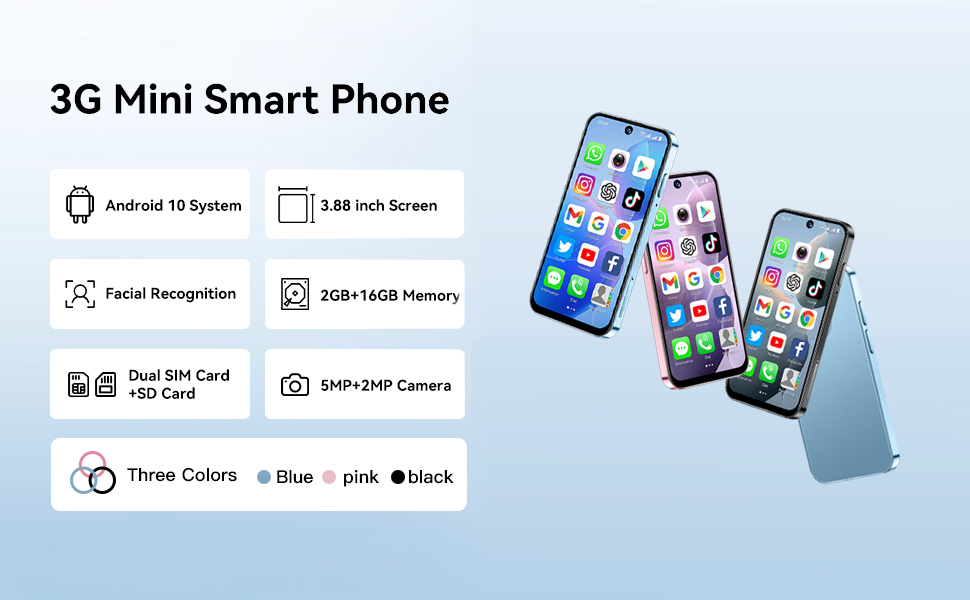
Image: Contents of the LMZYESHY Mini Phone XS19-16GB package, including the phone, protective case, screen protector, Type-C data cable, SIM ejector pin, and user manual.
Setup
1. SIM Card Installation
- Locate the SIM card tray on the side of the phone.
- Insert the provided eject pin into the small hole on the SIM tray to open it.
- Place your Nano-SIM card(s) and/or microSD card (for expandable storage) into the tray, ensuring correct orientation. The device supports dual SIM cards.
- Gently push the tray back into the phone until it clicks into place.
2. Initial Power On
- Press and hold the power button (usually on the right side) until the screen lights up.
- Follow the on-screen prompts to select your language, connect to Wi-Fi, and set up your Google account.
3. Charging the Device
- Connect the Type-C data cable to the charging port at the bottom of the phone.
- Connect the other end of the cable to a compatible USB power adapter (not included) and plug it into a wall outlet.
- The battery indicator on the screen will show charging status.
4. Face Recognition Setup
- Navigate to Settings > Security > Face Unlock.
- Follow the on-screen instructions to register your face. Ensure you are in a well-lit area.
- This feature allows for quick and secure unlocking of your device.

Image: Key features of the LMZYESHY Mini Phone XS19-16GB, including Android 10, 3.88-inch screen, facial recognition, memory, dual SIM support, and camera specifications.
Operating Instructions
1. Basic Navigation
- The phone features a 3.88-inch HD touch screen. Use gestures like tap, swipe, and pinch to navigate the interface.
- Swipe down from the top of the screen to access quick settings and notifications.
2. Making Calls
- Open the Phone app to dial numbers or select contacts.
- The device supports voice and video calls. Ensure you have an active SIM card and network coverage for cellular calls.
3. Connecting to Wi-Fi
- Go to Settings > Network & internet > Wi-Fi.
- Toggle Wi-Fi on and select your desired network from the list. Enter the password if prompted.
4. Installing Applications
- The phone runs on Android 10.0. Access the Google Play Store to download and install various applications.
- Ensure you have a stable internet connection (Wi-Fi or mobile data) for app downloads.

Image: The LMZYESHY Mini Phone XS19-16GB screen showing popular applications, demonstrating its capability to run mainstream apps on its Android 10 system.
5. Camera Usage
- Open the Camera app. The phone is equipped with a 2MP front camera and a 5MP rear camera.
- Tap the screen to focus and press the shutter button to capture photos or record videos.

Image: Two children interacting with the compact LMZYESHY Mini Phone XS19-16GB, highlighting its suitability for small hands and its use for communication and photography.
6. Expandable Storage
- The device has 16GB of internal storage and supports expandable storage up to 128GB via a microSD card.
- Insert a microSD card into the designated slot in the SIM tray to increase storage capacity for photos, videos, and other files.
Maintenance
1. Cleaning the Device
- Use a soft, lint-free cloth to gently wipe the screen and body of the phone.
- Avoid using harsh chemicals or abrasive materials, which can damage the screen or finish.
2. Battery Care
- To prolong battery life, avoid exposing the phone to extreme temperatures.
- Charge the phone using the provided Type-C cable and a compatible charger.
- While the phone supports fast charging, frequent full discharges and charges can impact long-term battery health.
3. Software Updates
- Regularly check for system updates in Settings > System > System update to ensure your device has the latest features and security patches.
Troubleshooting
- Phone not turning on: Ensure the battery is charged. Connect the phone to a charger and wait a few minutes before attempting to power it on again.
- Wi-Fi connection issues: Verify that Wi-Fi is enabled on your phone and that you have entered the correct password for your network. Restart your router and phone if problems persist.
- Slow performance or app crashes: Close unused applications running in the background. Clear app caches (Settings > Apps > [App Name] > Storage > Clear cache). If issues continue, consider a factory reset (back up your data first).
- Battery drains quickly: Reduce screen brightness, disable unnecessary features like Bluetooth or GPS when not in use, and limit background app activity. Note that intensive use, such as video streaming, will consume battery faster.
- Cannot make or receive calls: Check if your SIM card is properly inserted and activated. Ensure you have network coverage. Contact your mobile carrier if the issue persists.
Specifications
| Feature | Specification |
|---|---|
| Model Name | XS19-16GB |
| Operating System | Android 10.0 |
| Screen Size | 3.88 Inches |
| Resolution | 720 x 480 |
| RAM Memory | 2 GB |
| Internal Storage | 16 GB |
| Expandable Storage | Up to 128GB (microSD) |
| Rear Camera | 5 MP |
| Front Camera | 2 MP |
| Battery Capacity | 900 Milliamp Hours |
| Connectivity | Wi-Fi, Bluetooth, 3G Cellular Technology |
| Special Features | Dual SIM, Face Recognition, Fast Charging Support, GPS |
| Product Dimensions | 3.85 x 1.82 x 0.38 inches |
| Item Weight | 5 ounces |
Warranty Information
Warranty coverage for the LMZYESHY Mini Phone XS19-16GB is typically provided by the manufacturer or seller at the point of purchase. Please refer to the warranty card included in your product packaging or contact your retailer for specific details regarding warranty terms, duration, and claim procedures.
Support
For further assistance, technical support, or inquiries not covered in this manual, please contact the manufacturer, LMZYESHY, or your product retailer. Keep your purchase receipt and product model number (XS19-16GB) readily available when seeking support.