
Introduction
The CNBRO US-X-sd5106 Tactical Digital Watch is designed for outdoor enthusiasts and active individuals, offering a comprehensive suite of features for navigation, fitness tracking, and daily timekeeping. This manual provides detailed instructions to help you understand and utilize all functions of your watch effectively.
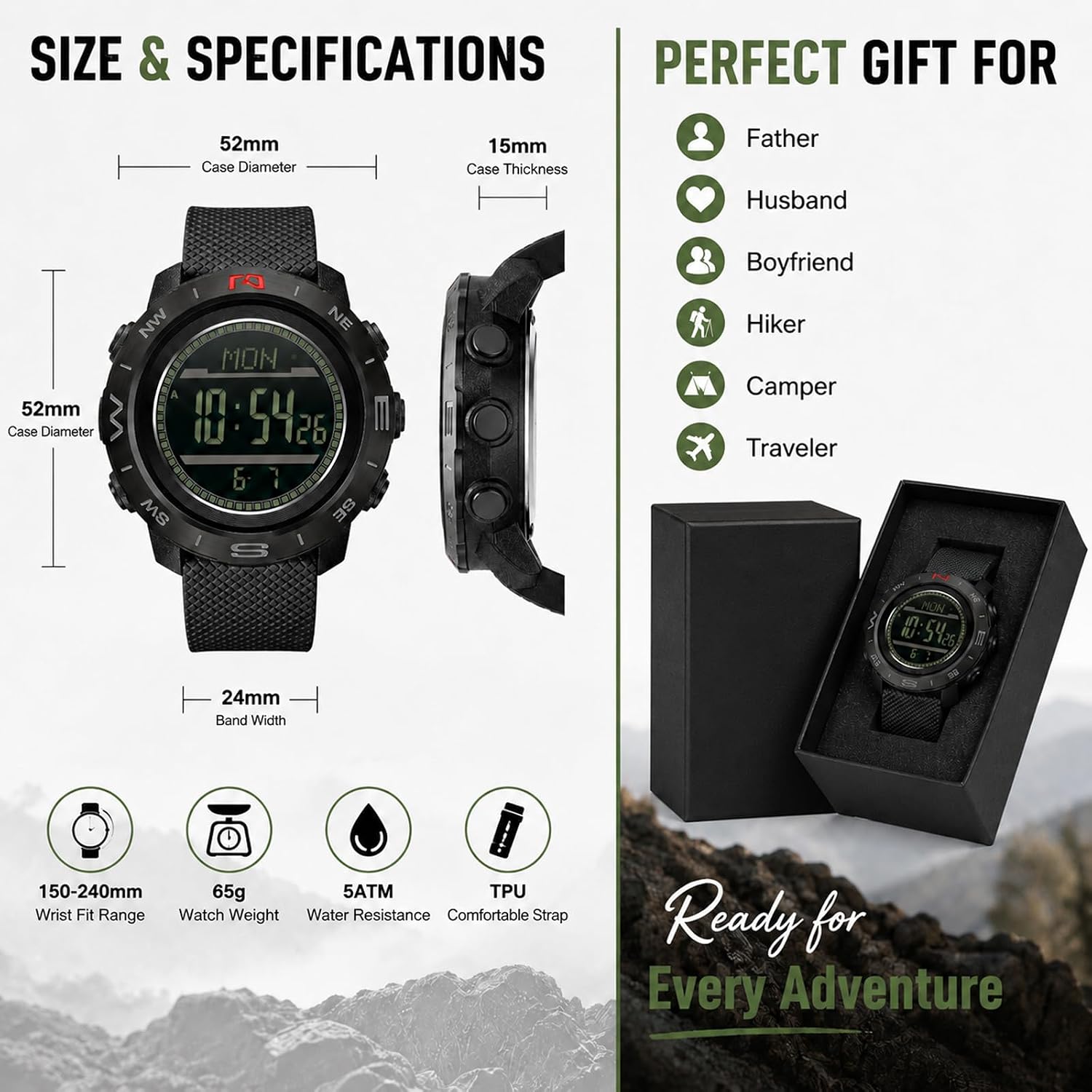
Image: The CNBRO US-X-sd5106 Tactical Digital Watch, highlighting its robust design suitable for various outdoor activities like hiking, camping, trekking, climbing, and travel.
Product Features
Your CNBRO US-X-sd5106 watch is equipped with multiple functions to support your activities:
Outdoor Sensors
- Altimeter: Tracks elevation changes for mountain sports.
- Barometer: Monitors atmospheric pressure to predict weather changes.
- Thermometer: Provides real-time temperature readings.
- Digital Compass: Assists with navigation and direction finding.
- Weather Forecast: Offers insights into upcoming weather conditions.

Image: A visual representation of the watch's five essential outdoor sensors, including altimeter, barometer, compass, thermometer, and weather forecast, with corresponding icons and descriptions.
Sports Tracking
- Step Counter (Pedometer): Records your daily steps.
- Calories Burned: Estimates energy expenditure during activities.
- Distance Tracker: Measures the distance covered during workouts.
- Activity Time: Tracks the duration of your physical activities.
- Average Speed: Monitors your pace during sports.

Image: The watch showcased alongside various sports activities, emphasizing its functions for tracking steps, calories, distance, workout time, and average speed.
Daily Functions
- Dual Time Zones: Allows tracking of two different time zones simultaneously.
- Countdown Timer: Useful for interval training or reminders.
- Stopwatch: Provides 1/100 second precision for timing events.
- Day & Date Display: Shows current day and date.
- LED Backlight: Illuminates the display for visibility in low light.
- Alarm + Hourly Chime: For reminders and time alerts.

Image: The watch highlighting its essential daily functions, including dual time, alarm, countdown timer, stopwatch, calendar, hourly chime, and LED backlight.
Durability and Materials
- Shock Resistant: Designed to withstand impacts.
- 5ATM Waterproof: Suitable for splashes, rain, and swimming (not for diving).
- Dust Resistant: Protects against dust ingress.
- Case Material: Steel bezel and ABS (Acrylonitrile Butadiene Styrene) case.
- Lens Material: Acrylic mirror.
- Band Material: TPU (Thermoplastic Polyurethane).
- Weight: Approximately 65g.

Image: The watch in a rugged outdoor environment, illustrating its durability features such as shock resistance, 5ATM waterproofing, and dust resistance, along with its material composition.
Setup
Before using your watch, please follow these initial setup steps:
1. Initial Power On
The watch typically arrives with a battery installed. If the display is off, press any button to activate it. If it does not turn on, the battery may need replacement (refer to the Maintenance section).
2. Setting Time and Date
- In Timekeeping Mode, press and hold the MODE button (usually bottom-left) until the seconds begin to flash, indicating setting mode.
- Press the RESET button (usually bottom-right) to cycle through the settings: seconds, hour, minute, year, month, day.
- Use the START/STOP button (usually top-right) to adjust the flashing value.
- Once all settings are correct, press the MODE button again to exit setting mode.
3. Sensor Calibration (Altimeter, Barometer, Compass)
For accurate readings, it is crucial to calibrate the sensors, especially the compass, before initial use and periodically thereafter.
- Compass Calibration: Enter Compass Mode. Follow the on-screen prompts to rotate the watch horizontally in a figure-eight motion until calibration is complete. Ensure the watch is on a level surface or held steadily during calibration.
- Altimeter/Barometer Calibration: In Altimeter or Barometer Mode, you may have options to set a reference altitude or pressure if known. Consult a reliable local source for current altitude or atmospheric pressure for best accuracy.
Operating Instructions
This section details how to use the various modes and functions of your watch.
Button Functions Overview
- MODE Button (Bottom-Left): Cycles through different watch modes (Timekeeping, Alarm, Stopwatch, Countdown, Altimeter, Barometer, Compass, Thermometer, Pedometer).
- LIGHT Button (Top-Left): Activates the LED backlight.
- START/STOP Button (Top-Right): Used to start/stop functions, adjust values upwards in setting mode, or view specific data.
- RESET Button (Bottom-Right): Used to reset functions, adjust values downwards in setting mode, or switch display information.
Mode-Specific Operations
Timekeeping Mode
- Displays current time, day, and date.
- To set time/date, refer to the 'Setting Time and Date' in the Setup section.
- Press RESET to toggle between 12-hour and 24-hour format.
Alarm Mode
- Press MODE until 'AL' or alarm icon appears.
- Press START/STOP to turn the alarm ON/OFF.
- Press and hold RESET to enter alarm setting mode. Use START/STOP and RESET to set the alarm time. Press MODE to confirm.
Stopwatch Mode
- Press MODE until 'ST' or stopwatch icon appears.
- Press START/STOP to start and stop the timer.
- Press RESET to clear the timer to zero.
- While timing, press RESET for lap/split time. Press START/STOP to resume, then RESET to clear.
Countdown Timer Mode
- Press MODE until 'TR' or countdown icon appears.
- Press and hold RESET to enter setting mode. Use START/STOP and RESET to set the desired countdown time. Press MODE to confirm.
- Press START/STOP to begin and pause the countdown.
- Press RESET to reset the timer to its set value.
Altimeter Mode
- Press MODE until 'ALTI' or altimeter icon appears.
- The watch will display current altitude.
- For calibration, refer to the 'Sensor Calibration' in the Setup section.
Barometer Mode
- Press MODE until 'BARO' or barometer icon appears.
- The watch will display current atmospheric pressure.
- Changes in pressure can indicate weather shifts. A rising pressure often means improving weather, while falling pressure suggests worsening conditions.
Compass Mode
- Press MODE until 'COMP' or compass icon appears.
- Hold the watch level and away from magnetic interference. The display will show the cardinal direction.
- Ensure proper calibration for accurate readings (refer to Setup section).
Thermometer Mode
- Press MODE until 'TEMP' or thermometer icon appears.
- The watch will display the current temperature.
- For accurate ambient temperature readings, remove the watch from your wrist for at least 15-20 minutes to allow it to equalize with the surrounding air temperature, as body heat can affect the sensor.
Pedometer/Fitness Tracking Mode
- Press MODE until 'STEP' or pedometer icon appears.
- The watch will display your step count, estimated calories burned, and distance covered.
- Use RESET to cycle through different fitness data displays.
LED Backlight
- Press the LIGHT button (top-left) to illuminate the display for a few seconds.
Maintenance
Proper care will ensure the longevity and performance of your watch.
Cleaning
- Wipe the watch case and band regularly with a soft, damp cloth.
- Avoid using harsh chemicals, solvents, or abrasive cleaners, as these can damage the watch's materials and finish.
- For stubborn dirt, a mild soap solution can be used, followed by rinsing with clean water and thorough drying.
Water Resistance
- The watch is 5ATM (50 meters) water resistant. This means it is suitable for everyday use, splashes, rain, and short periods of swimming in shallow water.
- Do not press any buttons while the watch is submerged in water.
- Not suitable for hot water activities (e.g., hot showers, saunas) or diving, as steam and rapid temperature changes can compromise the seals.
- After exposure to saltwater, rinse the watch with fresh water and dry thoroughly.
Battery Replacement
When the display becomes dim or functions become erratic, the battery may need replacement. This watch uses a standard watch battery (type usually indicated on the case back or in specifications). It is recommended to have battery replacement performed by a qualified watch technician to ensure proper sealing and maintain water resistance.
Troubleshooting
If you encounter issues with your watch, refer to the following common problems and solutions:
- Watch not displaying anything: Check if the battery needs replacement.
- Incorrect time/date: Re-enter setting mode and adjust the time and date as per the 'Setup' section.
- Inaccurate sensor readings (Altimeter, Barometer, Compass, Thermometer):
- Compass: Ensure it is calibrated correctly and used on a level surface away from magnetic interference.
- Thermometer: Remember to remove the watch from your wrist for accurate ambient temperature readings.
- Altimeter/Barometer: Calibrate with a known reference point if possible.
- Buttons unresponsive or stuck: Ensure no dirt or debris is lodged around the buttons. If water resistance is compromised, moisture might affect button function.
- Display difficult to read: Activate the LED backlight in low-light conditions. Ensure the display is clean.
- Accidental button presses: Some users report the right-side buttons being pressed when bending the wrist. Be mindful of wrist movement or adjust watch position if this occurs frequently.
If the problem persists after attempting these solutions, please contact customer support.
Specifications
Detailed technical specifications for the CNBRO US-X-sd5106 Tactical Digital Watch:
| Case Diameter | 52 mm |
| Case Thickness | 15 mm |
| Weight | 65 g |
| Band Width | 24 mm |
| Wrist Fit Range | 150–240 mm |
| Case Material | Steel bezel + ABS |
| Lens Material | Acrylic mirror |
| Band Material | TPU (Thermoplastic Polyurethane) |
| Water Resistance | 5ATM (50 meters) |
| Display Type | Digital |
| Movement Type | Quartz |
| Power Source | Battery Powered |
| Clasp Type | Buckle |
| Model Number | US-X-sd5106 |

Image: A diagram illustrating the dimensions and key specifications of the CNBRO US-X-sd5106 watch, such as case diameter, thickness, band width, and wrist fit range.
Warranty and Support
Your CNBRO US-X-sd5106 Tactical Digital Watch comes with an extended warranty. For any product-related inquiries or issues, please contact our customer service team.
Customer Service
If you experience any issues with your order or product, please contact us via your Amazon order page. Our team is committed to resolving your concerns within 24 hours.
Please provide your order number and a detailed description of the issue to facilitate a quick resolution.