
Introduction
The Barrina TX-L84 4FT Grow Lights are designed to provide optimal lighting for indoor plant cultivation. This system features four LED panels, delivering 336W of full-spectrum light with high Photosynthetic Photon Flux Density (PPFD). It includes a mechanical timer for automated operation and a linkable design for flexible setup. This manual provides detailed instructions for setup, operation, and maintenance to ensure healthy plant growth.

Image: Barrina TX-L84 4FT Grow Light system in operation, providing light to indoor plants.
Video: Overview of Barrina TX-L84 grow light features, including full coverage and spectrum details.
What's in the Box
Verify that all components are present before beginning installation.
- 4FT LED grow light for indoor plants (4 Packs)
- Accessories Packages (Hooks, Screws, Wall Anchors)
- User Manual
- Mechanical Timer
- On/off Switch Power Cord
- Connecting Cords (for linking multiple lights)

Image: Detailed packing list illustrating all items included in the Barrina TX-L84 grow light package.
Specifications
| Model Number | TX-L84 |
| Light Source Type | LED |
| Light Source Wattage | 336 Watts (4 x 84W) |
| Color Spectrum | 3000k+6500k+660nm (Full Spectrum with IR) |
| Material | Polycarbonate (PC) |
| Item Dimensions (L x W x H) | 46.45"L x 8.85"W x 4.32"H |
| Mounting Type | Hanging / Ceiling |
| Special Features | Not Dimmable, Mechanical Timer, Linkable |

Image: PPFD (Photosynthetic Photon Flux Density) measurements at various distances from the light source.

Image: Full spectrum details of the LED grow light, highlighting different light wavelengths for plant stages.
Setup
1. Installation Methods
The Barrina TX-L84 grow lights offer versatile installation options:
- Hanging/Suspended Mounting: Use the provided chains and hooks to hang the lights from a ceiling or rack.
- Surface Mounting: Secure the lights directly to a flat surface using screws and clips.
- Cable Tie Mounting: Utilize cable ties for a flexible attachment to various structures.
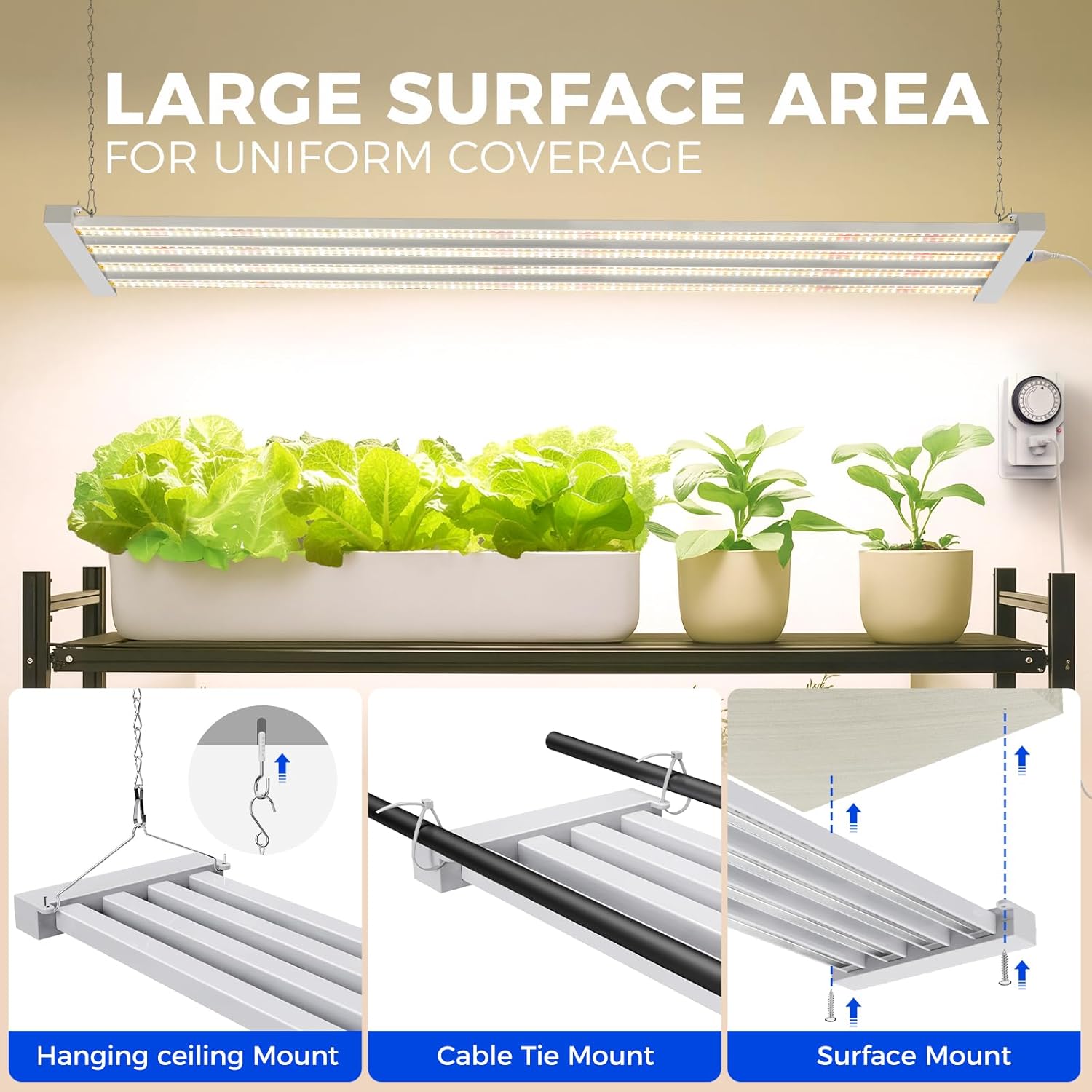
Image: Visual guide demonstrating hanging, cable tie, and surface mounting options.
Video: Step-by-step instructions on how to install the Barrina TX-L84 grow light.
2. Linking Multiple Lights
Up to 4 Barrina TX-L84 lights can be linked in series using the provided connecting cords. This allows for expanded coverage from a single power source.

Image: Illustration of the linkable design, showing how to connect multiple light units.
3. Mechanical Timer Setup
The included mechanical timer allows for automated on/off cycles. To set the timer:
- Clear Previous Settings: Lift all pins on the timer dial to clear any prior settings.
- Set ON/OFF Times: Push down the pins corresponding to the desired "ON" period. For example, to turn on at 7:00 AM and off at 6:00 PM, push down all pins between 7 and 18 (for 18:00, which is 6 PM). Each pin represents 15 minutes.
- Set Current Time: Rotate the dial clockwise until the arrow on the timer aligns with the current time.
- Activate Timer Mode: Ensure the switch on the side of the timer is set to the "Clock" (timer) mode.
- Plug In: Plug the timer into a 3-prong socket, then plug the grow light's power cord into the timer.

Image: Detailed view of the mechanical timer for setting automated schedules.
Operating Instructions
1. Powering On/Off
The grow light can be manually turned on or off using the switch on its power cord. For automated operation, use the mechanical timer as described in the Setup section.
2. Optimal Light Placement
For seedlings, position the lights approximately 12-18 inches above the plants. For vegetative growth, maintain a distance of 18-24 inches. During flowering and fruiting stages, the lights can be lowered to 6-12 inches, depending on plant tolerance and light intensity requirements. Observe your plants for signs of stress (e.g., bleaching, stretching) and adjust accordingly.
3. Timer Operation
Once the mechanical timer is set and plugged in, it will automatically control the grow light's on/off cycles daily. The timer has a power-off memory function, meaning it will resume its schedule after a power outage without needing to be reset.
Video: Instructions on how to effectively use the mechanical timer for the grow lights.
Maintenance
Regular maintenance ensures optimal performance and longevity of your grow lights.
- Cleaning: Periodically wipe the LED panels with a soft, dry cloth to remove dust and debris. Ensure the lights are unplugged before cleaning. Do not use liquid cleaners directly on the LEDs.
- Inspection: Regularly check power cords and connections for any signs of damage or wear. Replace any damaged components immediately.
- Airflow: Ensure adequate airflow around the light fixtures to facilitate 360° heat dissipation and prevent overheating, which can extend the LED lifespan.
Troubleshooting
- Light Not Turning On:
- Check if the power cord is securely plugged into both the light fixture and the power outlet (or timer).
- Verify the power outlet is functional by plugging in another device.
- If using the mechanical timer, ensure it is set to "Clock" mode and the pins are correctly pushed down for the current time.
- Check the on/off switch on the power cord.
- Plants Showing Stress (e.g., yellowing, stretching):
- Adjust the distance between the lights and plants. Yellowing or bleaching may indicate lights are too close; stretching may indicate lights are too far.
- Ensure the lights are operating for the correct duration (typically 12-18 hours per day for most plants).
- Consider other environmental factors such as water, nutrients, and temperature.
- Lights Flickering:
- Check all connections for looseness.
- Ensure the power supply is stable.
Warranty & Support
The Barrina TX-L84 Grow Lights come with a 2-year warranty from the manufacturer. This warranty covers defects in materials and workmanship under normal use.
For technical support, warranty claims, or any questions regarding your product, please contact Barrina customer service through their official website or the retailer where the product was purchased. Please have your model number (TX-L84) and proof of purchase ready.
Additional protection plans may be available for purchase:
- 3-Year Protection Plan: $25.99
- 4-Year Protection Plan: $34.99
- Complete Protect (monthly): $16.99