
1. Introduction
This instruction manual provides essential information for the proper installation, operation, and maintenance of your OATAO TPA-LS001D replacement accessory. Please read this manual thoroughly before attempting any installation or use to ensure safe and effective functionality. This accessory is designed as a replacement component for devices compatible with 3571-0007 and B555-0007 specifications.
2. Product Overview
The OATAO TPA-LS001D is a specialized replacement component designed to restore or enhance the functionality of compatible tablet systems. It is engineered for precise fit and performance, ensuring seamless integration with your existing equipment. This component is identified by its model number TPA-LS001D and is compatible with systems requiring parts 3571-0007 and B555-0007.
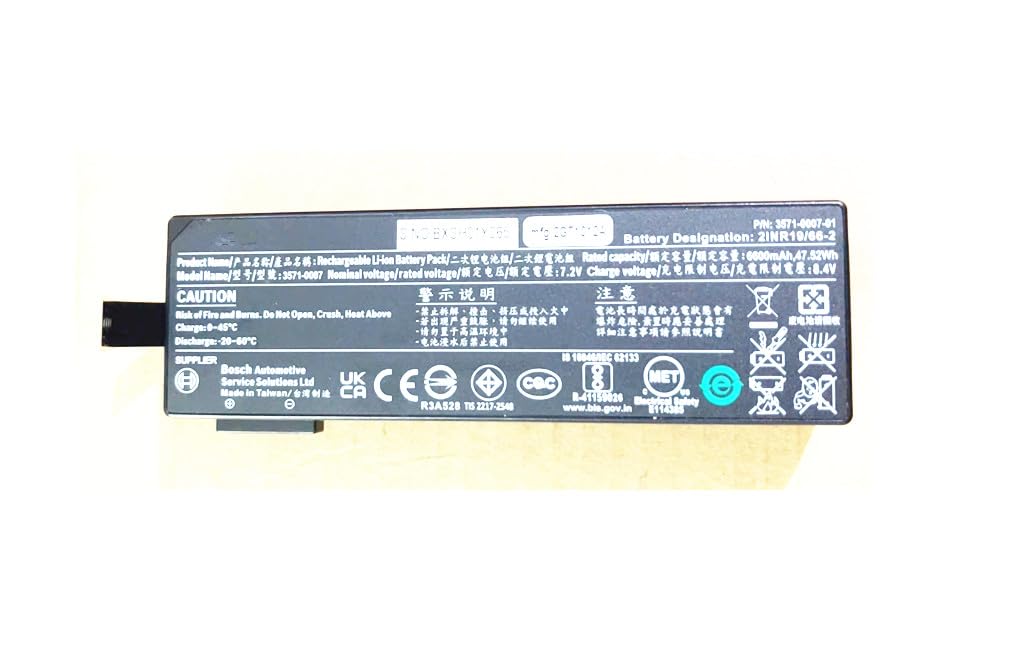
Figure 1: OATAO TPA-LS001D Replacement Accessory. This image displays the compact design of the replacement component, highlighting its connectors and housing.
3. Specifications
| Feature | Detail |
|---|---|
| Model Number | TPA-LS001D |
| Product Dimensions | 15.24 x 10.16 x 20.32 cm |
| Item Weight | 1 Kilogram |
| Material | Plastic |
| Operation Mode | ON-OFF |
| Current Rating | 2 Amps |
| Operating Voltage | 220 Volts |
| Contact Type | Normally Open |
| Connector Type | 2-pin |
| Switch Type | Kill Switch |
| Circuit Type | 1-way |
| Mounting Type | PCB Mount |
| Number of Positions | 2 |
| Lower Temperature Rating | 60 Degrees Celsius |
| Upper Temperature Rating | 60 Degrees Celsius |
| International Protection Rating | IP40 |
| Specification Met | cUL |
| UPC | 761759090970 |
4. Setup and Installation
Follow these steps carefully to install the OATAO TPA-LS001D replacement accessory:
- Unpacking and Inspection: Carefully remove the accessory from its packaging. Inspect it for any signs of damage during transit. Do not proceed with installation if the component appears damaged.
- Power Off Device: Before beginning any installation, ensure the host device (e.g., tablet) is completely powered off and disconnected from all power sources. This prevents electrical shock and damage to the device or component.
- Identify Replacement Area: Locate the area within your device where the original component is situated. Refer to your device's service manual for precise location and removal instructions of the old part.
- Remove Old Component: Carefully disconnect and remove the existing component. Note the orientation and connection points for proper installation of the new accessory.
- Install New Accessory: Align the OATAO TPA-LS001D replacement accessory with the designated mounting points. Gently press or secure it into place, ensuring all connectors (e.g., 2-pin) are firmly and correctly seated.
- Secure Connections: Verify that all connections are secure and that the accessory is properly mounted. Avoid excessive force during installation.
- Reassemble Device: Carefully reassemble your device, ensuring all covers and screws are replaced correctly.
- Initial Power-Up: Reconnect the device to its power source and power it on. Observe for any unusual behavior or error messages.
5. Operating Instructions
Once installed, the OATAO TPA-LS001D replacement accessory operates in conjunction with your device's existing systems. As a replacement component, its functionality is typically integrated and automatic, mirroring the behavior of the original part.
- Functionality: The accessory is designed to perform its specific function (e.g., ON-OFF switching, signal transmission) as soon as the host device is powered on and operating normally.
- Integration: No specific user interaction is usually required for the accessory itself, as it functions as an internal component. Its operation is managed by the device's operating system or hardware controls.
- Monitoring: If the accessory is a switch, its state (ON/OFF) will correspond to the device's intended function. Monitor your device's performance to confirm the accessory is working as expected.
6. Maintenance
Proper maintenance ensures the longevity and reliable performance of your OATAO TPA-LS001D replacement accessory.
- Cleaning: Since this is an internal component, direct cleaning is generally not required. If the device is opened for other maintenance, gently remove any dust or debris from the accessory using a soft, dry brush or compressed air. Do not use liquid cleaners directly on the component.
- Storage: If the accessory is not immediately installed, store it in its original packaging in a cool, dry place, away from direct sunlight, extreme temperatures, and humidity.
- Handling: Always handle the accessory by its edges to avoid touching the electrical contacts or sensitive components. Static electricity can damage electronic parts, so use appropriate anti-static precautions if handling outside of the device.
7. Troubleshooting
If you encounter issues after installing the OATAO TPA-LS001D replacement accessory, consider the following troubleshooting steps:
- Accessory Not Recognized:
- Ensure the device is fully powered off and then restart it.
- Verify that the accessory is correctly and securely connected to its designated port. Re-seat the component if necessary.
- Confirm compatibility: Double-check that your device model requires replacement parts 3571-0007 or B555-0007.
- Intermittent Functionality:
- Check for loose connections.
- Inspect the accessory and the device's internal connectors for any visible damage or debris.
- Device Not Powering On (if accessory is a power-related component):
- Ensure all power connections within the device are correctly made.
- Temporarily remove the new accessory and attempt to power on the device (if safe to do so without the component) to isolate the issue.
If these steps do not resolve the issue, contact OATAO customer support for further assistance.
8. Warranty and Support
OATAO stands behind the quality of its products. The TPA-LS001D replacement accessory comes with the following:
- One-Year Warranty: This product is covered by a one-year warranty from the date of purchase, protecting against manufacturing defects.
- Three-Month Return Protection: Customers are supported with a return protection clause, allowing returns for any reason within three months of purchase.
- Customer Support: For any questions, concerns, or technical assistance, please contact OATAO customer support. We aim to respond to all inquiries within 24 hours.
Please retain your proof of purchase for warranty claims and returns.