
Introduction
This manual provides detailed instructions for the assembly, operation, and maintenance of your CubiCubi 40-inch Computer Desk. Designed for versatility and efficiency, this desk features two drawers and a shelf, making it suitable for various settings including home offices, study areas, and bedrooms. Please read this manual thoroughly before beginning assembly or use to ensure proper setup and longevity of your product.

Image: The CubiCubi 40-inch Computer Desk in Modern Black, featuring its spacious desktop, two integrated drawers, and an open shelf. A monitor, keyboard, and other accessories are placed on the desk, demonstrating its functional design.
Safety Information
General safety precautions apply. Always follow assembly instructions carefully and do not overload the desk. Ensure all screws and fasteners are securely tightened before use. Keep small parts away from children during assembly. Do not stand or sit on the desk. Place the desk on a level surface to prevent wobbling and ensure stability.
Package Contents
Before assembly, verify that all components listed below are present and undamaged. If any parts are missing or damaged, please contact customer support.
- Desktop Panel
- Metal Frame Components (Legs, Support Bars)
- 2 Fabric Drawers with Front Panels
- Bottom Shelf Panel
- Headphone Hook
- Adjustable Feet Pads
- Assembly Hardware (Screws, Bolts, Allen Wrench)
- Instruction Manual
Assembly Instructions (Setup)
Assembly is estimated to take approximately 30 minutes. It is recommended to assemble the desk on a soft, clean surface to prevent scratches.
Step 1: Prepare Components
Unpack all parts and lay them out. Identify each component using the provided parts list in the separate detailed instruction sheet. Ensure you have the necessary tools (included).
Step 2: Assemble the Metal Frame
Connect the metal legs and support bars according to the diagrams in the detailed instruction sheet. Hand-tighten all screws initially. Ensure the frame is stable before fully tightening.
Step 3: Attach the Desktop Panel
Carefully place the desktop panel onto the assembled metal frame. Align the pre-drilled holes on the desktop with the holes on the frame. Secure the desktop using the provided screws. Fully tighten all screws on the entire frame and desktop.
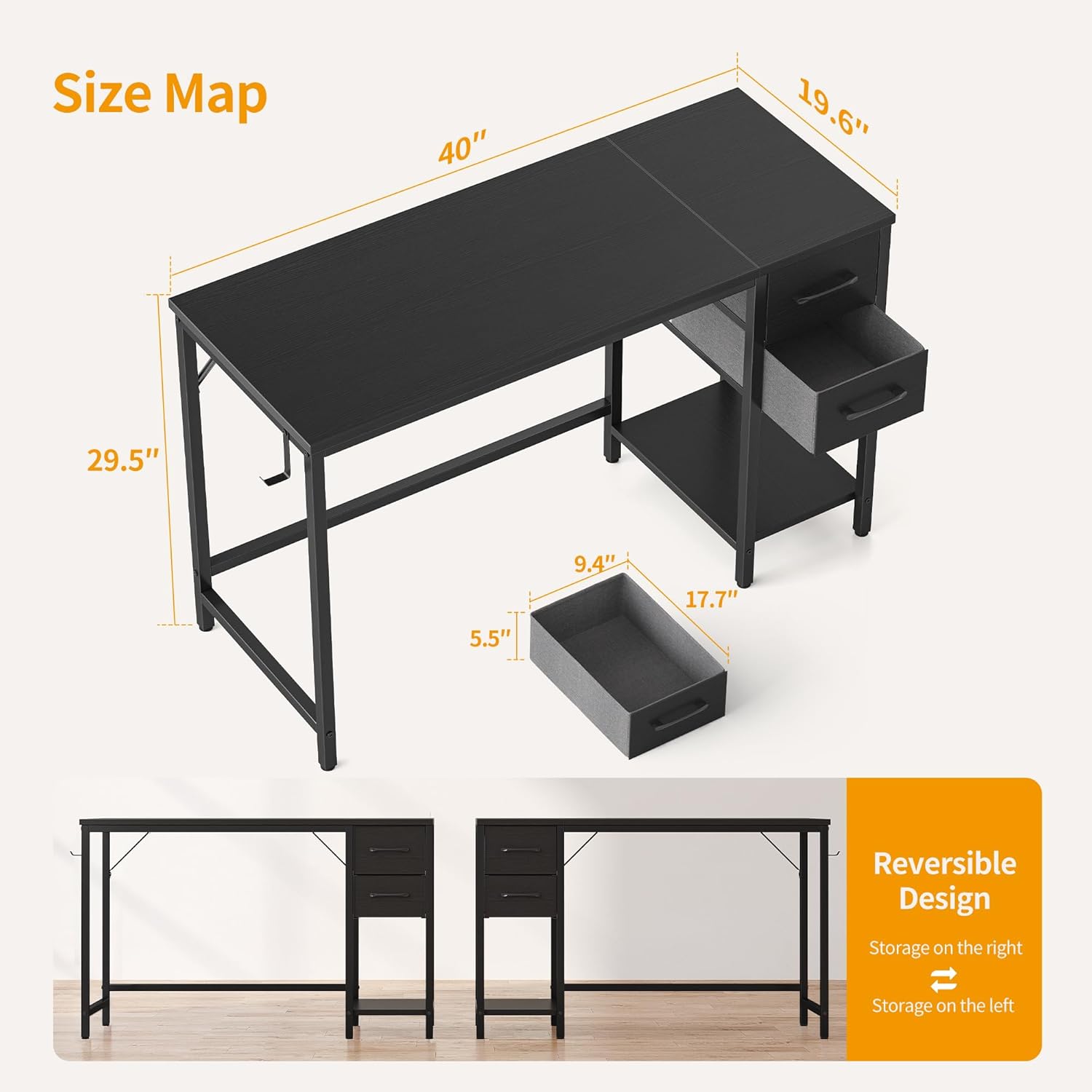
Image: A detailed size map of the CubiCubi desk, illustrating its dimensions (40"W x 19.6"D x 29.5"H) and the reversible design feature, allowing the storage unit to be installed on either the left or right side.
Step 4: Install Drawers and Shelf (Reversible Design)
The drawer and shelf unit can be installed on either the left or right side of the desk to suit your preference and room layout. Follow the specific instructions in your assembly guide for attaching the drawer frame to the main desk frame. Insert the fabric drawers into their designated slots. The bottom shelf can be used for additional storage or to house a small PC tower.

Image: This illustration demonstrates the versatility of the removable drawer and shelf. Method 1 shows the shelf set at 11 inches high, suitable for bags or books. Method 2 shows the shelf lowered to accommodate a PC tower up to 16.7 inches tall, by removing the bottom drawer.
Step 5: Attach Headphone Hook and Adjust Feet
Attach the iron headphone hook to the side of the desk frame as desired. Adjust the feet pads at the bottom of the desk legs to ensure the desk is level and stable on uneven floors. Turn the pads clockwise or counter-clockwise until the desk no longer wobbles.

Image: Detailed views of key features: an iron hook for headphones or bags, a comfortable handle on the fabric drawer, and adjustable feet pads that can be rotated to stabilize the desk on uneven surfaces.
Operating Instructions
Using the Drawers
The two fabric drawers provide convenient storage for office supplies, documents, or personal items. Simply pull the handles to open and push to close. Avoid overloading the drawers to ensure smooth operation and prevent damage.
Utilizing the Shelf
The open shelf beneath the drawers offers additional storage. It can be used for books, decorative items, or to house a small form factor computer tower. The shelf's height can be adjusted by removing the bottom drawer, as shown in the assembly section, to accommodate taller items like a PC.
Headphone Hook
The integrated headphone hook provides a convenient place to hang headphones, bags, or other accessories, keeping your desktop clear and organized.
Maintenance
Cleaning
Wipe the desk surfaces with a soft, damp cloth. Avoid using harsh chemicals or abrasive cleaners, as these can damage the laminated finish. For the fabric drawers, spot clean with a mild detergent and allow to air dry.
General Care
- Periodically check all screws and connections to ensure they remain tight.
- Avoid placing extremely hot or cold items directly on the desktop without protective coasters.
- Do not drag the desk when moving it; lift it to prevent damage to the legs and floor.
- Keep the desk away from direct sunlight and excessive moisture to prevent warping or discoloration.
Troubleshooting
Desk is Wobbly
- Check Adjustable Feet: Ensure all four adjustable feet pads are making firm contact with the floor and are properly adjusted to compensate for uneven surfaces.
- Tighten Screws: Re-tighten all assembly screws, especially those connecting the desktop to the frame and the frame components themselves.
- Level Surface: Verify that the desk is placed on a flat, level surface.
Drawers Do Not Slide Smoothly
- Check Alignment: Ensure the fabric drawers are correctly inserted into their slots and are not obstructed.
- Overload: Reduce the weight or volume of items in the drawers if they are overloaded.
Missing Parts or Damaged Components
If you find any parts missing or damaged upon opening the package, please contact CubiCubi customer support immediately with your purchase details and a description of the issue. Do not attempt to assemble the product with missing or damaged parts.
Specifications
| Brand | CubiCubi |
| Model Number | INUC-CD0004-100BWG-01 |
| Product Dimensions (D x W x H) | 19.6"D x 39.4"W x 29.5"H |
| Color | Modern Black |
| Material | Metal (Base), Wood (Top) |
| Finish Type | Laminated |
| Number of Drawers | 2 |
| Number of Shelves | 1 |
| Item Weight | 25.6 Pounds |
| Assembly Required | Yes (Tools Included) |
Warranty and Support
CubiCubi products are manufactured with quality and customer satisfaction in mind. For information regarding warranty coverage, returns, or technical support, please refer to the contact information provided with your purchase or visit the official CubiCubi website. Please have your model number (INUC-CD0004-100BWG-01) and purchase date ready when contacting support.