
Important Safety Instructions
Before using the JOROTO JV60 4D Vibration Plate, please read and understand all safety instructions. Improper use can lead to injury or damage to the device.
- Consult a physician before starting any new exercise program, especially if you have pre-existing medical conditions.
- Ensure the vibration plate is placed on a stable, level surface.
- Keep children and pets away from the device during operation.
- The maximum user weight capacity for this device is 158 KG (350 LBS). Do not exceed this limit.
- Unplug the device from the power outlet when not in use or before cleaning.
- Do not use the device if the power cord or plug is damaged.
- Avoid placing hands or feet under the device during operation.
- Use only the accessories provided by JOROTO.

The JOROTO JV60 4D Vibration Plate is designed for home use and supports a maximum weight of 158 kg, making it suitable for various users.
Package Contents
Please check the box to ensure all components are present:
- 1 x JOROTO JV60 4D Vibration Plate
- 2 x Resistance Bands
- 1 x Power Cable
- 1 x Remote Control
- 1 x User Manual
- 1 x Anti-slip Mat

This image displays all items you should find inside the product packaging, including the main unit and accessories.
Product Overview
The JOROTO JV60 is an advanced 4D vibration plate designed for comprehensive home workouts. It features three powerful, silent motors, offering a more intense and varied vibration experience compared to standard models. With 10 programs and 30 speed levels, it caters to various fitness needs, from relaxation to intense muscle toning.

This diagram highlights the superior 4D vibration technology and triple motor system of the JOROTO JV60, providing a powerful yet quiet workout.

Key design elements of the JV60 are shown, emphasizing its robust build, user-friendly remote, stability features, and quiet performance.
Setup
Follow these steps to set up your JOROTO JV60 4D Vibration Plate:
- Unpack: Carefully remove all components from the packaging.
- Position: Place the anti-slip mat on a flat, stable floor where you intend to use the device. Then, place the vibration plate on top of the mat.
- Connect Power: Insert the power cable into the power port on the side of the vibration plate and then into a suitable wall outlet.
- Attach Resistance Bands: Hook the resistance bands to the designated attachment points on the sides of the vibration plate.
- Power On: Flip the main power switch located on the side of the unit to the 'ON' position. The display panel should light up.
This video demonstrates the unboxing process, connecting the power cable, and attaching the resistance bands to the JOROTO JV60 4D Vibration Plate.
Operating Instructions
The JOROTO JV60 can be operated using the control panel on the unit or the included remote control.
Automatic Mode
The device offers 3 automatic programs (Relaxation, Toning, Energy) that combine different vibration types, times, and speeds for a varied workout.
- Ensure the device is powered on.
- Press the 'Mode' button on the remote control or control panel to cycle through the automatic programs (P1, P2, P3).
- Press 'Start/Stop' to begin the selected program.
Manual Mode
In manual mode, you can customize the vibration type, time, and speed.
- Ensure the device is powered on.
- Press the 'Mode' button until 'Manual Mode' is selected (indicated by 'L' on the display).
- Select Vibration Type: Use the dedicated buttons on the remote control (e.g., Swing, Vibration, Translation, or combinations) to choose your desired vibration pattern. The JV60 offers 7 manual modes.
- Adjust Time: Use the 'Time Up/Down' buttons to set the workout duration from 1 to 10 minutes.
- Adjust Speed: Use the 'Speed Up/Down' buttons to select a speed level from 1 to 30.
- Press 'Start/Stop' to begin your customized workout.

This image highlights the various vibration modes and the remote control for easy selection and adjustment.
This video demonstrates how to select and operate the JOROTO JV60 in both automatic and manual modes, including adjusting time and speed settings using the remote control.
Exercise Poses and Benefits
The JOROTO JV60 4D Vibration Plate can be used for a variety of exercises to target different muscle groups and achieve various fitness goals. The high-frequency vibrations help to activate muscles, improve circulation, and promote relaxation.
Benefits of Vibration Training:
- Joint Relief
- Improved Blood Flow
- Metabolic Boost
- Muscle Relaxation and Toning

This image shows a user performing a squat on the vibration plate, highlighting the wellness benefits.

This composite image illustrates several common exercise positions that can be performed on the vibration plate to engage different muscle groups.
Maintenance
Proper maintenance ensures the longevity and optimal performance of your JOROTO JV60 4D Vibration Plate.
Cleaning:
- Always unplug the device before cleaning.
- Wipe the surface of the vibration plate with a soft, damp cloth. Do not use abrasive cleaners or solvents.
- Ensure no liquid enters the internal components.
Storage:
- Store the device in a cool, dry place away from direct sunlight and moisture.
- Its compact design (17.1 cm height) allows for convenient storage under beds, sofas, or in cupboards.
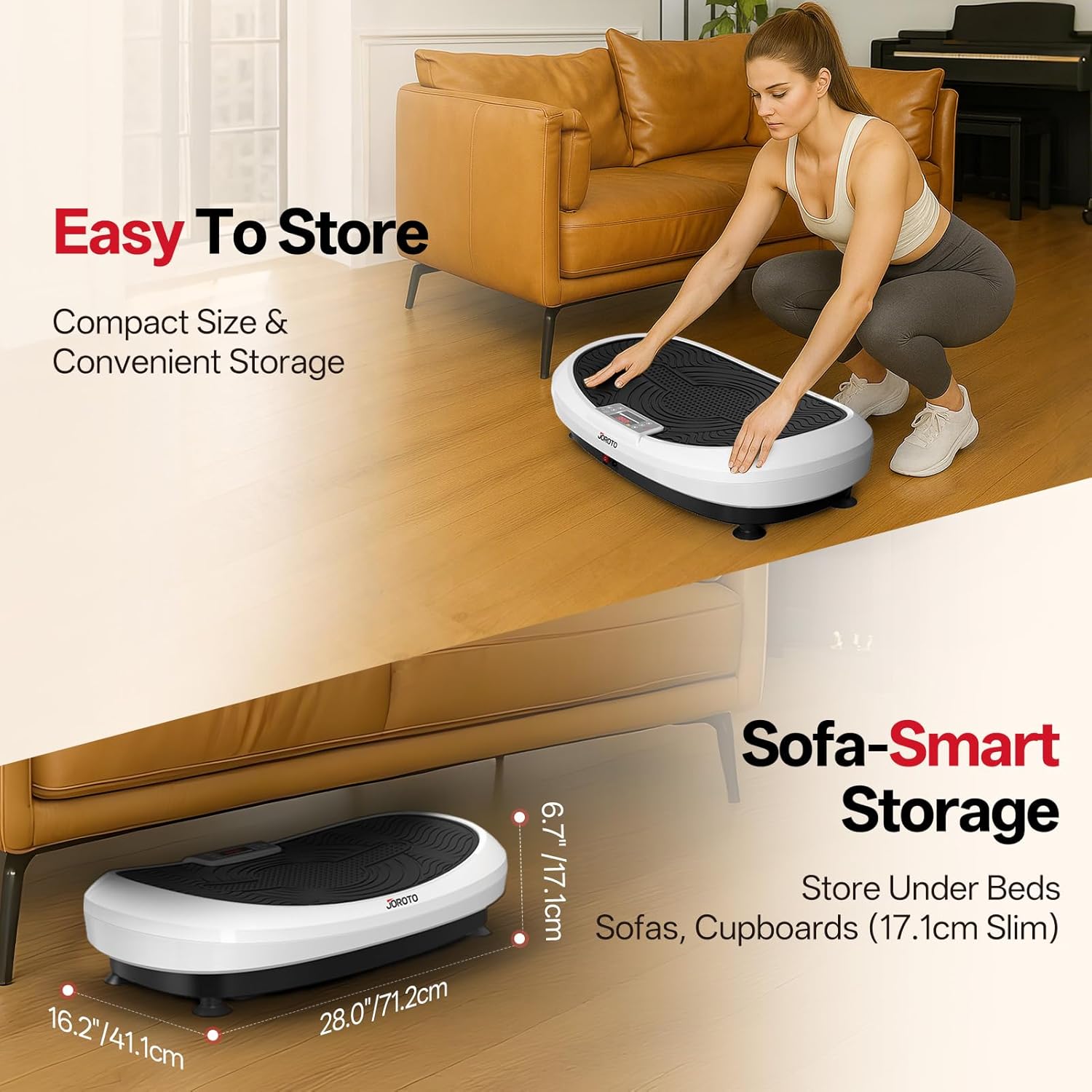
The image illustrates how easily the vibration plate can be stored in small spaces due to its slim profile.
Troubleshooting
If you encounter any issues with your JOROTO JV60, please refer to the following common problems and solutions:
| Problem | Possible Cause | Solution |
|---|---|---|
| Device does not power on. | Power cable not connected properly; Main power switch is off; Power outlet malfunction. | Ensure power cable is securely plugged into the device and outlet. Check if the main power switch is in the 'ON' position. Test the outlet with another device. |
| No vibration or weak vibration. | Incorrect mode selected; Speed level too low; Device overloaded. | Select an appropriate mode (automatic or manual). Increase the speed level. Ensure user weight does not exceed 158 KG. |
| Remote control not working. | Batteries are dead or incorrectly inserted; Obstruction between remote and device. | Replace batteries in the remote control. Ensure there are no obstacles blocking the signal. Point the remote directly at the device's receiver. |
| Unusual noise during operation. | Device not on a level surface; Loose components. | Ensure the device is on a flat, stable surface. Check for any loose parts. If the noise persists, contact customer support. |
Specifications
| Feature | Detail |
|---|---|
| Model Number | JV60 |
| Product Dimensions (L x W x H) | 71.2 x 71.2 x 17.1 cm (28.0 x 28.0 x 6.7 inches) |
| Item Weight | 16 Kilograms |
| Material | Alloy Steel |
| Max Recommended Load | 158 Kilograms (350 LBS) |
| Power Wattage | 440 Watts |
| Number of Programs | 10 (3 Automatic, 7 Manual) |
| Number of Resistance Levels | 30 |
| Control Type | Remote Control |
| Operation Mode | Automatic |
| Power Source | Corded Electric |
| Country of Origin | China |
Warranty and Support
The JOROTO JV60 4D Vibration Plate comes with a 1-year manufacturer's warranty.
For any questions, technical assistance, or warranty claims, please contact JOROTO Sport & Fitness customer service. Refer to your user manual for specific contact details or visit the official JOROTO website.
Customer Service: JOROTO Sport & Fitness