
1. Introduction
This manual provides comprehensive instructions for the installation, operation, and maintenance of your Kfwfuaee A3 Super 4 32-bit 6-Axis Flight Controller. Designed for fixed-wing aircraft, this flight controller offers advanced stabilization and precise control, enhancing your flight experience. Please read this manual thoroughly before using the product to ensure safe and optimal performance.
2. Product Overview and Package Contents
The A3 Super 4 flight controller features a 32-bit high-speed processor and a 6-axis high-precision sensor, providing reliable and stable flight stabilization. Its lightweight ABS construction ensures strong compatibility with various fixed-wing models.

Figure 2.1: Kfwfuaee A3 Super 4 Flight Controller Standard Set components. This image displays all items included in the standard package: the A3 Super 4 flight controller module, a USB programming adapter, a power cable with a capacitor, three servo extension cables, and two adhesive pads.
Package Contents:
- 1 x A3 Super 4 Flight Controller Module
- 1 x USB Programming Adapter
- 1 x Power Cable with Capacitor
- 3 x Servo Extension Cables
- 2 x Adhesive Pads
3. Features
- Advanced Stabilization: Features 6-axis stabilization for precise and smooth flight control.
- High-Speed Processor: Equipped with a 32-bit high-speed processor for enhanced performance and reliability.
- Multiple Flight Modes: Supports 6 flight modes and 6 switching positions, including Lock, Angle, and Leveling modes.
- Wide Compatibility: Integrates seamlessly with multiple fixed-wing aircraft and accessories due to its lightweight ABS construction and strong compatibility.
- Customizable Output Channels: Multiple digital serial protocol receivers and customizable output channels ensure ease of use and reliability.
- Remote Master Pass Support: Compatible with remote master pass through customizable and auxiliary output channels.
- Firmware Upgradable: Supports firmware upgrades via a programming card.
4. Specifications
| Parameter | Value |
|---|---|
| Main Controller | 32-bit |
| Sensor | 6-axis high-precision sensor |
| Gyro Scale Range | 2000 dps |
| Accelerometer Scale Range | 4 grams |
| PWM Output | 800-2220US, Neutral 1500/1520US, 50Hz-333Hz |
| Input Voltage | DC 4.8V - 8.4V |
| Operating Temperature | -10 to 50 degrees Celsius |
| Dimensions (Approx.) | 43 x 27 x 14 mm |
| Firmware | Upgradable via programming card |
5. Setup and Installation
Proper installation is crucial for the optimal performance of your A3 Super 4 flight controller. Follow these steps carefully.
5.1 Mounting the Flight Controller
- Choose a flat, stable surface on your aircraft, ideally near the center of gravity.
- Use the provided adhesive pads to securely mount the flight controller. Ensure it is firmly attached and does not vibrate.
- Orient the flight controller correctly as indicated by the arrows or markings on the module. Incorrect orientation will lead to unstable flight.
5.2 Wiring Diagram and Connections
Connect the flight controller to your receiver, ESC, and servos according to the diagram below. Pay close attention to the polarity and correct pin assignments.

Figure 5.1: Wiring diagram for the Kfwfuaee A3 Super 4 Flight Controller. This diagram illustrates how to connect the flight controller to a receiver (e.g., R7008SB), ESC, and various servos (Elevator, Aileron, Rudder). It highlights signal input pins and output channels (OUT1-OUT5).
- Connect the receiver's output channels (CH1-CH8) to the corresponding input pins on the flight controller (A2-E2-G, A-E-R, Serial RX/M).
- Connect the flight controller's output channels (OUT1-OUT5) to your servos (Aileron, Elevator, Rudder).
- Ensure the ESC is connected to the appropriate channel for throttle control.
- The pins marked with "+" and "-" are for power supply. WARNING: Do not use signal input pins for power supply.
- For standard PWM receiver mode, AUX1 and AUX2 are invalid. Functions of OUT1 to OUT5 can be specified via programming.
5.3 Initial Configuration
After physical installation, connect the flight controller to your computer using the USB programming adapter for initial setup and calibration. Refer to the official Kfwfuaee software for detailed configuration steps.

Figure 5.2: A person is shown configuring a drone, likely with the A3 Super 4 flight controller, using a laptop in an outdoor setting. This illustrates the software configuration process.
6. Operating Modes
The A3 Super 4 flight controller supports 6 distinct flight modes, which can be switched via your remote control's designated channels. The most common modes include:
- Lock Mode: Provides maximum stabilization, locking the aircraft's attitude. Ideal for beginners or stable flight.
- Angle Mode: Limits the maximum bank and pitch angles, preventing the aircraft from entering extreme attitudes.
- Leveling Mode: Automatically levels the aircraft when control sticks are released, assisting in maintaining stable flight.
- Other modes and their specific functionalities can be configured and assigned through the flight controller's software.
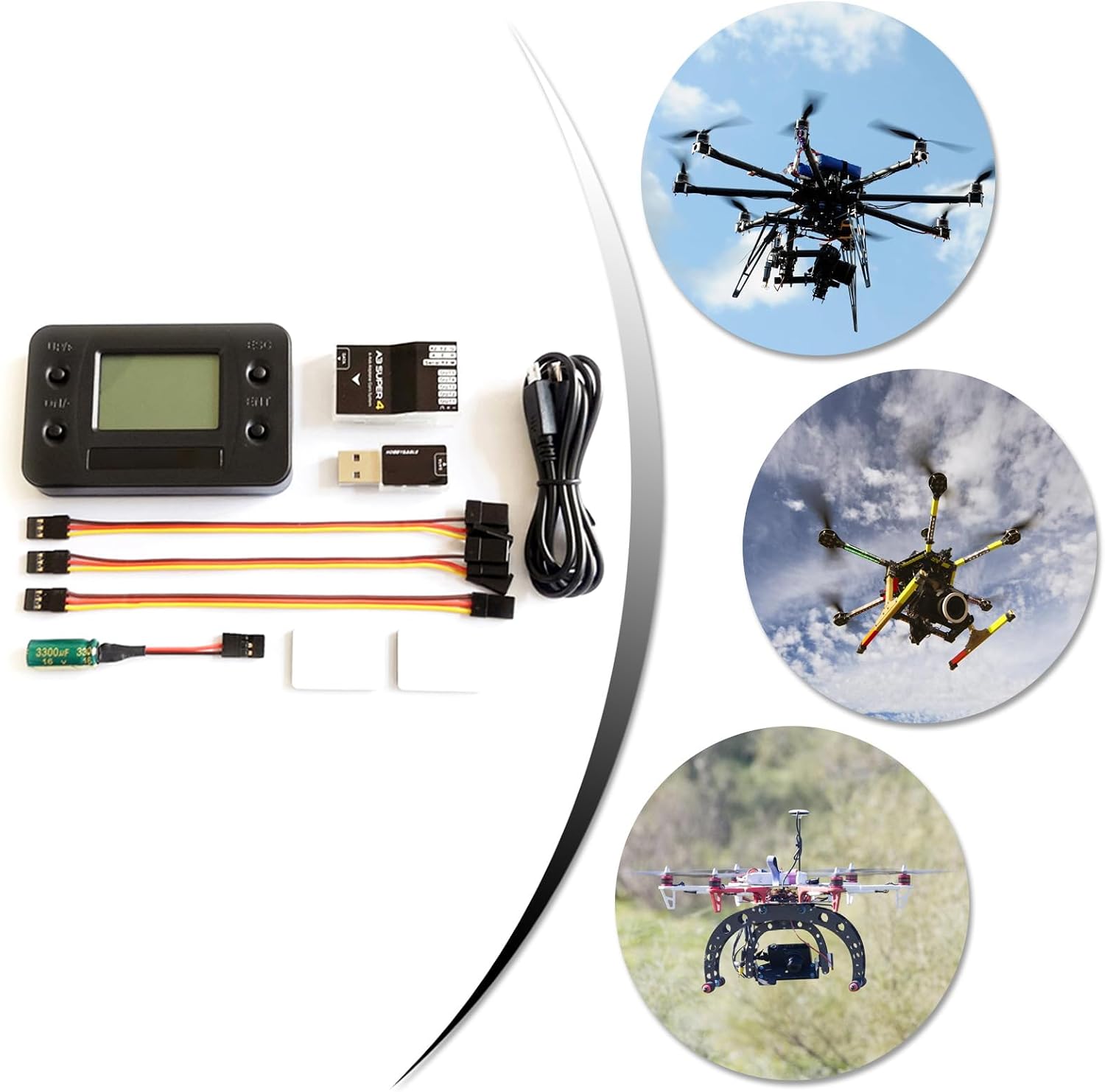
Figure 6.1: This image displays three different fixed-wing aircraft (drones) in flight, illustrating the versatility and application of the A3 Super 4 flight controller across various models.
7. Maintenance
To ensure the longevity and reliable performance of your flight controller, follow these maintenance guidelines:
- Keep Clean: Regularly clean the flight controller and its connections to prevent dust and debris buildup. Use a soft, dry cloth.
- Avoid Moisture: Protect the unit from moisture and extreme temperatures. Do not expose it to water or operate it outside the specified temperature range (-10 to 50 degrees Celsius).
- Secure Mounting: Periodically check that the flight controller is securely mounted and that all connections are firm. Vibrations can affect performance.
- Firmware Updates: Check for and install the latest firmware updates from the official Kfwfuaee website. Firmware updates can improve performance, add features, and fix bugs.
8. Troubleshooting
If you encounter issues with your A3 Super 4 flight controller, refer to the common problems and solutions below:
| Problem | Possible Cause / Solution |
|---|---|
| Unstable Flight / Erratic Behavior |
|
| No Response from Controls |
|
| Flight Modes Not Switching |
|
| Firmware Update Failure |
|
If the problem persists, please contact Kfwfuaee customer support for further assistance.
9. Warranty and Support
Kfwfuaee products are manufactured to high-quality standards. For specific warranty information, please refer to the warranty card included with your product or visit the official Kfwfuaee website. For technical support, troubleshooting assistance, or inquiries about spare parts, please contact our customer service team through the contact information provided on our official website or your purchase platform.
Online Resources:
- Official Kfwfuaee Website: www.kfwfuaee.com (Note: This is a placeholder URL as no official website was provided.)
- Product Support Page: Check the product page on your retailer's website for FAQs and additional resources.