
1. Introduction
Thank you for choosing the Yoever DR05 Women's Smart Watch. This device is designed to enhance your daily life with features such as call management, comprehensive health monitoring, and various sports modes. This manual provides essential information for setting up, operating, and maintaining your smartwatch to ensure optimal performance.
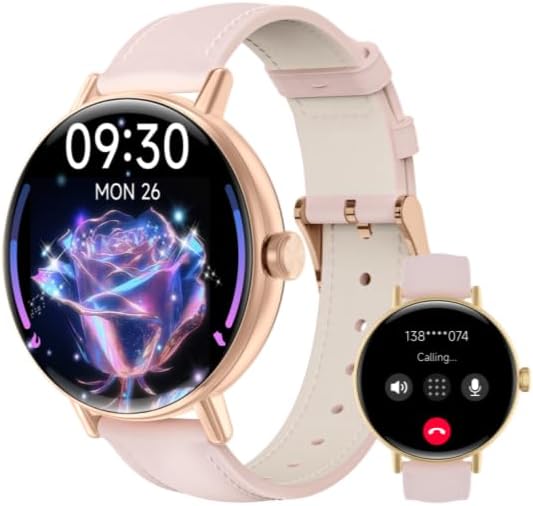
This image displays the Yoever DR05 Smart Watch, featuring a round rose gold-toned case and a pink silicone strap. The main screen shows a vibrant floral watch face with the time '09:30' and date 'MON 26'. An inset image on the right illustrates the watch's call function, displaying a 'Calling...' screen with a phone number and options to answer or decline.
2. What's in the Box
Upon opening your Yoever DR05 Smart Watch package, you should find the following items:
- Yoever DR05 Smart Watch (with strap)
- Magnetic Charging Cable
- User Manual

The Yoever DR05 Smart Watch is pictured alongside its magnetic charging cable, illustrating the charging mechanism. The cable easily attaches to the back of the watch for convenient power replenishment.

The front of the Yoever Smart Watch packaging, featuring a minimalist design with the text 'SMART WATCH' and a line art illustration of a watch face.
3. Setup
3.1 Charging the Smart Watch
Before initial use, fully charge your smartwatch. Connect the magnetic charging cable to the charging contacts on the back of the watch. Plug the USB end of the cable into a standard USB power adapter (5V/1A recommended) or a computer's USB port. The watch screen will indicate charging status. A full charge typically takes approximately 2 hours.
3.2 App Installation
To unlock the full functionality of your Yoever DR05 Smart Watch, you need to install the companion application, VeryFit, on your smartphone. The app is compatible with both Android and iOS devices.
- Scan the QR code provided on the product packaging or in the quick start guide using your smartphone's camera.
- Alternatively, search for 'VeryFit' in the Apple App Store (for iOS) or Google Play Store (for Android).
- Download and install the 'VeryFit' application.
- You can also access the app via this link: https://t.ido.ink/eAriqu

This image shows the back of the Yoever DR05 Smart Watch packaging. Key information visible includes the model number 'DR05', QR codes for downloading the 'VeryFit' application from the App Store and Google Play, manufacturer details, and a service email address: support@veryfit.com. Regulatory compliance marks are also present.
3.3 Pairing with Your Smartphone
After installing the VeryFit app, follow these steps to pair your smartwatch:
- Ensure your smartphone's Bluetooth is enabled.
- Open the VeryFit app and create an account or log in.
- Follow the in-app instructions to add a new device. The app will search for available devices.
- Select 'DR05' from the list of found devices.
- Confirm the pairing request on both your phone and the smartwatch.
- Once paired, the watch will synchronize data with the app.
4. Operating the Device
4.1 Basic Navigation
- Touchscreen: Swipe left/right, up/down to navigate through menus and features. Tap to select.
- Side Button: Press to return to the previous screen or wake up the watch. A long press may access quick settings or power options.
4.2 Call Function
The Yoever DR05 Smart Watch supports Bluetooth calling. Once paired, you can answer incoming calls directly from your wrist or make calls using the watch's dialer or contact list (synced via the app).
4.3 Health Monitoring
The watch continuously monitors various health metrics:
- Heart Rate: Provides real-time heart rate data.
- Sleep Tracking: Monitors sleep patterns, including deep sleep, light sleep, and wake times.
- SpO2 (Blood Oxygen): Measures blood oxygen saturation levels.
View detailed historical data in the VeryFit app.
4.4 Sports Modes
With over 110 sports modes, the watch tracks your activity during various exercises. Select your desired sport from the watch menu to record data such as duration, calories burned, and heart rate.

A collection of diverse watch faces for the Yoever DR05 Smart Watch, demonstrating customization options ranging from classic analog styles to modern digital displays with health data.
4.5 Notifications
Receive notifications for calls, messages, and app alerts directly on your watch. Ensure notification permissions are enabled in both your phone's settings and the VeryFit app.

The Yoever DR05 Smart Watch is shown on a user's wrist, highlighting its comfortable fit and design. The watch face displays digital time and date information.
5. Maintenance
5.1 Cleaning
Regularly clean your smartwatch and strap to prevent skin irritation and maintain device longevity. Use a soft, lint-free cloth. If necessary, slightly dampen the cloth with water. Avoid harsh chemicals or abrasive materials.
5.2 Water Resistance
The Yoever DR05 Smart Watch is IP68 waterproof, meaning it is resistant to dust and can withstand immersion in water up to 1.5 meters for 30 minutes. It is suitable for daily use, such as hand washing or light rain. However, it is not recommended for hot showers, saunas, or diving, as steam and high water pressure can compromise the seal.
6. Troubleshooting
If you encounter issues with your smartwatch, try the following solutions:
- Watch not turning on: Ensure the watch is fully charged. Connect it to the charger for at least 10 minutes.
- Unable to pair: Make sure Bluetooth is enabled on your phone and the watch is within range. Restart both your phone and the watch. Check if the VeryFit app has necessary permissions.
- Inaccurate health data: Ensure the watch is worn snugly on your wrist, not too tight or too loose. Clean the sensor on the back of the watch.
- Notifications not received: Verify that notifications are enabled in your phone's settings for the VeryFit app and within the app itself. Ensure the watch is connected via Bluetooth.
- App not syncing data: Check your phone's internet connection. Close and reopen the VeryFit app.
For further assistance, refer to the support section within the VeryFit app or contact customer support.
7. Specifications
| Feature | Specification |
|---|---|
| Model | DR05 |
| Display Size | 1.27 Inch |
| Connectivity | Bluetooth (for calls and data sync) |
| Water Resistance | IP68 |
| Health Monitoring | Heart Rate, Sleep, SpO2 |
| Sports Modes | 110+ |
| Battery | 1 9V battery (included) |
| Product Dimensions | 4 x 5 x 3 cm; 110 g |
| Manufacturer | Yoever |
8. Warranty and Support
Your Yoever DR05 Smart Watch comes with a standard manufacturer's warranty. Please refer to the warranty card included in your packaging for specific terms and conditions. For technical support, product inquiries, or warranty claims, please contact Yoever customer service.
Service Email: support@veryfit.com
You can also find additional support and FAQs within the VeryFit application.


