
SZMBHSD Car Dashboard and Car Interior Phone Holder
User Manual: 360 Degree Car Phone Holder
Model: Car Dashboard and Car Interior Phone Holder
Brand: SZMBHSD
Introduction
This manual provides comprehensive instructions for the installation, operation, and maintenance of your SZMBHSD 360 Degree Car Phone Holder. Designed for stability and versatility, this holder ensures your mobile device remains secure and accessible while driving. Please read this manual thoroughly before use to ensure proper functionality and safety.
Product Features
- Super-strong Adsorption: Features a vacuum suction cup or silicone material for firm fixation on flat surfaces such as glass, tiles, wooden desktops, and smooth plastics.
- Non-slip and Shockproof: Designed to prevent sliding, ensuring the phone remains stable even on bumpy roads.
- Trace-free Use: Requires no drilling or clamping, preventing damage to surfaces like car dashboards or desks.
- 360° Adjustable: Allows multi-angle rotation for smooth switching between horizontal and vertical screen orientations, suitable for navigation, video, and video calls.
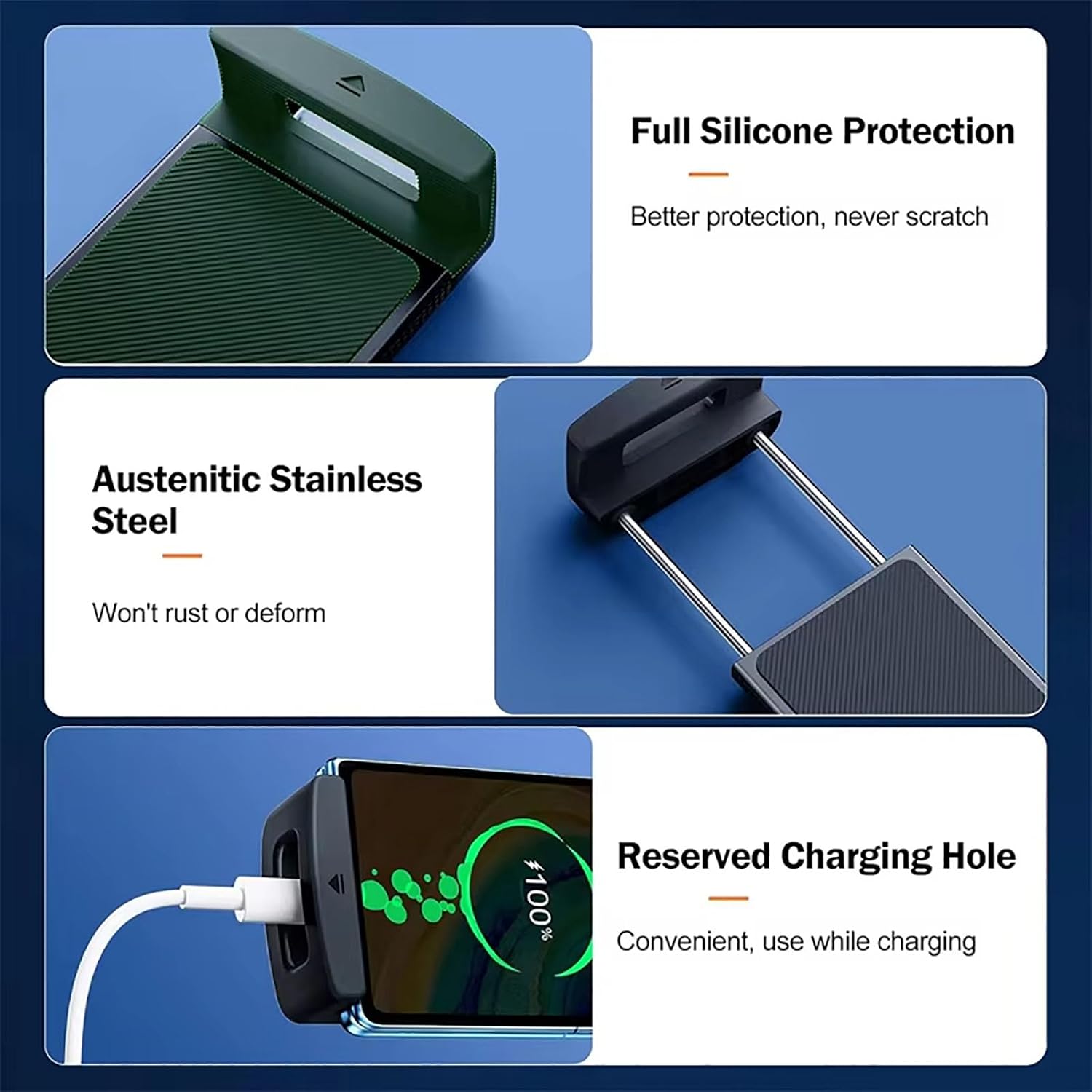
- Full Silicone Protection: Provides enhanced protection for your device, preventing scratches.
- Austenitic Stainless Steel: Constructed with durable material that resists rust and deformation.
- Reserved Charging Hole: Convenient design allows for charging while the phone is mounted.

This image illustrates key product features including full silicone protection for your device, the use of austenitic stainless steel for durability, and a conveniently reserved charging hole at the bottom of the holder.
Setup and Installation
- Prepare the Surface: Ensure the desired installation surface (e.g., car dashboard, windshield, desk) is clean, dry, and smooth.
- Assemble the Holder (if necessary): For the suction cup type, insert the ball head of the holder arm into the slot on the suction cup base and tighten the nut securely.

This image demonstrates the initial assembly step: inserting the ball head into the suction cup slot and tightening the securing nut.
- Attach the Suction Cup: Place the suction cup firmly onto the prepared flat surface.

This image highlights the strong suction capability of the holder's base when applied to a smooth surface.
- Secure the Suction Cup: Press down the suction cup buckle or lever to create a vacuum seal, ensuring the holder is firmly fixed.
This image illustrates the final step of securing the suction cup by pressing down its locking mechanism.
- Important Note for Rough Surfaces: If installing on a center console with a rough surface, the suction cup may not be firm immediately after installation. Wait approximately 20 minutes after installation before using the suction cup to allow the adhesive to fully adhere and stabilize.
Operating Instructions
Once installed, the phone holder offers flexible positioning and secure grip for your device.
- Inserting Your Phone: Gently expand the holder's arms and place your phone securely within the padded grips. The silicone protection ensures your phone is held without scratches.
- Adjusting Viewing Angle: The holder features a 360-degree adjustable joint. Loosen the adjustment knob slightly, position your phone to the desired horizontal or vertical orientation, and then tighten the knob to lock it in place.

This image demonstrates the multi-angle adjustability of the phone holder, allowing for optimal viewing positions.
- Charging Your Phone: Utilize the reserved charging hole at the bottom of the holder to connect your charging cable while your phone is mounted.
Maintenance
To ensure the longevity and optimal performance of your phone holder, follow these simple maintenance guidelines:
- Cleaning the Suction Cup: If the suction cup loses its stickiness, rinse it with warm water and let it air dry. Do not use harsh chemicals or abrasive materials.
- General Cleaning: Wipe the holder's body with a soft, damp cloth. Avoid excessive moisture.
- Storage: When not in use for extended periods, store the holder in a cool, dry place away from direct sunlight.
Troubleshooting
| Problem | Possible Cause | Solution |
|---|---|---|
| Suction cup not holding firmly. | Surface is dirty, uneven, or porous. Suction cup is dirty or not properly sealed. | Clean the surface and the suction cup. Ensure the surface is smooth and non-porous. Re-apply the suction cup, pressing down the buckle firmly. If on a rough center console, wait 20 minutes after installation for full adhesion. |
| Phone wobbles or falls out. | Holder arms not gripping phone tightly. Adjustment knob is loose. | Ensure phone is properly seated within the holder arms. Tighten the adjustment knob if the holder arm is loose. |
| Difficulty rotating the holder. | Adjustment knob is too tight. | Slightly loosen the adjustment knob before attempting to rotate, then re-tighten once the desired angle is achieved. |
Specifications
| Attribute | Detail |
|---|---|
| Product Dimensions | 25 x 18 x 3 cm |
| Item Weight | 500 g (0.5 Kilograms) |
| Installation Location | Dashboard, Center Console |
| Adjustability | 360 Degree Rotation |
| Material | Silicone, Austenitic Stainless Steel |
This image provides a visual representation of the product's key dimensions, including overall length, suction cup width, and holder height.
Safety Information
Please observe the following safety precautions:
- Keep out of reach of children. This product is not a toy and may contain small parts.
- Do not obstruct your view of the road or any vehicle controls when installing the holder.
- Ensure the holder is securely mounted before placing your device and driving.
- Do not attempt to disassemble or modify the product.

This image displays a warning label, emphasizing the importance of keeping the product out of reach of children.
Warranty and Support
For warranty information and customer support, please refer to the documentation provided with your purchase or contact the seller directly through the platform where the product was acquired. Keep your proof of purchase for any warranty claims.
Ask a question about this manual
Ask about setup, troubleshooting, compatibility, parts, safety, or missing instructions. Manuals+ will review the question and use this page’s manual context to help answer it.