1. Introduction
Thank you for choosing the Generic 50000mAh Solar Power Bank. This high-capacity portable charger is designed to keep your electronic devices powered on the go, featuring solar charging capabilities, multiple output ports, and a digital display for convenience. Please read this manual carefully to ensure proper use and optimal performance of your device.
2. Product Overview
2.1 Key Features
- Impressive 50000mAh Capacity: Provides multiple recharges for mobile devices.
- Integrated Solar Panel: Offers alternative charging for emergency situations or outdoor use.
- Versatile Charging: Equipped with 4 USB outputs (3 standard USB, 1 fast charging USB) and a USB Type-C output.
- Advanced Fast Charging: Supports 22.5W fast charging for efficient and rapid device power-up.
- Digital Display: Integrated LCD screen accurately shows the remaining battery level.
- Multiple Input Options: Compatible with Lightning, Micro USB, and USB Type-C inputs for recharging the power bank.
- Practical Design: Portable white structure with a convenient carrying handle, ideal for travel, work, and outdoor activities.
2.2 Components
Familiarize yourself with the different parts of your power bank:
- Digital Display: Shows battery percentage.
- Solar Panel: Located on the front for solar charging.
- USB Output Ports (x4): For charging external devices.
- USB Type-C Output Port: For charging external devices.
- Input Ports (Lightning, Micro USB, USB Type-C): For recharging the power bank.
- Power Button: To activate the display or turn on/off the device.
- Carrying Handle: For easy portability.
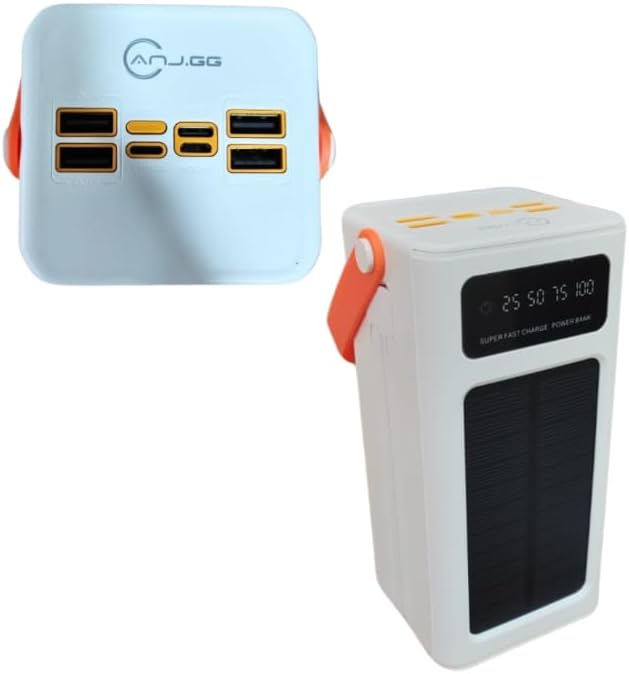
Image 2.2.1: Top view of the power bank, highlighting the four USB output ports and various input ports.

Image 2.2.2: Front-side view of the power bank, showing the digital display, solar panel, and carrying handle.
3. Setup
3.1 Initial Charging of the Power Bank
Before first use, fully charge the power bank using a wall adapter. This ensures the internal battery is properly conditioned.
- Connect a compatible charging cable (Micro USB, Lightning, or USB Type-C) to one of the power bank's input ports.
- Connect the other end of the cable to a USB wall adapter (not included) and plug it into a power outlet.
- The digital display will show the charging progress. Charge until the display reads 100%.
3.2 Solar Charging
The integrated solar panel provides an alternative charging method, primarily for emergencies or maintaining charge. It is not intended as the primary charging source due to varying solar intensity and charging speed.
- Place the power bank with the solar panel facing direct sunlight.
- Ensure no obstructions block the solar panel.
- The solar charging indicator on the display will activate when charging via solar power.
4. Operating Instructions
4.1 Charging External Devices
- Ensure the power bank is sufficiently charged. Check the digital display for the battery level.
- Connect your device's charging cable to one of the power bank's USB output ports or the USB Type-C output port.
- Connect the other end of the cable to your device.
- The power bank should automatically begin charging your device. If not, press the power button once to activate.
- The digital display will show the power bank's remaining charge.
For optimal performance, use quality charging cables compatible with your devices.
4.2 Understanding the Digital Display
The digital display provides real-time information about the power bank's status:
- Battery Percentage: Shows the exact remaining charge (e.g., 25, 50, 75, 100).
- Charging Indicator: An icon or animation will appear when the power bank is being recharged.
- Solar Charging Indicator: A specific icon (e.g., a sun) will light up when solar charging is active.
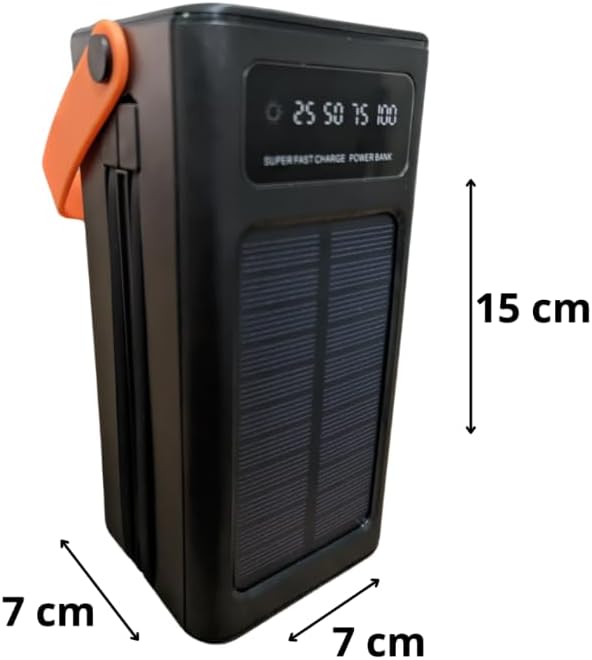
Image 4.2.1: Close-up of the digital display showing battery level indicators (25, 50, 75, 100).
5. Maintenance
- Regular Recharging: To maintain battery health, fully recharge the power bank at least once every three months, even if not in use.
- Storage: Store the power bank in a cool, dry place away from direct sunlight and extreme temperatures.
- Cleaning: Use a soft, dry cloth to clean the exterior. Do not use harsh chemicals or abrasive materials.
- Avoid Drops and Impacts: Protect the device from physical damage.
- Water Exposure: This device is not waterproof. Avoid exposure to water or high humidity.
6. Troubleshooting
- Device not charging from power bank:
- Ensure the power bank is charged (check digital display).
- Verify the charging cable is securely connected to both the power bank and your device.
- Try a different USB port on the power bank.
- Try a different charging cable.
- Press the power button on the power bank to activate output.
- Power bank not recharging:
- Ensure the charging cable is securely connected to the power bank's input port and the wall adapter.
- Verify the wall adapter is working and plugged into a live outlet.
- Try a different charging cable or wall adapter.
- For solar charging, ensure the panel is in direct sunlight and unobstructed. Note that solar charging is slower than wall charging.
- Slow charging:
- Ensure you are using a fast-charging compatible cable and your device supports fast charging.
- The 22.5W fast charging port provides higher output; ensure you are using this specific port if fast charging is desired.
- Close unnecessary applications on your device while charging.
7. Specifications
| Model | 50000mAh Solar Power Bank |
| Capacity | 50000mAh |
| Input Ports | Lightning, Micro USB, USB Type-C |
| Output Ports | 4 x USB (3x 5V-2A, 1x 22.5W Smart Port), 1 x USB Type-C |
| USB Type-C Output | 5V-3A, 9V-2.22A, 12V-1.67A |
| Fast Charging | Up to 22.5W |
| Special Features | Carrying Handle, Digital Display, Solar Panel |
| Power Source | Rechargeable Battery and Solar Power |
| Color | White |
| Product Weight | 450 g |
| Package Dimensions | 25 x 18 x 8 cm |

Image 7.1: Dimensions of the power bank (note: image shows black version for clarity of dimensions).
8. Warranty Information
This product is covered by a standard manufacturer's warranty against defects in materials and workmanship. The warranty period typically begins from the date of purchase. Please retain your proof of purchase for any warranty claims. For specific warranty terms and conditions, refer to the documentation provided at the time of purchase or contact your retailer.
9. Support
If you encounter any issues or have questions regarding your Generic 50000mAh Solar Power Bank that are not addressed in this manual, please contact the retailer or the point of purchase for assistance. Provide your product model and a detailed description of the issue to facilitate support.


