
Lumena Lamp
Lumena Lamp User Manual
Model: Lumena Lamp
Introduction
Thank you for purchasing the Lumena Lamp. This device is designed to create a calming and immersive atmosphere with its unique ocean wave water ripple projection and customizable lighting options. Please read this manual carefully before use to ensure proper operation and maintenance.
The Lumena Lamp imitates the natural wonders of the Northern Lights, wrapping any room with soft waves of light, and immersing you in a calm and dreamy experience. It features 16 stunning color options, allowing you to customize your room's ambiance to your personal preference.
Safety Information
- Keep the device away from water and high humidity environments.
- Do not disassemble or attempt to repair the device yourself. Refer to qualified service personnel.
- Use only the provided charging cable.
- Avoid direct eye exposure to the light source for prolonged periods.
- Ensure the device is placed on a stable, flat surface to prevent tipping.
Package Contents
Upon opening the package, please verify that all components are present and in good condition:
- 1 x Ocean Wave Water Ripple Projector Light
- 1 x Remote Control
- 1 x Charging Cable

Image: The Lumena Lamp, a cube-shaped light with a textured surface, emitting a blue light, shown next to its remote control. This image illustrates the main components included in the package.
Setup
- Unpacking: Carefully remove the Lumena Lamp and all accessories from the packaging.
- Placement: Place the lamp on a stable, flat surface in your desired location. For optimal projection effect, ensure there is a clear wall or ceiling surface for the light to project onto.
- Power Connection:
- For "Plug in" models: Connect the provided charging cable to the lamp's USB port and plug the other end into a standard USB power adapter (not included) or a compatible USB port.
- For "Rechargeable" models (if applicable): Ensure the lamp is fully charged before first use. Connect the provided charging cable to the lamp's USB port and a USB power source. The charging indicator (if present) will show charging status.
- Remote Control Battery: Insert 2 AAA batteries (not included) into the remote control, observing polarity.

Image: A diagram showing the dimensions of the Lumena Lamp, which is approximately 4.3 inches (11 cm) in width and depth, and 4.6 inches (11.5 cm) in height, with the light source elevated 0.78 inches (2 cm) from the base.
Operating Instructions
Using the Remote Control
The Lumena Lamp comes with a remote control for convenient operation. Ensure the remote is pointed towards the lamp for best response.
- Power ON/OFF: Press the ON button to turn the lamp on, and the OFF button to turn it off.
- Color Selection: Use the color buttons (R, G, B, W, and other color swatches) to select from 16 different light colors.
- Brightness Adjustment: The remote control allows for 6 adjustable brightness levels. Use the brightness up/down buttons to increase or decrease the light intensity.
- Mode Selection:
- Fade Mode: Activates a gradient mode where colors change automatically, creating a smooth transition effect.
- Flash Mode: (If available on remote) Cycles through colors with a quick flash.
- Strobe Mode: (If available on remote) Flashes a single color.
- Smooth Mode: (If available on remote) Provides a smooth transition between a limited set of colors.
Using the Touch Control
The Lumena Lamp also features a touch control on its base for basic functions.
- Power ON/OFF: Lightly touch the designated touch area on the lamp's base to turn it on or off.
- Change Color/Mode: Continue touching the area to cycle through different colors and lighting modes.
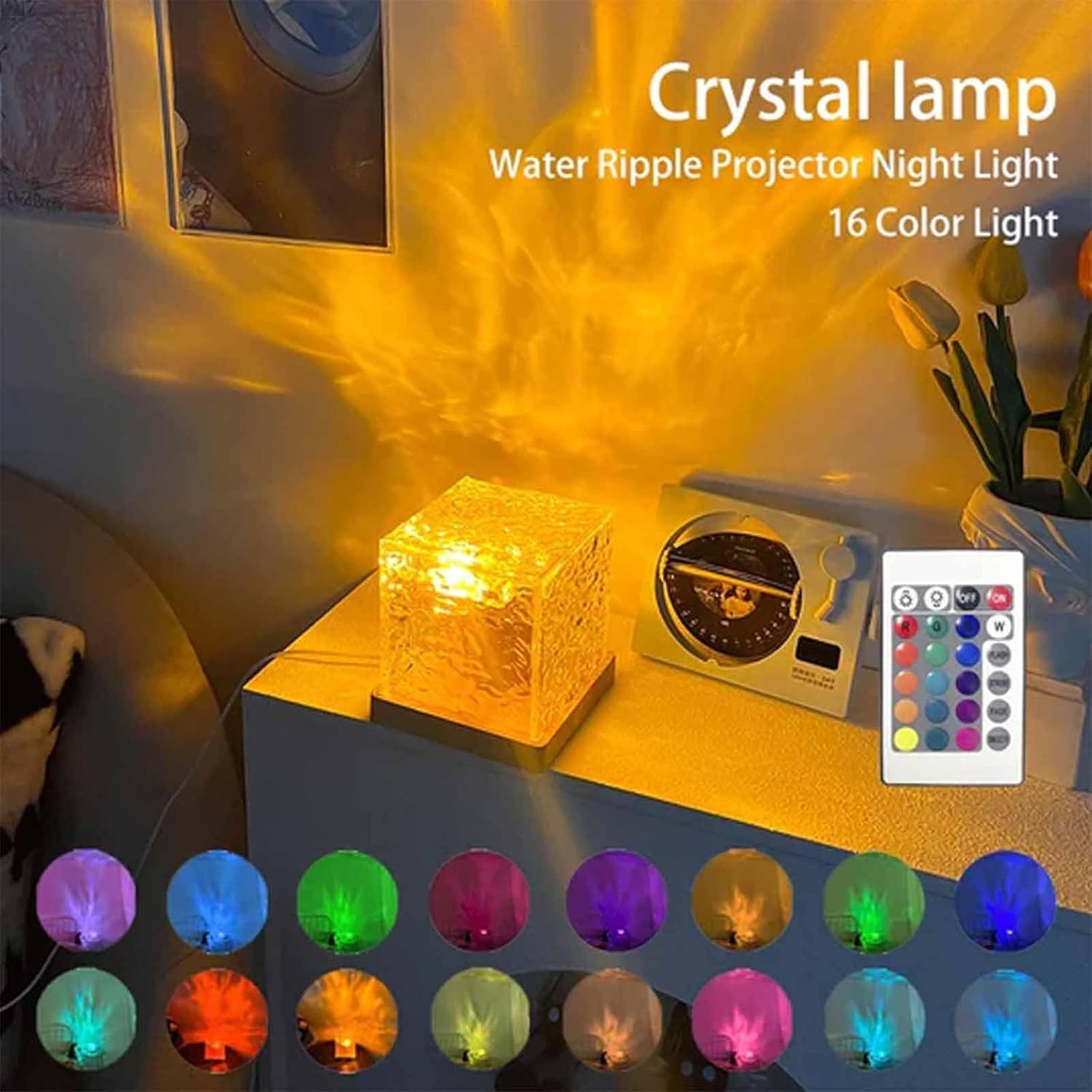
Image: The Lumena Lamp projecting a warm yellow water ripple effect on a wall, with an array of 16 color swatches displayed below, demonstrating the variety of available light colors.

Image: A collage of nine images, each showing the Lumena Lamp projecting different colored water ripple effects onto a wall, including shades of orange, green, blue, and white, highlighting its versatile ambiance creation.
Maintenance
- Cleaning: Disconnect the power before cleaning. Use a soft, dry cloth to wipe the lamp's surface. Do not use abrasive cleaners or solvents.
- Storage: When not in use for extended periods, store the lamp in a cool, dry place, away from direct sunlight.
- Battery Replacement (Remote): If the remote control's range decreases or it becomes unresponsive, replace the AAA batteries.
Troubleshooting
| Problem | Possible Cause | Solution |
|---|---|---|
| Lamp does not turn on. | No power connection / Low battery (rechargeable model) / Remote control battery dead. | Ensure the charging cable is securely connected and plugged into a working power source. Charge the lamp if it's a rechargeable model. Replace remote control batteries. |
| Remote control not working. | Batteries are dead or incorrectly inserted / Obstruction between remote and lamp / Remote out of range. | Check and replace remote control batteries, ensuring correct polarity. Remove any obstructions. Ensure remote is within effective range and pointed at the lamp. |
| Light projection is dim or unclear. | Lamp surface is dirty / Room is too bright. | Clean the lamp's projection surface with a soft, dry cloth. Use the lamp in a darker environment for best results. Adjust brightness settings. |
| Colors are not changing. | Stuck in a single color mode. | Press the mode buttons on the remote control (e.g., Fade Mode) to activate color cycling. |
Specifications
| Feature | Detail |
|---|---|
| Product Name | Lumena Lamp |
| Model Number | Lumena Lamp |
| Material | ABS+PC (Acrylonitrile Butadiene Styrene, Polycarbonate) |
| Dimensions | 4.3 x 4.3 x 4.3 inches (11 x 11 x 11 cm) |
| Light Colors | 16 Colors |
| Brightness Levels | 6 Adjustable Levels |
| Control Method | Touch and Remote Control |
| Power Source | USB Powered (Plug-in version) |
| Included Components | Ocean Wave Water Ripple Projector Light, Remote Control, Charging Cable |
Warranty and Support
This product is manufactured by Generic. For any warranty claims or technical support, please contact your retailer or the manufacturer directly. Please retain your proof of purchase for warranty purposes.
Note: The manufacturer's warranty typically covers defects in materials and workmanship under normal use. It does not cover damage caused by misuse, accident, unauthorized modification, or neglect.
Related documentsLumena Lamp


Ask a question about this manual
Ask about setup, troubleshooting, compatibility, parts, safety, or missing instructions. Manuals+ will review the question and use this page’s manual context to help answer it.