
SOURCEPOW SP-SR48100BT
SOURCEPOW 48V 100Ah LiFePO4 Lithium Battery Instruction Manual
Model: SP-SR48100BT
1. Introduction
This manual provides essential information for the safe and efficient operation of your SOURCEPOW 48V 100Ah LiFePO4 Lithium Battery. This deep cycle battery module is designed for various applications including RV, off-grid, solar, and home energy storage systems. Please read this manual thoroughly before installation and use.
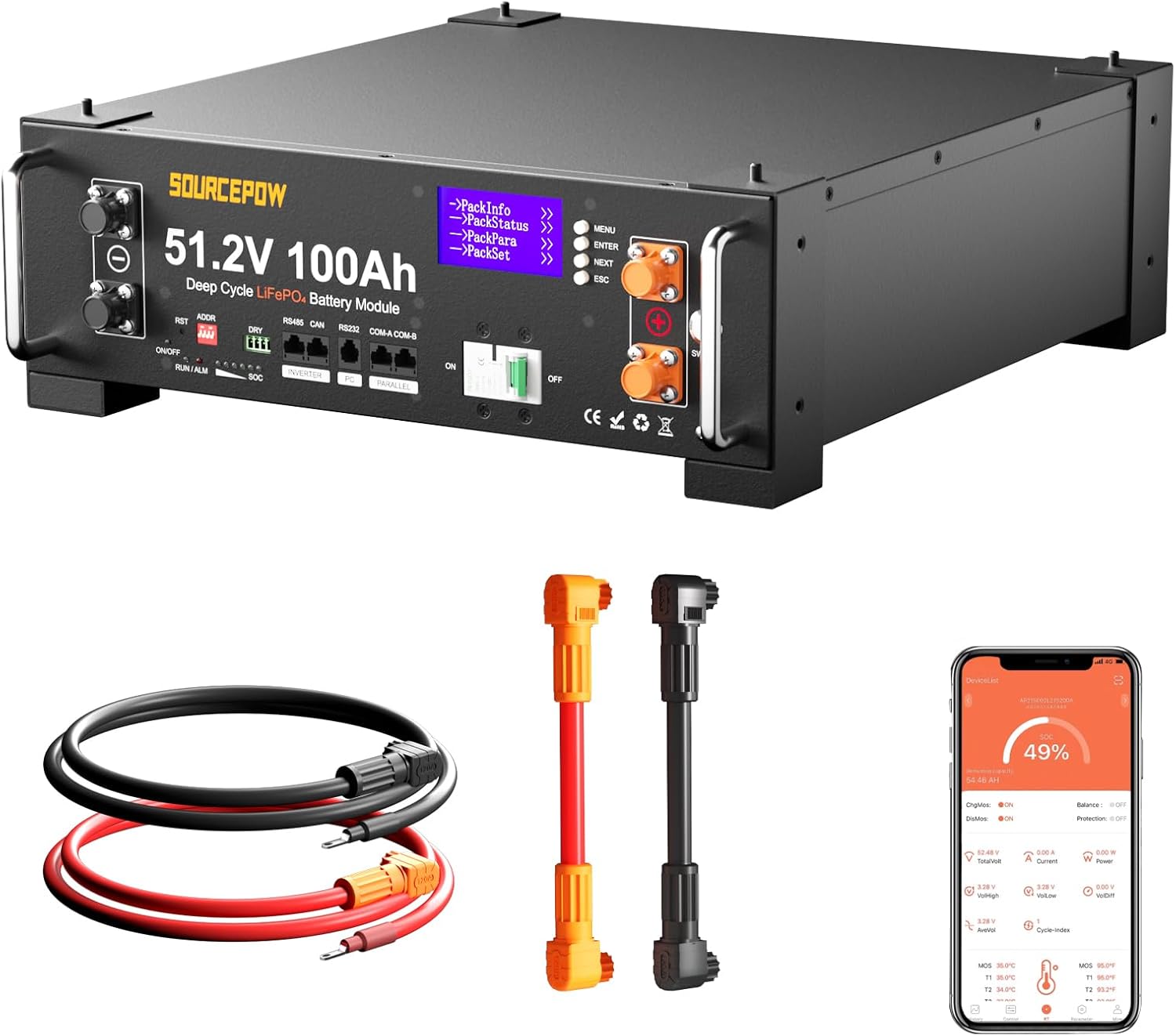
Figure 1: SOURCEPOW 48V 100Ah LiFePO4 Lithium Battery and accessories.
2. Safety Information
Always prioritize safety when handling and operating the battery. Failure to follow these instructions may result in injury, damage to the battery, or other property damage.
- Do not disassemble, crush, puncture, or short-circuit the battery.
- Keep the battery away from fire, heat sources, and direct sunlight.
- Do not immerse the battery in water or other liquids.
- Use only compatible chargers and inverters.
- Ensure proper ventilation during operation.
- Wear appropriate personal protective equipment (PPE) such as gloves and eye protection during installation and maintenance.
- In case of fire, use a Class D fire extinguisher. Water can be used for cooling, but avoid direct contact with burning lithium.
Warning:
This battery features low-temperature cutoff protection. Charging is prevented below 0°C (32°F) and discharging is prevented below -20°C (-4°F) to protect the battery from damage. Charging resumes at 5°C (41°F).

Figure 2: Low-Temperature Cut-Off Protection details.
3. Product Features
- Automotive Grade A Cells: Constructed with 16Pcs Automotive Grade LiFePO4 cells for high energy density, stable performance, and greater power.
- CAN/RS485 Communication: Supports seamless communication with popular all-in-one solar inverters (Victron, GoodWe, SMA, Growatt, SunGrow, DEYE).
- LCD Screen & APP Monitoring: Integrated LCD screen and LED indicators display real-time data (SOC, alarms, operating status). Bluetooth app allows remote monitoring.
- Expandable Energy: Can be connected in parallel with up to 15 batteries (15P) for a 51.2V 1500Ah battery bank, offering a maximum energy of 76.8kWh and maximum load power of 76.8kW.
- Intelligent 100A BMS: Built-in Battery Management System protects against overcharge, over-discharge, over-current, short circuit, high-temperature cutoff (75°C/167°F), and low-temperature cutoff.
- Durable & Easy to Install: 3U standard server rack cabinet compatibility or customized integrated stacking components. Metal casing enclosure for rugged durability and heat dissipation.
4. What's in the Box
The package includes the following items:
- 1x 48V 100AH LiFePO4 Battery
- Parallel wires (red and black)
- Communication cables (RJ45)
- Grounding wire
- Terminal screws
- User manual
- Rack fixed ears
- Stacking bracket
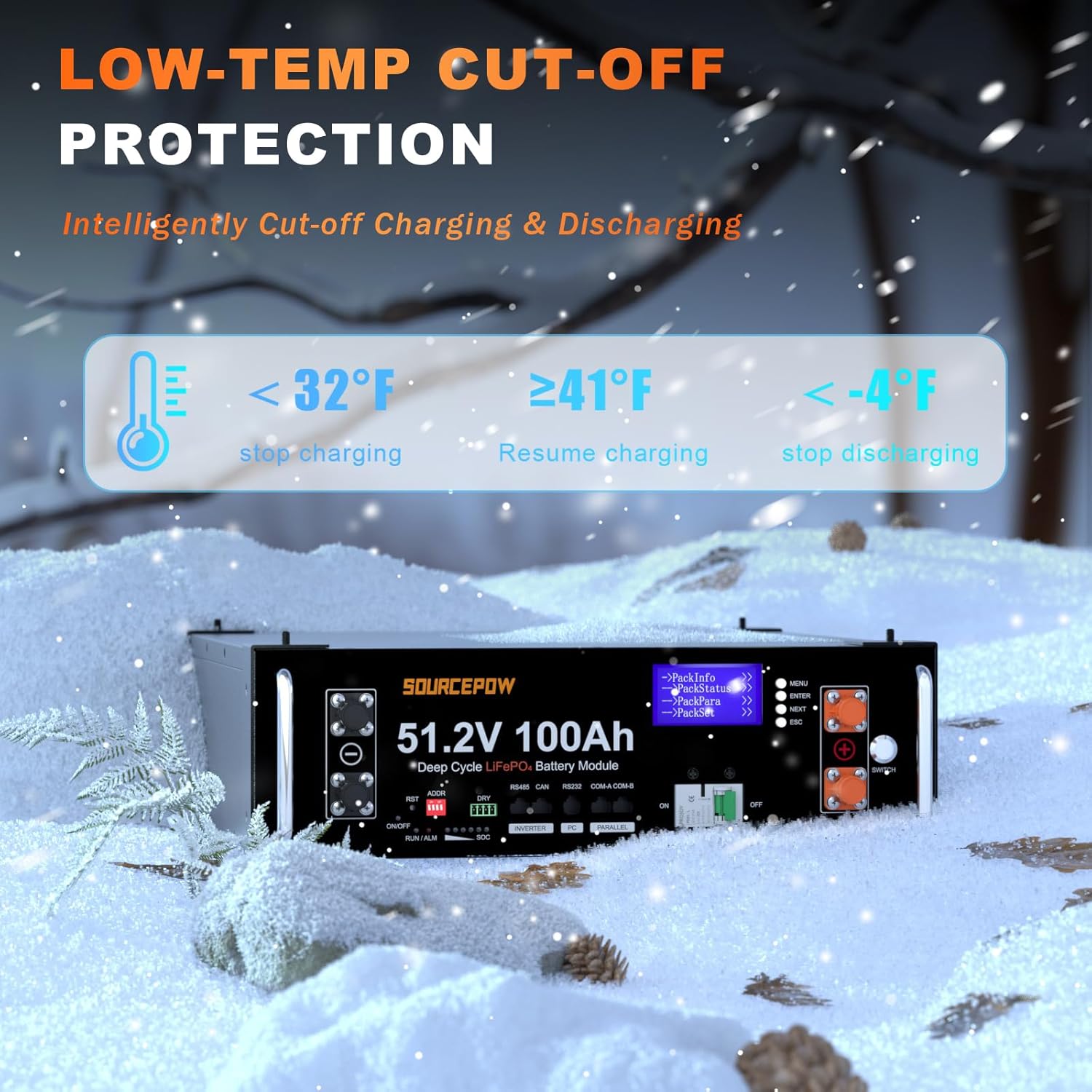
Figure 3: Included accessories with the battery.
5. Specifications
| Attribute | Value |
|---|---|
| Battery Module | 51.2V 100Ah |
| Rated Energy | 5.12kWh |
| Rated Capacity | 100Ah |
| Rated Voltage | 51.2V |
| Charge Cut-off Voltage | 58.4V |
| Discharge Cut-off Voltage | 41.6V |
| Recommended Charging Current | 20A-50A |
| Max. Discharging Current | 100A |
| Communication | CAN / RS485 / RS232 / Bluetooth |
| Charge Temperature | 0°C ~ 55°C |
| Discharge Temperature | -20°C ~ 60°C |
| Storage Temperature | 10°C ~ 35°C |
| Item Weight | 100 pounds |
| Product Dimensions | 18.89 x 17.4 x 5.23 inches |
| Model Number | SP-SR48100BT |
6. Setup and Installation
6.1 Physical Installation
The SOURCEPOW battery can be installed in a 3U standard server rack or stacked using the provided stacking brackets.
- Rack Installation: Secure the battery using the rack fixed ears and screws to a standard 3U server rack.
- Stacking Installation: For stacking multiple batteries, attach the stacking brackets to the corners of each battery. Ensure the batteries are securely stacked on a flat, stable surface.

Figure 4: Flexible expansion solutions with stacked batteries.
6.2 Wiring Connections
Connect the battery to your inverter and other batteries (if paralleling) using the provided cables.
- Power Cables: Connect the positive (+) and negative (-) terminals of the battery to your inverter using the appropriate power cables. Ensure correct polarity.
- Parallel Connection: For multiple batteries, use the provided parallel cables to connect the positive terminals together and the negative terminals together.
- Grounding: Connect the grounding wire from the battery to a reliable ground point.
6.3 Communication Setup
The battery supports CAN and RS485 communication protocols for integration with compatible inverters.
- Inverter Communication: Use an RJ45 communication cable to connect the battery's 'INVERTER' port (RS485 or CAN) to the corresponding communication port on your inverter.
- Parallel Communication: If multiple batteries are used, connect the 'PARALLEL' ports (COM-A/COM-B) between batteries using RJ45 cables to enable communication between them.
- PC Communication: The RS232 port can be used for PC communication for advanced monitoring or firmware updates.

Figure 5: Front panel overview with communication ports.
Video 1: Detailed product introduction and accessories, including front panel features and communication ports.
Video 2: Installation process for a multi-battery server rack system, demonstrating stacking and wiring.
Video 3: Instructions on how to connect batteries in parallel using stacking brackets.
7. Operating Instructions
7.1 Powering On/Off
- To power on the battery, ensure all connections are secure, then flip the DC breaker to the 'ON' position and press the 'ON/OFF' button.
- To power off, press the 'ON/OFF' button, then flip the DC breaker to the 'OFF' position.
7.2 LCD Screen and LED Indicators
The integrated LCD screen and LED indicators provide real-time status updates.
- LCD Screen: Use the MENU, ENTER, NEXT, and ESC buttons to navigate through various information screens such as Pack Info (voltage, current, capacity, temperature), Pack Status (standby, protection count, MOSFET status), Pack Para (parameters), and Pack Set (communication protocol selection).
- LED Indicators:
- RUN/ALM: Indicates operational status (Run) or an alarm condition (Alm).
- SOC: State of Charge indicator, showing the approximate battery charge level.

Figure 6: LCD display screen pages for monitoring and settings.

Figure 7: LED indicators for real-time status.
7.3 Bluetooth APP Monitoring
Monitor your battery's status and performance in real-time using the mobile Bluetooth app. Download the official SOURCEPOW app from your device's app store and follow the in-app instructions to connect to your battery.
8. Maintenance
LiFePO4 batteries generally require minimal maintenance. Follow these guidelines to ensure optimal performance and longevity:
- Regularly inspect battery terminals and connections for any signs of corrosion or looseness. Tighten as necessary.
- Keep the battery clean and free from dust and debris.
- Ensure adequate ventilation around the battery to prevent overheating.
- Avoid deep discharges and overcharges, though the built-in BMS provides protection against these conditions.
- Store the battery in a cool, dry place within the recommended storage temperature range (10°C ~ 35°C) if not in use for extended periods.
9. Troubleshooting
If you encounter any issues with your SOURCEPOW battery, refer to the following basic troubleshooting steps:
- Battery Not Powering On: Check the DC breaker and the ON/OFF button. Ensure all power cables are securely connected and have correct polarity.
- No Communication with Inverter: Verify that the communication cables are correctly connected to the appropriate ports (RS485 or CAN) on both the battery and the inverter. Check the inverter's settings for battery communication protocol.
- Alarm Indication: If the ALM LED is active, check the LCD screen or Bluetooth app for specific alarm codes or messages to identify the issue (e.g., over-voltage, under-voltage, over-current, temperature anomaly).
- Reduced Performance: Ensure the battery is operating within its recommended temperature range. Check for any loose connections or signs of damage.
For persistent issues or advanced troubleshooting, please contact SOURCEPOW customer support.
10. Warranty and Support
The SOURCEPOW 48V 100Ah LiFePO4 Lithium Battery comes with a 5-year warranty, ensuring reliability and peace of mind.
For any technical assistance, warranty claims, or product inquiries, please contact SOURCEPOW customer service. Our support team is available to assist you.
- Customer Service: Available 24 hours.
- Contact Information: Refer to the product packaging or the official SOURCEPOW website for the most up-to-date contact details.
Related Documents - SP-SR48100BT
 |
RICH SOLAR Alpha 5 Server User Manual: Energy Storage Lithium Battery Module Comprehensive user manual for the RICH SOLAR Alpha 5 Server, a 48V 100Ah energy storage lithium battery module. Covers installation, operation, troubleshooting, and safety measures. |
 |
Li Time 48V 100Ah LiFePO4 Battery Product Manual This product manual provides detailed information on the Li Time 48V 100Ah LiFePO4 battery, covering product overview, technical specifications, parallel connection guidelines, and troubleshooting steps for optimal performance and longevity. |
 |
ECO-WORTHY LiFePO4 Battery 6-PACK Rack Manual - Installation Guide Comprehensive installation and technical support manual for the ECO-WORTHY 6-PACK Rack, designed for LiFePO4 batteries. Includes a detailed packing list, step-by-step assembly instructions with textual descriptions of diagrams, and essential contact information for ECO-WORTHY. |
 |
ECO-WORTHY Cubix 100 LiFePO4 Server Rack Battery Manual - Operation and Maintenance Comprehensive operation and maintenance manual for the ECO-WORTHY Cubix 100 LiFePO4 Server Rack Battery (Model: ECO-LFP4810002). Covers installation, safety, specifications, troubleshooting, and disposal. |
 |
WattCycle 48V 100Ah Server Rack 3U Battery Operation Manual and Installation Guide Comprehensive operation manual and installation guide for the WattCycle 48V 100Ah Server Rack 3U Battery, a low-voltage LiFePO4 energy storage system. Covers safety, product overview, technical specifications, installation, commissioning, and maintenance procedures. |
 |
EG4-LL 48V 100AH Rack-Mounted Battery User Manual User manual for the EG4-LL 48V 100AH rack-mounted lithium iron phosphate battery, covering installation, operation, safety, troubleshooting, and technical specifications. |
Ask a question about this manual
Ask about setup, troubleshooting, compatibility, parts, safety, or missing instructions. Manuals+ will review the question and use this page’s manual context to help answer it.