
Introduction
This manual provides detailed instructions for the assembly, operation, and maintenance of your Aokitsink Mobile TV Stand with Drawer. This versatile TV stand is designed to accommodate 23-60 inch televisions, offering mobility, adjustable height, tilt functionality, and integrated storage solutions. Please read this manual thoroughly before assembly and use to ensure safe and optimal performance.
Safety Information
- Weight Capacity: Do not exceed the maximum load capacity of 50 lbs (22.6 kg) for the TV mount. Exceeding this limit can result in instability and potential injury or damage.
- TV Size: This stand is designed for TVs between 23 and 60 inches. Ensure your TV's VESA pattern is compatible (up to 400x400mm).
- Assembly: Follow all assembly instructions carefully. Incorrect assembly can lead to product failure. If you encounter any difficulties, contact customer support.
- Stability: Always ensure all four wheels are locked when the stand is stationary to prevent accidental movement. Avoid placing the stand on uneven surfaces.
- Children and Pets: Keep children and pets away from the stand during assembly. Do not allow children to climb on or play with the stand.
- Cables: Route all cables neatly and securely to prevent tripping hazards and damage to equipment.
Package Contents
Please verify that all components are present before beginning assembly. If any parts are missing or damaged, do not proceed with assembly and contact customer support.
(A detailed list of parts and hardware is typically included in the physical manual. Please refer to your product packaging for a complete list.)
Setup and Assembly Instructions
Follow these steps to assemble your Aokitsink Mobile TV Stand. It is recommended to have two people for certain assembly steps, especially when mounting the TV.
- Attach Wheels to Base: Secure the 360-degree rotating wheels to the bottom base plate. Ensure two of the wheels have locking mechanisms and are positioned for easy access.
- Assemble Vertical Supports: Connect the vertical support poles to the base plate.
- Install Shelves and Drawer: Attach the lower shelf and the upper shelf with the integrated fabric storage drawer to the vertical supports. Ensure the drawer slides smoothly.
- Attach TV Mounting Bracket: Secure the TV mounting bracket to the top of the vertical supports. This bracket allows for VESA compatibility up to 400x400mm.
- Mount TV: Carefully attach your television to the mounting bracket using the provided hardware. Ensure the TV is centered and securely fastened.
- Adjust Height: The TV stand features multiple holes for height adjustment. Select the desired height for your TV and secure it in place. The maximum TV installation height is 47.24 inches, and the minimum is 44.02 inches.


Operating Instructions
- Moving the Stand: To move the TV stand, unlock the two locking wheels. The 360-degree rotating wheels allow for smooth movement across various surfaces. Once in the desired position, lock the wheels to secure the stand.
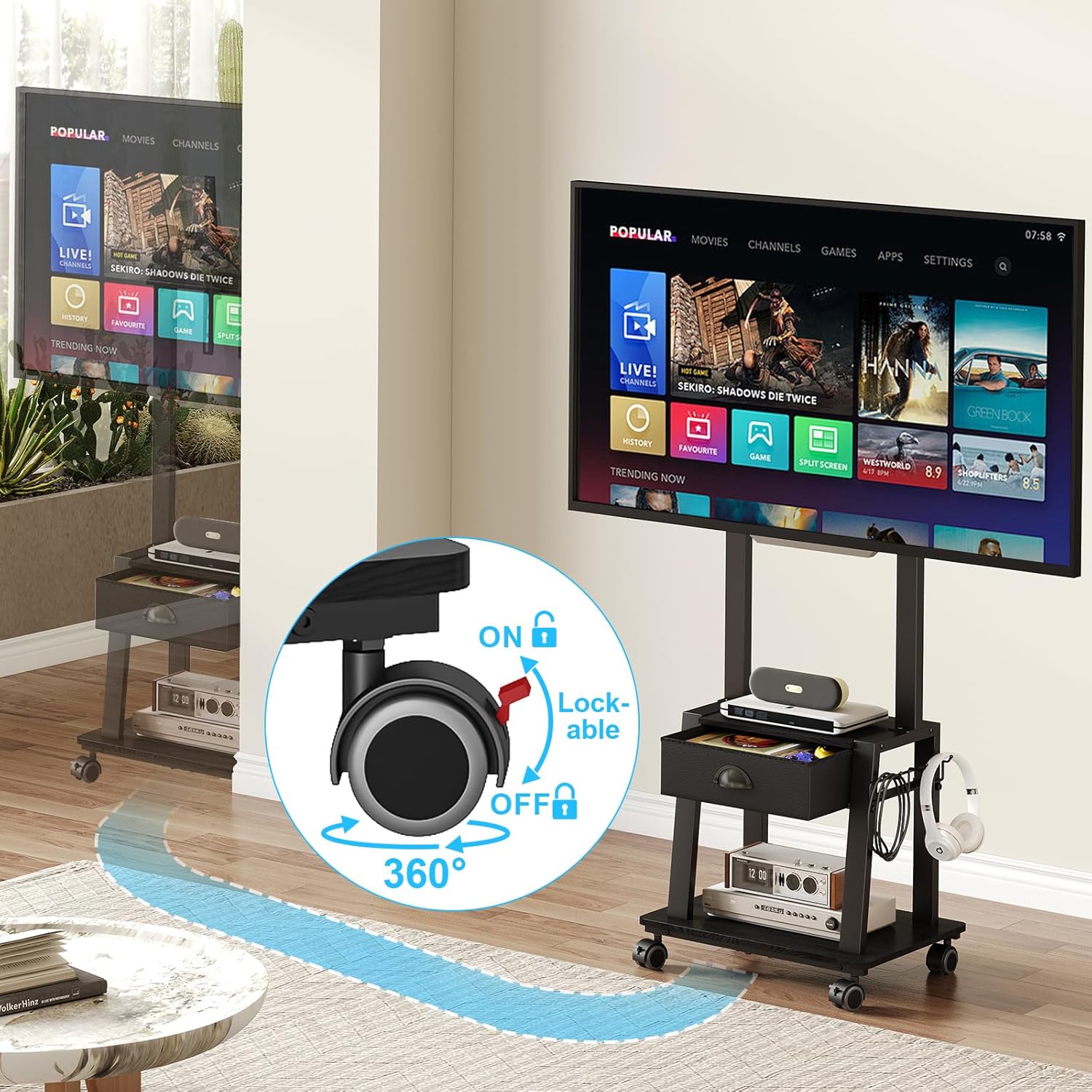
- Adjusting TV Tilt: The TV mount allows for a 15-degree upward or downward tilt adjustment. Loosen the tilt adjustment knobs on the side of the TV bracket, adjust the TV to your preferred viewing angle, and then securely tighten the knobs. This helps reduce glare and optimize viewing comfort.

- Using Storage: The stand includes a fabric storage drawer for items like remote controls, power cords, and game discs. The two shelves provide additional space for laptops, iPads, game consoles, speakers, or decorative items. Side hooks are available for hanging headphones or cables.


Video: This video demonstrates the key features of the Aokitsink Mobile TV Stand, including its mobility, storage drawer, and overall design for 23-60 inch TVs.
Maintenance
- Cleaning: Wipe the stand with a soft, damp cloth. Avoid using harsh chemicals or abrasive cleaners, which can damage the finish.
- Fasteners: Periodically check all screws and bolts to ensure they are tight. Retighten if necessary to maintain stability.
- Wheel Functionality: Keep the wheels free of debris to ensure smooth rolling.
Troubleshooting
- Stand is unstable: Ensure all connections are securely tightened. Verify that the TV weight does not exceed 50 lbs and is within the recommended size range. Make sure the stand is on a flat, level surface. Lock the wheels when stationary.
- Wheels not rolling smoothly: Check for any debris or obstructions in the wheels. Ensure the locking mechanisms are fully disengaged.
- TV not fitting the mount: Confirm your TV's VESA mounting pattern is compatible with the stand (up to 400x400mm). Refer to your TV's manual for its VESA specifications.
- Difficulty with assembly: Review the assembly instructions carefully. Ensure all parts are correctly oriented. If issues persist, contact customer support.
Specifications
| Brand | Aokitsink |
| Model | B0F7RDTS3J |
| Mounting Type | Floor Mount |
| Movement Type | Tilt |
| Material | Stainless Steel + MDF |
| Color | Black |
| Compatible Devices | Television |
| Maximum Supported Screen Size | 60 Inches |
| Minimum Supported Screen Size | 23 Inches |
| Maximum Load Capacity | 50 lbs (22.6 kg) |
| Maximum Tilt Angle | 15 Degrees (Up/Down) |
| Adjustable Height Range | Min 44.02 inches - Max 47.24 inches (TV installation height) |
| Item Weight | 8.89 Kilograms |
| Storage Shelves | 2 (430x265mm and 540x400mm) |
| Storage Drawer | 1 Fabric Drawer |
Warranty and Support
Warranty: This product does not come with a specified warranty. Please refer to the retailer's return policy for details on returns or exchanges.
Customer Support: For any questions, missing parts, or assistance with assembly or operation, please contact the seller or manufacturer through the platform where the product was purchased. Provide your order number and product model (B0F7RDTS3J) for faster service.