
1. Introduction
Thank you for choosing the Furologee 55-inch LED TV Stand. This entertainment center is designed to accommodate TVs up to 55 inches, offering both functional storage and modern aesthetics. It features integrated power outlets, USB charging ports, and multi-color LED lighting to enhance your living space. This manual provides detailed instructions for assembly, operation, and maintenance to ensure safe and optimal use of your new TV stand.

2. Important Safety Information
WARNING: To prevent tip-over, always assemble this furniture securely to the wall using the provided anti-tip kit. Failure to do so can result in serious injury or death.
- Keep heavy items away from the edges of the top surface to maintain stability.
- Keep small children and pets away from the product during assembly and use to prevent injury from sharp edges or small parts.
- Ensure all screws and fasteners are tightened securely before use. Periodically check and re-tighten as necessary.
- Do not overload shelves or drawers beyond their recommended weight capacity.
3. Package Contents
Before beginning assembly, ensure all parts listed in the instruction manual are present and undamaged. If any parts are missing or damaged, do not proceed with assembly and contact customer support.
Typical package contents include:
- Wooden panels (top, side, shelves)
- Metal frame components
- 6 Fabric drawers with handles
- Power strip with 2 AC outlets and 2 USB ports
- LED light strip with remote control
- Assembly hardware (screws, dowels, cam locks, etc.)
- Tools for assembly (e.g., Allen wrench)
- Anti-tip kit
4. Setup and Assembly
Assembly of the Furologee TV Stand is designed to be straightforward. Follow the step-by-step instructions provided in the included manual. Each accessory is labeled for easy identification. It is recommended to assemble the unit on a soft, clean surface to prevent scratches.
For a visual guide, please refer to the official installation video below:
Key assembly steps include:
- Attach the metal frame components to the wooden panels.
- Secure the shelves and dividers.
- Install the power strip into the designated slot on the top surface.
- Adhere the LED light strip to the underside of the top shelf.
- Assemble the fabric drawers by inserting the bottom panel and attaching the handles.
- Insert the assembled drawers into their respective compartments.
- Attach the anti-tip kit to the back of the TV stand and secure it to a wall stud.

5. Operating Instructions
5.1 LED Lights
The integrated multi-color LED light strip can be controlled using the included remote. This allows you to customize the ambiance of your room.
- Power On/Off: Press the red power button on the remote.
- Color Change: Use the color buttons (e.g., red, green, blue, white) to select a static color.
- Dynamic Modes: Press the 'MODE' button to cycle through various lighting effects (e.g., flash, strobe, fade, smooth).
- Brightness Adjustment: Use the 'BRIGHT+' and 'BRIGHT-' buttons to increase or decrease the light intensity.
- Speed Adjustment: In dynamic modes, use the 'SPEED+' and 'SPEED-' buttons to control the speed of the effect.

5.2 Charging Station
The TV stand is equipped with a built-in power strip for convenient charging and powering of your electronic devices.
- AC Outlets: Two standard 120V/12A AC outlets are available for devices like TVs, soundbars, or game consoles.
- USB Ports: Two 5V/2A USB charging ports are provided for charging smartphones, tablets, or other USB-powered accessories.
- Ensure the power cord from the TV stand is securely plugged into a wall outlet.
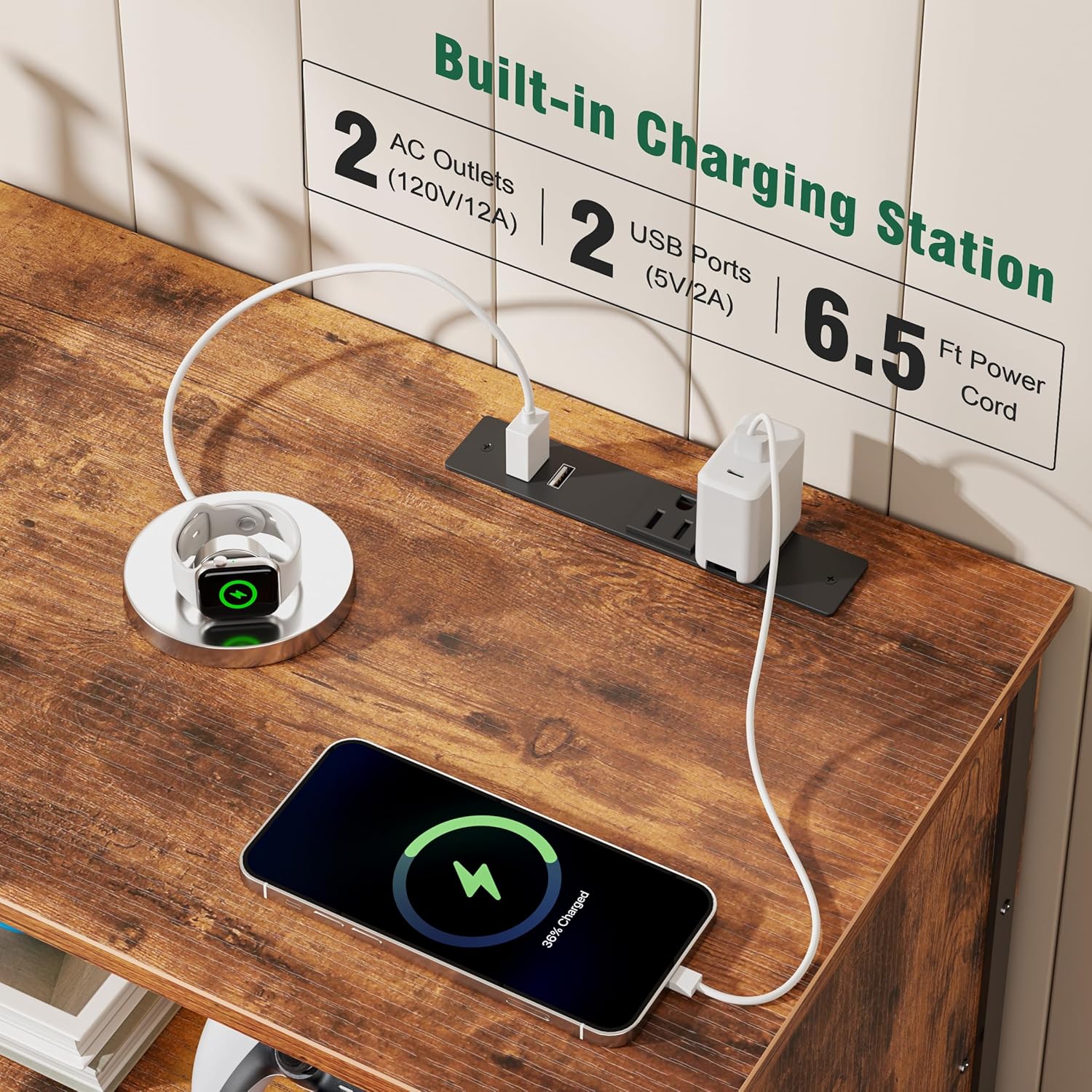
5.3 Storage Drawers
The six fabric drawers provide ample storage for various items, helping to keep your living space tidy.
- The drawers are made of fabric with a rustic wood-look front and metal handles.
- They are lightweight and easy to remove for organizing or cleaning.
- Use them to store media accessories, remote controls, books, or other personal items.

6. Maintenance
To ensure the longevity and appearance of your Furologee TV Stand, follow these simple maintenance guidelines:
- Cleaning: Wipe the wooden surfaces with a dry, soft cloth. Avoid using harsh chemicals or abrasive cleaners, which can damage the finish.
- Fabric Drawers: The fabric drawers can be spot cleaned with a damp cloth and mild soap if necessary. Allow to air dry completely.
- Stability Check: Periodically check all screws and fasteners to ensure they remain tight. Re-tighten if any looseness is detected.
- Avoid Moisture: Protect the unit from excessive moisture and direct sunlight to prevent warping or fading.

7. Troubleshooting
If you encounter any issues with your TV stand, refer to the following common solutions:
- Wobbly Unit: Ensure all screws are fully tightened. Adjust the leveling feet on the bottom of the unit to compensate for uneven floors.
- LED Lights Not Working: Check if the LED strip is properly connected to the power source and the remote control's battery is functional. Ensure the power strip is plugged into a live wall outlet.
- Power Outlets/USB Ports Not Functioning: Verify that the TV stand's main power cord is securely plugged into a working wall outlet. Test the wall outlet with another device.
- Drawers Not Sliding Smoothly: Ensure the drawer fabric is not caught on any internal frame components. Check that the drawer is correctly inserted into its slot.
If problems persist, please contact Furologee customer support for further assistance.
8. Specifications
| Feature | Detail |
|---|---|
| Model | 55 inch |
| Brand | Furologee |
| Color | Rustic Brown |
| Material Type | Engineered Wood |
| Item Dimensions (L x W x H) | 55.12 x 11.81 x 26.46 inches |
| Item Depth | 11.81 inches |
| Item Weight | 19.73 Kilograms |
| Required Assembly | Yes |
| Power Outlets | 2 AC (120V/12A) |
| USB Ports | 2 USB (5V/2A) |
| LED Lights | Multi-color RGB with remote control |
9. Warranty and Support
For warranty information or customer support, please refer to the documentation included with your product or visit the official Furologee website. Keep your purchase receipt for any warranty claims.